What Azure Resource Manager Does: A Comprehensive Guide to Modern Cloud Orchestration
Azure Resource Manager (ARM) is the centralized management and deployment service for Microsoft Azure, providing a consistent management layer for creating, updating, and deleting resources. It enables users to manage their infrastruct...
Azure Resource Manager (ARM) is the centralized management and deployment service for Microsoft Azure, providing a consistent management layer for creating, updating, and deleting resources. It enables users to manage their infrastructure through declarative templates rather than manual scripts, ensuring that cloud environments are organized, secure, and easily reproducible across different stages of the development lifecycle.
Contents
In the complex landscape of 2026 cloud computing, managing individual virtual machines, databases, and networking components in isolation is no longer viable. Organizations require a unified approach to handle thousands of interconnected assets. Azure Resource Manager (ARM) serves as the brain of the Azure ecosystem, acting as the single point of entry for all administrative requests. Whether you are using the Azure Portal, PowerShell, Azure CLI, or REST APIs, ARM is the underlying engine that authenticates your identity and executes your commands across the global infrastructure.
The Architecture of Azure Resource Manager
To understand what Azure Resource Manager does, one must first understand its position within the Azure stack. ARM sits between the user interfaces (like the Portal or SDKs) and the individual Azure services (such as Compute, Storage, or Web Apps).
When a user initiates an action—for example, creating a new Kubernetes cluster—the request is sent to the ARM endpoint. ARM does not perform the creation itself; instead, it performs several critical "gatekeeper" functions:
- Authentication and Authorization: ARM communicates with Microsoft Entra ID (formerly Azure AD) to verify that the user is who they claim to be and that they have the specific permissions required to perform the action on the targeted scope.
- Orchestration: ARM identifies which Resource Providers (RPs) are needed. If a request involves both a Virtual Machine and a Network Interface, ARM coordinates with the
Microsoft.ComputeandMicrosoft.Networkproviders. - Validation: Before any resources are provisioned, ARM checks the request against subscription quotas and organizational policies to ensure the deployment is compliant and feasible.
- Auditing: Every action passed through ARM is logged in the Azure Activity Log, providing a transparent trail of who changed what and when.
Key Concepts and Components
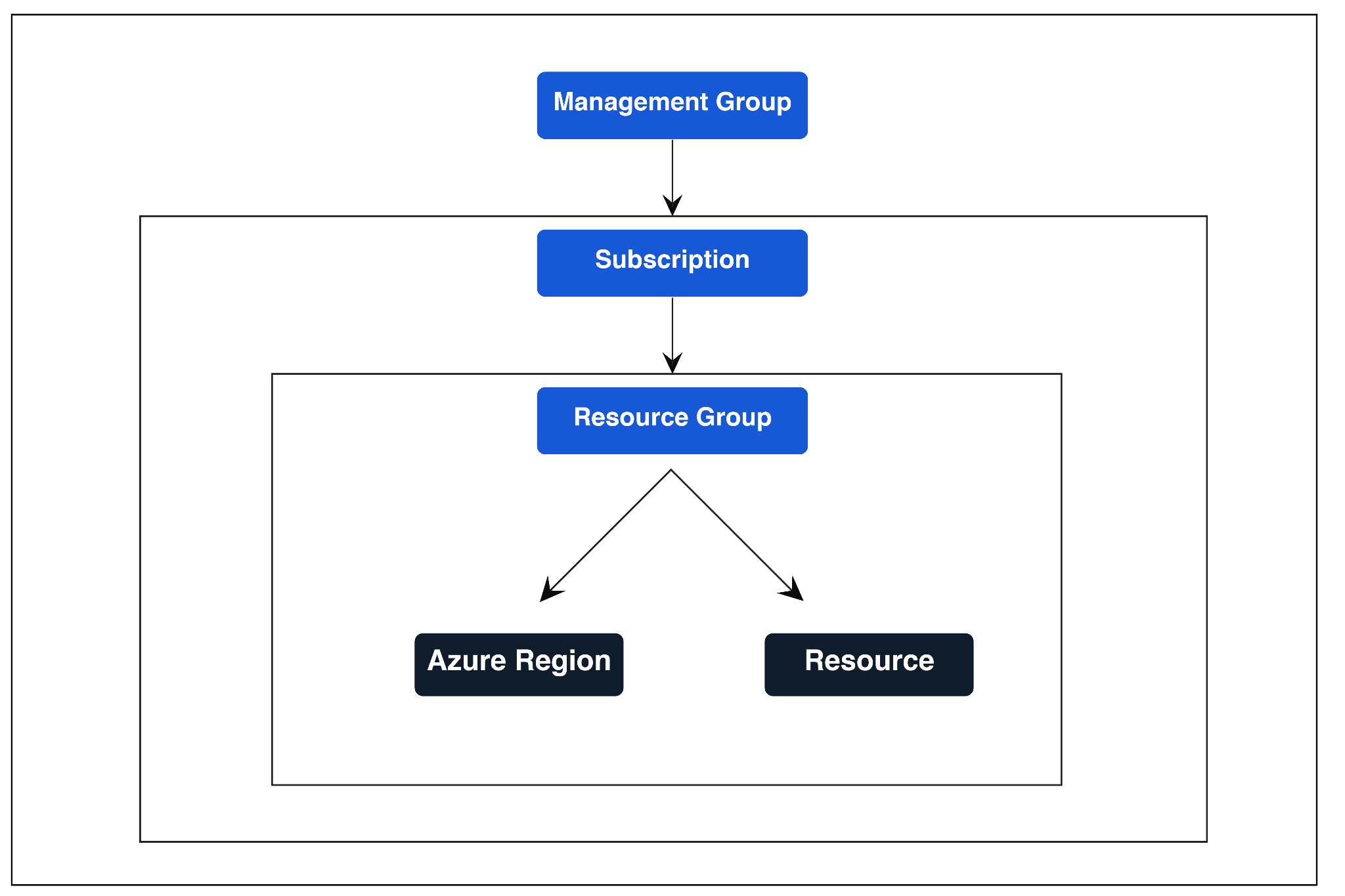
ARM operates on a specific hierarchical structure that allows for granular control and logical organization. This hierarchy is essential for managing large-scale enterprise environments effectively.
Management Groups and Subscriptions
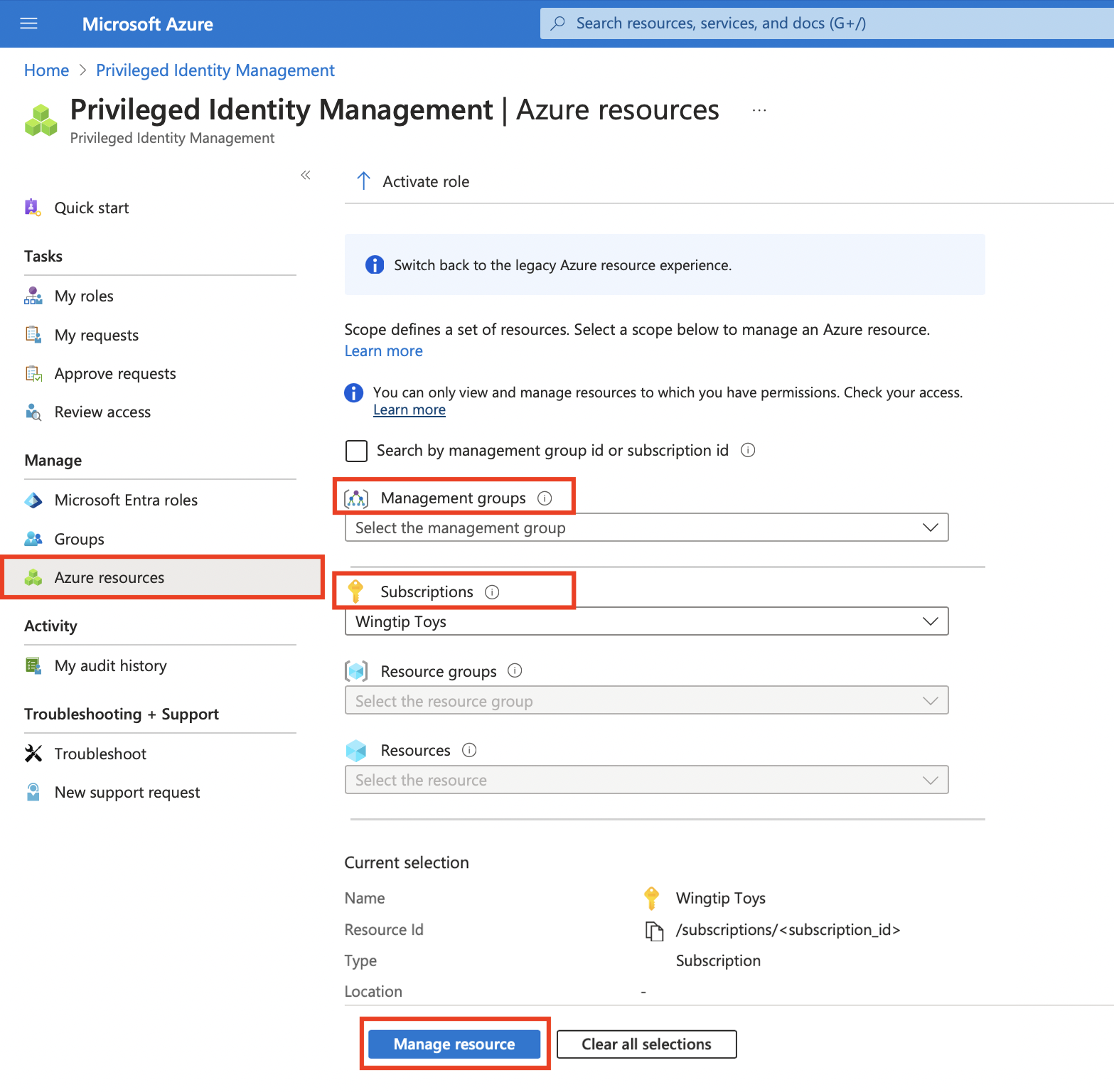
At the highest level, Management Groups provide a scope above subscriptions. If an organization has multiple subscriptions, ARM allows the application of governance conditions (like policies or RBAC) to a management group, which then automatically inherit down to all subscriptions within that group. Subscriptions act as the billing and administrative boundary.
Resource Groups
A resource group is a logical container into which Azure resources are deployed and managed. What ARM does here is critical: it allows you to group resources that share a common lifecycle. If you have a three-tier web application, you can place the web server, database, and virtual network into a single resource group. When the project is finished, deleting the resource group ensures that every associated asset is removed simultaneously, preventing "orphaned" resources that continue to accrue costs.
Resource Providers
Resource Providers are services that supply the resources you can deploy through ARM. Each provider offers a set of operations. For example, Microsoft.Storage provides the storage account resource type. ARM acts as a universal translator, allowing you to interact with hundreds of different providers using a unified syntax and authentication model.
Infrastructure as Code: ARM Templates and Bicep
One of the most powerful things Azure Resource Manager does is enable Infrastructure as Code (IaC). Instead of clicking through a graphical interface, developers define their infrastructure in declarative files.
The Power of Declarative Syntax
In a declarative model, you define the "final state" of the infrastructure (e.g., "I want a Standard_D2 virtual machine with 50GB of storage") rather than the steps to get there. ARM handles the complexity of the "how." If the resource already exists and matches the description, ARM does nothing. If it differs, ARM updates it. This property is known as idempotency, and it is foundational to modern DevOps practices.
ARM Templates (JSON)
Traditionally, ARM templates were written in JSON (JavaScript Object Notation). While powerful, JSON can be verbose and difficult to read for complex deployments. These templates allow for complex logic, parameterization, and dependencies, ensuring that a database is created before the web app that relies on it.
Azure Bicep
By 2026, Azure Bicep has become the preferred language for native Azure IaC. Bicep is a Domain-Specific Language (DSL) that provides a cleaner syntax than JSON while compiling down into ARM templates. ARM processes Bicep files to provide the same reliable, state-aware deployments but with significantly reduced code complexity and better modularity.
Governance and Security Features
Beyond deployment, ARM is the primary vehicle for Azure governance. It provides the tools necessary to maintain control over cloud spend and security compliance without stifling developer productivity.
Role-Based Access Control (RBAC)
ARM integrates deeply with RBAC to manage who has access to Azure resources, what they can do with those resources, and what areas they have access to. Permissions can be assigned at the Management Group, Subscription, Resource Group, or individual Resource level.
Azure Policy
Azure Policy is a service within ARM used to create, assign, and manage policies. These policies enforce different rules over your resources, ensuring they stay compliant with corporate standards and service level agreements. For instance, a policy can prevent users from creating virtual machines in specific geographic regions or mandate that all resources must have a "Cost Center" tag.
Resource Locks
To prevent accidental deletion or modification of critical infrastructure, ARM provides Resource Locks. Even a user with Full Owner permissions cannot delete a resource protected by a CanNotDelete lock until the lock itself is removed. This serves as a vital safety mechanism for production environments.
Comparing Management Approaches
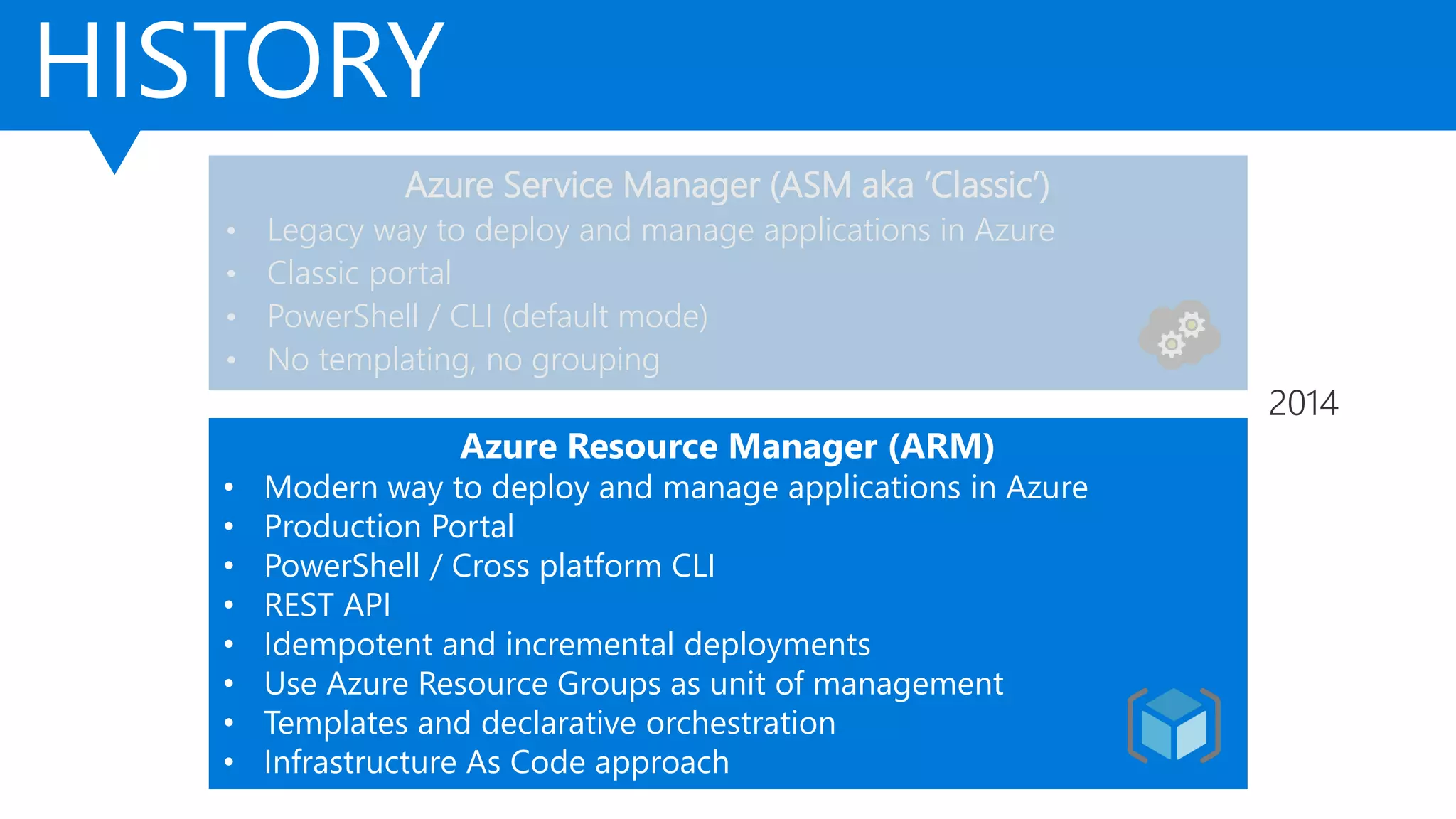
The following table illustrates how Azure Resource Manager compares to the legacy "Classic" model and common third-party tools as of 2026.
| Feature | Azure Resource Manager (ARM) | Classic (ASM) | Third-Party (e.g., Terraform) |
|---|---|---|---|
| Model Type | Declarative | Imperative | Declarative |
| Grouping | Logical Resource Groups | Individual Services | State-file based |
| Deployment | Parallel (Fast) | Serial (Slower) | Parallel |
| Governance | Native Policy & RBAC | Limited | External / Integration required |
| State Management | Managed by Azure | N/A | Managed by user (State file) |
| Native Tooling | Bicep / Portal / CLI | Portal (Deprecated) | CLI / Provider plugins |
Operational Efficiency and Cost Management
What ARM does for the bottom line is often overlooked. By using Tags, ARM allows organizations to categorize resources for billing purposes. You can apply a tag like Environment: Production or Department: Marketing to resources across different resource groups. When the billing cycle ends, ARM's metadata allows for granular cost attribution, making it easy to see exactly which projects are driving cloud expenditures.
Furthermore, ARM supports Template Specs. These are essentially "gold master" templates stored within Azure. Instead of developers writing their own resource definitions from scratch—which might lead to insecure or over-provisioned setups—they can deploy from a pre-approved Template Spec that has been vetted by the security and finance teams.
Troubleshooting and Deployment Logs
When a deployment fails, ARM provides detailed "Deployment Operations" logs. Because ARM tracks every step of the orchestration process, you can pinpoint exactly which resource failed and why (e.g., a naming conflict, a quota limit, or a dependency error). In 2026, these logs have become more intuitive, often providing direct links to documentation or automated "Quick Fix" suggestions within the Azure Advisor interface.
FAQ
Does Azure Resource Manager cost extra to use?
No, Azure Resource Manager is a core platform service provided at no additional cost. You only pay for the actual Azure resources (like VMs, storage, or bandwidth) that you deploy and manage through ARM. The management layer itself, including the use of Bicep, RBAC, and Azure Policy, is included in your Azure subscription.
Can I use ARM to manage resources in other clouds?
Standard ARM is specifically for Microsoft Azure. However, through a service called Azure Arc, you can extend ARM's management capabilities (like Policy and RBAC) to servers, Kubernetes clusters, and data services living in on-premises data centers or even other cloud providers like AWS and GCP.
What is the difference between a Resource Group and a Region?
A Region is a physical location (like East US or West Europe) where your data and hardware reside. A Resource Group is a logical container for management. A single Resource Group can contain resources located in many different regions, allowing you to manage a globally distributed application as a single entity.
Is ARM the same as the Azure Portal?
No. The Azure Portal is a graphical user interface (web-based) that uses ARM to execute commands. ARM is the underlying API service. When you click "Create" in the Portal, the Portal sends a request to ARM, which then handles the actual provisioning.
Why should I use Bicep instead of JSON ARM templates?
Bicep offers a much simpler syntax, better support for modularity (reusing code), and automatic dependency management. While ARM still uses JSON under the hood, Bicep is easier for humans to write and maintain, significantly reducing the likelihood of syntax errors in your Infrastructure as Code.
Practical Recommendations
For organizations looking to maximize the value of what Azure Resource Manager does, the first step is to move away from manual deployments. Start by exporting existing resource groups into Bicep files to understand their structure. Implement Azure Policy early to prevent "resource sprawl" and ensure that all assets are tagged appropriately for cost tracking.
By adopting a "Template-First" mentality, you ensure that your infrastructure is documented, repeatable, and secure. As you scale into 2026 and beyond, leveraging ARM's hierarchy—Management Groups and Subscriptions—will be the difference between a chaotic cloud footprint and a well-governed enterprise environment.
Image Gallery