Comprehensive Guide to Public Cloud Services: Architecture, Costs, and Implementation for 2026
Public cloud services refer to computing resources—such as servers, storage, databases, and networking—delivered over the public internet by third-party providers. In 2026, these services offer scalable, on-demand infrastructure that a...
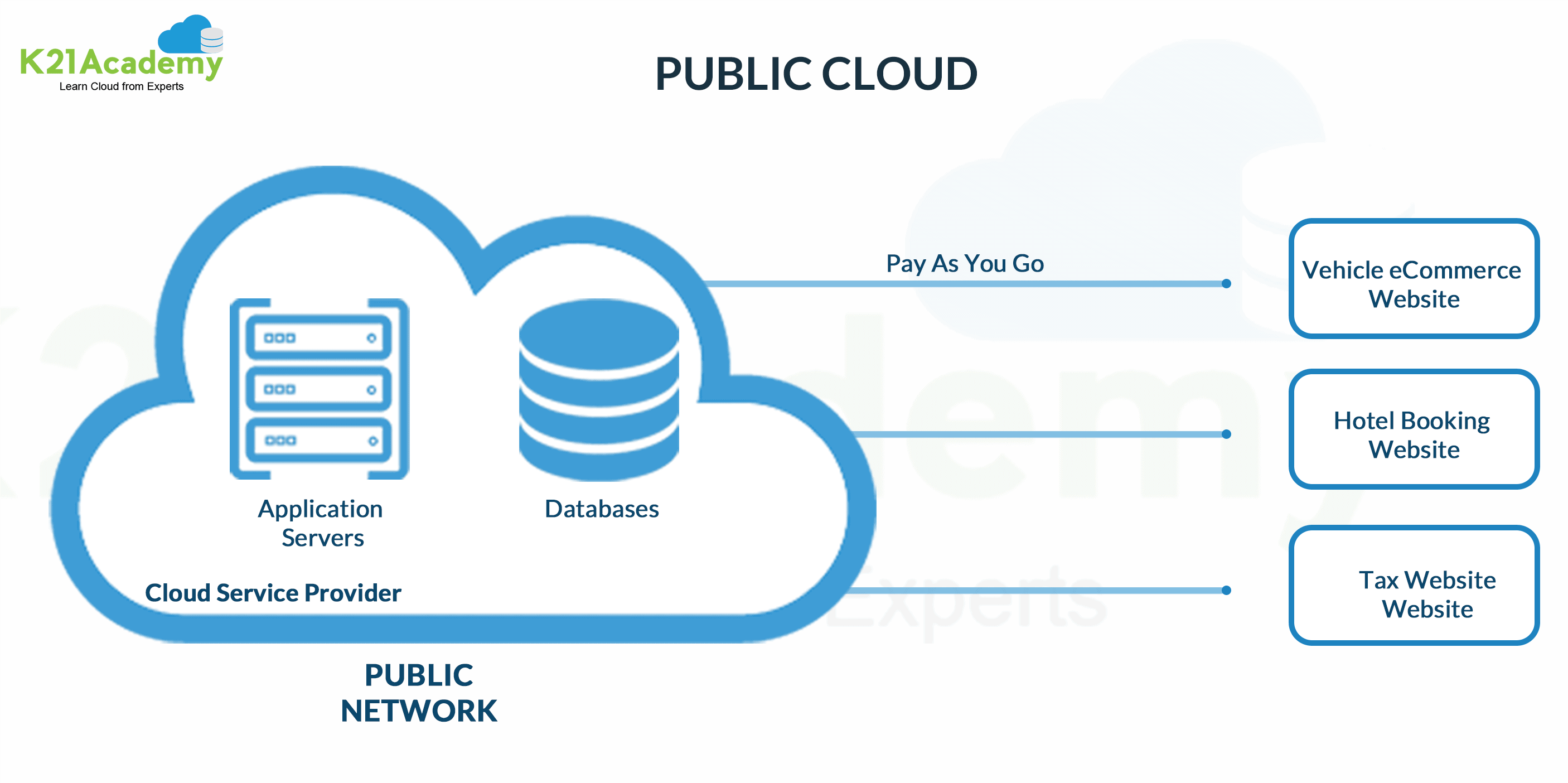
Public cloud services refer to computing resources—such as servers, storage, databases, and networking—delivered over the public internet by third-party providers. In 2026, these services offer scalable, on-demand infrastructure that allows organizations to deploy applications globally without the capital expense of owning or maintaining physical data centers.
Contents
Defining the Public Cloud Ecosystem in 2026
The public cloud landscape has evolved into the backbone of global digital operations. Unlike private clouds, which are dedicated to a single organization, public cloud resources are shared among multiple tenants, though each tenant's data and workloads remain logically isolated. By 2026, the distinction between "basic infrastructure" and "intelligent services" has blurred, as major providers now integrate advanced artificial intelligence (AI) and machine learning (ML) directly into their core offerings.
The primary appeal of public cloud services lies in their elasticity and utility-based pricing. Organizations can scale resources up or down instantaneously based on demand, paying only for what they consume. This shift from Capital Expenditure (CapEx) to Operational Expenditure (OpEx) has democratized access to high-performance computing, enabling startups to leverage the same world-class infrastructure as multinational corporations.
Core Service Models: IaaS, PaaS, and SaaS
To understand public cloud services, one must distinguish between the three primary delivery models. Each offers a different level of control and responsibility for the user.
Infrastructure as a Service (IaaS)
IaaS provides the fundamental building blocks of computing. It includes virtualized hardware, such as virtual machines (VMs), storage disks, and networking. In an IaaS model, the provider manages the physical data center and hypervisor, while the user is responsible for the operating system, middleware, and applications. This model is ideal for organizations that require maximum control over their environment or are migrating legacy workloads that need specific configurations.
Platform as a Service (PaaS)
PaaS removes the need for organizations to manage underlying infrastructure, including operating systems and runtime environments. It provides a framework that developers can use to build, test, and deploy applications more quickly. By 2026, PaaS offerings have expanded to include "Serverless" computing, where the cloud provider automatically handles all resource allocation, allowing developers to focus entirely on code. Common examples include managed database services and container orchestration platforms like Kubernetes.
Software as a Service (SaaS)
SaaS is the most common form of public cloud service for end-users. It delivers ready-to-use applications over the internet. The provider manages everything—from the hardware and networking to the application software and data security. Familiar examples include Microsoft 365, Salesforce, and specialized enterprise resource planning (ERP) tools. In 2026, SaaS has become increasingly modular, allowing businesses to integrate various specialized tools via APIs.
Evaluating the Major Providers: AWS, Azure, and Google Cloud
While the market includes numerous niche players, three dominant "hyperscalers" define the public cloud industry. Selecting the right provider depends on existing technical debt, specific workload requirements, and geographic needs.
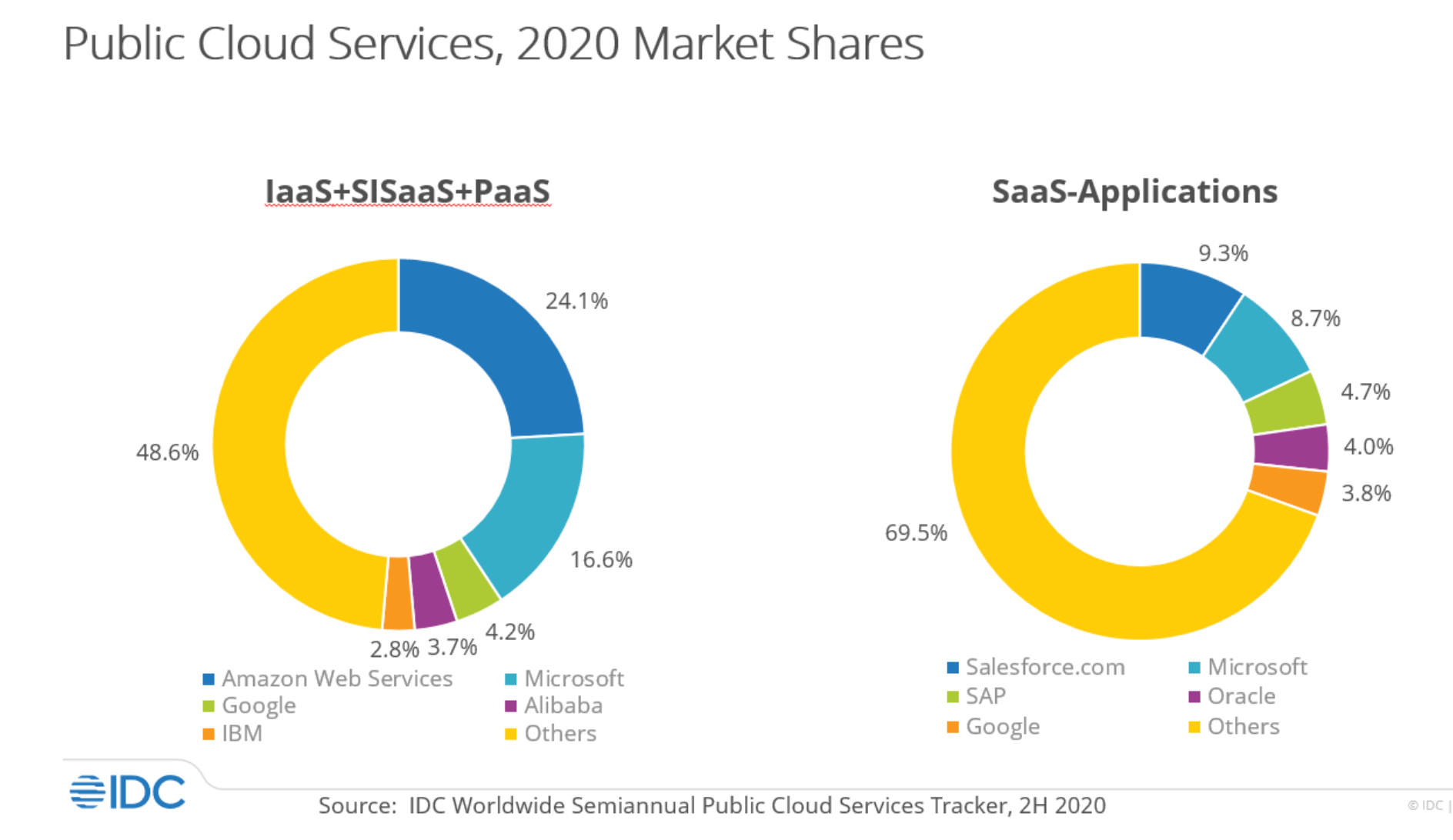
- Amazon Web Services (AWS): As the pioneer of public cloud, AWS maintains the largest market share and the most extensive service catalog. It is known for its robust developer tools and vast global infrastructure. In 2026, AWS remains the gold standard for high-scale, complex distributed systems.
- Microsoft Azure: Azure is the preferred choice for enterprises heavily invested in the Microsoft ecosystem (Windows Server, Active Directory, SQL Server). Its deep integration with enterprise software makes it a seamless transition for traditional corporate IT departments.
- Google Cloud Platform (GCP): Google Cloud has carved out a significant niche in data analytics, artificial intelligence, and containerized applications. Organizations prioritizing data-driven insights often choose GCP for its advanced BigQuery and AI Vertex platforms.
Security and the Shared Responsibility Model
A common misconception is that the cloud provider is solely responsible for security. In reality, public cloud services operate under a Shared Responsibility Model.
The provider is responsible for the "Security of the Cloud"—this includes the physical security of data centers, the hardware, and the software layers that run the infrastructure. The customer is responsible for "Security in the Cloud." This includes protecting the data itself, managing user access (Identity and Access Management), securing the guest operating system, and configuring firewalls correctly.
In 2026, security strategies have shifted toward Zero Trust Architecture. This means that no entity, whether inside or outside the network, is trusted by default. Strict verification is required for every person and device trying to access resources on the public cloud. Furthermore, data sovereignty laws (such as GDPR in Europe) now require many organizations to ensure their data remains within specific geographic boundaries, a feat made possible by the "Regions" and "Availability Zones" offered by public cloud providers.
Cost Management and FinOps Strategies
While the public cloud offers potential cost savings, it also introduces the risk of "cloud sprawl"—unmonitored resources that continue to accrue charges. To combat this, the discipline of FinOps (Financial Operations) has become essential.
FinOps is a cultural practice that brings together finance, engineering, and business teams to manage cloud spend effectively. Key strategies include:
- Right-sizing: Regularly analyzing resource utilization to ensure you aren't paying for over-provisioned servers.
- Reserved Instances: Committing to long-term usage (1-3 years) in exchange for significant discounts compared to on-demand pricing.
- Spot Instances: Utilizing spare capacity at a fraction of the cost, suitable for non-critical, interruptible workloads.
- Tagging and Allocation: Assigning metadata tags to every resource so costs can be billed back to specific departments or projects.
Public Cloud vs. Hybrid and Multi-Cloud Approaches
By 2026, most large enterprises no longer rely on a single public cloud. Instead, they utilize Hybrid Cloud or Multi-Cloud strategies.
- Hybrid Cloud: Combines on-premises private infrastructure with public cloud services. This allows sensitive data to stay on-site while leveraging the public cloud for "cloud bursting" (handling sudden spikes in traffic).
- Multi-Cloud: Uses services from multiple public cloud providers (e.g., using AWS for compute and GCP for data analytics). This prevents vendor lock-in and increases resilience; if one provider suffers an outage, critical systems can failover to another.
| Feature | Infrastructure as a Service (IaaS) | Platform as a Service (PaaS) | Software as a Service (SaaS) |
|---|---|---|---|
| User Control | High (Full OS control) | Medium (Application/Data) | Low (Configuration only) |
| Responsibility | Customer manages OS & Middleware | Customer manages Code/Data | Provider manages everything |
| Primary Audience | System Administrators | Software Developers | Business End-Users |
| Example Use Case | Moving legacy VMs to the cloud | Building a new web application | Managing customer relationships |
| Scalability | Manual or semi-automated | Highly automated | Managed by provider |
| Cost Basis | Per hour/second of resource | Per execution or user | Per user/subscription |
Steps for Successful Public Cloud Adoption
Transitioning to public cloud services is a multi-phase process that requires careful planning.
- Assessment: Audit existing on-premises workloads to determine which are "cloud-ready." Use the "6 Rs" of migration: Rehost (Lift and Shift), Replatform, Refactor, Repurchase, Retire, or Retain.
- Foundation Setting: Establish a "Landing Zone." This is a pre-configured environment that includes security policies, networking, and identity management, ensuring that new workloads are compliant from day one.
- Data Migration: Use tools like AWS DataSync or Azure Data Box to move large volumes of data securely.
- Optimization: Once migrated, move away from simple "Lift and Shift" and begin using cloud-native features like auto-scaling and managed databases to reduce costs and improve performance.
Common Pitfalls to Avoid
Even with advanced tools available in 2026, many organizations struggle with cloud adoption. One major mistake is failing to account for egress fees. While it is often free or cheap to move data into the cloud, providers charge significant fees to move data out of their network.
Another pitfall is ignoring latency requirements. If an application requires sub-millisecond response times, it must be deployed in a region geographically close to the end-users. Providers offer "Edge Locations" to solve this, but they must be configured correctly.
Frequently Asked Questions
Are public cloud services secure enough for government or financial data? Yes, most major providers offer specialized regions (such as AWS GovCloud or Azure Government) that meet strict regulatory requirements like FedRAMP, HIPAA, and PCI-DSS. With proper encryption and access controls, public cloud environments are often more secure than traditional on-premises data centers.
What happens if the cloud provider goes out of business? While highly unlikely for major players like Microsoft or Amazon, this concern highlights the importance of a multi-cloud strategy. Organizations should maintain backups of their data outside of their primary provider's environment and use containerized applications (like Docker) that can be moved between clouds with minimal friction.
Is public cloud always cheaper than on-premises? Not necessarily. For steady, predictable workloads with high resource utilization, on-premises hardware can sometimes be more cost-effective over a five-year period. The public cloud is most cost-effective for variable, elastic, or experimental workloads where the ability to scale and the lack of upfront capital investment are critical.
What is the environmental impact of public cloud services in 2026? Sustainability has become a primary focus. Major providers now offer "Carbon Footprint" dashboards and have committed to powering their data centers with 100% renewable energy. Moving to the public cloud is generally more energy-efficient than maintaining fragmented, underutilized on-premises servers.
Do I need to hire new staff to manage public cloud services? Current IT staff will need upskilling. Managing cloud services requires knowledge of "Infrastructure as Code" (IaC) tools like Terraform or Bicep, as well as cloud-specific security and networking. Many organizations choose to work with a Managed Service Provider (MSP) during the transition phase.
Final Recommendation
For organizations beginning their cloud journey in 2026, the best approach is to start with a cloud-native mindset. Rather than simply moving old servers to the cloud, look for opportunities to replace legacy systems with PaaS or SaaS solutions. Prioritize security by implementing Multi-Factor Authentication (MFA) and Zero Trust policies immediately. By leveraging the elasticity and advanced AI capabilities of public cloud services, businesses can achieve a level of agility that was previously impossible.
Image Gallery