How to Find the Owner of a Domain Name in 2026
To find the owner of a domain name, you must query a WHOIS or RDAP (Registration Data Access Protocol) database, such as the official ICANN Lookup tool. While privacy regulations like GDPR often redact personal contact details, these t...
To find the owner of a domain name, you must query a WHOIS or RDAP (Registration Data Access Protocol) database, such as the official ICANN Lookup tool. While privacy regulations like GDPR often redact personal contact details, these tools identify the registrar and provide an anonymized contact method to reach the registrant.
Contents
Identifying the entity or individual behind a website is a fundamental task for digital investigators, legal professionals, and business developers. Whether you are looking to purchase a "parked" domain, investigating a potential trademark infringement, or conducting cybersecurity research, the process of uncovering domain ownership has become increasingly complex. In 2026, the landscape of domain data is governed by a balance between transparency for accountability and strict data privacy protections for individuals.
The Evolution of Domain Ownership Discovery: WHOIS to RDAP
For decades, the WHOIS protocol was the primary method for retrieving domain registration data. It was a simple, text-based query system that returned the registrant’s name, physical address, email, and phone number. However, the legacy WHOIS protocol lacked security, standardization, and support for international character sets.
By 2026, the industry has fully transitioned to RDAP (Registration Data Access Protocol) as the standard for accessing domain information. RDAP offers several technical advantages over the old WHOIS system:
- Structured Data: RDAP uses JSON (JavaScript Object Notation), making it easier for automated systems to parse and interpret information accurately.
- Secure Access: It operates over HTTPS, ensuring that queries are encrypted and protected from interception.
- Differentiated Access: RDAP allows registries to provide different levels of data based on the user's credentials. For example, law enforcement or intellectual property attorneys may be granted access to more detailed records than a casual web user.
- Internationalization: Unlike the original WHOIS, RDAP natively supports non-Latin characters, which is essential for the growth of Internationalized Domain Names (IDNs).
The Impact of Privacy Regulations (GDPR and Beyond)
The most significant hurdle in finding a domain owner today is the impact of privacy mandates like the European Union’s General Data Protection Regulation (GDPR) and the California Consumer Privacy Act (CCPA). These laws have forced ICANN (the Internet Corporation for Assigned Names and Numbers) to implement policies that redact "non-public" personal information from public-facing databases.
In 2026, when you perform a lookup, you will likely see fields labeled as "Data Redacted" or "Contact Privacy Service." This does not mean the information is gone; rather, it is shielded to protect the registrant's privacy. To bridge this gap, ICANN has refined the System for Standardized Access/Disclosure (SSAD), which provides a framework for parties with a "legitimate interest" to request the disclosure of redacted data. This usually requires proving a legal need, such as a trademark violation or a criminal investigation.
Primary Methods for Identifying a Domain Owner
1. Using the ICANN Lookup Tool
The official ICANN Lookup tool remains the most reliable starting point. It aggregates data from various registries and registrars to provide a comprehensive view of a domain's status.
- Step 1: Visit the official ICANN registration data lookup site.
- Step 2: Enter the domain name (e.g., example.com) in the search bar.
- Step 3: Review the results. Pay close attention to the Registrar information and the Registry Expiration Date. Even if the owner's name is hidden, the registrar's name tells you which company handles the domain's management.
- Step 4: Look for the "Registrant Contact" section. If the name is redacted, there is often an "Email" field containing a URL or an anonymized email address (e.g.,
abc123xyz@anonymized-provider.com) that forwards your message to the actual owner.
2. Registrar-Specific WHOIS Lookups
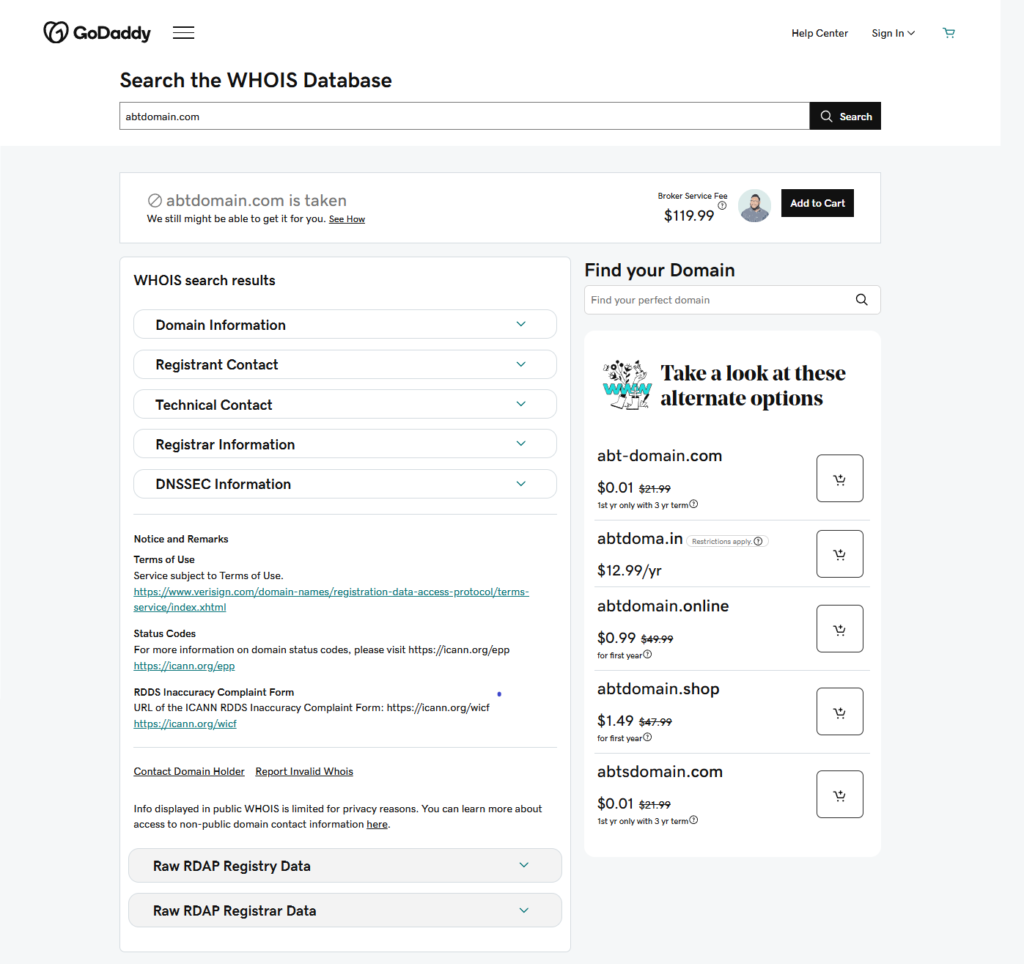
Often, the registrar who manages the domain has more up-to-date information in their local database than the global ICANN mirror. If the ICANN tool identifies the registrar as GoDaddy, Namecheap, or Google Cloud, you should visit that specific registrar’s WHOIS search page. These portals often include a built-in contact form specifically designed to allow the public to reach the registrant without exposing the registrant's private email address.
3. Historical WHOIS Data Services
If a domain was registered before the strict implementation of GDPR (pre-2018) or has changed hands recently, historical records might contain the owner's details. Subscription-based services like DomainTools, WhoisXML API, and Whoxy maintain massive archives of past WHOIS records. By looking at the "WHOIS History," you can see who owned the domain in 2015 or 2020. If the domain has not changed ownership since then, those old records likely represent the current owner.
Advanced Investigation Techniques
When standard database queries yield no results, professionals turn to secondary clues left across the internet.
Analyzing SSL/TLS Certificates
Every secure website requires an SSL/TLS certificate. Some organizations use Organization Validation (OV) or Extended Validation (EV) certificates. These certificates require the issuing authority to verify the legal identity of the entity owning the website. By clicking the "padlock" icon in your browser and inspecting the certificate details, you may find the name of the corporation or organization that manages the site.
Reverse IP and DNS Lookups
A domain name is simply a human-readable pointer to an IP address. By performing a "Reverse IP Lookup," you can see what other websites are hosted on the same server. If a server hosts only one or two sites, and those sites belong to a specific company, it is highly probable that the domain in question is owned by that same entity. Additionally, checking the SOA (Start of Authority) record in the DNS settings can sometimes reveal an administrator’s email address that was not redacted in the WHOIS database.
On-Site Content and Legal Disclosures
Never overlook the website itself. Most legitimate businesses are required by law to include certain disclosures.
- Terms of Service and Privacy Policy: These pages almost always name the legal entity responsible for the site’s operation.
- Footer Information: Copyright notices often list the owner’s name (e.g., "© 2026 Acme Corp").
- Corporate Registries: If the website mentions a company name, you can cross-reference that name with government databases like the SEC (U.S.), Companies House (U.K.), or state-level Secretary of State filings to find the registered agents and officers.
Comparison of Domain Discovery Methods
| Method | Accuracy | Privacy Bypass | Best Used For | Cost |
|---|---|---|---|---|
| ICANN RDAP Lookup | Highest | Low (Redacted) | Basic status and registrar identification | Free |
| Historical WHOIS | High (for older domains) | High | Finding owners of long-standing domains | Paid Subscription |
| SSL Certificate Audit | Medium | Medium | Identifying corporate owners | Free |
| Registrar Contact Form | High | N/A (Indirect) | Direct communication with the owner | Free |
| Legal/SSAD Request | Absolute | Highest | Legal disputes and criminal investigations | High (Legal fees) |
Common Obstacles and Troubleshooting
Domain Privacy and Proxy Services
Many registrars offer services like "Domains By Proxy" or "Withheld for Privacy." In these cases, the WHOIS record will list the contact information of the privacy service provider rather than the owner. To reach the owner, you must follow the specific instructions provided by the privacy service, which usually involve sending an email to a unique address that they then forward.
Country Code Top-Level Domains (ccTLDs)
The rules for .com, .net, and .org are governed by ICANN, but country-specific domains like .de (Germany), .uk (United Kingdom), or .jp (Japan) follow the rules of their respective national registries. Some ccTLDs have much stricter privacy rules than others. For instance, the .de registry (DENIC) only reveals registrant data to third parties who can prove a specific legal claim against the domain owner.
Legal and Ethical Considerations
In 2026, privacy is a high-priority digital right. Attempting to bypass privacy protections for the purpose of harassment, doxxing, or unauthorized marketing is often a violation of terms of service and, in some jurisdictions, a breach of data protection laws. Always ensure your search for a domain owner is conducted through legitimate channels, especially if the intent involves legal action or high-value acquisitions.
FAQ
Is it possible to find the owner of a domain for free?
Yes, the ICANN Lookup and registrar-specific WHOIS tools are free to use. These will provide you with the registrar's name, the domain's expiration date, and usually an anonymized way to contact the owner. However, finding the actual personal name of a private individual may require paid historical tools or legal intervention if they have enabled privacy protection.
Why is domain ownership information hidden?
Data privacy laws like GDPR (Europe) and CCPA (California) require domain registrars to protect the personal information of individuals. This prevents "scraping" of the WHOIS database by spammers, scammers, and identity thieves. As a result, the default setting for most domain registrations in 2026 is "Redacted" or "Private."
Can I find the owner of a domain if they use a proxy service?
You cannot directly see their name, but you can still communicate with them. Proxy services are required by ICANN to provide a functional method (such as an email forwarding address or a web form) for the public to reach the registrant for legitimate inquiries, such as purchase offers or legal notices.
How do I find the owner of a .gov or .edu domain?
These specialized domains are managed under different sets of rules. For .gov domains, the information is usually publicly available through the DotGov program managed by CISA. For .edu domains, the registration data is often more transparent than commercial TLDs, though it usually points to the IT department or administrative office of the specific educational institution.
What should I do if the domain owner doesn't respond to my emails?
If you are trying to buy the domain, you may want to hire a domain broker. Brokers have specialized tools and professional networks that allow them to track down owners more effectively. If the issue is legal (e.g., copyright infringement), you should consult with an intellectual property attorney who can file a formal "cease and desist" or use the SSAD system to request data disclosure.
Recommendations for Next Actions
If you need to identify a domain owner today, start with the ICANN Lookup tool to identify the registrar. Once the registrar is known, use their specific contact portal to reach out. If the domain is "parked" or shows a "For Sale" landing page, use the contact information provided on that page, as it is often the most direct path to the owner. For historical research or complex investigations, consider a trial of a WHOIS history service to see if the registrant's details were ever public in the past.
Image Gallery