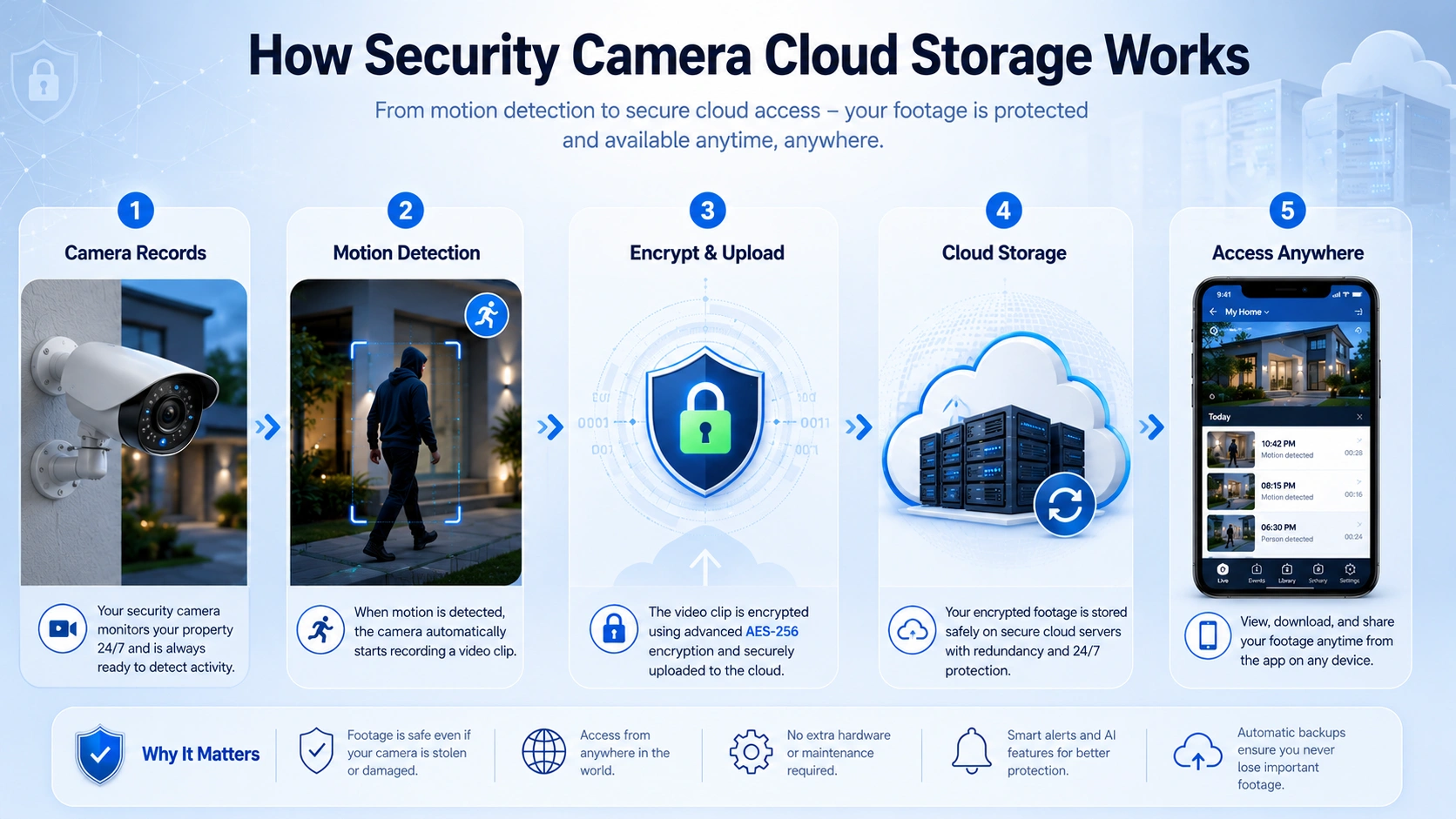
Why Security Cameras That Save to Personal Cloud Often Fall Short
Security cameras that rely on personal cloud storage often fall short due to network upload bottlenecks, strict cloud API rate limits, sync latency during intrusions, and a lack of dedicated video management software features like pre-...
Security cameras that rely on personal cloud storage often fall short due to network upload bottlenecks, strict cloud API rate limits, sync latency during intrusions, and a lack of dedicated video management software features like pre-event buffering and automated circular retention.
Contents
While saving surveillance footage to a personal cloud drive or self-hosted server eliminates monthly subscription fees, general-purpose cloud storage is not optimized for real-time, high-bitrate video streaming. Consequently, users frequently face dropped frames, missing footage, and security vulnerabilities.
The Appeal vs. The Reality of Personal Cloud Video Storage
Using personal cloud infrastructure—such as a personal Google Drive, Microsoft OneDrive, Dropbox, or a self-hosted Nextcloud instance linked over WebDAV or FTP—appears to offer the best of both worlds: complete data control and zero monthly cloud subscription fees. Homeowners and small business operators often configure IP cameras supporting ONVIF (Open Network Video Interface Forum) or RTSP (Real-Time Streaming Protocol) to push clips directly to these personal storage destinations.
However, a fundamental architectural mismatch exists between generic cloud file storage and the high-demand requirements of continuous or event-driven video surveillance. Generic cloud services are built for standard file synchronization, document backups, and asynchronous file sharing. They are not engineered to ingest continuous, high-bitrate, multi-channel media streams under unpredictable network conditions.
When a security camera attempts to stream or batch-upload video to a personal cloud, the underlying hardware, firmware, and network protocols are pushed beyond their intended design limits. The result is often a system that functions well during initial testing but fails precisely when a critical security event occurs.
6 Critical Reasons Personal Cloud Security Cameras Fail
- Camera Detects Motion
- Writes to Local Buffer
- Attempts Personal Cloud Sync
- High Network Latency
- Delayed / Failed Upload
- API Rate-Limit (429 Error)
- Silent Data Loss / Dropped Frames
- High Network Latency
1. Network Upload Bottlenecks and Asymmetric Speeds
Most residential and small-business internet connections rely on asymmetric broadband technologies, such as asymmetric digital subscriber line (ADSL), cable, or standard fiber tiers, where upload speeds are significantly lower than download speeds.
A single 4K security camera streaming H.265 video requires a stable upload throughput of approximately 4 to 8 Megabits per second (Mbps). If a property has four 4K cameras attempting to upload motion events simultaneously, the required upload bandwidth can easily saturate residential upload pipelines.
When bandwidth saturation occurs:
- Packet Loss: The camera drops video frames to keep up with the real-time stream, resulting in choppy, unreadable footage.
- Network Degradation: Other critical network activities (such as VoIP calls or remote work applications) suffer severe latency.
- Failed Handshakes: The camera loses connection to the cloud destination entirely, leaving long gaps in recording logs.
2. API Quotas, Rate Throttling, and Silent Failure Modes
General-purpose consumer cloud storage providers protect their infrastructure by imposing strict application programming interface (API) rate limits and file write quotas.
| Cloud Service Platform | Typical Rate-Limiting Mechanism | Impact on IP Camera Cloud Sync |
|---|---|---|
| Google Drive API | Daily upload caps & HTTP 429 (Too Many Requests) limits per user per minute | High-frequency motion events or snapshot uploads freeze mid-day after reaching request thresholds. |
| Microsoft OneDrive | Throttles concurrent connection requests and bulk file creation | File sync queues backlog; video clips upload hours after the actual event occurred. |
| Self-Hosted Nextcloud / WebDAV | Limited by single-thread PHP execution and SQLite/MySQL database write speeds | Database locks occur during concurrent file writes, causing the IP camera to abort file transfers. |
| Dropbox API | Strict data write rates per token across dynamic IP connections | Connection resets interrupt raw MP4 file finalizing, rendering files corrupt and unplayable. |
When an IP camera hits an API rate limit, the cloud service returns an error code (such as HTTP 429). Most low-cost security camera firmwares are not built with sophisticated exponential backoff algorithms. Instead of queuing the video, the camera simply drops the file, leading to silent data loss—where the user assumes footage is safely backed up, only to discover blank folders after an incident.
3. The Post-Event Upload Vulnerability (The Destruction Risk)
One of the most dangerous design flaws in basic personal cloud setups is their reliance on post-event uploading.
When a standard motion-triggered IP camera detects activity:
- It records the event locally (to an internal flash buffer or micro-SD card).
- Once the motion stops, it closes the video file wrapper (e.g.,
.mp4or.mkv). - It initiates a handshaking process with the personal cloud directory.
- It begins transferring the completed file across the WAN (Wide Area Network).
This process can take anywhere from 10 seconds to several minutes depending on file size and connection speed. If an intruder identifies the camera and physically destroys or disconnects it during or immediately after an event, the upload never completes. The recorded file remains stored in volatile local buffer memory or on the destroyed micro-SD card, leaving the property owner with zero offsite evidence of the intrusion.
4. Lack of Pre-Roll Buffering and Video Management Intelligence
Enterprise Video Management Systems (VMS) and dedicated surveillance clouds utilize continuous pre-event buffering. This mechanism maintains a rolling 5-to-15 second video loop in active memory, ensuring that when motion triggers a clip, the recorded file includes the crucial seconds before the trigger occurred.
Personal cloud sync scripts rarely support real-time pre-roll buffering due to file system limitations. Personal cloud endpoints treat video files as static objects rather than live data streams.
As a result, personal cloud cameras suffer from:
- Truncated Event Starts: Footage begins after the subject is already mid-frame, missing faces or license plates as individuals enter the field of view.
- No Metadata Tagging: Generic cloud drives cannot index video by motion vector, object classification (person, vehicle, animal), or facial recognition. Locating a specific event requires manually scrubbing through dozens of unindexed video files.
- Fragmented Files: Constant starting and stopping of motion triggers generates thousands of tiny, fragmented clips that clutter storage and make sequential playback difficult.
5. Excessive Storage Management and Disk Wear
Unlike specialized Network Video Recorders (NVRs) or managed cloud surveillance services that utilize circular buffer overwriting (automatically deleting the oldest footage when storage reaches capacity), personal cloud drives handle file retention poorly.
Without custom automation scripts running on an external server, a personal cloud folder will rapidly fill to maximum capacity. Once full:
- General cloud services reject incoming writes entirely.
- Local cameras micro-SD cards undergo severe write endurance stress as they attempt to hold un-synced data, accelerating memory card wear and leading to premature hardware failure.
- Homeowners are forced to manually perform monthly maintenance to prune old video files.
6. Cybersecurity Vulnerabilities and Network Exposure
Connecting a standalone security camera directly to a personal cloud storage target—especially when host configurations require opening external network ports (such as port 21 for FTP or port 80/443 for WebDAV)—creates severe security vectors.
Many budget IP cameras run outdated Linux kernels with unpatched vulnerabilities. Exposing these devices to the open internet so they can communicate with remote personal cloud servers invites automated botnets to scan, breach, and exploit the camera’s internal firmware. Furthermore, video streams sent to personal cloud buckets via basic, unencrypted protocols (such as unencrypted FTP or HTTP) allow bad actors on the network path to intercept private footage.
Comparing Surveillance Architectures
To understand why personal cloud configurations fall short, it helps to evaluate how they compare against dedicated local systems (NVRs) and purpose-built surveillance cloud platforms.
| Feature / Architecture Aspect | Personal Cloud Sync (FTP / WebDAV / Drive) | Dedicated Local NVR (Network Video Recorder) | Purpose-Built Cloud Surveillance Platform |
|---|---|---|---|
| Data Ingestion Reliability | Low (Subject to API limits & network drops) | High (Isolated local isolated PoE network) | High (Optimized stream chunking & backoff) |
| Upload Speed Requirements | High upload bandwidth dependent | Zero WAN bandwidth (Local recording) | Dynamic, adaptive bitrate adjustment |
| Pre-Event Buffering | Rarely supported | Fully supported (Continuous local buffer) | Fully supported (Edge-buffered cloud sync) |
| Theft Protection | Moderate (Fails if camera destroyed mid-event) | Low (Unless NVR is hidden in a secure safe) | Very High (Instant edge-to-cloud streaming) |
| Recurring Monthly Costs | None (Uses existing cloud storage) | None (After initial hardware investment) | Subscription fee per camera/channel |
| Video Search & AI Analytics | Manual file browsing; no smart tagging | Hardware-based AI (Person/Vehicle detection) | Serverless AI indexing & instant scrubbing |
| Maintenance Burden | High (Manual scripts & disk cleanup required) | Low (Automated local circular overwriting) | Zero maintenance (Fully managed) |
How to Bridge the Gap: Best Practices for Personal Cloud Security
If you prefer to utilize personal cloud infrastructure to avoid proprietary vendor lock-in and monthly recurring fees, you can mitigate many of these inherent limitations by implementing a hybrid architectural design.
- IP Camera (Edge) (Continuous Rec)
- PoE
- Local NVR / NAS (RTSP/Circular Sync)
- Encrypted Sync
- Remote Personal Cloud (Offsite Redundancy)
Implement a Local Intermediate Buffer (NAS/NVR Hybrid)
Do not configure IP cameras to write directly to a remote personal cloud over the WAN. Instead, point cameras to a local Network Attached Storage (NAS) unit or a local dedicated VMS server (such as Surveillance Station, Frigate, or ZoneMinder) over an isolated local network switch.
- Local Write Security: The local VMS records full-bitrate, continuous 24/7 video streams locally without hitting upload limits or API restrictions.
- Asynchronous Offsite Mirroring: Configure the local NAS to package, encrypt, and asynchronously upload event snapshots or compressed backup clips to your personal cloud during off-peak hours using robust tools like Rclone.
Utilize Edge Storage with Local Failover Memory
Ensure all deployed IP cameras feature high-endurance, industrial-grade micro-SD cards configured for edge storage. Ensure the camera firmware supports Automatic Network Replenishment (ANR). When the camera loses connection to the network or cloud target, it temporarily writes footage to its onboard card and automatically syncs the missing data back to the primary storage pool once the link is restored.
Enforce Strict Encryption and Zero-Trust Access
- Use Secure Transfer Protocols: Disable plain FTP or HTTP. Limit all camera-to-cloud file transfers to encrypted channels using SFTP, FTPS, or HTTPS/TLS 1.3 endpoints.
- Isolate Cameras via VLANs: Segregate IP cameras onto a dedicated Virtual Local Area Network (VLAN) without direct outbound internet access. Allow communication only to your local intermediate VMS server to protect your broader home or enterprise network from potential camera firmware exploits.
Frequently Asked Questions
Can I use Google Drive or OneDrive for 24/7 continuous video recording?
No. General consumer cloud drives like Google Drive and Microsoft OneDrive are not designed for continuous high-throughput file streaming. Attempting continuous upload will quickly consume your internet bandwidth, exhaust API rate limits, trigger automatic account throttling, and result in unplayable or missing video files.
Why does my personal cloud camera stop uploading clips after a few days?
This issue is typically caused by storage exhaustion or API rate limiting. Standard cloud drives lack circular overwriting mechanisms; once the available storage space fills up, incoming file uploads are blocked. Additionally, if your camera generates hundreds of motion events daily, the service provider's API security controls may temporarily block the camera's IP address.
What is the difference between a personal cloud and a dedicated surveillance cloud?
A personal cloud (like Dropbox or self-hosted Nextcloud) stores generic static files without real-time video stream optimization, smart timeline indexing, or AI motion analysis. A dedicated surveillance cloud uses specialized video ingestion pipelines, edge-to-cloud buffer synchronization, immediate frame-by-frame cloud processing, and continuous circular data retention policies.
Is storing security footage on a local NAS better than using personal cloud drives?
Yes. A local NAS (Network Attached Storage) operating on a local Ethernet switch provides significantly higher bandwidth, sub-millisecond recording latency, enterprise-grade file systems, continuous circular overwriting, and complete security against internet outages.
How can I prevent an intruder from stealing my footage if my camera is destroyed?
To prevent footage loss during theft, implement edge-to-cloud pre-buffering via a dedicated cloud security platform, hide your local recorder (NVR/NAS) inside a locked, fireproof enclosure, or use an intermediate local server that uploads encrypted motion events to remote offsite targets instantaneously upon trigger initiation.
Architectural Recommendation
For reliable, robust video surveillance, avoid using direct camera-to-personal-cloud connections as your primary recording pipeline.
Instead, adopt a hybrid local-first architecture:
- Deploy an onboard local recorder (such as an NVR or dedicated NAS running VMS software) on an isolated VLAN to capture continuous, uncompressed footage locally.
- Configure edge storage on high-endurance SD cards inside each camera for local failover.
- Use encrypted file transfer mechanisms (such as Rclone over TLS) on your local server to push secondary, event-driven backup clips asynchronously to your offsite personal cloud target.
This hybrid approach guarantees low-latency, unthrottled local recording while preserving offsite redundancy in the event of hardware theft or physical damage.
Image Gallery