Exploring the Cisco Cloud Security API Postman Collection: A Comprehensive Technical Guide
The Cisco Cloud Security API Postman collection serves as a standardized, pre-configured toolkit for developers and security engineers to interact with Cisco’s security ecosystem. It simplifies the process of automating policy manageme...
The Cisco Cloud Security API Postman collection serves as a standardized, pre-configured toolkit for developers and security engineers to interact with Cisco’s security ecosystem. It simplifies the process of automating policy management, retrieving security logs, and orchestrating threat responses by providing ready-to-use request templates, authentication headers, and environment variables across platforms like Cisco Umbrella and Cisco Secure Access.
Contents
In the current landscape of 2026, security operations centers (SOCs) have transitioned from manual dashboard management to API-first strategies. As organizations scale their cloud footprints, the ability to programmatically control security parameters is no longer a luxury but a requirement. Cisco has responded by consolidating its various security offerings—ranging from DNS-layer security to full Security Service Edge (SSE) architectures—into a more unified API structure. The Postman collection for Cisco Cloud Security acts as the bridge between these complex back-end services and the engineers responsible for maintaining them.
This guide provides a practical overview of how to leverage these collections to streamline security workflows, detailing the setup process, core functionalities, and advanced automation techniques.
The Strategic Role of APIs in Cisco Cloud Security
Modern cloud security is defined by its agility. When a new threat is detected, the time to remediation must be measured in seconds, not hours. Cisco’s cloud security portfolio, primarily centered around Cisco Umbrella and its evolution into Cisco Secure Access, exposes a vast array of RESTful APIs. These APIs allow for the programmatic execution of tasks that were previously confined to the graphical user interface (GUI).
The Postman collection is essentially a JSON file that contains organized folders of API requests. Each request is pre-populated with the correct HTTP method (GET, POST, PATCH, DELETE), endpoint URLs, and expected header structures. By using these collections, teams can avoid the tedious task of manually coding requests from documentation, reducing human error and accelerating deployment cycles.
Key benefits of using the Postman collection include:
- Rapid Prototyping: Quickly test how a specific API call behaves before integrating it into a custom Python script or Go application.
- Documentation Alignment: The collections are frequently updated to reflect the 2026 versions of the Cisco DevNet documentation, ensuring that deprecated endpoints are replaced with current ones.
- Collaboration: Security teams can share "Environments" within Postman, ensuring that everyone is testing against the same variables without exposing sensitive API keys in the code itself.
Essential Prerequisites for API Integration
Before you can effectively use the Cisco Cloud Security Postman collection, several administrative and technical foundations must be in place. Failure to configure these correctly is the most common cause of "401 Unauthorized" or "403 Forbidden" errors.
1. API Credentials and Scoping
You must possess an active Cisco Umbrella or Cisco Secure Access subscription. Within the administrative console, navigate to the API Keys section. Cisco utilizes different key types depending on the intended task:
- Reporting Keys: Required for fetching activity logs and security events.
- Management Keys: Used for creating policies, adding network identities, and managing internal sites.
- Network Devices Keys: Specifically for registering hardware or virtual appliances to the cloud.
In 2026, Cisco has moved toward a more granular Role-Based Access Control (RBAC) for APIs. When generating a key, ensure you grant the specific permissions (e.g., "Read-only" vs. "Full Access") required for your intended Postman tests.
2. Postman Environment Setup
The collection relies heavily on Environment Variables. You should create a new environment in Postman labeled "Cisco Cloud Security" and include the following variables:
baseUrl: The regional endpoint for your instance (e.g.,api.umbrella.comor the newerapi.sse.cisco.com).apiKey: Your generated client ID.apiSecret: Your generated client secret.organizationId: Found in the URL of your Cisco dashboard.
Importing and Configuring the Postman Collection
Accessing the collection is typically done through the Cisco DevNet Automation Exchange or the official Cisco Security GitHub repository.
Step-by-Step Import Process
- Download/Fork: Locate the collection JSON file or fork the collection directly from the Cisco Public Postman Workspace.
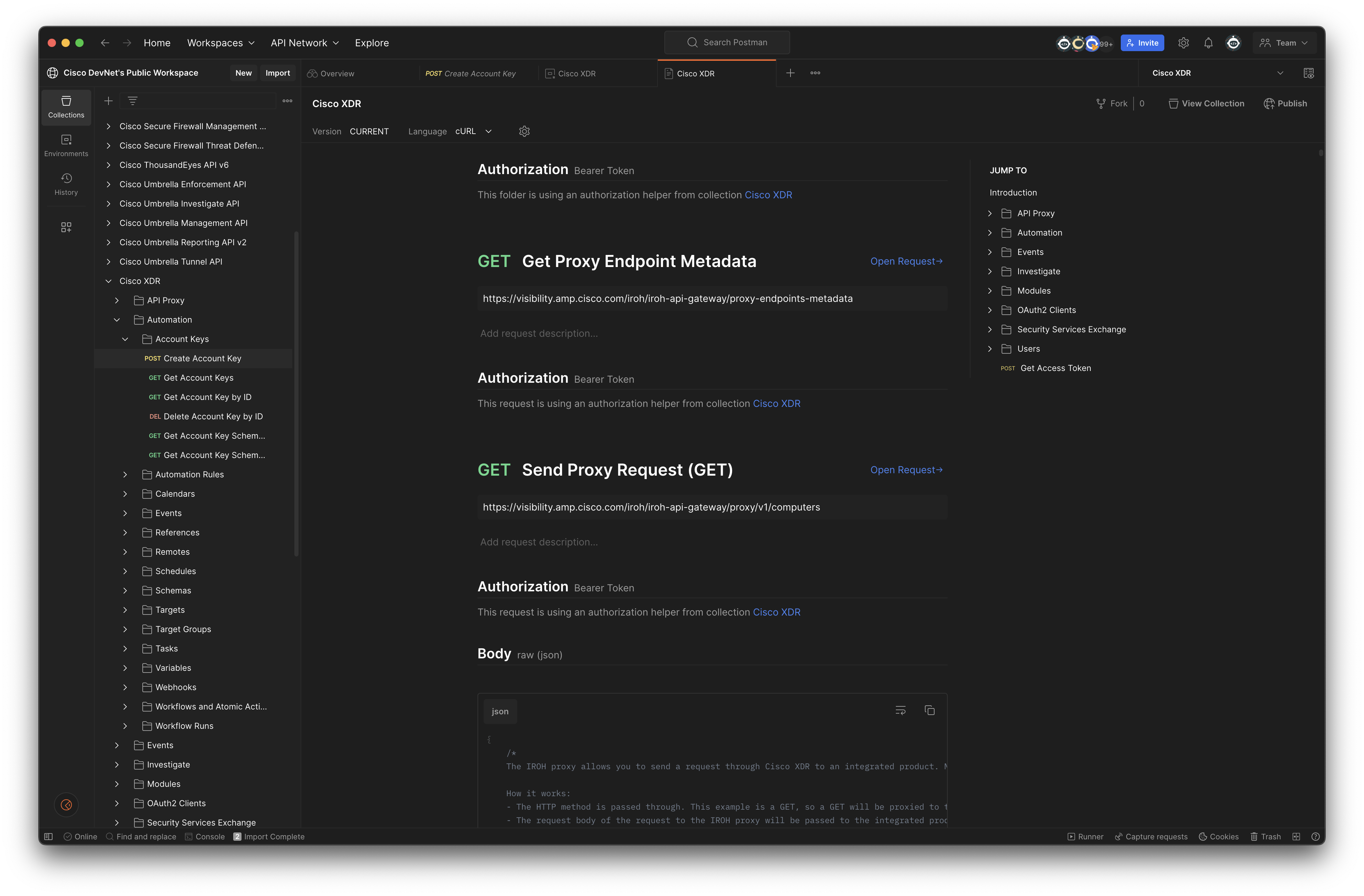
- Import to Postman: Click the "Import" button in the top-left corner of Postman and drag the JSON file into the interface.
- Variable Mapping: Once imported, you will see a folder structure categorized by functional areas (e.g., "Policies," "Reports," "Deployment"). Click on the "Variables" tab of the collection to ensure it is inheriting values from the Environment you created in the previous section.
Handling Authentication (OAuth 2.0)
Most modern Cisco APIs use OAuth 2.0. The Postman collection usually includes a specialized "Auth" folder. You must run the "Get Access Token" request first. This request exchanges your apiKey and apiSecret for a temporary Bearer Token. Postman is typically configured via scripts in the "Tests" tab to automatically save this token into a variable called accessToken, which is then used by all subsequent requests in the collection.
Deep Dive: Key API Modules and Use Cases
The power of the Cisco Cloud Security API is best understood through its functional modules. Each folder in the Postman collection targets a specific operational pillar.
The Enforcement API
This is perhaps the most utilized module for automated threat intelligence. If your organization subscribes to a third-party threat feed, you can use the Enforcement API to automatically push malicious domains or IPs to your "Blocked" list in Cisco Umbrella.
- Practical Task: Using a POST request to the
/domainsendpoint to add a list of newly discovered phishing URLs identified by your internal SOC.
The Reporting API
Monitoring and compliance require constant data extraction. The Reporting API allows you to pull granular details about DNS queries, firewall blocks, and proxy activity.
- Practical Task: Running a GET request to
/security-activitywith a filter for "high-severity" events over the last 24 hours. This data can then be exported or visualized directly within Postman’s "Visualize" tab.
The Deployment API
For large-scale enterprises, manual installation of the Cisco AnyConnect/Secure Client is inefficient. The Deployment API manages the registration of "Roaming Computers" and "Network Identities."
- Practical Task: Auditing all active roaming clients to identify machines that haven't checked in for more than 30 days, facilitating better asset management and security hygiene.
Comparative Analysis of Cisco Cloud Security APIs
As of 2026, Cisco offers several API sets under the Cloud Security umbrella. Understanding the differences is vital for selecting the right collection.
| API Category | Primary Target | Authentication Method | Core Use Case |
|---|---|---|---|
| Umbrella Legacy | DNS-layer security | API Key/Basic Auth | Legacy DNS filtering and basic reporting. |
| Cisco Secure Access (SSE) | Unified Security Fabric | OAuth 2.0 (Bearer) | Full Zero Trust (ZTNA), CASB, and SWG management. |
| Investigate API | Threat Intelligence | API Key | Querying Cisco's global database for domain reputation. |
| Secure Cloud Insights | Infrastructure Visibility | OAuth 2.0 | Mapping relationships between cloud assets and risks. |
Advanced Automation: Testing and Scripting
Postman is not merely a "request sender"; it is a testing environment. Within the Cisco collection, you will find "Pre-request scripts" and "Tests."
Pre-request Scripts are used to perform calculations or format data before the request is sent. For example, if an API requires a timestamp in a specific ISO format, a JavaScript snippet in the pre-request tab can generate this automatically.
Tests are used to validate the response. A standard test in the Cisco collection might look like this:
pm.test("Status code is 200", function () { pm.response.to.have.status(200); }); pm.test("Response contains Organization ID", function () { var jsonData = pm.response.json(); pm.expect(jsonData.organizationId).to.eql(pm.environment.get("organizationId")); });
By implementing these tests, you can run the Postman Collection Runner to execute a series of 50 or 100 requests in sequence, ensuring that your entire security configuration is functioning as expected after a maintenance window or policy update.
Troubleshooting Common API Issues
Even with a pre-configured collection, technical hurdles can arise. Here are the most frequent issues encountered in 2026:
- 401 Unauthorized: This almost always indicates an expired Bearer Token. Re-run the "Get Access Token" request. If the issue persists, verify that your Client ID and Secret have not been revoked in the Cisco dashboard.
- 403 Forbidden: This occurs when the API key has the correct credentials but lacks the necessary "Scope." Check if your key is set to "Read-Only" while you are attempting a POST or DELETE operation.
- 429 Too Many Requests: Cisco enforces rate limits to ensure service stability. If you are running bulk operations, implement a "delay" between requests in the Postman Collection Runner settings.
- JSON Schema Validation Failures: If Cisco updates the API back-end and the Postman collection hasn't been refreshed, you may see errors where the response format doesn't match the expected template. Always ensure you are using the latest version of the collection from DevNet.
Frequently Asked Questions
How do I secure my API keys within Postman?
Never hard-code your API keys into the "Initial Value" column of the Environment variables if you plan to share the workspace. Only use the "Current Value" column, as this data stays local to your machine and is not synced to the Postman cloud unless you explicitly configure a secure vault.
Can I use this Postman collection for Cisco Secure Access (SSE)?
Yes. In 2026, Cisco has integrated the Umbrella APIs into the broader Secure Access (SSE) framework. While some legacy endpoints remain, the Postman collection now includes specific folders for SSE features like Zero Trust Private Access (ZTNA) and Cloud Malware Protection.
Is there a cost associated with using Cisco Cloud Security APIs?
The APIs themselves are included with your Cisco subscription. However, certain high-volume threat intelligence APIs, such as the Investigate API, have tier-based limits depending on your license level (e.g., Advantage vs. Essentials).
How often is the Cisco Postman collection updated?
Cisco DevNet typically updates the official collections quarterly. However, the community-driven portions of the GitHub repository often see more frequent updates as new features are released in the Cisco cloud security monthly sprints.
Can I convert Postman requests into automated scripts?
Postman has a built-in feature called "Code Snippet" (the icon). You can select a request from the Cisco collection and automatically generate the equivalent code in Python (Requests), JavaScript (Axios), or cURL, which serves as a perfect starting point for building permanent automation scripts.
Strategic Recommendation
To maximize the value of the Cisco Cloud Security API Postman collection, begin by automating your most repetitive manual tasks. Start with Reporting to gain visibility without the risk of altering security posture. Once comfortable with the API syntax and authentication flow, move toward Policy Management. By the end of 2026, the standard for SOC efficiency will be "Security as Code," and mastering these Postman collections is the essential first step toward achieving that level of operational maturity.
Image Gallery