Understanding Emergency Communication Protocols: Mullins Library Active Shooter Alerts
When an active shooter alert is issued for the David W. Mullins Library at the University of Arkansas, the institution initiates an immediate, multi-channel notification sequence designed to disseminate life-saving instructions to stud...
When an active shooter alert is issued for the David W. Mullins Library at the University of Arkansas, the institution initiates an immediate, multi-channel notification sequence designed to disseminate life-saving instructions to students, faculty, staff, and visitors. These alerts function through the campus-wide Rave Mobile Safety system, which transmits real-time guidance via SMS, email, desktop overrides, and physical siren arrays to facilitate immediate lockdown or evacuation procedures.
Contents
The Infrastructure of Campus Safety Alerts
The University of Arkansas employs an integrated notification architecture to ensure that information regarding critical incidents—such as a potential active shooter threat at the Mullins Library—reaches the campus community as rapidly as possible. Understanding how this system functions is essential for anyone on campus, as the efficacy of these alerts depends on both the technical deployment and the end-user’s familiarity with receiving them.
The primary backbone of this system is the University of Arkansas Alert system. This is a centralized communication hub that allows campus safety officials to push high-priority notifications to registered devices. When an incident is reported, authorities verify the threat level and initiate a predefined template that includes the nature of the event, the location (e.g., Mullins Library), and the recommended action, such as "Run, Hide, Fight."
Notification Channels and Redundancy
Because cellular networks can become congested during emergencies, the institution utilizes multiple, redundant communication pathways to ensure message delivery:
- SMS Text Messaging: The most immediate form of contact, typically sent to mobile numbers registered within the university’s student and employee information systems.
- Email Notifications: Sent to official university email accounts. While slower than SMS, these often contain more detailed instructions or long-term updates.
- Desktop Alerts: Computers connected to the university network may receive a full-screen override or a prominent pop-up message, ensuring that those working in library labs or office spaces are alerted even if their phones are silenced.
- Physical Infrastructure: Outdoor siren systems and fire alarm integration are sometimes used in conjunction with alerts to signal an immediate need for evacuation or sheltering in place.
Standard Emergency Procedures: Run, Hide, Fight
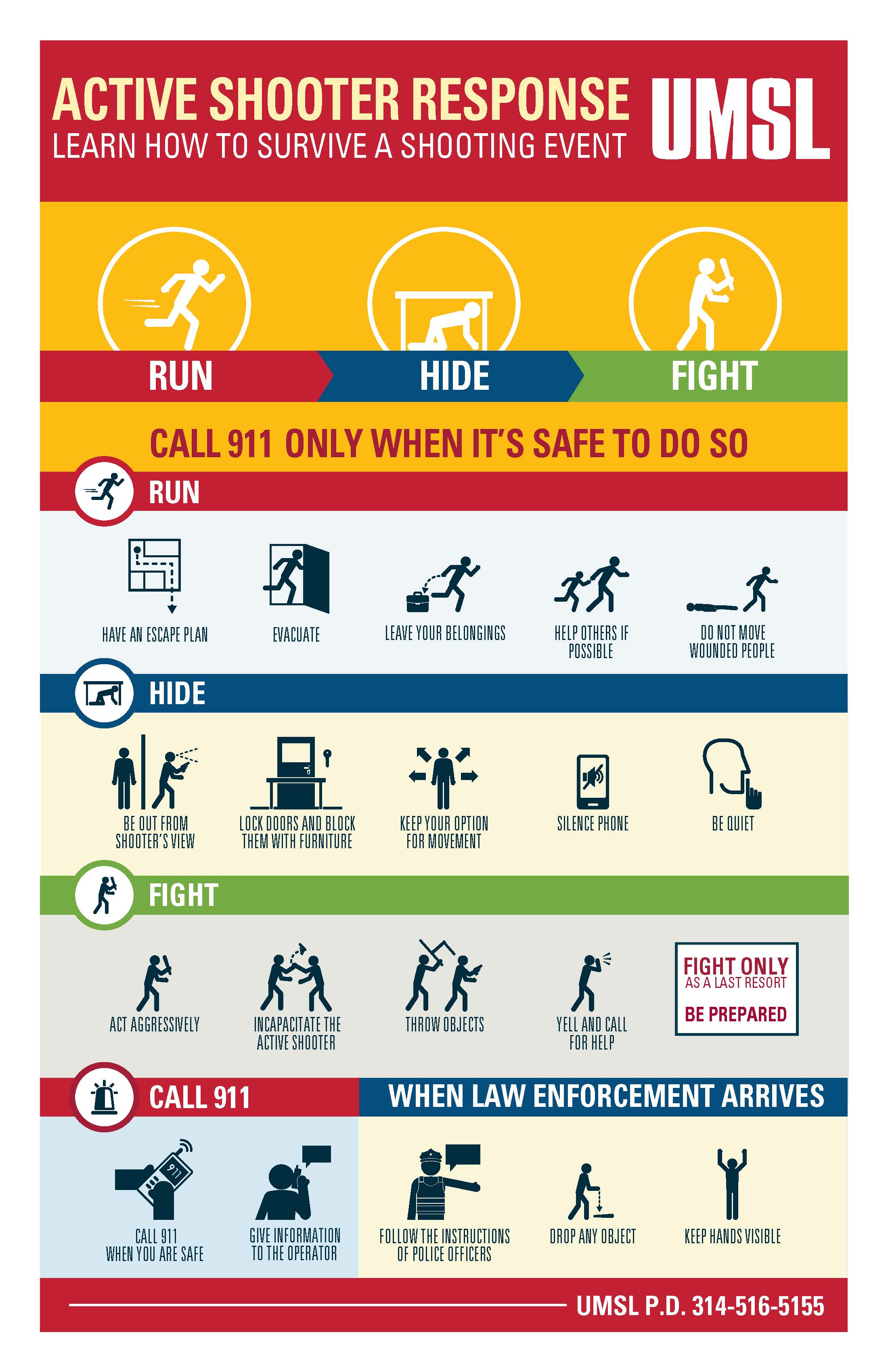
When an active shooter alert is received, the standard protocol recommended by the University of Arkansas and supported by federal safety guidelines is the "Run, Hide, Fight" methodology. Understanding these steps before an emergency occurs is critical, as split-second decision-making is required during an active threat event.
Run (Evacuate)
If an accessible escape path is available, attempting to evacuate the library is the priority. When fleeing:
- Leave your belongings behind.
- Help others escape if possible, but do not let them slow you down.
- Prevent individuals from entering an area where the shooter may be located.
- Once in a safe area, call 911 or campus police.
Hide (Shelter in Place)
If evacuation is not possible, find a place to hide where the shooter is less likely to find you. In the context of the Mullins Library, this might involve moving into study rooms, restrooms, or office areas that can be locked from the inside.
- Lock the door and barricade it with heavy furniture if available.
- Silence your mobile phone, including the vibration setting.
- Turn off lights and close blinds.
- Stay low to the ground and remain silent.
Fight (Defend)
As a last resort, and only when your life is in imminent danger, attempt to disrupt or incapacitate the shooter. This involves acting with physical aggression and utilizing improvised weapons found within the library environment, such as chairs, fire extinguishers, or heavy technical equipment.
Comparative Overview of Emergency Notification Features
The following table summarizes the different methods used to communicate emergency status across university facilities, highlighting the specific utility of each during an active shooter event.
| Notification Method | Primary Benefit | Reliability in Crisis | Audience Scope |
|---|---|---|---|
| SMS/Text Alert | High visibility/immediate read | Moderate (network congestion) | All registered users |
| Desktop Override | Impossible to ignore while working | High (internal network) | Staff/Students in labs |
| Detailed instructions | High | All faculty/staff/students | |
| Physical Sirens | Immediate environmental cue | High | Those physically on-site |
| Social Media | Public/External reach | Moderate | General public/Families |
Institutional Responsibilities and Legal Limitations
It is important for members of the University of Arkansas community to understand that emergency alerts are distributed by institutional administrators and campus law enforcement. These alerts are based on preliminary information. In the high-stress environment of an active shooter scenario, the initial notification may be brief or updated frequently as the situation evolves.
The university operates under a "duty to warn" framework, which mandates that the institution must provide timely information about threats to the campus community under the Clery Act. However, users should note that the system relies on accurate contact information. If a student or staff member has changed their phone number or email address without updating their profile in the university portal, they may fail to receive critical alerts.
Disclaimer for Emergency Situations
This article provides general information regarding emergency protocols and does not constitute official legal or safety advice. In the event of an actual emergency, always follow the direct instructions provided by University of Arkansas law enforcement and campus safety officials. Emergency procedures are subject to change based on specific threat assessments.
Frequently Asked Questions (FAQ)
1. How do I register or verify my contact information for alerts? Students and staff must log into the University of Arkansas portal and navigate to the personal information or emergency contact settings. It is recommended to perform this check at the start of each academic semester to ensure that all mobile numbers and recovery emails are current.
2. What should I do if I am inside the Mullins Library during an alert but do not have my phone? Focus on the immediate environment. Listen for announcements over the building’s public address system, observe the reactions of staff members, and look for "Shelter in Place" signs or indicators. If you see others fleeing or hiding, seek the nearest exit or secure room immediately.
3. Are there different types of alerts for non-shooter emergencies? Yes. The university uses the same infrastructure for weather warnings, hazardous material spills, or utility failures. Pay close attention to the specific text within the alert, as the recommended safety actions differ significantly between an active shooter (Hide/Lockdown) and a building fire (Evacuation).
4. Can parents or off-campus community members receive these alerts? The primary system is usually restricted to active university accounts. However, the university often maintains public-facing social media channels that relay these alerts. Monitor official university accounts on platforms like X or Facebook during a major incident.
5. Why might there be a delay in receiving an alert? While the system is designed for near-instant transmission, cellular carrier delays, network congestion, and the time required for campus police to verify an incident can lead to minor intervals between the start of an event and the delivery of the message. Always prioritize your immediate safety over waiting for a notification.
Next Actions and Preparedness
To maintain the highest level of personal safety, every member of the university community should take three proactive steps. First, ensure your contact information is up to date in the university directory. Second, familiarize yourself with the floor plan of the Mullins Library, identifying at least two exit routes from your most frequented study or work areas. Third, review the official University of Arkansas police safety guides annually to remain familiar with current lockdown and response protocols. Being prepared reduces the reaction time required to save lives when a threat is identified.
Image Gallery