What Does the S in HTTPS Stand For? Understanding Web Security in 2026
In the context of a website address, the "S" in HTTPS stands for Secure. It indicates that the website is using the Hypertext Transfer Protocol Secure, which encrypts the data exchanged between your web browser and the server, ensuring...
In the context of a website address, the "S" in HTTPS stands for Secure. It indicates that the website is using the Hypertext Transfer Protocol Secure, which encrypts the data exchanged between your web browser and the server, ensuring privacy, data integrity, and authentication.
Contents
For decades, the foundation of the World Wide Web was built on HTTP (Hypertext Transfer Protocol). However, as the internet evolved from a simple information-sharing platform into a global hub for commerce, banking, and private communication, the limitations of standard HTTP became a significant vulnerability. By 2026, HTTPS has become the non-negotiable standard for all web traffic, but understanding exactly what that "S" signifies requires a look at the underlying technologies and the security protocols that keep our digital lives safe.
Defining HTTPS: Hypertext Transfer Protocol Secure
HTTPS is not a separate protocol from HTTP; rather, it is the standard HTTP protocol layered on top of a security protocol. Specifically, it uses TLS (Transport Layer Security)—and formerly SSL (Secure Sockets Layer)—to wrap the data in an encrypted "tunnel."
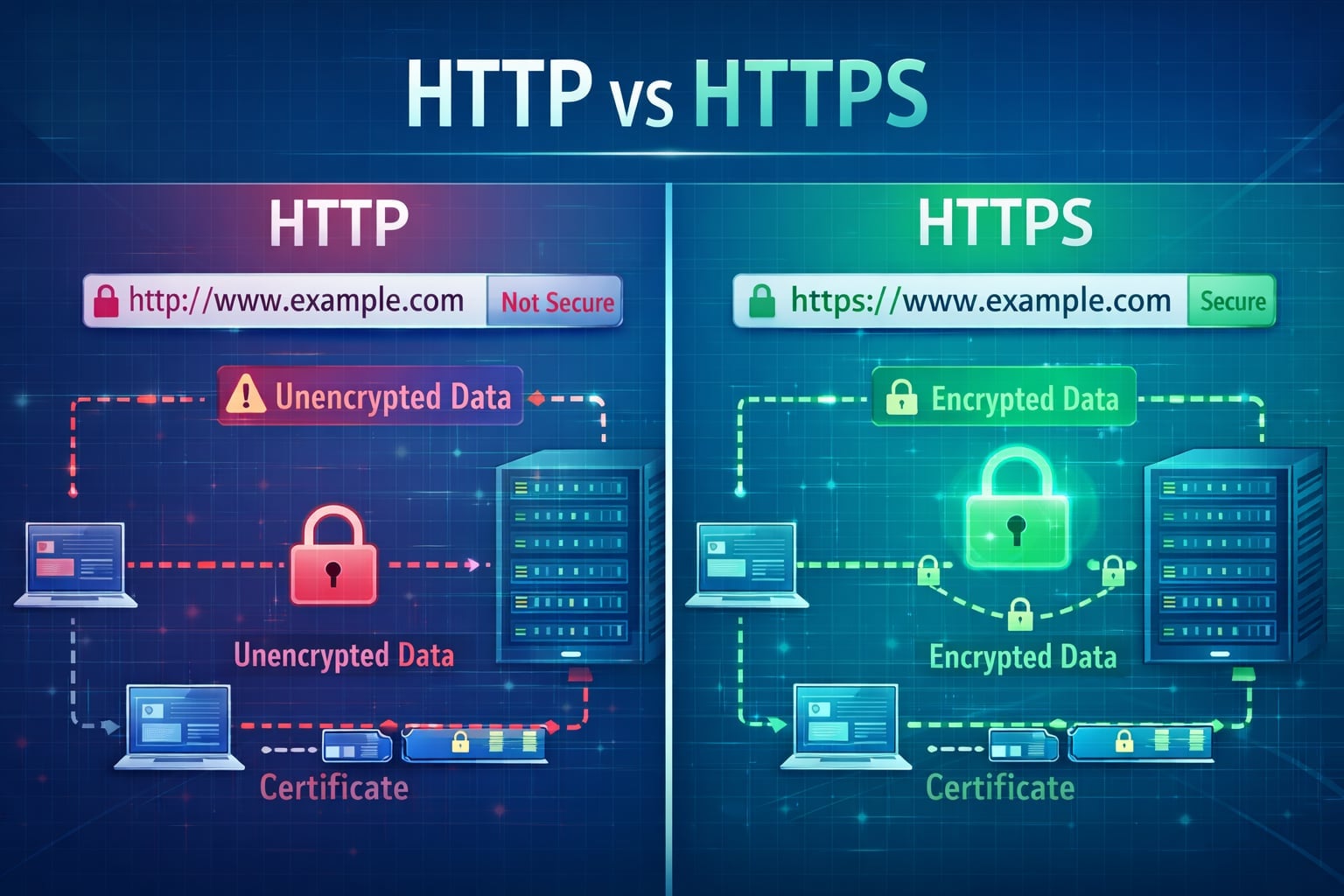
When you visit a website, your browser (the client) and the website’s server need a way to talk to each other. In a standard HTTP connection, this conversation happens in plain text. If a malicious actor intercepts the communication, they can read every password, credit card number, and personal message sent. The "S" signifies that this risk has been mitigated through a cryptographic handshake that establishes a private connection.
The Three Pillars of the "Secure" Designation
To earn the "S" in its name, HTTPS provides three key layers of protection:
- Encryption: This involves encoding the data so that only authorized parties can understand it. Even if a hacker manages to "sniff" the packets of data while they are in transit across the internet, they will only see a meaningless jumble of characters.
- Data Integrity: This ensures that the data cannot be modified or corrupted during transfer without the system detecting it. This prevents "man-in-the-middle" attacks where a hacker might try to inject malicious code or change the recipient of a financial transaction.
- Authentication: This proves that the user is communicating with the intended website. It protects against DNS spoofing and phishing attacks by verifying that the server holds a valid certificate issued by a trusted third party.
How the "Secure" Layer Actually Works
The implementation of the "S" relies on a complex but lightning-fast process called the TLS Handshake. In 2026, most modern web traffic utilizes TLS 1.3, which has streamlined this process to reduce latency and improve security.
The TLS Handshake Process
When you type a URL into your browser, the following steps occur in milliseconds:
- Client Hello: Your browser sends a message to the server including which versions of TLS it supports and a list of supported cipher suites (algorithms for encryption).
- Server Hello: The server responds with its chosen cipher suite and its SSL/TLS Certificate.
- Authentication: Your browser checks the certificate against a list of trusted Certificate Authorities (CAs). It verifies that the certificate is valid, not expired, and belongs to the domain you are visiting.
- Key Exchange: The browser and server use public-key cryptography to agree on a "session key"—a unique, symmetric key used only for that specific browsing session.
- Encrypted Communication: Once the session key is established, all subsequent data sent back and forth is encrypted using that key.
Port 443 vs. Port 80
In networking, "ports" are virtual endpoints for communication. Standard, insecure HTTP traffic typically uses Port 80. When the "S" is added to create HTTPS, the traffic moves to Port 443. This distinction allows network firewalls and servers to treat secure and insecure traffic differently, prioritizing the encrypted channel.
The Evolution from SSL to TLS
While many people still refer to security certificates as "SSL certificates," the SSL protocol itself has been officially deprecated for years due to discovered vulnerabilities.
- SSL (Secure Sockets Layer): Developed by Netscape in the mid-1990s. SSL 2.0 and 3.0 were the early standards but are now considered unsafe.
- TLS (Transport Layer Security): The successor to SSL. TLS 1.0 was first defined in 1999. In 2026, TLS 1.2 and TLS 1.3 are the industry standards.
When you purchase or install an "SSL certificate" today, you are actually installing a digital certificate that enables TLS connections. The industry maintains the term "SSL" largely because of brand recognition, but the "S" in HTTPS today almost exclusively implies the use of TLS.
Why HTTPS is Essential for Every Website
In the early 2010s, HTTPS was often reserved for checkout pages and login screens. By 2026, the landscape has shifted so that "HTTPS everywhere" is the baseline expectation.
1. User Trust and the "Not Secure" Warning
Modern browsers are designed to protect users. If a site does not have the "S," browsers like Chrome, Safari, and Firefox display a prominent "Not Secure" warning in the address bar. For businesses, this warning is a conversion killer. Users are conditioned to look for the padlock icon (or the equivalent identity verification in modern UI) before entering any information.
2. SEO and Search Rankings
Search engines, most notably Google, have used HTTPS as a ranking signal since 2014. All other factors being equal, a secure site will outrank an insecure site. By 2026, search algorithms have become even more stringent, often deprioritizing non-encrypted sites to the point of invisibility for competitive keywords.
3. Regulatory and Legal Compliance
Laws such as the GDPR (General Data Protection Regulation) in Europe and the CCPA (California Consumer Privacy Act) in the United States effectively mandate encryption for any site handling personal data. Failing to provide a secure connection can lead to massive fines and legal liabilities if a data breach occurs.
4. Performance Benefits
Contrary to the old myth that encryption slows down a website, HTTPS is actually a prerequisite for using modern, high-performance web protocols like HTTP/2 and HTTP/3. These protocols allow for multiplexing (loading multiple files at once) and reduced header overhead, making HTTPS sites significantly faster than their HTTP predecessors.
Comparing HTTP and HTTPS
The following table summarizes the fundamental differences between the insecure and secure versions of the protocol:
| Feature | HTTP (Insecure) | HTTPS (Secure) |
|---|---|---|
| Meaning | Hypertext Transfer Protocol | Hypertext Transfer Protocol Secure |
| Port | Default Port 80 | Default Port 443 |
| Encryption | None (Plain Text) | TLS/SSL Encryption |
| Security | Vulnerable to Eavesdropping | Protected against Tampering |
| SEO Impact | No benefit / Negative | Positive Ranking Signal |
| Browser Status | "Not Secure" Warning | Padlock Icon / Validated |
| Performance | Restricted to HTTP/1.1 | Supports HTTP/2 and HTTP/3 |
| Data Integrity | None | Verified by Digital Signatures |
Types of Certificates that Provide the "S"
Not all "S" designations are created equal. Depending on the level of verification, a website might use one of three types of certificates:
- Domain Validated (DV): The most common and easiest to obtain. The CA simply verifies that the applicant owns the domain. These are often free (via services like Let’s Encrypt) and are suitable for blogs and small websites.
- Organization Validated (OV): The CA verifies the domain ownership and the legal existence of the organization. This provides a higher level of trust for business websites.
- Extended Validation (EV): The highest tier of security. The CA performs a rigorous background check on the company. While the famous "green bar" of the past has been replaced by more subtle UI cues in 2026, EV certificates remain the gold standard for financial institutions and major e-commerce entities.
Common Misconceptions About HTTPS
Despite its ubiquity, several myths persist regarding what the "S" actually does:
- "HTTPS means the website is safe from hackers": This is false. HTTPS only secures the connection between you and the server. It does not mean the website itself hasn't been hacked, or that it doesn't contain malware. A secure connection to a malicious site just means your data is being sent securely to a criminal.
- "Only sites that handle money need HTTPS": In 2026, even a static portfolio or a recipe blog needs HTTPS. Without it, ISPs can inject ads into your site, and hackers can track which pages your users are visiting.
- "HTTPS makes my site slow": As mentioned earlier, modern TLS 1.3 and HTTP/3 actually make secure sites faster than insecure ones.
Verifying HTTPS and Troubleshooting
To ensure a site is properly utilizing the "S," you can click the icon to the left of the URL in the address bar. This will display the certificate status. If a site is "HTTPS" but you still see a warning, it may be due to:
- Mixed Content: The main page is secure, but it is trying to load images or scripts from an insecure "http://" source.
- Expired Certificates: Certificates must be renewed periodically (often every 90 days in 2026). An expired certificate will trigger a browser block.
- Name Mismatch: The certificate was issued for "example.com" but is being used on "another-site.com."
Practical Recommendation
If you are a website owner in 2026, ensure that your hosting provider offers automated TLS renewal and that your site is configured to Force HTTPS (via a 301 redirect). This ensures that any user attempting to reach the "http://" version of your site is automatically moved to the "https://" version. For users, always check for the secure connection before entering any sensitive data, and consider using browser extensions that enforce "HTTPS Everywhere" if your browser does not already do so by default.
Image Gallery