How the System Resource Manager Works: A Deep Dive into OS Architecture
A system resource manager is a foundational component of an operating system that arbitrates access to physical hardware, including the CPU, RAM, storage, and network interfaces. It uses complex scheduling algorithms and virtualization...
A system resource manager is a foundational component of an operating system that arbitrates access to physical hardware, including the CPU, RAM, storage, and network interfaces. It uses complex scheduling algorithms and virtualization techniques to ensure that multiple processes can coexist, preventing any single application from monopolizing hardware or causing system-wide instability.
Contents
Operating systems are designed to create an abstraction layer between software applications and the raw hardware of a computer. Without a system resource manager, software would have to communicate directly with electronic circuits, leading to chaos where two programs might attempt to write to the same memory address or use the processor simultaneously. By 2026, these management systems have evolved from simple reactive schedulers into proactive, often AI-enhanced coordinators that anticipate workload spikes and adjust power envelopes in real-time.
The Core Objectives of Resource Management
The primary goal of any resource manager is to maximize efficiency while maintaining fairness. Efficiency is measured by throughput (how much work is done over time) and utilization (how much of the hardware is active). Fairness ensures that background tasks do not starve for resources while the foreground application is running, and vice versa.
To achieve this, the resource manager operates as a "governor." It monitors every request made by the software (via system calls) and decides whether to grant, delay, or deny those requests based on the current state of the machine. This involves three critical pillars:
- Isolation: Ensuring that a crash in one application does not corrupt the memory or state of another.
- Accounting: Tracking which process is using what resource to prevent "leaks" or "zombie" processes from consuming power indefinitely.
- Enforcement: Applying limits or priorities so that critical system services always have the "right of way."
CPU Management and Process Scheduling
The Central Processing Unit (CPU) is the most contested resource in any system. Because a single CPU core can technically only execute one instruction sequence at a time, the resource manager must perform "context switching" at incredible speeds to give the illusion of multitasking.
The Role of the Scheduler
The scheduler is the specific part of the resource manager that decides which process gets to use the CPU. In 2026, most modern operating systems use a multi-level feedback queue. This system categorizes tasks based on their behavior. For instance, "interactive" tasks (like a mouse click or typing) are given high priority but short time slices, while "batch" tasks (like video rendering) are given lower priority but longer durations on the processor.
Preemptive vs. Cooperative Multitasking
Modern resource managers are almost exclusively preemptive. This means the manager has the authority to forcibly "pause" a running application when its time slice expires or when a higher-priority task arrives. This prevents a poorly written program from "hanging" the entire computer. The manager saves the current state of the CPU registers for the paused program and loads the state for the next program, a process known as a context switch. While context switching is essential, it carries overhead; the resource manager must balance the frequency of switches to avoid wasting too many CPU cycles on the management itself.
Memory Management: The Virtualization of RAM
If the CPU is the engine, RAM is the workspace. The system resource manager handles memory through a sophisticated technique called Virtual Memory.
Virtual Address Spaces
The resource manager does not allow applications to see physical RAM addresses. Instead, it provides each application with a "Virtual Address Space." When a program thinks it is writing to memory address 0x001, the resource manager (working with the hardware’s Memory Management Unit, or MMU) maps that virtual address to a real, physical location in the RAM chips.
This abstraction allows for several critical features:
- Protection: One program cannot "guess" the address of another program's data because their virtual maps are entirely separate.
- Paging: If the system runs out of physical RAM, the resource manager can move "cold" data (information not used recently) to the much slower hard drive or SSD. This is called "swapping" or "paging." When the program needs that data again, a "page fault" occurs, signaling the resource manager to bring the data back into RAM.
- Memory Compression: Modern managers often compress data within RAM rather than moving it to the disk, significantly increasing the "effective" memory available without a performance hit.
I/O and Peripheral Management
Input/Output (I/O) management involves coordinating data flow between the CPU/RAM and external devices like NVMe drives, network cards, and GPUs. Because hardware devices operate at vastly different speeds—a processor is millions of times faster than a standard network connection—the resource manager must use buffers and queues.
When an application wants to save a file, it doesn't wait for the drive to finish spinning or writing. Instead, the resource manager takes the data, places it in a buffer (a temporary storage area in RAM), and tells the application the job is "done." The manager then handles the actual transfer to the physical disk in the background. This "asynchronous I/O" allows the computer to remain responsive even during heavy data transfers.
Interrupt Handling
Resource managers also manage "interrupts." These are signals sent by hardware to the CPU to get immediate attention. For example, when you move your mouse, the mouse hardware sends an interrupt. The resource manager must pause current work, handle the mouse movement, and then resume. Effective resource management ensures that these interrupts are handled so quickly that the user never perceives a delay.
Resource Management Comparisons
The following table compares how different primary resources are handled by the management system:
| Resource Type | Primary Management Mechanism | Key Metric for Success | Typical Bottleneck Symptom |
|---|---|---|---|
| CPU | Scheduler / Time-Slicing | Instructions Per Second (IPS) | System "stutter" or high latency |
| RAM | Virtual Memory / Paging | Hit Rate (RAM vs. Disk) | "Thrashing" (excessive disk activity) |
| Storage | I/O Queuing / Buffering | IOPS (Input/Output Per Sec) | Applications freezing during "Save" |
| Network | Packet Scheduling / Shaping | Bandwidth / Latency | Buffering in media or lag in gaming |
Specialized Resource Managers: WSRM and Cgroups
While the kernel manages resources at a low level, there are higher-level software "managers" used in server environments.
Windows System Resource Manager (WSRM)
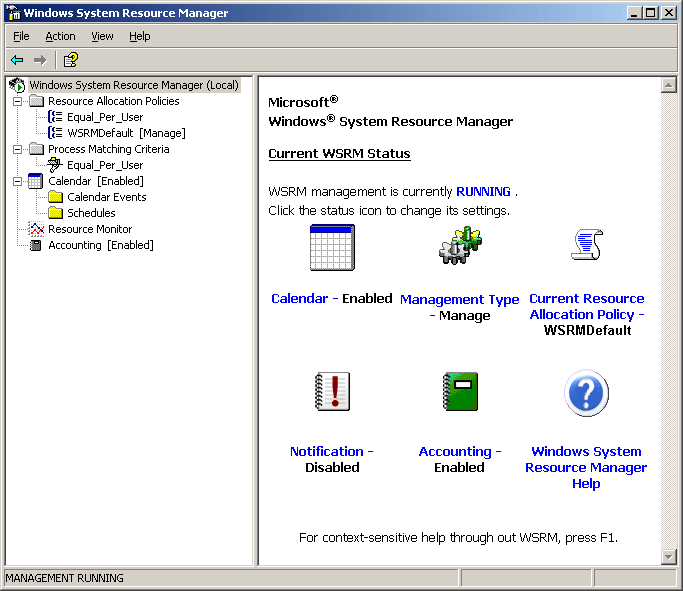
Historically, Windows Server included WSRM to allow administrators to allocate specific percentages of CPU or memory to specific users or applications. While deprecated in favor of newer technologies, its legacy lives on in Windows Containers and Hyper-V, which use the same logic to ensure a virtual machine doesn't "steal" all the resources from the host.
Linux Control Groups (cgroups)
In the Linux world, cgroups is the gold standard. It allows the system to organize processes into hierarchical groups and then apply limits. This is the technology that makes Docker and Kubernetes possible. By 2026, cgroups (v2) are the primary way cloud providers ensure that one customer's website doesn't slow down another customer's website on the same physical server.
Troubleshooting Resource Management Issues
Even the best resource manager can be overwhelmed. When a system "slows down," it is usually because the manager is forced to make sub-optimal decisions due to resource exhaustion.
- Thrashing: This occurs when the system has so little RAM that it spends more time moving data between the disk and RAM than actually executing code. The resource manager is working hard, but the "useful" work being done is near zero.
- Deadlocks: This is a logic error where Process A is waiting for a resource held by Process B, while Process B is waiting for a resource held by Process A. A sophisticated resource manager can sometimes detect these "deadly embraces" and force-terminate one process to break the cycle.
- Priority Inversion: This happens when a low-priority task holds a resource needed by a high-priority task. Modern managers use "Priority Inheritance," where the low-priority task is temporarily "promoted" to high priority so it can finish its work and release the resource.
Common Questions About Resource Management
What is the difference between Task Manager and a System Resource Manager?
The Task Manager (in Windows) or Activity Monitor (in macOS) is merely a user interface. It provides a visual representation of what the underlying System Resource Manager is doing. The actual "manager" is a set of algorithms and code paths within the OS kernel that work invisibly in the background, whether you have the Task Manager window open or not.
How does the system prevent one application from taking all the RAM?
The manager uses "working set" limits and "quotas." If an application requests more memory than is physically available, the manager will first try to clear "cached" data. If that isn't enough, it will start moving that specific application's least-used data to the "page file" on the disk. This slows down that specific app but prevents the entire OS from crashing.
Can I manually change how the resource manager works?
Yes, but it is generally not recommended for average users. On Windows, you can change "Process Priority" in the Task Manager, which tells the scheduler to give more time slices to a specific app. On Linux, you can use the nice or renice commands. However, the manager is usually better at balancing the system than a human, as it can react in microseconds.
What is "Resource Starvation"?
Starvation occurs when a process is perpetually denied access to a resource it needs to finish its task. This usually happens if the resource manager’s scheduling algorithm is poorly designed, allowing high-priority tasks to continuously jump to the front of the line, leaving low-priority tasks waiting forever. Modern "fairness" algorithms prevent this by slowly increasing the priority of tasks that have been waiting a long time.
Is AI used in system resource management in 2026?
Yes. By 2026, most major operating systems use machine learning models to predict user behavior. For example, if the system learns you always open a heavy creative suite at 9:00 AM, the resource manager will preemptively clear background caches and "spin up" hardware performance states a few minutes prior to ensure the smoothest possible experience.
Final Recommendation
To keep your system's resource manager functioning optimally, the most effective action is to maintain at least 15-20% free space on your primary drive. Because the resource manager relies on the "page file" (disk space used as emergency RAM), a completely full drive prevents the manager from swapping data, which can lead to system crashes and severe lag. Additionally, if you are a power user, monitor your "Committed" memory rather than just "In Use" memory, as this shows the total potential demand being placed on your resource manager.
Image Gallery