What is SQL Server Reporting Services? The Definitive Guide to SSRS
SQL Server Reporting Services (SSRS) is a server-based reporting platform from Microsoft used to create, manage, and deliver mobile and paginated reports. It provides a suite of tools and services that allow organizations to transform...
SQL Server Reporting Services (SSRS) is a server-based reporting platform from Microsoft used to create, manage, and deliver mobile and paginated reports. It provides a suite of tools and services that allow organizations to transform raw data into formatted, actionable insights accessible via web browsers, mobile devices, or automated email subscriptions.
Contents
Understanding the Core Purpose of SSRS
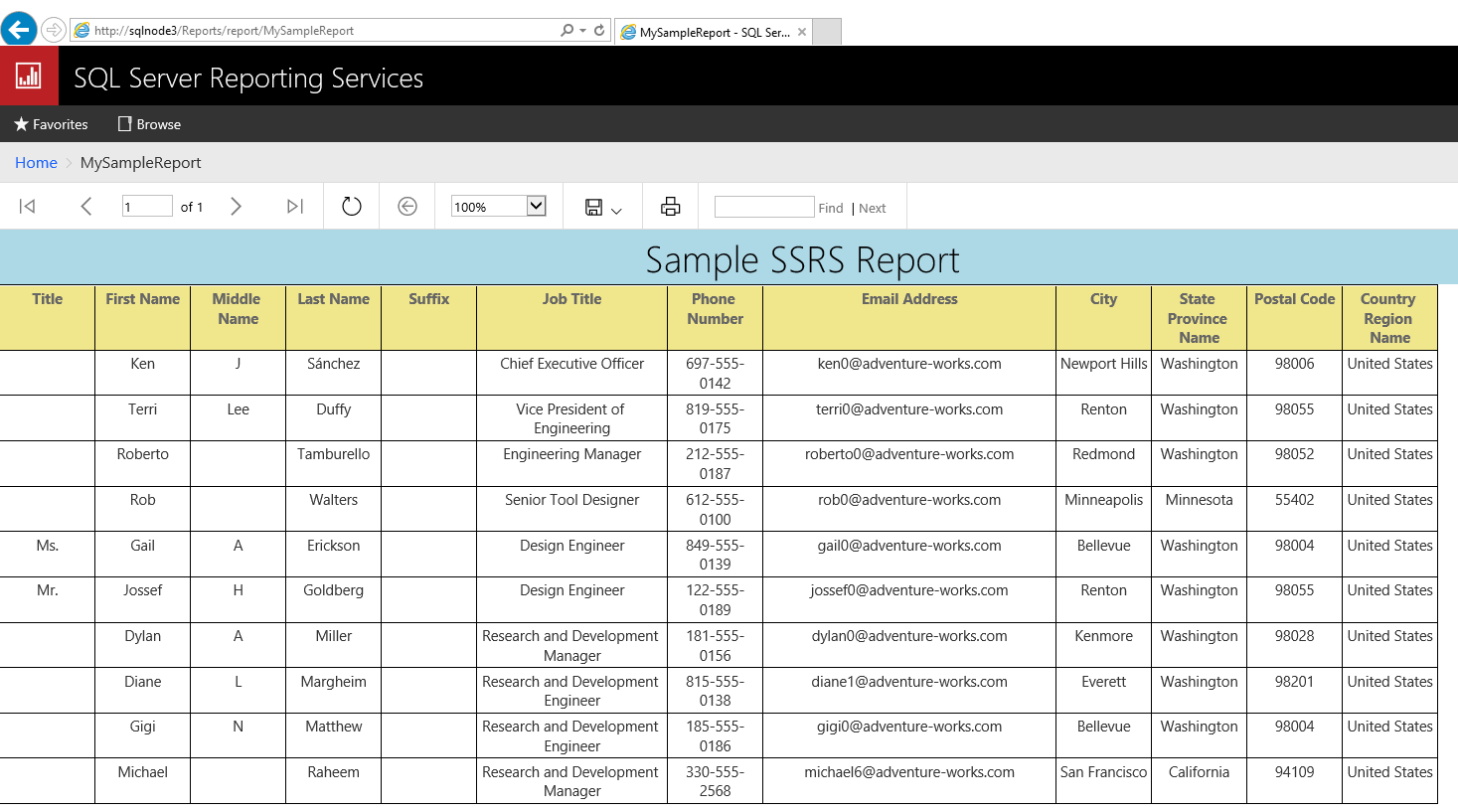
In the ecosystem of business intelligence, SQL Server Reporting Services (SSRS) occupies a specific and vital niche: paginated reporting. While modern tools like Power BI focus on interactive data exploration and "glanceable" dashboards, SSRS is designed for "pixel-perfect" reports that are intended to be printed or shared as documents. These reports are called "paginated" because they are formatted to fit well on a physical page, with defined headers, footers, and page numbers, even if the data spans thousands of rows across hundreds of pages.
As of 2026, SSRS remains a foundational component for enterprise data strategies. Many organizations rely on it for operational documents such as invoices, shipping labels, balance sheets, and regulatory compliance reports. These are documents where the layout must remain consistent regardless of the device used to view them. SSRS provides the infrastructure to host these reports securely, manage user access, and schedule automated delivery.
The Architecture of SSRS: How It Works
To understand SSRS, one must look at it as a three-tier system comprising the development environment, the report server, and the delivery interface. This architecture ensures that report generation is separated from data storage, allowing for scalability and high performance even with large datasets.
1. The Report Server
The heart of SSRS is the Report Server, a specialized engine built on top of the Microsoft Windows service architecture. It handles the processing of report definitions (stored in XML-based .rdl files), retrieves data from specified sources, and renders the output into the desired format (such as PDF, Excel, or HTML). The Report Server also manages the "Report Server Database," which stores metadata, security settings, report definitions, and cached data for faster performance.
2. Report Authoring Tools
Developers and business analysts use specific tools to build reports:
- SQL Server Data Tools (SSDT): An extension for Visual Studio used primarily by developers. It provides a robust environment for complex report logic, custom code integration, and source control management.
- Report Builder: A standalone, more user-friendly tool designed for business users who need to create reports without diving into a full development environment. It features a "drag-and-drop" interface similar to Microsoft Office.
3. The Web Portal
The Web Portal is the front-end interface where users interact with reports. It is a web-based application where reports are organized into folders. Users can browse the portal to run reports on demand, view historical report "snapshots," or manage their own report subscriptions.
Key Features and Capabilities
SSRS is distinguished by several technical capabilities that make it more than just a visualization tool. It is an end-to-end report management system.
Data Connectivity and Integration
SSRS is highly versatile in terms of data sources. While it is naturally optimized for Microsoft SQL Server, it can pull data from virtually any source that has an OLE DB, ODBC, or .NET provider. This includes:
- Relational databases like Oracle, MySQL, and PostgreSQL.
- Cloud sources such as Azure SQL Database and Azure Analysis Services.
- Multidimensional sources like SQL Server Analysis Services (SSAS).
- XML data files and web services.
Subscription and Delivery Models
One of the most powerful features of SSRS is its ability to push information to users automatically.
- Standard Subscriptions: A user can set up a schedule (e.g., every Monday at 8:00 AM) to receive a specific report via email or have it saved to a network file share in a format like PDF or Excel.
- Data-Driven Subscriptions: For enterprise-scale needs, these subscriptions query a data source to determine the recipients and parameters of a report. For example, a single data-driven subscription could send a unique sales report to 500 different regional managers, each seeing only the data relevant to their specific territory.
Role-Based Security
Security in SSRS is integrated with Windows Authentication and Active Directory. Administrators can define granular permissions through roles such as "Browser" (view only), "Publisher" (upload reports), and "Content Manager" (full control over folders and security). This ensures that sensitive financial or HR data is only accessible to authorized personnel.
SSRS vs. Power BI: Choosing the Right Tool
A common point of confusion is whether an organization should use SSRS or Power BI. In 2026, the answer is rarely "one or the other," but rather "how to use both effectively."
| Feature | SQL Server Reporting Services (SSRS) | Power BI |
|---|---|---|
| Primary Goal | Paginated, "Pixel-Perfect" reports. | Interactive, visual data exploration. |
| Layout | Fixed page sizes (A4, Letter); ideal for printing. | Fluid, canvas-based; ideal for screens. |
| Data Volume | Handles massive datasets intended for listing (e.g., 10,000 rows). | Optimized for aggregated views and trends. |
| Delivery | Email, File Share, Web Portal. | Power BI Service (Cloud), Mobile App, Embedded. |
| Development Tool | Report Builder, Visual Studio (SSDT). | Power BI Desktop. |
| File Extension | .rdl (Report Definition Language). | .pbix (Power BI Desktop File). |
When to choose SSRS: Use SSRS when you need a document that looks exactly the same every time it is generated, such as an audit log, an official transcript, or a monthly bank statement. When to choose Power BI: Use Power BI when you need to "drill down" into data, see real-time trends, or provide executives with a high-level overview of KPIs through interactive charts.
Installation and Technical Requirements
Deploying SSRS in 2026 requires a clear understanding of the licensing and infrastructure prerequisites. Since SQL Server 2017, SSRS has been removed from the main SQL Server setup wizard and exists as a separate installer. This allows Microsoft to update the reporting engine independently of the database engine.
Licensing
SSRS is licensed as part of the SQL Server edition you purchase.
- Enterprise Edition: Includes all features, including data-driven subscriptions and mobile reports.
- Standard Edition: Includes core reporting features but limits certain advanced delivery and scaling options.
- Express Edition: A free version for small-scale use, though it lacks many automation and scheduling features.
Software Prerequisites
- Database Engine: You must have a SQL Server instance (2016 or later) to host the
ReportServerandReportServerTempDBdatabases. - Operating System: Windows Server 2019, 2022, or 2025 (depending on your hardware cycle).
- Browser Support: Modern browsers like Microsoft Edge, Google Chrome, and Mozilla Firefox are fully supported for the Web Portal.
For detailed installation steps and the latest hardware compatibility lists, refer to the official Microsoft SQL Server documentation.
The Life Cycle of an SSRS Report
Developing a report in SSRS follows a predictable workflow that ensures quality and consistency across the enterprise.
- Defining the Data Source: The developer establishes a connection to the database. This can be a "Shared Data Source" (reusable by many reports) or an "Embedded Data Source" (unique to one report).
- Creating the Dataset: A query (usually T-SQL) is written to fetch specific fields from the data source. Developers can use parameters to allow users to filter data at runtime (e.g., selecting a date range).
- Designing the Layout: Using the "Toolbox," the developer adds report items such as Tables (for simple lists), Matrices (for cross-tab reports), Charts, or Gauges.
- Applying Logic and Expressions: SSRS uses a syntax similar to Visual Basic for "Expressions." These are used for conditional formatting (e.g., turning a cell red if sales are below a target) or performing calculations.
- Preview and Deployment: The report is tested locally and then "deployed" (uploaded) to the Report Server.
- Access and Management: Once on the server, the administrator sets permissions and configures any necessary subscriptions.
Common Troubleshooting and Optimization
Even a well-designed SSRS environment can encounter performance bottlenecks. Most issues fall into two categories: slow data retrieval or slow rendering.
- Parameter Sniffing: If a report runs fast for some users but slow for others, it might be due to SQL Server's parameter sniffing. Using local variables in your T-SQL stored procedures can often resolve this.
- Large PDF Rendering: Rendering a 500-page PDF is CPU-intensive. If the Report Server is sluggish, consider upgrading the RAM or moving the
ReportServerTempDBto faster SSD storage. - Session Timeouts: For very long-running reports, you may need to adjust the
SystemReportTimeoutsettings in the Site Settings of the Web Portal to prevent the browser from timing out before the data is ready.
Frequently Asked Questions
Is SSRS being replaced by Power BI?
No, SSRS is not being replaced. Instead, Microsoft has integrated SSRS technology into the Power BI ecosystem. You can now host "Power BI Paginated Reports" (which are essentially SSRS .rdl files) in the Power BI Service. SSRS remains the primary solution for on-premises, dedicated paginated reporting.
Can I run SSRS on Linux?
Currently, the SSRS Report Server is only supported on Windows. While the SQL Server Database Engine can run on Linux, the reporting services component remains tied to Windows-specific libraries for rendering and authentication.
Does SSRS support mobile devices?
Yes. Since SQL Server 2016, SSRS has included a "Mobile Report Publisher" (based on Datazen technology). This allows you to create responsive reports specifically optimized for smartphones and tablets, accessible through the Power BI Mobile app.
What is the difference between a Table and a Matrix in SSRS?
A Table has a fixed number of columns but a dynamic number of rows. A Matrix (often called a pivot table) has both a dynamic number of rows and a dynamic number of columns, expanding horizontally and vertically based on the data.
Can SSRS export to Microsoft Word?
Yes, SSRS supports exporting to .docx format. It also supports Excel (.xlsx), PDF, CSV, XML, and MHTML. Each renderer has specific limitations regarding how it handles page breaks and overlapping elements.
Next Steps for Implementation
If you are looking to implement or upgrade your reporting infrastructure in 2026, start by auditing your current report inventory. Identify which reports require interactivity (move these to Power BI) and which require precise formatting or automated distribution (keep these in SSRS).
For those new to the platform, downloading Microsoft Report Builder is the fastest way to begin experimenting with report design. Ensure your SQL Server environment is properly licensed for Reporting Services and begin with a small pilot project—such as an automated daily sales summary—to familiarize your team with the deployment and subscription workflow.
Image Gallery