AWS Cloud Security Monitoring Tools: A Practical Guide
AWS cloud security monitoring requires a multi-layered approach using native services like AWS CloudTrail, Amazon CloudWatch, Amazon GuardDuty, AWS Security Hub, and Amazon Inspector, alongside integrated third-party platforms. Establi...
AWS cloud security monitoring requires a multi-layered approach using native services like AWS CloudTrail, Amazon CloudWatch, Amazon GuardDuty, AWS Security Hub, and Amazon Inspector, alongside integrated third-party platforms. Establishing visibility across infrastructure requires centralizing event logs, automating threat detection, monitoring network traffic, and enforcing continuous compliance across all enterprise accounts.
Contents
Core Native AWS Security Monitoring Tools
Securing workloads in Amazon Web Services (AWS) begins with understanding the native security and observability services provided by the platform. Under the AWS Shared Responsibility Model, AWS manages the security of the cloud, while organizations are responsible for security in the cloud. Native monitoring tools provide the primary telemetry required to audit activity, identify misconfigurations, detect anomalous behavior, and respond to security events.
- AWS Security Monitoring Layer
- Threat & Vulnerability
- Amazon GuardDuty
- Amazon Inspector
- Central Posture & Compliance
- AWS Security Hub
- Operational & Audit
- AWS CloudTrail
- Amazon CloudWatch
- Threat & Vulnerability
- Ingestion & Automated Response
- Amazon EventBridge
- AWS Lambda / AWS Systems Manager
AWS CloudTrail: Audit and API Governance
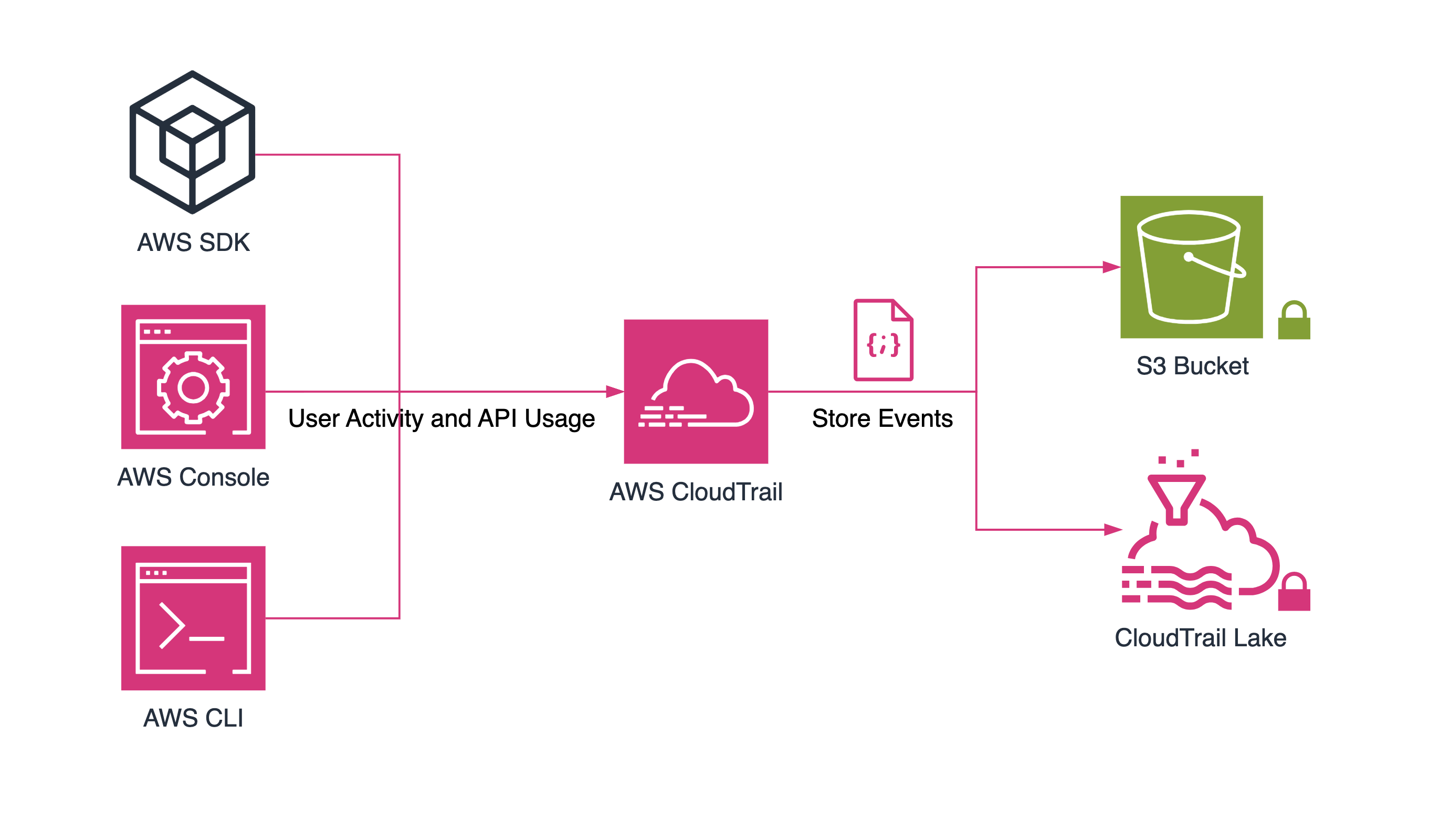
AWS CloudTrail acts as the foundational auditing service for your AWS environment. It records API calls, user actions, and administrative changes made through the AWS Management Console, Command Line Interface (CLI), and Software Development Kits (SDKs).
- Management Events: Capture control plane operations, such as creating an Amazon S3 bucket, launching an EC2 instance, or modifying an IAM policy.
- Data Events: Capture resource-level operations, such as S3 object-level actions (
GetObject,PutObject) or AWS Lambda function invocations. Because data events occur at high volume, they are configured selectively to manage costs. - Insights Events: Leverage automated analysis of CloudTrail management events to detect unusual API call volumes or operational anomalies (e.g., a sudden spike in access requests or unauthorized API calls).
To maintain audit integrity, CloudTrail logs should be delivered to a dedicated, encrypted S3 bucket in a centralized log-archive account with object lock enabled to prevent tampering or unauthorized deletion.
Amazon CloudWatch: Operational Observability and Log Aggregation
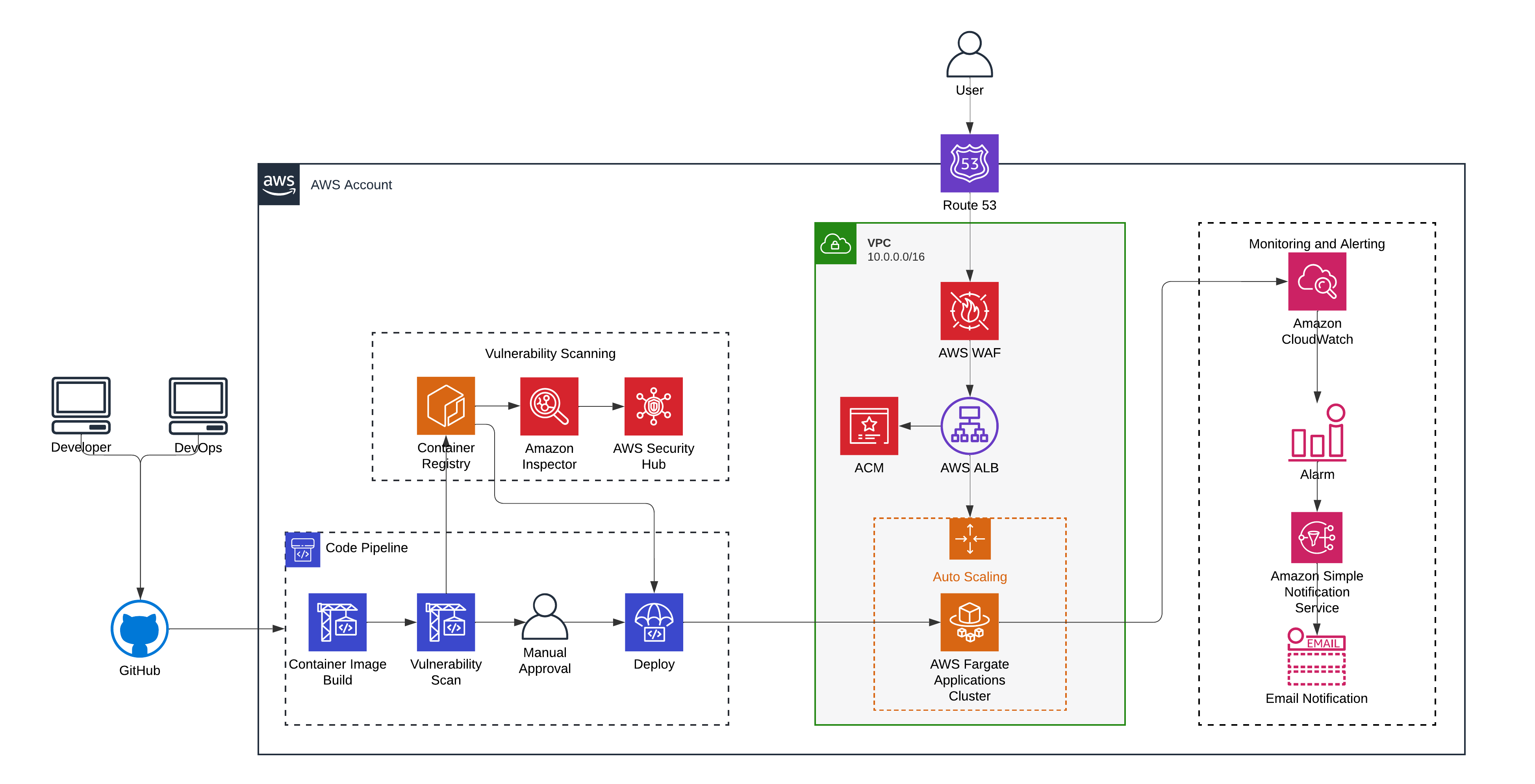
While CloudTrail tracks who did what to AWS resources, Amazon CloudWatch focuses on performance metrics, log aggregation, and system health. From a security monitoring perspective, CloudWatch Logs functions as the primary collection pipeline for system logs, application logs, web server access logs, and custom telemetry.
CloudWatch Metric Filters allow security teams to transform unstructured log data into actionable quantitative metrics. For instance, a metric filter can scan CloudTrail logs in CloudWatch for failed IAM console login attempts or unauthorized API calls, triggering a CloudWatch Alarm whenever a predefined threshold is crossed.
Amazon GuardDuty: Intelligent Threat Detection
Amazon GuardDuty is an automated threat detection service that continuously monitors AWS accounts and workloads for malicious activity and unauthorized behavior. Unlike rule-based monitoring tools, GuardDuty uses machine learning, anomaly detection, and integrated threat intelligence feeds (including AWS Security Research and reputable third-party sources).
GuardDuty operates without requiring agents by analyzing independent data streams:
- AWS CloudTrail Event Logs: Identifies compromised IAM credentials, unusual API activity, and configuration changes.
- VPC Flow Logs: Detects communication with known command-and-control (C2) servers, port scanning, and suspicious outbound traffic.
- DNS Logs: Identifies requests to malicious domains or DNS exfiltration attempts.
- EKS & Kubernetes Audit Logs: Monitors container plane activity for compromised clusters.
- S3 Data Events & Malware Protection: Scans object access patterns and evaluates newly uploaded objects in S3 or EBS volumes for malicious payloads.
AWS Security Hub: Centralized Posture and Compliance Management
Managing security across multi-account AWS environments requires a single pane of glass. AWS Security Hub aggregates, organizes, and prioritizes security findings from Amazon GuardDuty, Amazon Inspector, Amazon Macie, AWS IAM Access Analyzer, and integrated partner solutions.
Security Hub evaluates your AWS environment against automated security standards, such as:
- AWS Foundational Security Best Practices (FSBP)
- CIS AWS Foundations Benchmark
- PCI DSS (Payment Card Industry Data Security Standard)
- NIST SP 800-53
Findings are standardized into the AWS Security Finding Format (ASFF), making it straightforward to parse data, route alerts to SIEM systems, or invoke automated remediation scripts via Amazon EventBridge.
Amazon Inspector: Vulnerability and Workload Assessment
Amazon Inspector provides automated vulnerability management for AWS workloads. It continuously scans Amazon EC2 instances, container images stored in Amazon Elastic Container Registry (ECR), and AWS Lambda functions for software vulnerabilities (CVEs) and unintended network exposure.
Inspector uses AWS Systems Manager (SSM) agent technology to inventory installed software packages on EC2 instances without introducing heavy performance overhead. When a vulnerability is published in a public database, Amazon Inspector correlates the CVE against your resource inventory to evaluate risk in real time.
Comparing Native AWS Security Monitoring Tools
Selecting the right combination of monitoring services depends on your operational requirements, compliance mandates, and architecture. The table below outlines key capabilities across native AWS tools.
| Tool Name | Primary Function | Key Inputs & Telemetry | Best Use Case | Typical Pricing Model |
|---|---|---|---|---|
| AWS CloudTrail | API and user activity auditing | Management events, Data events, Insights events | Auditing compliance, tracking identity actions, governance | Per 100,000 management events (first copy free); per S3 data event |
| Amazon CloudWatch | Metric monitoring and log storage | Application logs, OS logs, custom metrics | Application observability, metric-based security alarms | Per GB log ingestion and storage; per active metric/alarm |
| Amazon GuardDuty | ML-based threat detection | CloudTrail, VPC Flow Logs, DNS logs, EKS audit logs | Detecting compromised credentials, C2 traffic, malware | Per GB evaluated logs (CloudTrail, VPC, DNS) |
| AWS Security Hub | Security posture & compliance | GuardDuty, Inspector, Macie, IAM Access Analyzer | Centralized dashboard, CIS benchmark auditing | Per compliance check per account/region; per finding ingested |
| Amazon Inspector | Vulnerability scanning | OS software inventory, ECR container layers, Lambda code | CVE detection on EC2, container images, and serverless | Per active EC2 instance/month; per container image scan |
| Amazon Macie | Sensitive data discovery | S3 object content, bucket policy analysis | Locating exposed PII, PHI, or intellectual property in S3 | Per bucket evaluated; per GB data inspected |
Architecting an Integrated AWS Security Monitoring Strategy
Deploying isolated security tools creates operational silos and alert fatigue. A mature AWS security monitoring architecture unifies data streams into a structured pipeline: centralized logging, automated analysis, prioritized posture management, and event-driven remediation.
- AWS Multi-Account Core
- Workload Accounts (CloudTrail / VPC Logs)
- Log Archive Account (Central S3 + KMS)
- Security Operations Account
- Amazon GuardDuty & Amazon Inspector
- AWS Security Hub (Aggregated Findings)
- Automated Response
- Amazon EventBridge
- AWS Lambda / Systems Manager Automation
Step 1: Establish Centralized Logging via AWS Organizations
In multi-account environments managed by AWS Organizations, telemetry should never remain isolated within individual workload accounts.
- Deploy an Organization Trail: Configure AWS CloudTrail at the organization management level to enforce logging across all existing and future child accounts.
- Central Storage S3 Bucket: Direct CloudTrail logs, VPC Flow Logs, and GuardDuty findings to a dedicated Log Archive Account.
- Apply Strict Bucket Policies: Secure the destination S3 bucket using server-side encryption with AWS Key Management Service (AWS KMS) customer-managed keys (CMK), enforce TLS in transit via bucket policies, and enable S3 Object Lock in compliance mode to block log deletion.
Step 2: Implement Multi-Account GuardDuty and Security Hub
Using AWS Organizations integration, designate a Security Tooling or Security Operations account as the Delegated Administrator for both Amazon GuardDuty and AWS Security Hub.
- Enforcing auto-enablement ensures that whenever a new AWS account is created within the organization, GuardDuty threat detection and Security Hub compliance monitoring are provisioned automatically.
- Centralizing findings into the administrator account prevents local workload owners from altering or disabling security settings.
Step 3: Configure Event-Driven Response with Amazon EventBridge
Detection without automated response increases mean time to respond (MTTR). AWS Security Hub and Amazon GuardDuty publish events directly to Amazon EventBridge.
For high-severity alerts, EventBridge can trigger automated remediation workflows:
- Exposed Credentials: If GuardDuty detects an IAM secret key leaked online, an EventBridge rule can trigger an AWS Lambda function to attach an
AWSDenyAllpolicy to the affected IAM user and revoke existing sessions. - Unintended Network Access: If Security Hub flags an S3 bucket as publicly readable, an automated workflow can immediately enforce S3 Block Public Access at the bucket level.
- Notification Routing: Security teams can route filtered, critical alerts directly to messaging channels (such as Slack, Microsoft Teams, or PagerDuty) via Amazon SNS.
Native AWS Security Tools vs. Third-Party SIEM & CSPM Solutions
While AWS native security tools provide deep integration with cloud services, many enterprise organizations incorporate third-party Security Information and Event Management (SIEM) and Cloud Security Posture Management (CSPM) platforms.
Native AWS Security Tools
- Strengths: Zero infrastructure setup, native understanding of AWS API structures, immediate compatibility with new AWS services, low operational maintenance, and pay-as-you-go pricing.
- Limitations: Multi-cloud visibility (e.g., Azure, Google Cloud Platform, on-premises) requires separate management; visualization tools like CloudWatch Dashboards can require extra configuration compared to dedicated enterprise SIEM platforms.
Third-Party Platforms (e.g., Splunk, Datadog, Wiz, Palo Alto Networks Prisma Cloud)
- Strengths: Unified cross-cloud visualization, standardized incident response across multi-cloud environments, advanced correlation engine across endpoint and network data, and pre-built compliance mapping for complex global regulations.
- Limitations: Higher licensing costs, requirements for agent deployment or extensive cross-account IAM role authorizations, and egress/ingestion data charges when pushing high-volume logs out of AWS environments.
Hybrid Strategy
Most enterprise environments adopt a hybrid approach: native services like AWS CloudTrail, GuardDuty, and VPC Flow Logs collect and analyze raw events inside AWS, while aggregated findings and critical security alerts are forwarded out to an enterprise SIEM via AWS Data Firehose or S3 bucket integrations.
Controlling Security Monitoring Costs and Reducing Noise
Log ingestion, continuous evaluation, and high-volume metric monitoring can lead to unpredictable cloud expenditures if unmanaged. Implementing cost control mechanisms ensures sustainable security operations.
1. Optimize Log Delivery and Filtering
Data storage and ingestion represent a major portion of security monitoring costs.
- Filter VPC Flow Logs: Avoid logging all IP traffic if operational requirements allow. Filter logs to capture only
REJECTtraffic to monitor blocked unauthorized connection attempts, or restrict logging to specific production VPC subnets. - Scope CloudTrail Data Events: Enable data events only for sensitive S3 buckets or high-risk Lambda functions rather than across all resources in an account.
2. Manage CloudWatch Log Retention
By default, CloudWatch Logs retain log groups indefinitely. Define explicit log retention policies (e.g., 30 or 90 days) for non-critical log groups. For long-term historical retention, export logs to Amazon S3 Standard-Infrequent Access (S3 Standard-IA) or Amazon S3 Glacier using CloudWatch subscription filters.
3. Tune Security Hub Standards and GuardDuty Suppressions
Alert fatigue undermines security efficacy.
- Disable irrelevant rules in AWS Security Hub (for example, turn off PCI DSS checks on non-PCI workload accounts).
- Create GuardDuty suppression rules for expected, harmless operational anomalies (such as automated CI/CD deployment pipelines using dynamic IP ranges) to prevent repeated false positives.
Frequently Asked Questions
What is the difference between AWS CloudTrail and Amazon CloudWatch?
AWS CloudTrail logs API activity, user interactions, and administrative requests across your AWS account (focusing on governance and auditing). Amazon CloudWatch monitors application performance, infrastructure operational metrics, system logs, and resource health (focusing on operational performance and log management).
Does Amazon GuardDuty impact the performance of EC2 instances or databases?
No. Amazon GuardDuty operates out-of-band by directly analyzing underlying AWS control plane logs, VPC Flow Logs, and network metadata. Because it does not require running agents inside host operating systems, it introduces no performance overhead or resource latency on workloads.
How does AWS Security Hub simplify multi-account security?
AWS Security Hub integrates with AWS Organizations to consolidate security findings from all member accounts into a single master account dashboard. It automatically formats disparate findings into the standardized AWS Security Finding Format (ASFF) and runs automated checks against compliance standards like CIS and PCI DSS.
Can native AWS security tools monitor hybrid or on-premises environments?
Some native tools offer hybrid capabilities. Amazon Inspector can scan on-premises servers if they are managed through AWS Systems Manager (SSM). CloudWatch Logs can collect logs from on-premises servers using the unified CloudWatch Agent. However, GuardDuty and CloudTrail prioritize AWS-hosted cloud resources and infrastructure activity.
How long should AWS security logs be retained for audit compliance?
Retention mandates depend on industry frameworks (e.g., PCI DSS requires retaining audit trail history for at least one year, with three months immediately accessible). Best practice involves storing recent logs (30–90 days) in CloudWatch or S3 Standard for active querying, and auto-archiving older logs to S3 Glacier with Object Lock for multi-year compliance storage.
Practical Next Steps
To build a secure monitoring environment across your AWS infrastructure, follow these action items:
- Enable AWS CloudTrail across all accounts: Verify that an Organization Trail is active, writing to an encrypted, centralized S3 bucket located within a secure Log Archive account.
- Turn on Amazon GuardDuty: Activate GuardDuty in all active AWS regions—even unused regions—to identify unauthorized resource provisioning or compromised credentials globally.
- Deploy AWS Security Hub: Enable Security Hub in your designated security administration account and select the AWS Foundational Security Best Practices (FSBP) standard.
- Establish Event-Driven Alerts: Use Amazon EventBridge to send critical GuardDuty findings and high-severity Security Hub alerts to your security team's preferred operational channels.
- Review Log Retention Configurations: Set lifecycle rules on CloudWatch Log Groups and S3 buckets to archive historical data efficiently while maintaining compliance alignment.
Image Gallery