Understanding the Private Internet Network: How VPN Technology Works
A Virtual Private Network (VPN) creates a secure, encrypted tunnel across a public network such as the internet, allowing client devices to send and receive data as if directly connected to a private network. It achieves privacy by enc...
A Virtual Private Network (VPN) creates a secure, encrypted tunnel across a public network such as the internet, allowing client devices to send and receive data as if directly connected to a private network. It achieves privacy by encapsulating IP packets, encrypting payloads, and routing traffic through gateway servers to mask the origin address.
Contents
Core Concepts: What Makes an Internet Connection "Private"?
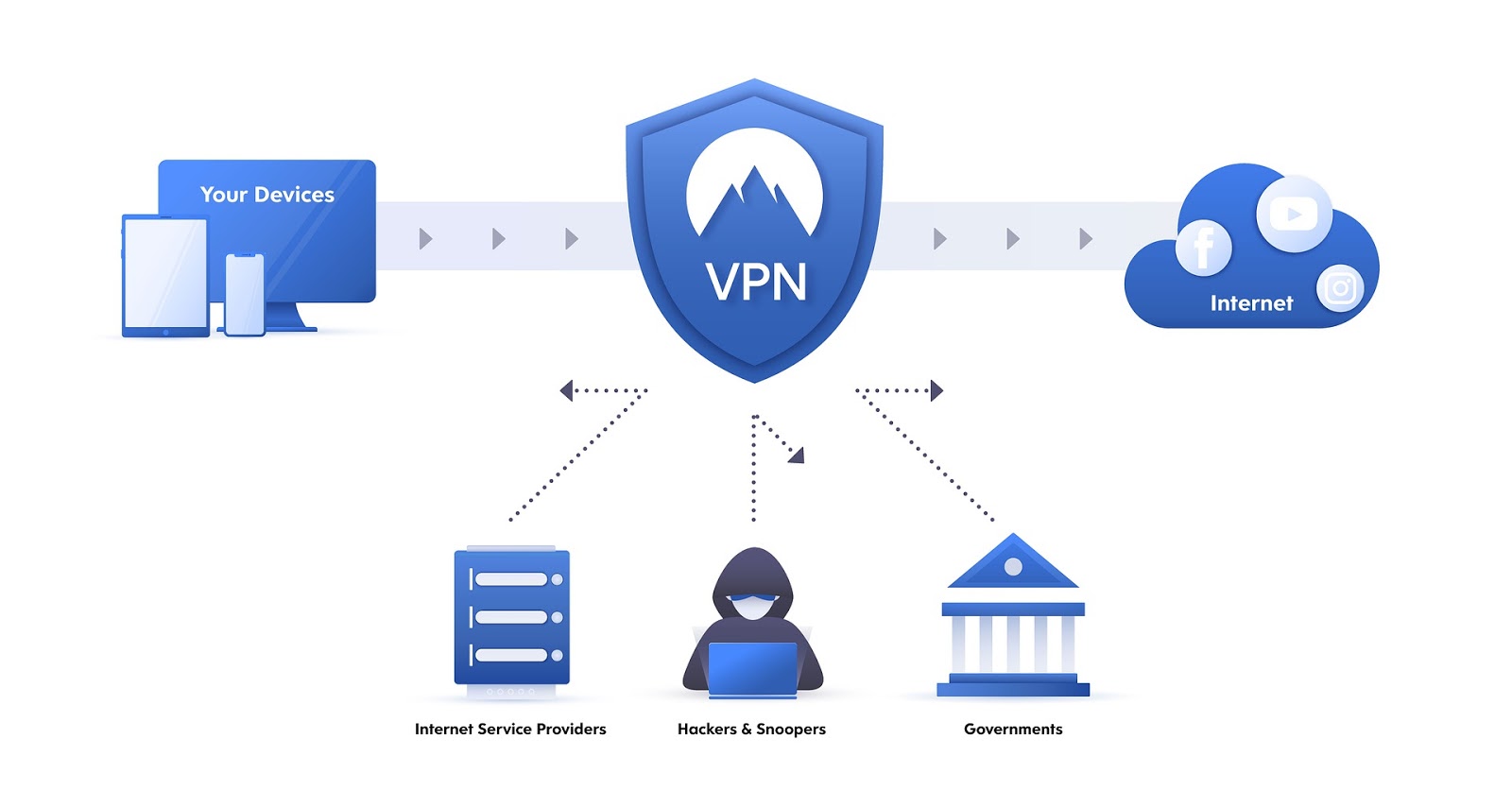
The public internet operates as a open, packet-switched mesh network. By default, internet protocol (IP) traffic travels through multiple third-party routers, internet service providers (ISPs), and network switches in cleartext or partially unencrypted headers. Anyone positioned along the network path—including network administrators, ISPs, and malicious actors on unencrypted public Wi-Fi—can inspect metadata such as destination IP addresses, request domains (via unencrypted DNS), and timing patterns.
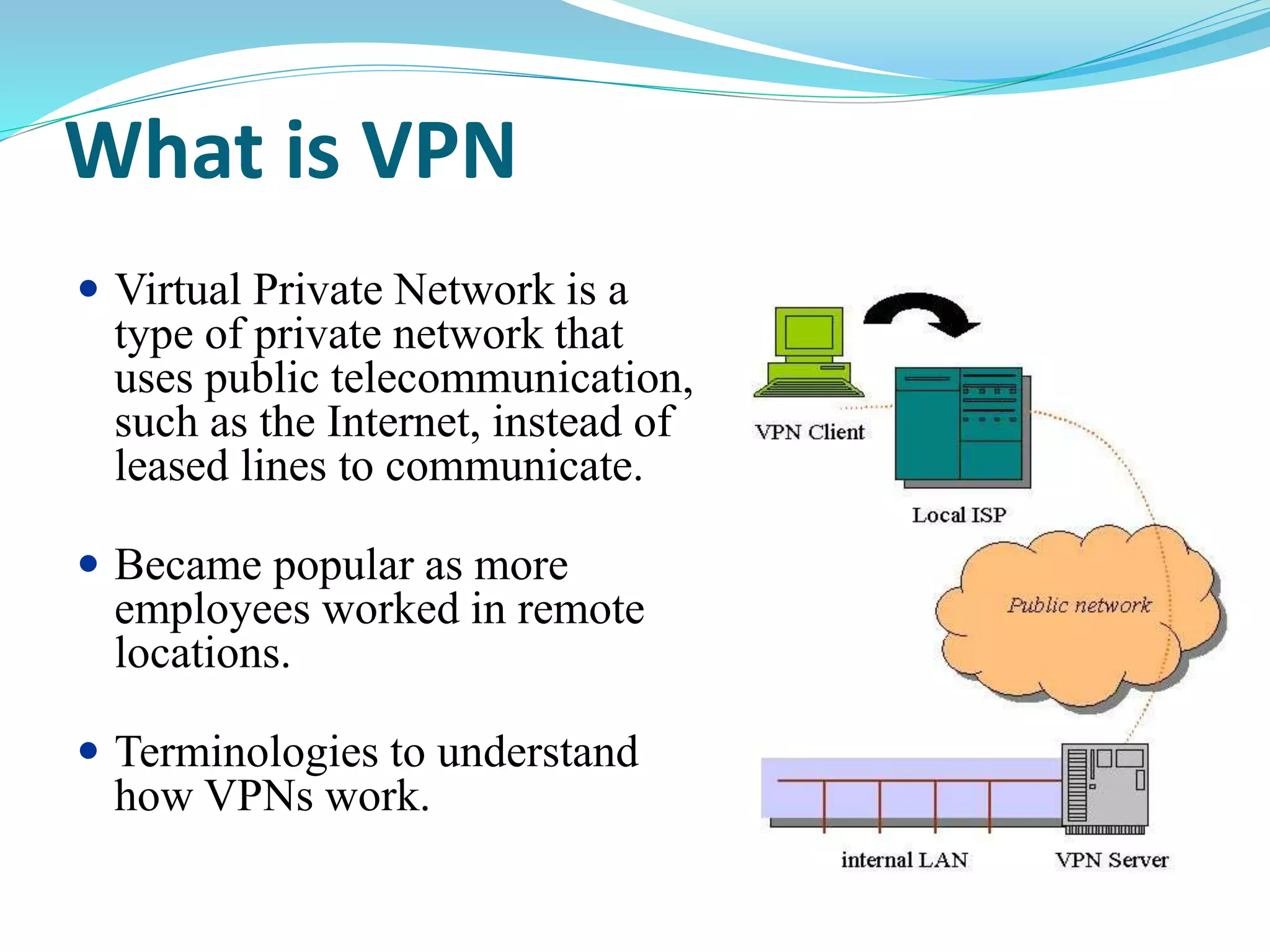
A private internet network established via VPN technology fundamentally alters this data path. Instead of sending packets directly to the destination web server over the public routing table, the client software wraps the original IP packet inside a new data envelope. This process, known as tunneling, hides the original source IP address, destination IP address, and payload data from intermediate network nodes.
- Client Device
- Encrypted Tunnel / Encapsulated IP Packets
- Public Internet / ISP Routers
- Decryption & Egress
- VPN Server Gateway
- Standard IP Route
- Destination Website / Enterprise Resource
Clarifying VPN Definitions and Terminology
When researching private network technology, three distinct applications often share similar naming conventions:
- Virtual Private Networks (VPN Protocols & Architecture): The underlying cryptographic protocols (such as WireGuard, OpenVPN, and IPsec) and network designs used to construct secure communication paths over public infrastructure.
- Enterprise Remote Access & Site-to-Site Networks: Private networks built by businesses to connect remote employees or geographically distributed offices to corporate intranets, databases, and cloud environments without exposing those services to the open internet.
- Consumer VPN Services (e.g., Private Internet Access, ExpressVPN, NordVPN): Commercial subscription services that operate networks of global servers. Consumers route their personal internet traffic through these servers to mask their home IP address, secure open Wi-Fi connections, and prevent ISP-level tracking.
Regardless of whether the technology is deployed for corporate infrastructure or individual privacy, the mathematical and networking principles governing the encrypted private tunnel remain identical.
How a Virtual Private Network Operates: Technical Architecture
Establishing a private internet network connection involves a structured sequence of cryptographic handshakes, key exchanges, packet encapsulations, and routing alterations.
- Handshake & Auth (TLS / Noise Protocol)
- Key Exchange (ECDH / DH)
- Tunnel Construction (Virtual Network Adapter Assigned)
- Encapsulation (AES-256 / ChaCha20)
- Egress & NAT (Gateway Public IP)
- Return Decryption (Payload Restored to Client)
1. The Connection Handshake and Key Exchange
When a user initiates a VPN connection, the client and the VPN server establish contact. They negotiate cryptographic parameters using asymmetric cryptography. Through key-exchange protocols such as Elliptic Curve Diffie-Hellman (ECDH), both parties generate a shared secret key over an insecure network without ever transmitting the secret key itself across the wire.
2. Virtual Adapter Initialization
Upon successful authentication, the VPN client software creates a virtual network interface (often referred to as a TUN/TAP adapter) on the host operating system. The operating system updates its local routing table, instructing the networking stack to direct outbound traffic through this virtual interface rather than the physical network card (Ethernet or Wi-Fi).
3. Packet Encapsulation and Encryption
When an application (such as a web browser) issues a network request:
- The OS sends the standard TCP/UDP packet to the virtual TUN adapter.
- The VPN software takes the entire IP packet—including source IP, destination IP, and payload—and encrypts it using a symmetric cipher like AES-256-GCM or ChaCha20-Poly1305.
- The software appends an outer IP header. The outer header lists the client's local IP as the source and the VPN server's IP address as the destination.
4. Transit, Decryption, and Egress
The encapsulated packet travels across the ISP infrastructure to the VPN server. The intermediate ISP routers only see encrypted bytes moving between the user and the VPN gateway address.
Upon receipt, the VPN server:
- Strips off the outer IP header.
- Decrypts the inner payload using the shared session key.
- Forwards the original request to the target internet destination via Network Address Translation (NAT).
To the target destination (e.g., a web server), the request appears to originate directly from the VPN server's public IP address, entirely masking the client's true location and identity.
Core VPN Protocols: A Technical Comparison
The performance, stability, and security of a private network connection depend heavily on the underlying protocol chosen to handle encapsulation and key exchange.
| Protocol | Core Characteristic |
|---|---|
| WireGuard | Lightweight codebase (~4k lines), high throughput |
| OpenVPN | Highly configurable, operates over UDP or TCP port 443 |
| IPsec / IKEv2 | Rapid reconnects, native mobile OS integration |
| SSTP | Microsoft proprietary, built-in TLS fallback |
WireGuard
WireGuard is a modern, high-performance VPN protocol that uses state-of-the-art cryptography, including the Noise protocol framework, Curve25519, ChaCha20, Poly1305, and BLAKE2s. Unlike legacy protocols containing hundreds of thousands of lines of code, WireGuard maintains an extremely compact codebase (approximately 4,000 lines of code). This drastically reduces the attack surface and makes security auditing straightforward. Detailed specifications are documented in IETF RFC 8860.
OpenVPN
OpenVPN is an open-source protocol that relies on the OpenSSL library to handle encryption and key exchange. It supports a wide array of ciphers and can run over either User Datagram Protocol (UDP) for lower latency or Transmission Control Protocol (TCP) for maximum reliability. When configured over TCP port 443, OpenVPN traffic blends in with standard HTTPS web traffic, making it effective at traversing strict firewalls and network blocks.
IPsec / IKEv2
Internet Protocol Security (IPsec) combined with Internet Key Exchange Version 2 (IKEv2) is a standard protocol suite maintained by the Internet Engineering Task Force (IETF). Described in IETF RFC 4301, IPsec operates directly at the Network Layer (Layer 3) of the OSI model. IKEv2 handles auto-reconnection seamlessly, making it exceptionally reliable for mobile devices transitioning between Wi-Fi networks and cellular towers.
Technical Comparison of Leading VPN Protocols
| Feature / Metric | WireGuard | OpenVPN (UDP) | OpenVPN (TCP) | IPsec / IKEv2 |
|---|---|---|---|---|
| Primary Cipher Suite | ChaCha20-Poly1305 | AES-256-GCM / CBC | AES-256-GCM / CBC | AES-256-GCM / AES-CBC |
| Codebase Complexity | ~4,000 lines | ~70,000–100,000+ lines | ~70,000–100,000+ lines | High (OS dependent) |
| Throughput Efficiency | Highest (Low CPU overhead) | Moderate | Lower (TCP-over-TCP penalty) | High |
| Handshake Speed | Near-Instantaneous (< 100ms) | Moderate (1–3 seconds) | Moderate (2–5 seconds) | Fast (< 500ms) |
| Firewall Traversal | Moderate (Fixed UDP ports) | High (Configurable ports) | Highest (Port 443 HTTPS mask) | Moderate (UDP 500/4500) |
| Mobile Mobility (Roaming) | Excellent | Fair | Poor | Superior |
| Standardization | Linux Kernel Native | Open Source Standard | Open Source Standard | IETF Standard |
Key Security Features and Technical Specifications
When assessing a private internet network implementation, several architectural features determine its resilience against data leaks and interception:
- Client Traffic
- System Firewall Rule (Kill Switch)
- DNS Leak Filter
- Encrypted Tunnel
Encryption Algorithms and Cipher Suites
Modern VPN systems rely on symmetric encryption for payload data.
- AES-256 (Advanced Encryption Standard): Utilizes a 256-bit key size. Approved by government standards agencies worldwide, such as the NIST Computer Security Resource Center, for securing sensitive data. It is often combined with Galois/Counter Mode (AES-256-GCM) to provide authenticated encryption.
- ChaCha20-Poly1305: A modern stream cipher paired with Poly1305 for message authentication. Standardized in IETF RFC 8439, it delivers equal or superior security to AES-256 while executing much faster on mobile processors that lack dedicated hardware acceleration for AES.
Perfect Forward Secrecy (PFS)
PFS ensures that even if an adversary captures encrypted network traffic today and compromises the VPN server's long-term private key in the future, they still cannot decrypt the past traffic. By generating ephemeral (temporary) session keys for every single session or time interval, compromise of one key reveals only a narrow window of data.
DNS Leak Protection
A common security vulnerability occurs when an operating system routes web traffic through an encrypted VPN tunnel but continues sending Domain Name System (DNS) queries over the unencrypted ISP network. Comprehensive VPN clients enforce explicit DNS routing rules, binding all local system DNS requests to the encrypted VPN gateway's internal DNS resolvers.
Network Kill Switches
If an encrypted tunnel drops unexpectedly due to network switching or signal loss, an operating system's default behavior is to route traffic back over the unencrypted physical adapter. A system-level kill switch alters local firewall rules (such as iptables on Linux or Windows Filtering Platform rules on Windows) to block all outbound IP traffic immediately if the VPN interface disconnects.
Practical Deployment Models: Remote Access vs. Site-to-Site vs. Personal Privacy
Understanding how private networks are deployed helps clarify why different technical architectures are selected for specific environments.
Remote Access VPN:
- Remote Employee
- Encrypted Tunnel
- Enterprise Perimeter Firewall
- Intranet
Site-to-Site VPN:
- Office A Gateway (Local LAN A)
- Encrypted Tunnel
- Office B Gateway (Local LAN B)
Remote Access VPNs
Used extensively by distributed corporate workforces. A client application installed on a laptop or mobile device authenticates with an enterprise perimeter firewall or gateway (e.g., Cisco AnyConnect, Palo Alto GlobalProtect, or OpenVPN Access Server). Once connected, the remote user receives a private IP address within the corporate subnet, enabling secure access to internal file servers, databases, and enterprise resource planning (ERP) systems.
Site-to-Site VPNs
Site-to-site networks connect entire local area networks (LANs) across separate physical locations. Instead of installing client software on individual end-user devices, network routers or dedicated hardware firewalls at each office location establish a permanent IPsec tunnel between them. Employees in Office A can seamlessly access servers located in Office B without taking any manual connection steps.
Personal and Consumer VPN Services
Consumer-facing VPN services allow users to select from broad infrastructure networks across global geographies. These services rely primarily on shared public IP addresses. When hundreds of users share a single public-facing IP address on a egress gateway server, individual user activity blends in with the aggregate pool, creating an extra layer of statistical anonymity.
Troubleshooting VPN Performance and Latency Overhead
Routing internet traffic through an encrypted intermediate proxy introduces predictable performance trade-offs. Understanding these variables allows network engineers and consumers to optimize connection speeds.
1. Latency and Round-Trip Time (RTT)
Data cannot travel faster than the speed of light through optical fiber. Routing traffic through a VPN server located thousands of miles away introduces network delay (ping time).
- Fix: Connect to the geographically closest VPN server unless bypassing location-specific restrictions requires selecting a distant endpoint.
2. Encryption Overhead and CPU Bottlenecks
Encrypting and decrypting every packet consumes CPU cycles. On low-powered hardware (such as home routers or budget smartphones), high-throughput transfers over AES-256 can max out processing power, creating a bottleneck.
- Fix: Switch from OpenVPN to WireGuard, or choose hardware that supports AES-NI (Advanced Encryption Standard New Instructions) hardware acceleration.
3. MTU and Packet Fragmentation
Every network interface has a Maximum Transmission Unit (MTU)—the largest packet size (in bytes) that can pass through without fragmentation. Standard Ethernet MTU is 1500 bytes. Because VPN encapsulation adds extra headers (often 40 to 80 bytes), an unadjusted MTU will cause packets to exceed 1500 bytes. This forces intermediate routers to fragment packets, degrading performance and causing connection timeouts.
- Fix: Adjust the VPN adapter MTU settings down to 1420 or 1360 bytes, and enable Path MTU Discovery (PMTUD) or TCP MSS Clamping (
mssfixin OpenVPN).
Step-by-Step Implementation Framework
To deploy or configure a private network connection safely:
- Identify the Architecture Requirement: Determine if the objective is securing individual endpoint traffic (Remote Access / Personal VPN) or connecting whole subnets (Site-to-Site).
- Select an Appropriate Protocol: Choose WireGuard for modern systems requiring high throughput and low battery consumption; choose OpenVPN if traversing strict corporate firewalls; choose IPsec/IKEv2 for mobile devices switching frequently between Wi-Fi and 5G.
- Verify Cryptographic Baselines: Ensure key sizes meet current standards: AES-256-GCM or ChaCha20-Poly1305 for symmetric encryption, and RSA-3072+ or Curve25519 for key exchanges.
- Configure Endpoint Leak Protection: Verify that DNS requests are bound to the tunnel and enforce a system-level firewall kill switch.
- Test for Data Leaks: Use online network diagnostics to verify that neither original IPv4/IPv6 addresses nor local ISP DNS servers are visible while connected.
Frequently Asked Questions
Does a VPN make an internet connection completely anonymous?
No. A VPN provides privacy by encrypting data transit and masking IP addresses, but it does not grant absolute anonymity. Web services can still identify users through active account logins, browser fingerprinting, tracking cookies, and software permissions. Furthermore, the operator of the VPN server itself technically retains visibility over destination network traffic unless robust zero-logs policies and diskless (RAM-only) server architectures are enforced.
What is the difference between a VPN and an HTTPS connection?
HTTPS (Hypertext Transfer Protocol Secure) encrypts connection traffic between a web browser and a single specific website, keeping content private. However, intermediate networks can still see the domain name (via TLS Server Name Indication) and destination IP address. A VPN encrypts all IP traffic originating from the system—including background operating system requests, messaging applications, and DNS queries—and hides the ultimate destination address from local observers.
Why do some streaming services or websites block VPN connections?
Content platforms and services often block access from known VPN IP addresses to enforce regional licensing agreements or mitigate automated fraud. Because hundreds or thousands of VPN users frequently share a single egress IP address, anti-abuse systems detect this anomalous concentration of traffic from a single IP and flag it as a proxy, prompting CAPTCHAs or access denials.
Can a VPN bypass ISP speed throttling?
A VPN can bypass bandwidth throttling only if the ISP targets specific types of traffic (such as peer-to-peer file transfers or specific streaming video platforms) using Deep Packet Inspection (DPI). Because the VPN encrypts all payload traffic, the ISP can no longer categorize the content type and applies uniform routing. However, if an ISP throttles an entire connection due to total data usage limits, a VPN will not restore full speeds.
What is a "No-Logs" policy in consumer VPN services?
A no-logs policy means that the service provider does not log, store, or monitor user activity, including connection timestamps, bandwidth usage, original IP addresses, or destination IPs. Because policy statements are simple marketing assertions, authoritative providers undergo independent third-party cybersecurity audits and deploy infrastructure on diskless, RAM-only servers that automatically erase all data upon reboot.
Practical Recommendation
For users establishing private networks, select protocol architectures based on technical requirements rather than brand marketing. For modern enterprise deployments and personal endpoint security, WireGuard provides the optimal balance of cryptographic security, lean code implementation, and processing efficiency. If operating behind restrictive networks or firewalls, maintain an OpenVPN configuration running over TCP port 443 as a reliable fallback. Always test active connections for DNS and IPv6 leaks using standard network testing tools before transmitting sensitive data.
Image Gallery