Comprehensive Guide to Accessing Maricopa County Court Minute Entries in 2026
Maricopa County court minute entries are official, chronological summaries of courtroom proceedings generated by clerks during judicial hearings, trials, and motions. Accessing these public records in Arizona's most populous county req...
Maricopa County court minute entries are official, chronological summaries of courtroom proceedings generated by clerks during judicial hearings, trials, and motions. Accessing these public records in Arizona's most populous county requires navigating the Clerk of the Superior Court portals, understanding case number formats, and recognizing the distinction between public records and sealed or confidential documents.
Contents
Understanding Maricopa County Court Minute Entries and Their Purpose
Court minute entries serve as the official paper trail of a judicial proceeding. When a judge makes a ruling, sets a future hearing date, or takes a motion under advisement, the courtroom clerk logs these actions into a minute entry. For attorneys, litigants, researchers, and journalists, these documents provide immediate clarity on case trajectories without requiring the purchase of full audio transcripts or waiting for formal judgments and decrees.
In Maricopa County, which encompasses Phoenix, Mesa, Scottsdale, and surrounding municipalities, the Superior Court processes millions of pages of legal documentation annually. The transition toward robust digital archiving means that the vast majority of minute entries from civil, criminal, family court, probate, and tax cases are digitized and indexed for public retrieval.
Understanding the legal lifecycle of a court record ensures you look for the right information in the appropriate repository. Below is a breakdown of the primary case types managed by the Maricopa County Superior Court and their standard tracking characteristics:
| Case Type Identifier | Description & Primary Subject Matter | Typical Minute Entry Availability |
|---|---|---|
| CR | Criminal felony matters, grand jury indictments, and post-conviction relief | Available publicly unless ordered sealed or involving minors |
| FC | Family Court (divorce, child custody, paternity, legal separation) | Partially restricted; certain financial or medical disclosures redacted |
| CV | Civil litigation (contract disputes, personal injury, property claims, malpractice) | Fully public, including motion rulings and scheduling orders |
| PB | Probate, trusts, guardianships, and conservatorships | Publicly accessible except for protected medical or psychological evaluations |
| TX | Tax Court appeals and valuation disputes with the Department of Revenue | Publicly accessible for corporate and individual tax litigation |
Prerequisites and Necessary Information for Record Retrieval
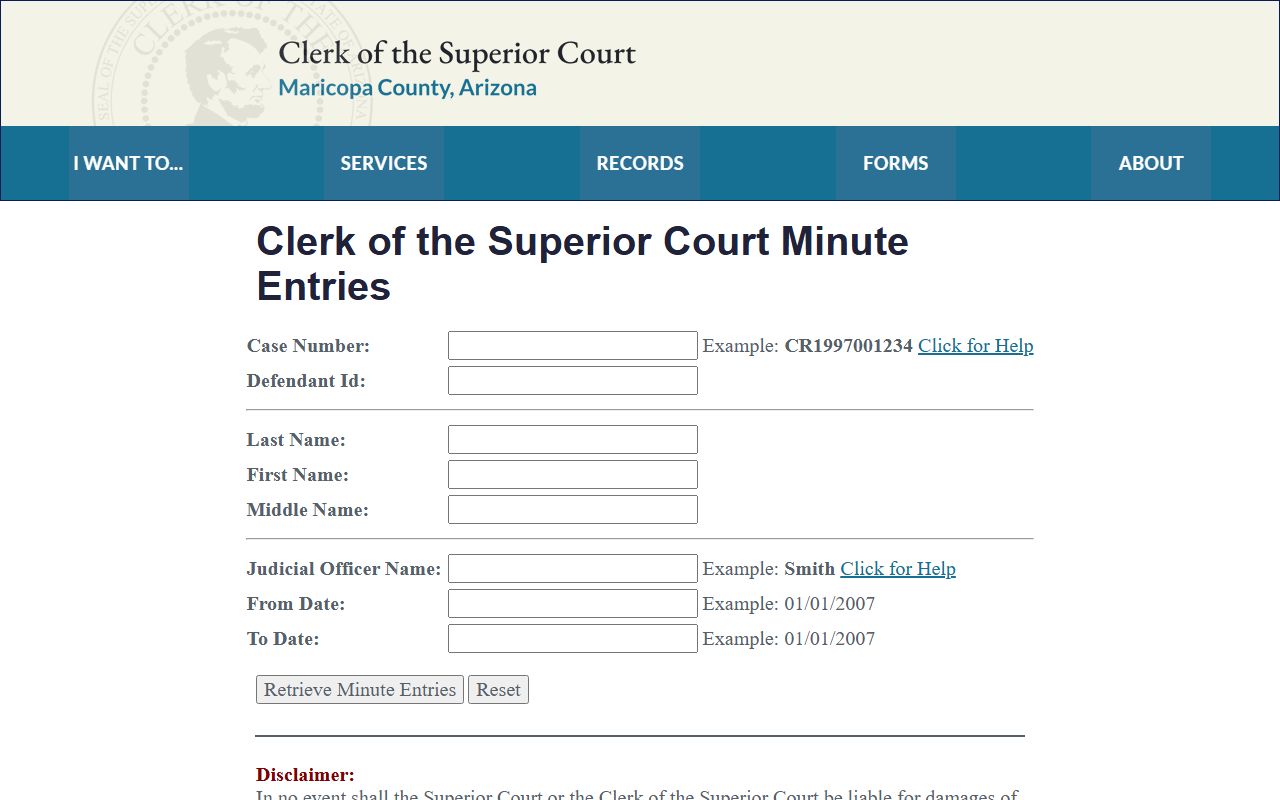
Before attempting to locate a specific minute entry on the Maricopa County Clerk of the Superior Court website, you must gather specific identifiers. Searching without adequate details often yields excessive results or dead ends.
- Exact Case Number: The most efficient path to any minute entry is the standardized Maricopa County case number format (e.g., CV2026-001234 or CR2026-987654). The letters designate the division, followed by the four-digit filing year and a sequential tracking number.
- Party Names: If the case number is unknown, you will need the exact legal spelling of the plaintiff's, defendant's, petitioner's, or respondent's full name. Middle initials and date-of-birth identifiers help narrow down common names.
- Date Range: Knowing the approximate or exact date of the hearing significantly speeds up manual filtering within large dockets.
- Presiding Judicial Officer: Knowing the specific judge or commissioner assigned to the department helps verify that you are looking at the correct court calendar docket.
Essential Privacy Warning: While Maricopa County operates under a presumption of public access, certain minute entries contain restricted information. Documents involving juvenile dependency, adoption, mental health commitments, and specific domestic violence protections are legally shielded from public disclosure under Arizona Supreme Court rules.
Step-by-Step Guide to Accessing Minute Entries Online
The Maricopa County Clerk of the Superior Court provides public search utilities through official web platforms. Follow this systematic workflow to locate and download minute entries without incurring unnecessary fees or utilizing third-party broker services.
- Navigate to the Official Portal: Access the official website of the Maricopa County Clerk of the Superior Court at Clerk of the Superior Court.
- Select the Court Records Search Tool: Locate the case lookup or public access portal section. Depending on current system interfaces, you may choose between public terminals or the authorized e-case search system.
- Input Search Parameters: Enter either the complete case number or switch to the name-search function. Ensure you select the correct court division (Civil, Criminal, Family, etc.) to optimize search query performance.
- Access the Docket Tab: Once the correct case record opens, navigate to the "Docket" or "Register of Actions" tab. This page lists every filing, motion, and hearing in chronological order.
- Identify the Minute Entry: Look for line items labeled "Minute Entry," "ME," or corresponding descriptions indicating an order or hearing summary issued by the court.
- Download and Verify: Click on the document link to view the PDF version of the minute entry. Verify the case number, header, and judge's signature line to ensure absolute authenticity before utilizing the record for legal or administrative purposes.
Navigating Public Access Terminals and In-Person Options
When online databases experience technical downtime, or when records pre-date comprehensive digital archiving, physical access remains a vital alternative. Maricopa County maintains multiple judicial facilities where the public can inspect records directly.
- Downtown Phoenix Courthouse: The Central Court Building located at 201 West Jefferson Street, Phoenix, AZ 85003, houses comprehensive public access computer terminals and administrative record services.
- Southeast Court Facility: Located at 222 East Javelina Avenue, Mesa, AZ 85210, serving residents and legal professionals in the East Valley.
- Northwest Regional Court Center: Located at 14264 West Tierra Buena Lane, Surprise, AZ 85374, handling regional court proceedings and public inquiries.
When visiting these facilities, public service kiosks allow users to view electronic docket histories and print minute entries for nominal per-page copy fees. Staff members can assist with navigation, though they are legally prohibited from providing legal advice or interpreting the contents of the minute entries.
Comparing Online Self-Service Portals Versus Certified Records Requests
Depending on your precise objective—whether casual research, self-representation, or formal evidentiary submission—you must choose between standard digital retrieval and official certified document requests.
| Feature / Requirement | Self-Service Online Portal | Official Certified Records Request |
|---|---|---|
| Cost | Free digital viewing / nominal download fees | Standard statutory search and certification fees per page |
| Authentication | Uncertified PDF copy for informational use | Signed, sealed, and certified by the Clerk of the Court |
| Admissibility | Generally acceptable for research and tracking | Legally admissible in formal evidentiary hearings and appeals |
| Accessibility | 24/7 availability via internet connection | Subject to courthouse operating hours and staff processing times |
| Redaction Level | Standard public view with auto-redactions | Thorough compliance review for protected information |
Common Pitfalls and Troubleshooting When Searching Dockets
Users frequently encounter obstacles when attempting to retrieve Maricopa County minute entries. Recognizing these common failure points prevents wasted time and ensures accurate research results.
- Name Variations and Aliases: Failing to search for maiden names, hyphens, or common phonetic misspellings can result in missing active litigation files. Always check alternative spellings if an initial search yields zero records.
- Sealed Versus Expunged Files: If a criminal case has been successfully set aside or expunged, or if a family law matter is sealed, the docket entries will either display restricted status or return no public results. Do not assume a lack of records means the case never existed without verifying case status parameters.
- System Timeouts: High traffic on county servers can cause search queries to drop. Utilize off-peak hours for bulk docket reviews or extensive multi-year searches.
- Minute Entry Delays: Understand that a minute entry is not published instantaneously upon the conclusion of a hearing. Clerks require time to review stenographic notes, draft summaries, and secure judicial sign-off. Allow 24 to 72 hours post-hearing for a minute entry to appear on the public docket.
Practical Recommendations for Legal Researchers and Litigants
Maintaining an organized archive of Maricopa County court minute entries requires systematic digital hygiene. Always download PDF copies rather than relying solely on browser bookmarks, as URL structures within government portals can change during system upgrades. For complex litigation involving multiple motions, create a master chronological spreadsheet cross-referencing the minute entry date, the presiding judge's ruling, and the resulting compliance deadlines. Staying proactive with docket monitoring ensures that no court-ordered deadlines or scheduling conferences are missed.
Image Gallery