How to Use the Loan Simulation: A Comprehensive Guide for 2026
To use a loan simulation, you must input the total principal amount, the expected annual interest rate, and the repayment term into a digital calculator. The tool automatically generates an estimated monthly payment and a total cost of...
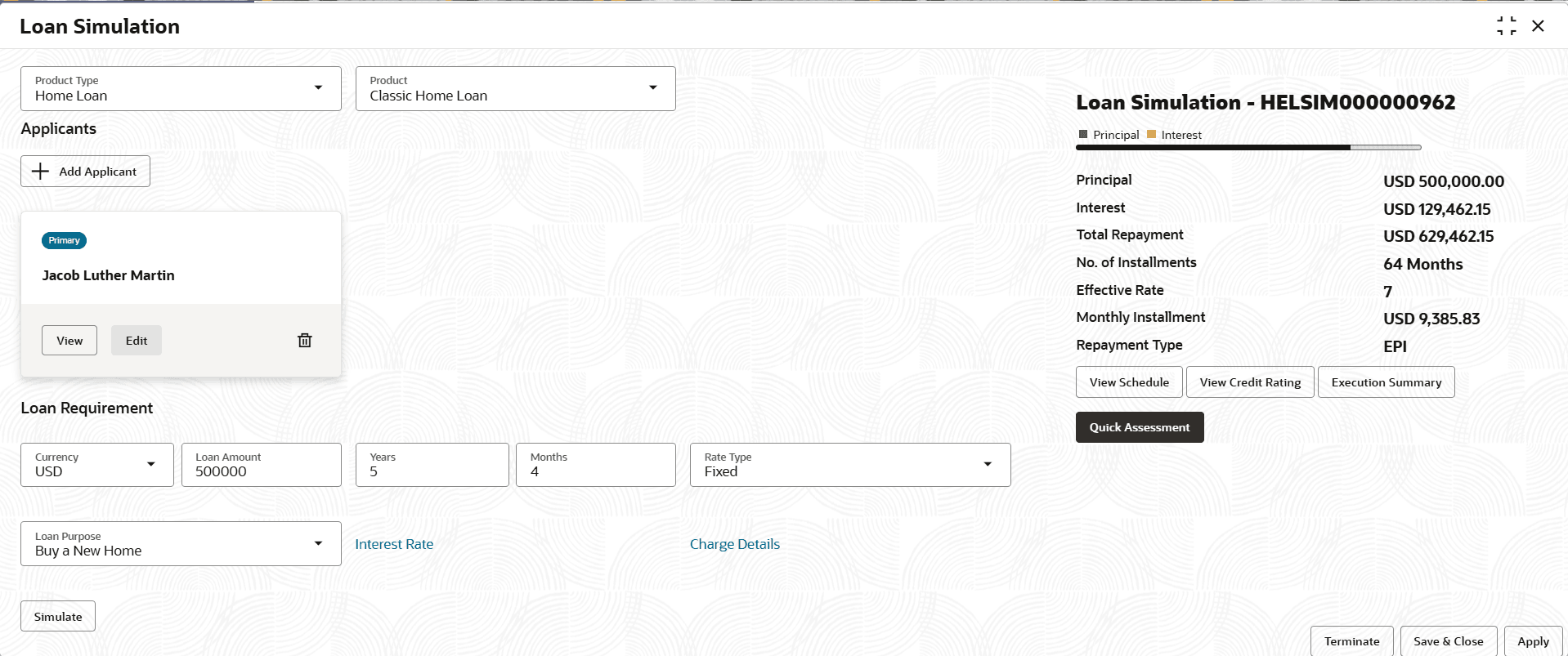
To use a loan simulation, you must input the total principal amount, the expected annual interest rate, and the repayment term into a digital calculator. The tool automatically generates an estimated monthly payment and a total cost of credit, allowing you to adjust variables to find a balance between affordable installments and minimized interest expenses.
Contents
Loan simulations have become indispensable tools for financial planning in 2026. Whether you are looking to purchase a home, finance a vehicle, or consolidate high-interest debt, understanding how to navigate these digital interfaces is the first step toward fiscal responsibility. A simulation is not merely a calculator; it is a strategic modeling tool that provides a snapshot of your future financial obligations based on current market conditions and your specific credit profile.
The Purpose and Mechanics of Loan Simulations
A loan simulation, often referred to as a loan calculator or debt modeler, uses mathematical algorithms to determine the cost of borrowing over time. The primary goal is to provide transparency. By using a simulation, you remove the guesswork from the lending process, enabling you to walk into a bank or access an online lender with a clear understanding of what you can afford.
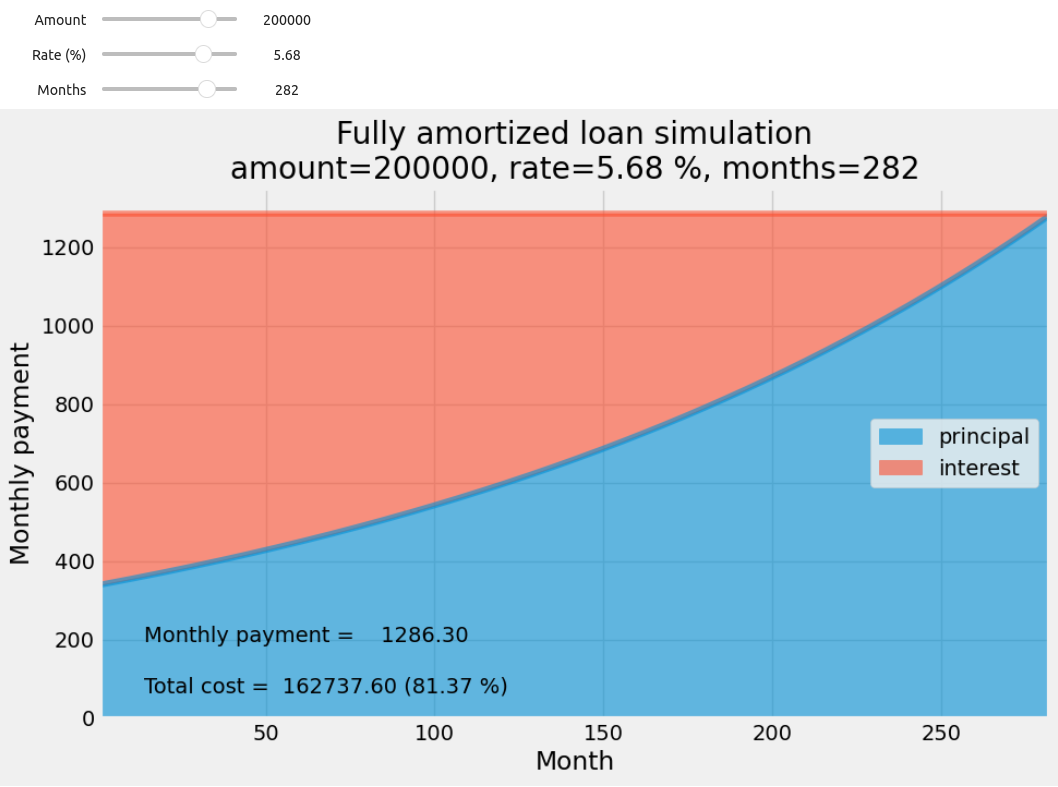
The underlying engine of most simulations is the amortization formula. This formula calculates how much of each payment goes toward the principal (the original amount borrowed) and how much goes toward the interest (the cost charged by the lender). In the early stages of a loan, simulations often show that a larger portion of your monthly payment is dedicated to interest. As the balance decreases, the interest portion shrinks, and the principal repayment accelerates. Understanding this mechanic via a simulation helps you visualize the long-term impact of your borrowing decisions.
Essential Data Points for an Accurate Simulation
Before you begin using a loan simulation tool, you must gather specific data points. The accuracy of the output is entirely dependent on the quality of the input. Using "placeholder" numbers can lead to a false sense of security regarding your budget.
1. Principal Amount
This is the total sum you intend to borrow. In 2026, with fluctuating property values and vehicle prices, it is crucial to account for down payments. For example, if a home costs $500,000 and you have a $100,000 down payment, your principal for the simulation should be $400,000.
2. Interest Rate (Nominal vs. APR)
The interest rate is the percentage of the principal charged by the lender per year. While many people use the nominal interest rate, a sophisticated simulation should allow for the Annual Percentage Rate (APR). The APR includes the interest rate plus other costs, such as origination fees or mortgage insurance, providing a more realistic view of the total cost.
3. Loan Term
The term is the duration of the loan, usually expressed in months or years. Common terms include 36 to 72 months for auto loans and 15 to 30 years for mortgages. The simulation will demonstrate how a shorter term increases your monthly payment but drastically reduces the total interest paid over the life of the loan.
4. Frequency of Payments
While most loans are repaid monthly, some simulations allow for bi-weekly or weekly payment schedules. Adjusting this setting can show you how increasing payment frequency can shave months—or even years—off a long-term debt by reducing the time interest has to accrue.
Step-by-Step Tutorial: Navigating the Simulation Tool
Most modern financial portals in 2026 offer intuitive interfaces, but the sequence of operations remains consistent across platforms.
Step 1: Select the Loan Type
Different loans have different calculation rules. A mortgage simulation will often include fields for property taxes, homeowners insurance, and Private Mortgage Insurance (PMI). A personal loan simulation, conversely, is usually simpler, focusing strictly on interest and principal. Ensure you are using the specific simulator designed for your product type.
Step 2: Input Your Core Variables
Enter the principal, interest rate, and term you gathered earlier. Start with a "best-case scenario" based on your current credit score. If you are unsure of your rate, many simulations provide a dropdown menu based on credit tiers (e.g., Excellent, Good, Fair).
Step 3: Review the "Total Cost of Credit"
Look past the monthly payment. The most important figure in any simulation is the total amount repaid. This is the sum of all monthly installments over the life of the loan. Subtracting the original principal from this total reveals exactly how much the lender is charging you for the service of borrowing.
Step 4: Perform a Sensitivity Analysis
This is where the power of the simulation truly lies. Change the interest rate by 0.5% or 1% to see how it affects your payment. Adjust the term length. For instance, if you are looking at a 30-year mortgage, simulate a 20-year or 15-year option. You may find that while the monthly payment is higher, the savings in total interest are substantial enough to justify a tighter monthly budget.
Step 5: Analyze the Amortization Schedule
Most professional-grade simulations generate a table or graph showing the loan balance over time. Reviewing this allows you to see the "break-even" point where more of your payment begins going toward the principal than the interest.
Comparison of Loan Scenarios (Example Table)
The following table illustrates how a loan simulation can clarify the differences between common borrowing durations and rates for a $30,000 loan (typical for a vehicle or major home improvement in 2026).
| Loan Scenario | Interest Rate (APR) | Term (Months) | Monthly Payment | Total Interest Paid | Total Cost of Loan |
|---|---|---|---|---|---|
| Short-Term / Low Rate | 5.5% | 36 | $905.82 | $2,609.52 | $32,609.52 |
| Mid-Term / Standard | 6.5% | 60 | $586.98 | $5,218.80 | $35,218.80 |
| Long-Term / High Rate | 8.0% | 84 | $467.59 | $9,277.56 | $39,277.56 |
Note: Figures are estimates provided for simulation education purposes. Actual rates in 2026 depend on individual creditworthiness and lender policies.
Interpreting the Results: Beyond the Numbers
When you use the loan simulation, the results should be interpreted within the context of your broader financial health. A "manageable" monthly payment according to the calculator might not be manageable if it pushes your Debt-to-Income (DTI) ratio above 36% or 43%, which are common thresholds used by lenders for approval.
Furthermore, a simulation cannot account for the "opportunity cost" of your money. If a simulation shows that taking a longer loan allows you to keep more cash in a high-yield savings account or investment portfolio that earns more than the loan’s interest rate, the longer loan might actually be the mathematically superior choice. This is known as leverage, and a good simulation is the first step in calculating whether leverage works in your favor.
Common Mistakes to Avoid When Using a Loan Simulation
Even with high-quality tools, users often fall into traps that lead to inaccurate financial expectations.
- Ignoring Extra Fees: Many simulations do not automatically include closing costs, origination fees, or administrative charges. Always check if the "Principal" field should include these rolled-in costs.
- Using "Teaser" Rates: Lenders often advertise "rates as low as," which are reserved for those with near-perfect credit. If your credit score is average, simulate using a higher, more realistic rate to avoid disappointment during the actual application process.
- Forgetting Inflation: In a 2026 economy, the value of a dollar today is not the same as its value in ten years. While a $500 payment might feel high now, it may feel significantly lower in the future due to wage inflation. Some advanced simulations allow for "inflation-adjusted" views, though these are more common in investment modeling.
- Neglecting Prepayment Options: If you plan to pay off the loan early, ensure the simulation allows you to add "extra monthly payments." Seeing how an extra $100 a month affects a 30-year mortgage can be a powerful motivator for debt reduction.
FAQ: Frequently Asked Questions
Does running a loan simulation affect my credit score?
No. Using a loan simulation is a "soft" activity that does not involve an inquiry into your credit report. It is a mathematical exercise conducted on a standalone tool. Your credit score is only affected when you officially apply for a loan and the lender performs a "hard" credit pull.
Can a loan simulation guarantee the rate I will receive?
No. A simulation provides an estimate based on the data you provide. The final rate offered by a financial institution will be determined after a comprehensive review of your credit history, income verification, debt-to-income ratio, and the value of any collateral involved.
Why does my bank’s simulation show a different payment than a third-party calculator?
Differences often arise from how interest is compounded (daily vs. monthly) or whether the bank’s tool automatically includes specific fees or insurance premiums. Always check the "Assumptions" or "Settings" section of the tool to see how it handles these variables.
How do I simulate a loan with a variable interest rate?
Simulating variable-rate loans (like ARMs) is more complex. You should run multiple simulations: one at the current "start" rate, one at the "expected" rate after the first adjustment, and one at the "ceiling" or maximum possible rate. This helps you understand the worst-case scenario for your budget.
Should I trust a simulation for a business loan?
Business loan simulations are useful but often require more inputs, such as amortization styles (straight-line vs. declining balance) and potential balloon payments. For complex enterprise financing, use a simulation as a preliminary guide but consult with a financial advisor or CPA for a detailed cash-flow analysis.
Practical Recommendation
When you have finished using the loan simulation and have identified a scenario that fits your budget, your next step should be to verify your credit score through an official channel. Knowing your exact score allows you to rerun the simulation with a much narrower—and more accurate—interest rate range. Once you have a finalized model, print or save the amortization schedule. Bring this document to your lender meetings; it demonstrates financial literacy and provides a baseline for negotiating terms that align with your researched expectations.
Image Gallery