Navigating iOS App Ad Blockers in 2026: Comprehensive Performance and Security Guide
Finding the right iOS app ad blocker requires understanding how Apple handles content filtering through Safari extensions and network-level DNS configurations. Modern iOS ad blockers utilize native WebKit content extension APIs or loca...
Finding the right iOS app ad blocker requires understanding how Apple handles content filtering through Safari extensions and network-level DNS configurations. Modern iOS ad blockers utilize native WebKit content extension APIs or local VPN loops to intercept tracking scripts, remove banner advertisements, and reduce data consumption across mobile applications and web browsers without compromising device security.
Contents
Understanding How iOS Content Blocking Operates
Apple structures iOS content blocking to preserve user privacy and maintain device battery efficiency. Unlike desktop environments where extensions can inspect every network packet in real-time, iOS ad blockers operate within strict operational sandboxes defined by Apple's Safari Content Blocking API and NetworkExtension framework.
Safari content blockers rely on declarative JSON rulesets compiled by the application and delivered directly to the Safari rendering engine. Because Safari executes these rules natively before loading page elements, blocking occurs instantly without routing web traffic through external proxies or degrading browsing speeds.
Content Blockers versus Network-Level VPN Blockers
- Safari Content Blockers: These tools inject rules directly into Apple's WebKit engine. They operate exclusively inside the Safari browser and supported in-app browsers, stripping out ads, scripts, and trackers before rendering web pages.
- DNS-Based and VPN Blockers: These applications establish a local loopback VPN interface on the iOS device. They intercept domain name system (DNS) requests system-wide, dropping connection attempts made to known ad-serving and tracking domains before those requests leave the device.
Core Benefits of Deploying an iOS Ad Blocker
Integrating a dedicated content blocker into an iPhone or iPad delivers tangible improvements to user experience, resource utilization, and digital safety. Evaluating these advantages clarifies why mobile ad blocking has shifted from an optional preference to a standard practice in 2026.
- Cellular Data Preservation: Blocking high-bandwidth video ads, tracking pixels, and rich-media banners significantly reduces monthly mobile data consumption.
- Battery Longevity: Stopping aggressive JavaScript execution and continuous tracking telemetry prevents unnecessary CPU utilization, lowering thermal output and extending battery life.
- Enhanced Privacy Protection: Content blockers prevent third-party trackers from building persistent behavioral profiles, blocking cross-site scripting and known malware distribution vectors.
- Streamlined Reading Interface: Removing visual clutter allows content-heavy sites to render cleanly, improving readability and reducing page load latency by up to 50 percent on cellular connections.
Comparative Analysis of Leading iOS Ad Blocking Solutions
Selecting the optimal ad blocker depends on whether the primary goal is intensive web browsing optimization or system-wide app telemetry suppression. The following table compares top-tier iOS content filtering utilities based on technical capabilities, operational architecture, and pricing structures.
| Application Name | Primary Filtering Method | System-Wide App Filtering | Open Source Architecture | Pricing Model |
|---|---|---|---|---|
| Wipr | Safari Content Rules (JSON) | No (Browser Only) | Proprietary | One-time purchase |
| AdGuard for iOS | Safari API + Local VPN | Yes (App & Browser) | Partially Open Source | Free tier / Subscription |
| 1Blocker | Safari Content Rules (JSON) | No (Browser Only) | Proprietary | Free tier / Subscription |
| NextDNS (iOS Profile) | Encrypted DNS / DoH | Yes (System-Wide) | Proprietary Service | Free tier / Usage-based |
| Brave Browser (App) | Built-in Brave Shields | In-App Browser Only | Open Source (Brave Core) | Free |
Step-by-Step Configuration Guide for Safari Content Blocking
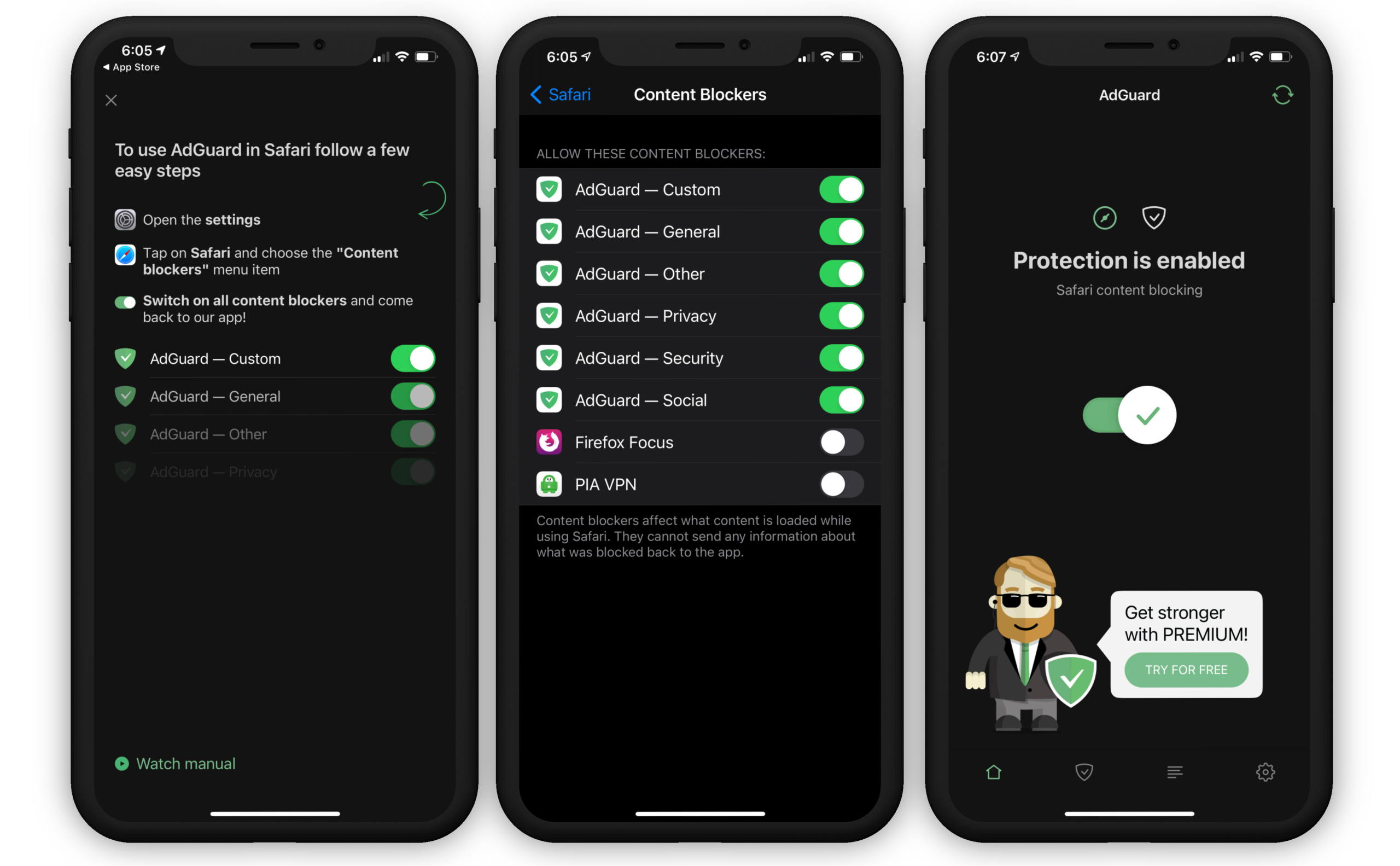
Enabling and fine-tuning a native Safari content blocker requires specific configuration steps within the iOS Settings menu to ensure the extension has proper permissions to operate.
- Download and Install: Acquire a reputable content blocker from the Apple App Store, such as Wipr or 1Blocker, ensuring the application is updated for the current iOS architecture.
- Access Safari Settings: Open the native iOS Settings application, scroll down, and tap on Safari.
- Configure Extensions: Under the General section, tap on Extensions. Locate the newly installed ad blocker and toggle the main switch to On.
- Grant Permissions: Enable permissions by toggling Allow in Private Browsing and setting permissions to All Websites to ensure consistent filtering across standard and incognito browsing sessions.
- Update Filter Lists: Open the standalone ad blocker app from the home screen, navigate to its settings or rules menu, and perform a manual database update to fetch the latest filter definitions.
- Verify Operation: Launch Safari, navigate to an ad-heavy news or media website, and confirm that promotional banners, tracking scripts, and intrusive overlays are successfully suppressed.
Potential Limitations and Troubleshooting Common Failures
While modern iOS content blockers are highly efficient, users frequently encounter specific technical hurdles during daily usage. Addressing these issues requires systematic troubleshooting.
- Broken Web Elements: Over-aggressive blocking rules can strip necessary layout scripts from banking portals or transactional web apps. Use the blocker's whitelist feature or long-press the Safari reload icon to "Request Reload Without Content Blockers" for trusted domains.
- Local VPN Conflicts: If utilizing a system-wide DNS blocker or local loopback VPN alongside a corporate VPN or secure remote access client, iOS will terminate one connection to establish the other. Configure split tunneling or utilize Safari-native extension blockers to bypass this limitation.
- Outdated Blocklists: If advertisements begin bypassing filters, check the host application settings. Ensure background app refresh is enabled for the ad blocker so rule lists update automatically without manual intervention.
Frequently Asked Questions
Do iOS ad blockers remove advertisements inside third-party apps like social media clients?
Standard Safari content blockers only function inside Safari and apps utilizing SFSafariViewController. To block ads inside native third-party social media or gaming apps, users must employ a local DNS-based blocker or a profile-level filtering service that intercepts network traffic system-wide.
Will installing an iOS ad blocker compromise my private account data or passwords?
Reputable ad blockers that rely purely on Apple's native Safari Content Blocking API cannot read web page text, form inputs, or login credentials because they operate entirely within a sandboxed environment without inspecting network traffic.
Why do some websites display anti-adblock warning walls despite having an blocker enabled?
Publishers frequently deploy JavaScript detection scripts to identify when standard DOM elements fail to render. Advanced iOS blockers counter this by incorporating specific anti-circumvention rules that neutralize ad-block detection scripts without breaking core site functionality.
Can an ad blocker save mobile data on a limited cellular plan?
Yes, blocking image-heavy ad banners, auto-playing video containers, and third-party tracking scripts drastically reduces background data transfer, often saving between 20 to 40 percent of overall cellular data consumption during active web browsing.
How do I whitelist a specific website that requires scripts to function properly?
Most iOS ad blockers include an explicit whitelist or allowlist section within their companion mobile apps. Alternatively, users can open the target website in Safari, tap the page settings icon in the address bar, and select the option to disable content blockers for that specific domain.
Maximizing Your iOS Privacy Ecosystem
Securing an iOS device against unwanted telemetry, intrusive trackers, and visual clutter demands a balanced approach combining native Safari content extensions with careful permission management. By selecting an appropriate blocking tool and keeping rule definitions updated, users achieve a faster, cleaner, and significantly more private mobile computing experience.
Image Gallery