The Best Accounting Programs for Mac in 2026: A Comprehensive Guide
For businesses operating within the Apple ecosystem in 2026, the best accounting programs for Mac include cloud-based powerhouses like QuickBooks Online and Xero, alongside specialized native desktop applications such as AccountEdge an...
For businesses operating within the Apple ecosystem in 2026, the best accounting programs for Mac include cloud-based powerhouses like QuickBooks Online and Xero, alongside specialized native desktop applications such as AccountEdge and MoneyWorks. The optimal choice depends on whether your workflow requires the mobility of the cloud or the high-speed data sovereignty of a localized macOS application optimized for Apple Silicon.
Contents
The Evolution of Mac Accounting Software
Historically, the accounting software market was dominated by Windows-centric applications, leaving Mac users with limited, often feature-stripped versions of popular tools. However, the shift toward cloud computing and the transition to Apple Silicon (M-series chips) have fundamentally changed this dynamic. In 2026, Mac users no longer face a "feature gap." Instead, they have access to some of the most sophisticated financial management tools ever built, designed specifically to leverage the high-performance architecture of macOS.
Current accounting solutions are divided into two primary categories: Software-as-a-Service (SaaS) platforms that run in a browser and native macOS applications that reside on your hard drive. Both have matured significantly, offering deep integration with other Mac-centric tools like iCloud, Apple Mail, and third-party CRM systems.
Top Cloud-Based Accounting Solutions for Mac
Cloud-based programs are the dominant choice for small to mid-sized businesses in 2026. Their primary advantage is platform independence; because they run in a browser, they look and perform identically on a MacBook Pro, an iPad, or even an iPhone.
QuickBooks Online (QBO)
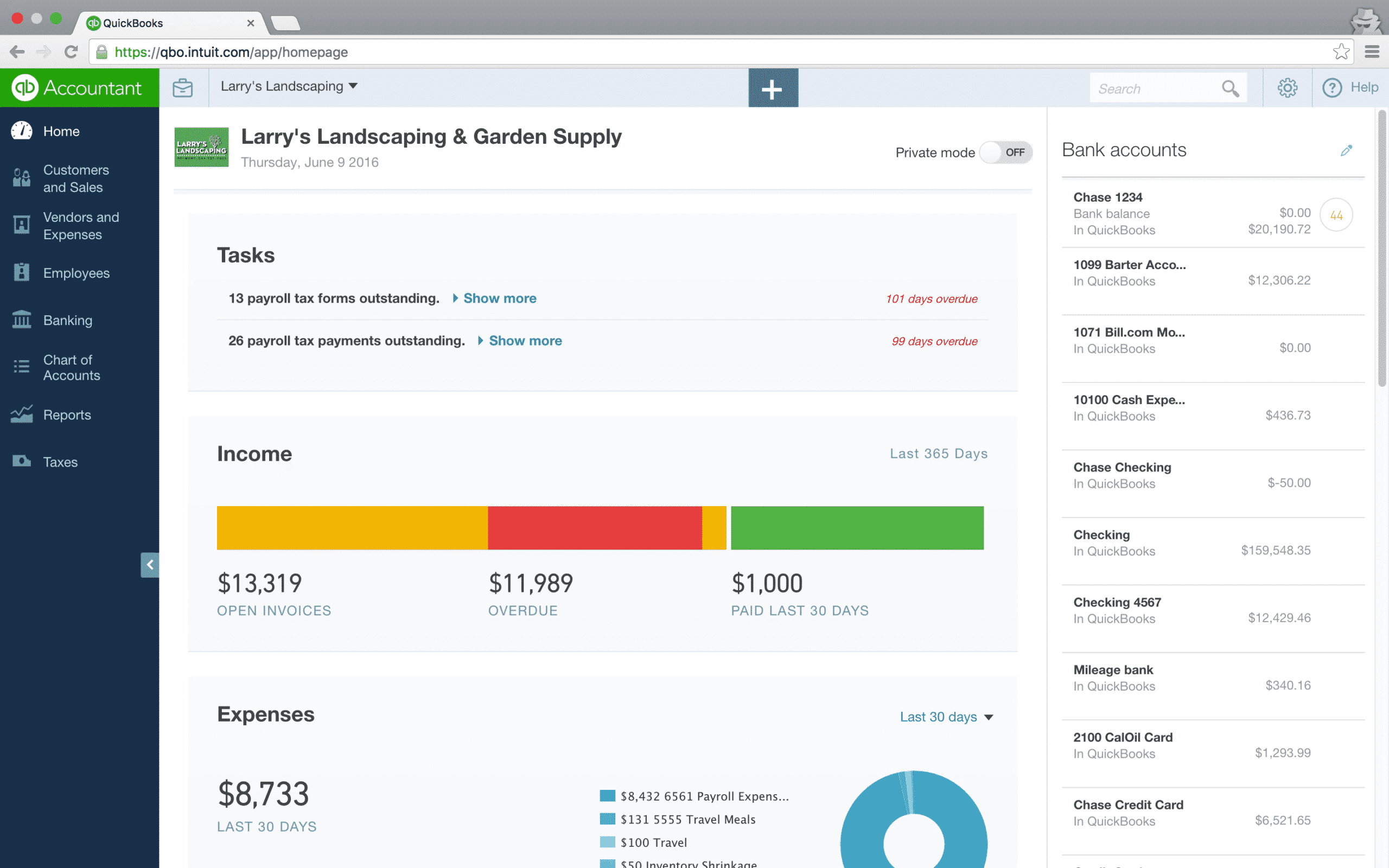
QuickBooks Online remains the industry standard. Its dominance is largely due to its massive ecosystem and the fact that the vast majority of accounting professionals are trained on its interface. For Mac users, QBO offers a dedicated "Mac App" version that provides a slightly more integrated experience than a standard Chrome or Safari tab, including keyboard shortcuts and better window management.
- Key Features: Automated bank feeds, advanced inventory tracking, and seamless payroll integration.
- Best For: Growing businesses that need to share data with an external CPA or bookkeeper.
- Technical Advantage: QBO’s 2026 updates include enhanced AI-driven categorization that significantly reduces manual data entry.
Xero
Xero is often cited as the most "Mac-like" cloud accounting platform due to its clean, intuitive user interface and emphasis on design. It has gained significant ground in 2026 among creative agencies and tech startups.
- Key Features: Unlimited users on all plans, robust multi-currency support, and an extensive marketplace of over 1,000 integrations.
- Best For: Businesses that prioritize collaboration and use a wide array of other SaaS tools.
- Technical Advantage: Xero’s "Hubdoc" integration allows for seamless document imaging and data extraction, utilizing the high-resolution cameras found on modern Mac and iOS hardware.
FreshBooks
FreshBooks has evolved from a simple invoicing tool into a full-featured double-entry accounting system. It remains the top choice for freelancers and service-based professionals who need to track time and bill clients accurately.
- Key Features: Exceptional time tracking, proposal-to-invoice workflows, and a simplified expense management system.
- Best For: Solo entrepreneurs and small agencies.
- Technical Advantage: Its tight integration with macOS Widgets allows users to track billable time directly from the desktop without opening the main application.
Native Desktop Accounting Programs for Mac
Despite the cloud revolution, many businesses still prefer native desktop software. Native apps offer faster performance, work without an internet connection, and keep sensitive financial data stored locally rather than on a third-party server.
AccountEdge Pro
AccountEdge has been the premier native Mac accounting software for decades. In 2026, it remains a "power user" favorite because it does not require a constant internet connection and offers a level of depth in inventory management that many cloud apps struggle to match.
- Key Features: Comprehensive payroll, complex inventory (including multi-location), and a one-time purchase or subscription hybrid model.
- Best For: Wholesalers, manufacturers, and retailers who want total control over their data.
- Technical Advantage: Optimized for the latest macOS Sequoia (and subsequent versions), utilizing Grand Central Dispatch to handle complex reports across multiple CPU cores.
MoneyWorks
MoneyWorks is a high-performance accounting suite that is frequently overlooked but highly praised by those who use it. It is exceptionally fast, even with massive databases containing hundreds of thousands of transactions.
- Key Features: High-level custom reporting, multi-currency capabilities, and a powerful API for custom integrations.
- Best For: Larger organizations or those with highly specific reporting requirements.
- Technical Advantage: MoneyWorks Gold is a cross-platform solution that allows Mac and Windows users to work on the same local network flawlessly.
Comparison of Top Accounting Programs for Mac (2026)
| Feature | QuickBooks Online | Xero | FreshBooks | AccountEdge Pro | MoneyWorks |
|---|---|---|---|---|---|
| Deployment | Cloud / Browser | Cloud / Browser | Cloud / Browser | Native macOS | Native macOS |
| Ideal User | Mid-sized SMBs | Tech-forward SMBs | Freelancers | Product Sellers | Power Users |
| Inventory | Advanced (Plus/Adv) | Standard | Basic | Highly Advanced | Very Advanced |
| Offline Access | No | No | No | Yes | Yes |
| Multi-Currency | Yes | Yes | Yes | Yes | Yes |
| Price Range | $$$ (Monthly) | $$ (Monthly) | $ (Monthly) | $$$ (Annual/One-time) | $$$ (One-time) |
Technical Requirements and macOS Integration
When selecting an accounting program in 2026, compatibility with Apple Silicon is paramount. Modern macOS versions are optimized for the unified memory architecture of M1 through M5 chips. Cloud apps are naturally compatible via optimized browsers like Safari, but native apps must be "Universal" binaries to avoid the performance penalty of Rosetta 2 translation.
Performance and Security
Native applications like AccountEdge and MoneyWorks benefit from macOS's built-in security features. They utilize FileVault for disk encryption and can be configured to require Touch ID for access. Cloud apps, conversely, rely on browser-based security and Two-Factor Authentication (2FA). In 2026, look for apps that support Passkeys, allowing you to sign in using your Mac’s biometric sensors instead of traditional passwords.
Integration with Apple Ecosystem
The best accounting programs for Mac integrate with the OS features you use daily:
- Apple Mail: Send invoices directly through your configured mail accounts.
- Contacts: Sync client data between your accounting software and your macOS/iOS contact list.
- iCloud Drive: Automatically back up local accounting databases or store exported reports.
- Shortcuts: Automate repetitive tasks, such as generating a weekly P&L report, using the macOS Shortcuts app.
Critical Criteria for Choosing Your Program
To make an informed decision, you must evaluate your business needs against the technical limitations of each platform.
- Connectivity Needs: If you travel frequently or work from locations with unreliable internet, a native program like AccountEdge is superior. If you need to check your books on the go from any device, Xero or QuickBooks Online is the logical choice.
- Scalability: Consider where your business will be in three years. While FreshBooks is excellent for a freelancer, a growing retail operation will eventually need the inventory depth found in MoneyWorks or QuickBooks' higher tiers.
- Accountant Access: Ask your accountant what they prefer. Many firms in 2026 use QuickBooks Online Accountant or Xero HQ, which allows them to log in and review your books remotely. Using a native app might require you to send them a "backup" file, which can create version control issues.
- Reporting Complexity: If you need highly customized reports that look at data in non-standard ways, MoneyWorks provides a reporting engine that is more flexible than the templated reports found in most cloud platforms.
Common Mistakes to Avoid
- Ignoring the "Mac" Version: Some older Windows programs are "ported" to Mac using wrappers (like Wine). These often perform poorly and crash frequently. Always ensure the software is a native macOS application or a modern web-based app.
- Underestimating Payroll: Mac-native payroll is complex due to changing tax laws. If you have employees, ensure your chosen program has a robust, cloud-synced payroll module (like QuickBooks Payroll) rather than trying to calculate taxes manually.
- Overlooking Hidden Costs: Subscription models can be expensive over time. A $50/month subscription costs $3,000 over five years. Sometimes, the higher upfront cost of a native desktop license is more economical in the long run.
Frequently Asked Questions
Can I run QuickBooks Desktop on a Mac in 2026?
Intuit officially discontinued the standalone "one-time purchase" QuickBooks Desktop for Mac several years ago. In 2026, the available versions are QuickBooks Online or the subscription-based QuickBooks Desktop Plus for Windows (which requires Parallels or a similar virtualization tool to run on a Mac). For a native experience, most users have transitioned to QuickBooks Online.
Does Apple have its own accounting software?
No, Apple does not produce a first-party accounting application. While users can use Numbers (part of the iWork suite) for basic bookkeeping and expense tracking, it lacks the double-entry engine, automated bank feeds, and tax compliance features required for a formal business.
Are cloud accounting apps as secure as desktop apps?
Yes, and in some cases, more so. Leading providers like Xero and QuickBooks use bank-grade encryption and perform automatic backups across multiple geographic locations. For a desktop app to match this, the user must manually manage an off-site backup strategy to protect against hardware failure or local theft.
Can I use an iPad for my business accounting?
Absolutely. Cloud-based programs like FreshBooks and Xero have highly optimized iPadOS apps. With the power of M-series chips in modern iPads, the experience is nearly identical to the desktop, especially when paired with a keyboard and trackpad.
How do I migrate my data from Windows to a Mac program?
Most modern programs offer import tools for CSV or Excel files. If moving from QuickBooks Windows to QuickBooks Online, there is a built-in migration tool. For native Mac apps like MoneyWorks, you can typically export your chart of accounts and open balances from your old software and import them directly.
Strategic Recommendation
If you are a service-based freelancer or small agency, FreshBooks provides the most streamlined experience with the best macOS integration.
For general small businesses that work closely with an accountant, QuickBooks Online is the safest bet due to its ubiquity and powerful feature set.
However, if you are a power user who values data privacy, speed, and offline access, AccountEdge Pro remains the gold standard for native macOS accounting. Regardless of your choice, ensure your hardware is updated to a modern Apple Silicon Mac to take full advantage of the security and performance enhancements available in 2026.
Image Gallery