How to Ensure Secure Attachments in Email: Encryption, Protocols, and Best Practices
To ensure secure attachments in email, encrypt the file contents using end-to-end encryption protocols like S/MIME or OpenPGP, or protect compressed archives with AES-256 encryption using passwords delivered out-of-band. For enterprise...
To ensure secure attachments in email, encrypt the file contents using end-to-end encryption protocols like S/MIME or OpenPGP, or protect compressed archives with AES-256 encryption using passwords delivered out-of-band. For enterprise compliance, replace direct attachments with secure, access-controlled cloud sharing links, and enforce email authentication standards alongside Data Loss Prevention (DLP) rules.
Contents
Why Standard Email Attachments Present Severe Security Risks
Email was originally designed as an open, plain-text communication protocol. When an email containing a standard attachment is sent, the file is converted into a Base64-encoded text stream and passed through multiple intermediate Mail Transfer Agents (MTAs) across the internet. Without specific protective measures, this architecture exposes sensitive files to substantial risks:
- Eavesdropping and Interception: Standard Transport Layer Security (TLS) encrypts emails only while in transit between servers. If an intermediate server does not support TLS or has been compromised, the attachment can be intercepted in cleartext via Man-in-the-Middle (MitM) attacks.
- Data Leakage at Rest: Even if an email reaches the destination inbox securely, the attachment remains stored on cloud servers, local mail clients, and backup servers in an unencrypted or easily accessible format.
- Malicious Payload Injection: Cybercriminals frequently exploit email attachments to distribute malware, ransomware, and credential-harvesting scripts through macro-enabled spreadsheets, executable files, or malicious PDF forms.
- Regulatory Non-Compliance: Unprotected attachments containing personally identifiable information (PII), protected health information (PHI), or financial data directly violate major privacy regulations such as the Health Insurance Portability and Accountability Act (HIPAA), the General Data Protection Regulation (GDPR), and the California Consumer Privacy Act (CCPA).
Securing email attachments requires layered security: protecting file confidentiality, controlling access rights, and verifying file integrity before and after transmission.
Method 1: Implement End-to-End Encryption (S/MIME and OpenPGP)
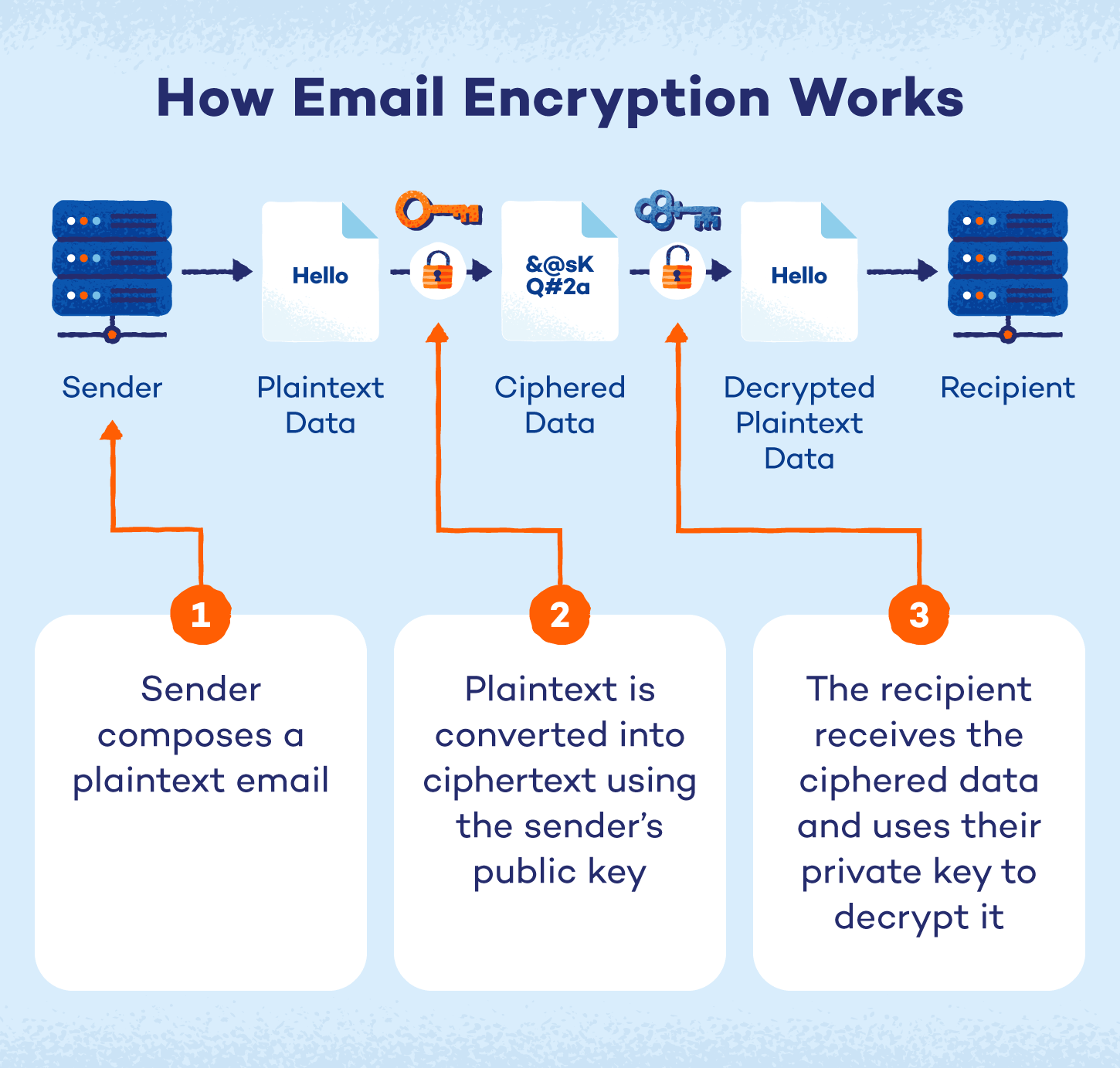
End-to-End Encryption (E2EE) is the most robust technical safeguard for email communications. E2EE encrypts the email body and all attached files directly on the sender’s local device using public-key cryptography. The payload remains encrypted across all intermediate servers and can only be decrypted by the intended recipient possessing the corresponding private key.
S/MIME (Secure/Multipurpose Internet Mail Extensions)
S/MIME is an industry standard built into most enterprise email clients, including Microsoft Outlook, Apple Mail, and Mozilla Thunderbird. It relies on digital certificates issued by a trusted Certificate Authority (CA) using X.509 standards.
- Obtain a Digital Certificate: Both the sender and recipient must obtain an S/MIME certificate from a recognized Certificate Authority or an internal Public Key Infrastructure (PKI).
- Publish Public Keys: Exchange signed emails to automatically share public keys between parties.
- Sign and Encrypt Attachments: Select the "Encrypt" and "Digital Signature" options in your email client prior to sending. The application automatically encrypts the email payload—including all attachments—using the recipient's public key.
OpenPGP (Pretty Good Privacy)
OpenPGP is an open-source alternative to S/MIME that does not strictly rely on centralized Certificate Authorities, opting instead for a web-of-trust model or direct key distribution servers. It is commonly implemented using tools like GNU Privacy Guard (GPG) integrated with webmail clients or desktop applications (such as Thunderbird with Mailvelope).
- Best For: Developer environments, privacy-conscious organizations, and peer-to-peer technical communications.
- Operational Limitation: Both S/MIME and OpenPGP require key management infrastructure and prerequisite public key exchange, which can introduce friction for non-technical external recipients.
Method 2: Use Encrypted Secure File Portals and Zero-Trust Sharing Links
For enterprise organizations transmitting sensitive files to external parties, replacing traditional email attachments with zero-trust secure file storage links provides superior control and auditing capabilities.
Instead of attaching the actual binary file to an outbound message, the file is uploaded to an encrypted cloud storage repository or Secure File Transfer Protocol (SFTP) server. The email contains only a unique, secured web link.
- Sender Uploads File to Portal
- Encrypted Storage (AES-256 at Rest)
- Recipient Accesses Via Authenticated Secure Link
Advantages of Secure Portal Links over Direct Attachments:
- Granular Access Control: Senders can require multi-factor authentication (MFA), password verification, or single sign-on (SSO) before the recipient can view or download the attachment.
- Time-to-Live (TTL) and Expiration: Access rights can be set to expire automatically after a specified time window (e.g., 7 days or 30 days).
- Revocation Rights: Senders can immediately revoke access to a sent link if an email was addressed to the wrong recipient or if a document contains errors.
- Audit Logging: Detailed logs record exactly when, where, and by whom the file was accessed or downloaded, supporting regulatory compliance reporting.
- Bypassing File Size Constraints: Traditional email protocols limit attachment size (typically 20 MB to 25 MB). Secure portals handle files multi-gigabyte files securely without triggering delivery bounces.
Enterprise platforms supporting automated attachment link conversion include Microsoft Purview Message Encryption, Google Workspace Client-Side Encryption, Virtru, and Kiteworks.
Method 3: Protect Files Locally Before Attachment (AES-256 Containers)
When sender and receiver do not share an E2EE infrastructure or portal service, files can be secured individually at the system level before being attached to a standard email message.
1. Compressed Encrypted Archives (7-Zip / WinZip)
Packaging sensitive documents into an encrypted ZIP or 7z archive ensures the raw file contents cannot be extracted even if intercepted in transit or accessed from an unencrypted inbox.
- Encryption Algorithm: Always select AES-256 (Advanced Encryption Standard with a 256-bit key). Avoid older legacy ZIP 2.0 encryption algorithms, which are vulnerable to brute-force attack tools.
- Header Encryption: Enable options to encrypt file names (available in
.7zformat) to prevent unauthorized viewers from seeing confidential metadata or document titles.
2. Native PDF Encryption
Modern PDF applications allow document authors to set strong password protection using 128-bit or 256-bit AES encryption.
- Set an Open Password to restrict reading rights to authorized parties.
- Disable permission features that allow copying, editing, or printing if the document contains proprietary IP.
Critical Rule: Out-of-Band Password Delivery
Never include the decryption password in the same email message as the encrypted attachment. If the email account or transit channel is compromised, an attacker gains both the encrypted payload and the decryption key simultaneously.
Always transmit passwords using an Out-of-Band (OOB) communication channel, such as:
- Encrypted messaging platforms (e.g., Signal or WhatsApp).
- Direct SMS or voice calls.
- Secure enterprise credential managers.
Method 4: Deploy Enterprise Email Security Controls (DLP, CDR, and Authentication)
Organizations operating central email gateways must implement platform-level defenses to inspect, sanitize, and verify incoming and outgoing attachments.
1. Data Loss Prevention (DLP) Policies
Data Loss Prevention engines scan outbound email content and attachments for sensitive data patterns, such as credit card numbers, Social Security numbers, driver's license records, or customer account details. DLP systems automatically enforce policies such as:
- Blocking transmission of unencrypted sensitive documents.
- Forcing automatic message encryption via client portals.
- Alerting IT compliance officers to unauthorized data transfers.
2. Content Disarm and Reconstruction (CDR)
Content Disarm and Reconstruction is an advanced threat prevention technique for inbound email attachments. Rather than relying solely on signature-based antivirus software to detect known malware, CDR processes incoming documents (such as Microsoft Office files or PDFs) by:
- Stripping away embedded macros, active scripts, dynamic objects, and hyperlinked media.
- Rebuilding a clean, safe version of the document file.
- Delivering the sanitized version to the recipient's inbox.
This zero-trust approach neutralizes zero-day exploits and malicious document payloads before they reach local workstations.
3. Email Authentication Infrastructure (SPF, DKIM, and DMARC)
Attackers frequently use domain spoofing to deliver malicious attachments disguised as legitimate invoices or corporate notices. Organizations must enforce strict email authentication protocols to verify message provenance:
- Sender Policy Framework (SPF): Specifies which IP addresses are authorized to send email on behalf of a domain.
- DomainKeys Identified Mail (DKIM): Adds a cryptographic signature to outbound messages, ensuring that neither the email body nor its attachments have been altered during transit.
- Domain-based Message Authentication, Reporting, and Conformance (DMARC): Enforces policies (such as
p=reject) instructing receiving servers to block messages that fail SPF or DKIM checks.
Technical Comparison of Attachment Protection Methods
The table below compares standard methods for securing email attachments based on technical execution, encryption strength, usability, and operational suitability:
| Protection Method | Encryption Standard | Primary Defense Focus | Recipient Friction | Best Use Case |
|---|---|---|---|---|
| S/MIME | Asymmetric Public/Private Key (RSA/ECC) | End-to-End Confidentiality & Identity Verification | High (Requires shared certificates) | Enterprise B2B, Government, Legal Communications |
| OpenPGP | Asymmetric Public/Private Key (Web of Trust) | End-to-End Confidentiality & Authenticity | High (Requires key exchange) | Developer teams, Privacy advocates, Technical users |
| Secure Cloud Link / Portal | AES-256 (At Rest), TLS 1.3 (In Transit) | Controlled Access, Revocation, Audit Logging | Low to Medium (Portal sign-in) | Large files, HIPAA/GDPR compliance, External client sharing |
| AES-256 Compressed Archive (7-Zip) | Symmetric Key (AES-256) | File-Level Payload Encryption | Low (Requires password) | Ad-hoc document sharing without infrastructure |
| Outbound Gateway DLP | Dynamic (Enforces TLS/Portal Encryption) | Prevention of Unintended Data Leakage | Zero to Low (Automated background rule) | Enterprise regulatory compliance & IP protection |
Common Security Mistakes to Avoid
Even when using robust technical solutions, operational procedural failures can compromise email attachment security:
- Sending Passwords in the Same Email: Transmitting the file and its password in the same message or reply thread invalidates the protection offered by AES file encryption.
- Assuming Default TLS Equals End-to-End Security: TLS encrypts data only between email servers. It does not protect files at rest on third-party servers or against unauthorized access on the recipient's machine.
- Allowing Executable Attachments: Email gateways should permanently block file extensions associated with script execution or payload installation, including
.exe,.bat,.vbs,.js,.scr, and.isofiles, even inside unencrypted ZIP archives. - Ignoring Document Metadata: Office documents and PDFs often contain hidden metadata, including author names, internal server paths, edit histories, and track-changes markup. Always sanitize file metadata prior to attaching external files.
- Failing to Verify Recipient Addresses: Autocomplete features in email clients frequently lead to accidental misdirection of sensitive attachments. Always verify recipient email addresses prior to clicking send.
Frequently Asked Questions
Is a password-protected Word or Excel document secure enough for sensitive data?
Legacy password protection in older Microsoft Office formats (such as .doc or .xls) is easily bypassed using automated recovery tools. Modern versions using .docx or .xlsx utilize stronger AES encryption when password-protected; however, packaging files into a dedicated AES-256 archive (via 7-Zip or WinZip) or using a dedicated encrypted message portal remains significantly safer.
Does TLS guarantee my email attachment is secure?
No. Standard TLS encrypts the connection between intermediate mail servers (MTA to MTA) to prevent passive eavesdropping over the wire. However, TLS does not provide end-to-end encryption. The attachment can still be read on intermediate mail servers, cloud storage relays, or compromised inboxes.
How do I send secure email attachments from mobile devices?
Mobile devices can use secure attachment workflows by installing enterprise mail clients with built-in S/MIME support (such as Microsoft Outlook for iOS/Android configured with user certificates), using dedicated secure web portals, or uploading files to enterprise-managed cloud storage platforms to generate access-controlled sharing links.
How can organizations stop users from downloading malicious attachments?
Organizations should deploy central Secure Email Gateways (SEGs) equipped with Content Disarm and Reconstruction (CDR) to strip dynamic scripts and macros, alongside cloud sandboxing engines that execute attachments in isolated virtual environments to analyze behavior before delivering messages to user inboxes.
Strategic Next Steps for Securing Email Attachments
- Audit Current Data Transfers: Identify the types of sensitive data (PII, financial, legal) regularly transmitted via email within your organization.
- Establish Secure File Sharing Policies: Prohibit the direct attachment of sensitive internal files. Define standard procedures for using secure cloud portals or AES-256 out-of-band encryption.
- Implement Technical Controls: Configure email authentication protocols (SPF, DKIM, DMARC), enforce mandatory TLS on gateway servers, and set up Data Loss Prevention (DLP) policies to detect unencrypted file exports automatically.
- Train Employees: Conduct routine security awareness training focused on spotting spoofed attachment phishing campaigns and adhering to proper out-of-band password sharing procedures.
Image Gallery