Does PNC Bank Offer Zelle for Transfers?
PNC Bank does offer Zelle for fast, convenient peer-to-peer transfers, allowing eligible customers to send and receive money directly through the PNC Mobile Banking app or online banking platform using a mobile number or email address....
PNC Bank does offer Zelle for fast, convenient peer-to-peer transfers, allowing eligible customers to send and receive money directly through the PNC Mobile Banking app or online banking platform using a mobile number or email address.
Contents
Understanding Zelle Integration with PNC Bank
Modern digital banking has transformed how consumers handle peer-to-peer (P2P) payments, making physical cash and paper checks largely obsolete for everyday transactions. For customers banking with PNC Bank, integrating modern payment rails is a critical component of managing personal finances. Zelle has emerged as one of the most prominent networks for person-to-person money movement, operating across a consortium of major financial institutions. PNC Bank fully supports this network, embedding it directly into its proprietary digital infrastructure. This integration allows account holders to execute transactions without needing to download a standalone application, streamlining the user experience.
The partnership between traditional banking institutions and networks like Zelle relies on secure application programming interfaces (APIs) that facilitate real-time or near-real-time settlement of funds. When a PNC customer initiates a transfer, the bank verifies the availability of funds in the checking or savings account, authenticates the user via multi-factor security protocols, and coordinates with the Zelle directory service to locate the recipient's financial institution. Because PNC Bank integrates these controls natively within its app and website, users can leverage existing login credentials and security tokens, minimizing friction while maintaining institutional-grade security standards.
Eligibility Requirements and Account Prerequisites
Before utilizing Zelle through PNC Bank, account holders must satisfy specific eligibility criteria and operational prerequisites. Not every type of account or customer profile automatically qualifies for full P2P capabilities. Ensuring compliance with these baseline requirements prevents transaction errors, temporary holds, or account restrictions.
Eligible Account Types
PNC Bank typically permits Zelle transactions from standard consumer checking accounts and select savings accounts. However, business accounts may operate under different fee structures, transaction limits, and enrollment procedures through PNC Treasury Management or designated business digital banking portals. Credit cards, home equity lines of credit (HELOCs), and certain specialized trust accounts are generally excluded from sending funds via Zelle due to the nature of revolving credit and regulatory restrictions.
Profile and Security Prerequisites
To register and use Zelle with PNC, customers must meet the following baseline conditions:
- Active Digital Banking Profile: Users must be enrolled in PNC Online Banking or possess the official PNC Mobile Banking app on a compatible iOS or Android device.
- Valid U.S. Mobile Number: A primary mobile number capable of receiving SMS verification codes is required to enroll and authenticate the account. Landlines and certain Voice over IP (VoIP) numbers may be restricted.
- Unique Email Address: An active email address must be linked to the profile for receiving notifications and managing secondary payment routing identifiers.
- Age and Residency: Account holders must meet the legal age of majority in their jurisdiction and maintain a residential address within the United States.
How to Set Up and Access Zelle in PNC Online and Mobile Banking
Accessing Zelle through PNC Bank requires a one-time enrollment process designed to link your mobile number or email address to your specific bank account. This mapping creates a secure tokenized directory entry, ensuring money sent to your identifier routes directly to your PNC account without exposing your full account or routing numbers to the sender.
Step-by-Step Enrollment Guide
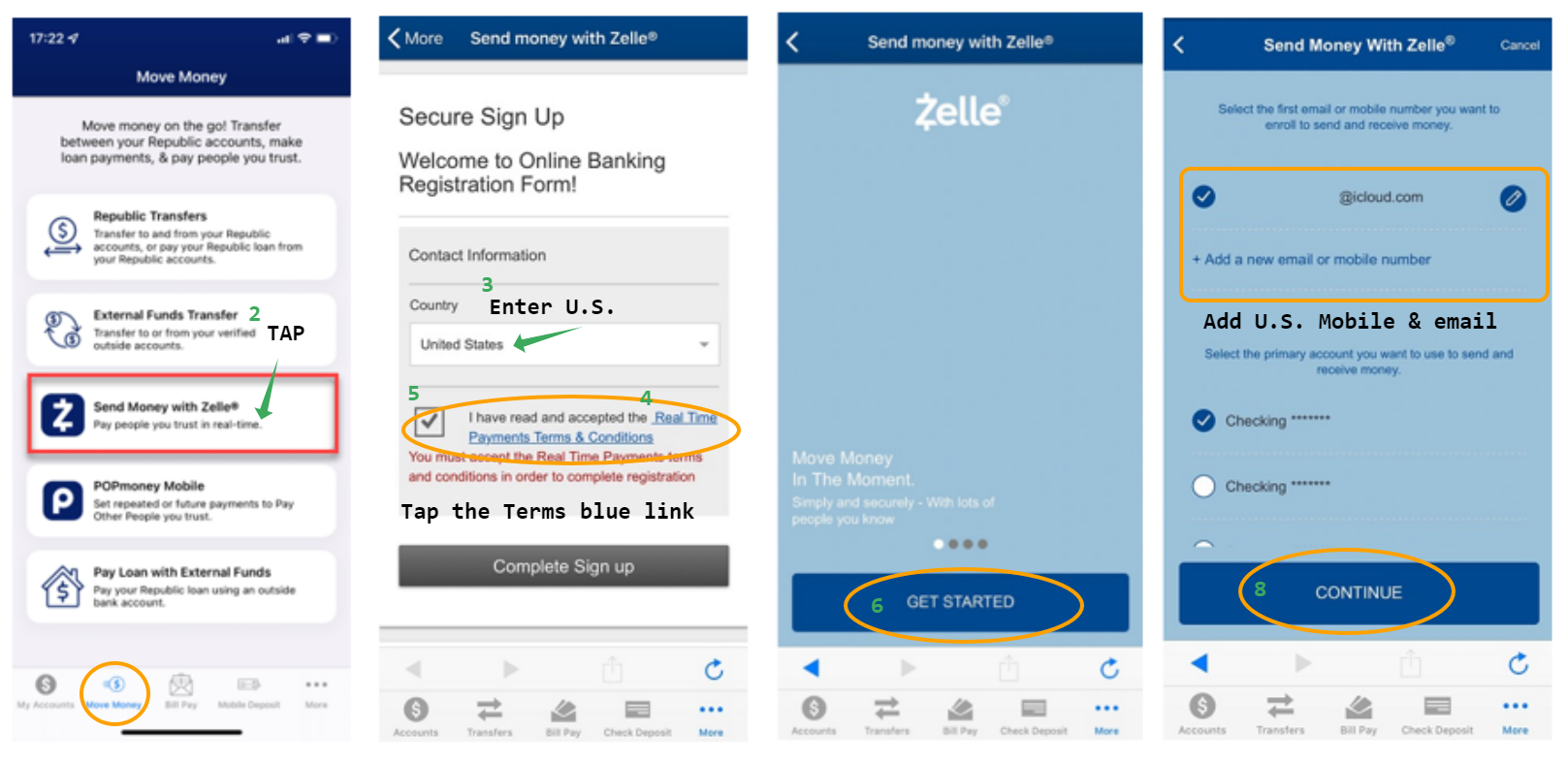
- Log In: Open the PNC Mobile Banking app on your smartphone or navigate to the official PNC online banking portal on a secure desktop browser. Enter your credentials and complete any required multi-factor authentication steps.
- Locate the Transfer Hub: Navigate to the menu and select the "Pay" or "Transfer" tab. Look for the "Send Money with Zelle" option.
- Review Terms and Conditions: Read the service agreement, privacy disclosures, and fee schedules associated with P2P transfers. Accept the terms to proceed.
- Select Your Identifier: Choose whether you want to register your mobile phone number or your email address. If you have already used that mobile number with Zelle at another bank, you will be prompted to migrate your token over to PNC.
- Verify Your Identity: Enter the one-time passcode (OTP) sent via SMS to your registered mobile device to finalize the linking process. Once verified, your account is active for sending and receiving funds.
Transaction Limits, Timing, and Fee Structures
Managing cash flow effectively requires a clear understanding of the financial boundaries and operational costs associated with digital money transfers. While PNC Bank does not typically charge its consumer customers a fee to send or receive standard funds through Zelle, specific operational parameters govern how much money can be moved and how quickly it arrives.
| Feature / Parameter | PNC Bank Zelle Implementation |
|---|---|
| Standard Transfer Fee | $0 (Free for standard consumer send and receive transactions) |
| Incoming Fund Availability | Typically minutes, provided the recipient is already enrolled with Zelle |
| Outgoing Transfer Limits | Varies based on account history, account tier, and internal risk assessment |
| Required App | Integrated within the PNC Mobile App (standalone Zelle app is optional) |
| Supported Account Types | Personal checking and select savings accounts |
Understanding Transfer Limits
PNC Bank enforces daily and monthly dollar limits on outgoing Zelle transfers to mitigate fraud and financial crime risks. These limits are dynamic and may scale upward for accounts with established, positive banking histories. Conversely, newly opened accounts or accounts exhibiting unusual transaction patterns may face tighter restrictions. Customers attempting to send amounts exceeding their assigned limit will receive an error notification prompting them to adjust the transfer amount or contact customer support.
Processing Times and Settlement Speed
In most instances, transfers sent through Zelle between enrolled users settle within minutes. However, delays can occur under specific circumstances. If a recipient is not yet enrolled in Zelle, the transfer will remain pending until they enroll using the designated mobile number or email address within a 14-day window. If uncollected after 14 days, the transaction expires, and the funds are automatically returned to the sender's PNC account. Additionally, PNC's fraud monitoring systems may occasionally place temporary reviews on transactions that trigger risk filters, requiring manual verification before funds are released.
Security, Fraud Prevention, and Consumer Protection
Because peer-to-peer payments operate much like physical cash—once sent, funds are immediately withdrawn from the sender's account and transferred to the recipient—understanding security safeguards is paramount. Neither PNC Bank nor Zelle typically offers chargeback protections or fraud reimbursement for authorized transactions sent voluntarily to the wrong recipient or associated with consumer scams.
Common Security Risks and Best Practices
- Verify Recipient Details: Always double-check the recipient's mobile number or email address before authorizing a transfer. Sending money to an incorrect digit can route funds to an unintended party with little recourse for recovery.
- Transact Only with Trusted Parties: Treat Zelle transfers like cash. Only send money to friends, family members, or trusted merchants whom you personally know. Avoid using P2P networks to purchase goods or services from unknown online sellers offering unverified deals.
- Recognize Phishing Scams: PNC Bank and Zelle representatives will never ask you to disclose your online banking password, PIN, or one-time verification codes over the phone or via unsolicited text messages.
Frequently Asked Questions
Can I use Zelle with a PNC business account?
PNC business banking customers have distinct digital pathways. While business accounts may support P2P payments, they often require enrollment through business-specific treasury management systems rather than the consumer mobile app, and standard consumer limits or fee structures may not apply.
What happens if I send money to someone who does not have Zelle?
If the recipient is not enrolled, they will receive an email or text notification with instructions on how to set up Zelle. They must link their mobile number or email to a qualifying bank account within 14 days to claim the funds. If they fail to do so, the transaction cancels automatically, and the money returns to your PNC account.
Are there any fees for receiving money through Zelle with PNC?
PNC Bank does not charge its consumer account holders a fee to receive money through Zelle. The sender's financial institution also determines its own fee policies, but receiving funds into a PNC account is free of standard transaction charges.
Why is my Zelle transfer pending or delayed?
Transfers may pend due to routine security reviews by PNC's fraud detection algorithms, or because the recipient has not yet completed their Zelle enrollment. If a transaction remains pending past the standard timeframe, contact PNC customer service for clarification.
Can I cancel a Zelle transfer after sending it?
Once a transfer is initiated, it cannot be canceled if the recipient is already enrolled in Zelle, as the funds move almost instantaneously. If the recipient is not yet enrolled, you can cancel the pending transaction from your activity history within the PNC mobile app before they claim the funds.
Conclusion and Next Actions
PNC Bank offers fully integrated Zelle capabilities directly within its online and mobile banking environments, providing a fast and secure method for personal account holders to send and receive funds. To get started, log into your PNC Mobile Banking app, navigate to the transfer menu, and complete the quick enrollment process using your mobile number or email address. Always verify recipient details carefully and restrict P2P transfers to trusted contacts to protect your financial assets from unauthorized loss.
Image Gallery