How Cloud Backup Systems Protect Data: Architecture, Security, and Resilience
Cloud backup systems protect data by creating secure, encrypted copies of information and storing them in geographically dispersed remote servers. This process utilizes a multi-layered defense strategy—including end-to-end encryption,...
Cloud backup systems protect data by creating secure, encrypted copies of information and storing them in geographically dispersed remote servers. This process utilizes a multi-layered defense strategy—including end-to-end encryption, immutable storage, and rigorous identity management—to ensure that data remains accessible and untampered, even in the event of hardware failure, natural disasters, or sophisticated ransomware attacks.
Contents
As we navigate the technological landscape of 2026, the reliance on cloud backup has transitioned from an optional safety net to a core component of digital infrastructure. The sheer volume of data generated by enterprises and individuals requires protection mechanisms that are more robust than traditional local backups. Understanding how these systems safeguard our digital lives requires a deep dive into the technical protocols and architectural redundancies that define modern cloud storage.
The Foundation: Encryption at Every Stage
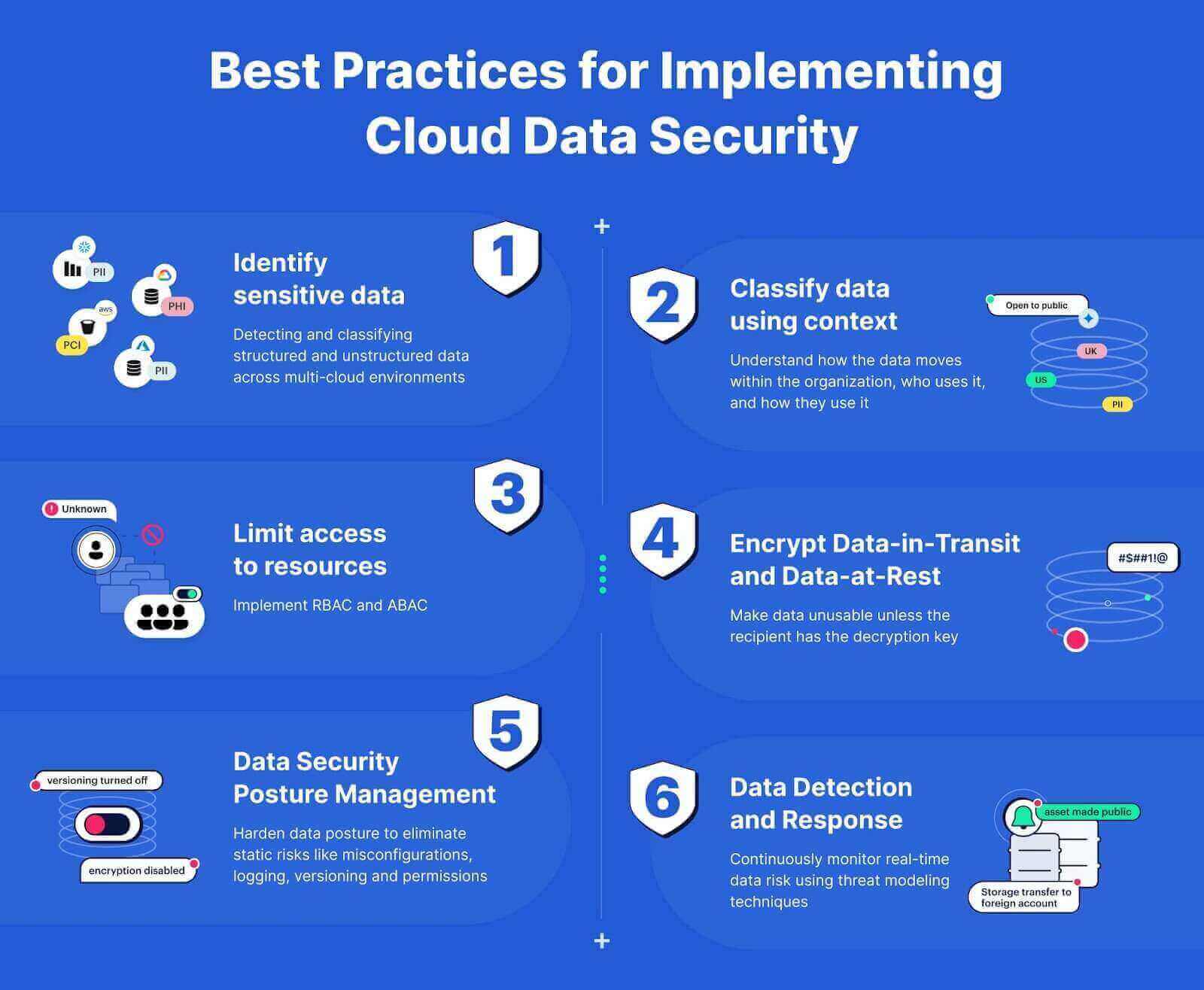
The primary mechanism cloud backup systems use to protect data is encryption. Encryption transforms readable data into an unreadable format using complex algorithms, ensuring that only authorized parties with the correct decryption key can access the information. In a professional cloud backup environment, this happens in three distinct phases.
Encryption in Transit
When data moves from your local device or server to the cloud provider’s data center, it travels across the public internet. To prevent "man-in-the-middle" attacks, where hackers intercept data packets during transmission, providers use Transport Layer Security (TLS 1.3). This creates a secure tunnel for the data. By 2026, any reputable service has phased out older versions of SSL and TLS to maintain the highest security standards.
Encryption at Rest
Once the data arrives at the provider’s data center, it is written to storage drives. At this stage, Advanced Encryption Standard (AES) 256-bit encryption is the industry gold standard. Even if a physical drive were stolen from a data center, the data would be useless to the thief without the specific encryption keys managed by the service.
Private Key Management (Zero-Knowledge)
One of the most critical security features is "Zero-Knowledge" encryption. In this model, the user creates and manages their own encryption key. The service provider never sees this key and has no way to reset it. Because the provider does not have the key, they cannot be compelled by legal requests to hand over your data, nor can a rogue employee at the data center access your files. However, this places the responsibility of key management entirely on the user; losing the key means losing the data forever.
Architecture of Redundancy: Beyond the Single Server
Cloud backup is not merely "someone else's computer." It is a massive, interconnected web of storage resources designed for high availability and durability.
Geographic Redundancy
A major threat to data is physical destruction—fires, floods, or earthquakes that destroy a local office. Cloud providers mitigate this by distributing data across multiple Availability Zones (AZs) and regions. When you upload a file, the system often creates multiple fragments or replicas of that file and stores them in different physical buildings, often hundreds of miles apart.
Erasure Coding and Data Integrity
Modern systems use a technique called Erasure Coding. Instead of simply making two or three full copies of a file (which is inefficient), the system breaks data into shards, expands them, and encodes them with redundant data pieces. If a disk or even an entire server rack fails, the system can mathematically reconstruct the missing data from the remaining shards. This allows providers to offer "eleven nines" of durability (99.999999999%), meaning the statistical probability of losing a single file is infinitesimally low.
Defeating Ransomware with Immutability and Versioning
Ransomware has become the most significant threat to data integrity. Modern cloud backup systems have evolved specifically to counter this by moving beyond simple "syncing" to true "archiving."
Immutable Storage (Object Lock)
The most effective defense against ransomware is immutability. When data is stored in an immutable state—often referred to as an "Object Lock"—it cannot be modified, overwritten, or deleted for a specified retention period. Even if a hacker gains administrative access to your backup account, they cannot delete the backups to force a ransom payment. The cloud provider’s system is hard-coded to reject any "delete" or "modify" commands for that data until the timer expires.
Incremental Versioning
Cloud backup systems protect data by keeping historical versions of files. If a user’s local files are encrypted by ransomware on Tuesday, they can simply "roll back" their cloud storage to the state it was in on Monday. This ensures that a single point of failure (the current version of a file) does not compromise the entire history of that data.
Identity and Access Management (IAM)
A backup is only as secure as the gatekeeper. Most data breaches in the cloud result from compromised credentials rather than technical flaws in the storage itself.
- Multi-Factor Authentication (MFA): In 2026, MFA is non-negotiable. Providers require a second form of verification—such as a hardware security key (FIDO2) or a biometric scan—to access backup settings or initiate a restore.
- Role-Based Access Control (RBAC): For businesses, cloud backup systems allow for granular permissions. An IT administrator might have the right to set backup schedules, but only a Chief Security Officer might have the right to delete old archives.
- API Security: Many backups are automated via software. Systems protect these "machine-to-machine" connections using scoped API tokens that have limited lifespans and restricted permissions, preventing a single compromised token from granting full account access.
Efficiency through Compression and Deduplication
While security is paramount, the practical protection of data also depends on the speed and reliability of the backup process. If a backup takes 24 hours to complete, data generated in the interim is at risk.
- Source-side Deduplication: The backup software analyzes data before it is sent. If it sees that 100 employees have the same 50MB training video on their laptops, it only uploads one copy to the cloud. This saves bandwidth and ensures backups complete quickly.
- Compression: Data is compressed to reduce its footprint, making it faster to transmit and cheaper to store.
- Block-level Incremental Transfers: Once an initial backup is complete, the system only uploads the specific "blocks" of data that have changed. If you edit one sentence in a 100-page document, the system only transmits the few kilobytes associated with that change, not the entire file.
Comparing Protection Methods
Choosing the right cloud backup strategy depends on the value of the data and the required recovery speed.
| Feature | File Sync (e.g., OneDrive/Dropbox) | Cloud Backup (e.g., Backblaze/Acronis) | Cloud Disaster Recovery (DRaaS) |
|---|---|---|---|
| Primary Goal | Collaboration and access | Data preservation and recovery | Business continuity (system uptime) |
| Versioning | Often limited (30 days) | Extensive/Infinite | Real-time replication |
| Encryption | Server-side (Provider managed) | End-to-end (User managed option) | High-level enterprise encryption |
| Immutability | Rarely available | Standard in high-tier plans | Integrated with recovery points |
| Recovery Speed | Slow for large volumes | Moderate (Download dependent) | Near-instant (Failover to cloud) |
| Cost | Low/Bundled | Moderate | High |
Compliance and Data Sovereignty
For many organizations, "protecting data" also means protecting it from legal and regulatory risk. Cloud backup systems in 2026 are highly attuned to regional laws such as the GDPR (Europe), CCPA (California), and various data residency acts.
Providers allow users to select the specific geographic region where their data is stored. For example, a German company can ensure their backups never leave German soil. Furthermore, many providers undergo third-party audits to achieve certifications like SOC2 Type II and ISO 27001, which prove that their internal security controls are actually functioning as advertised.
Common Pitfalls in Cloud Data Protection
Even with advanced technology, human error can undermine the protection of cloud backups.
- Confusing Sync with Backup: As noted in the table above, syncing services (like basic Google Drive) are designed for accessibility. If you delete a file on your computer, a sync service often deletes it in the cloud. A true backup service maintains the copy regardless of what happens to the local source.
- Neglecting Restore Tests: A backup is only successful if it can be restored. Many organizations fail to realize their backups are corrupted because they never perform "drill" restores.
- Underestimating Bandwidth Needs: For large data sets, the "protection" is delayed by the time it takes to upload. Users must ensure their upload speeds are sufficient to meet their Recovery Point Objective (RPO)—the maximum amount of data they can afford to lose between backup cycles.
Frequently Asked Questions
Is cloud backup safer than an external hard drive?
Generally, yes. While an external drive is fast, it is susceptible to the same physical risks as your computer (fire, theft, or mechanical failure). Cloud backup provides geographic separation and automated redundancy that a single physical drive cannot match. The best practice is the 3-2-1 rule: 3 copies of data, on 2 different media types, with 1 copy stored off-site (the cloud).
What happens to my data if the cloud provider goes out of business?
Reputable providers have "contingency of service" clauses and often use standardized data formats. However, it is a significant risk. Major players like Amazon (AWS), Microsoft (Azure), and Google are unlikely to vanish overnight, but for smaller niche providers, you should verify their financial stability and data export options.
Can hackers delete my cloud backups?
If you have Immutable Storage or Object Lock enabled, hackers cannot delete your backups even if they steal your password. Without these features, a hacker who gains full administrative access to your account could potentially delete your archives. This highlights the importance of MFA and "Zero-Knowledge" keys.
Does cloud backup protect against all types of malware?
Cloud backup protects against the effects of malware (data loss or encryption) by allowing you to restore clean versions of your files. It does not necessarily "clean" the malware from your system; you must ensure the malware is removed from your local hardware before restoring your files, or you risk re-infecting the data.
How much does it cost to protect a large amount of data?
By 2026, costs have stabilized due to the efficiency of cold storage tiers. Standard backup typically ranges from $0.005 to $0.02 per GB per month. "Cold storage" for long-term archives is significantly cheaper but carries higher "egress" fees when you need to download the data.
Final Recommendation
To ensure your data is truly protected, do not rely on a single solution. Use a dedicated cloud backup service that supports end-to-end encryption and immutable versioning. For businesses, prioritize providers with SOC2 compliance and geographic sovereignty options. Most importantly, automate your backups and perform a test restoration at least once every quarter to verify that your data is not only stored but also recoverable.
Image Gallery