How Do Employers Find You on Indeed: A Complete Visibility Guide for 2026
Employers find you on Indeed primarily by searching the Indeed Resume database using targeted keywords, required skill sets, and geographic filters, or by reviewing applicants who have applied directly to their open job listings. Optim...
Employers find you on Indeed primarily by searching the Indeed Resume database using targeted keywords, required skill sets, and geographic filters, or by reviewing applicants who have applied directly to their open job listings. Optimizing your profile for Indeed's search algorithms ensures hiring managers can discover your resume even when you are not actively applying for jobs.
Contents
Understanding how recruiters source talent on job boards requires a look into the platform's backend architecture. Indeed operates not just as a job search engine for candidates, but as a robust Applicant Tracking System (ATS) and sourcing database for employers. Gaining visibility in this ecosystem requires a strategic balance of keyword optimization, profile completeness, and adherence to the platform's ranking signals.
The Mechanics of the Indeed Resume Search Engine
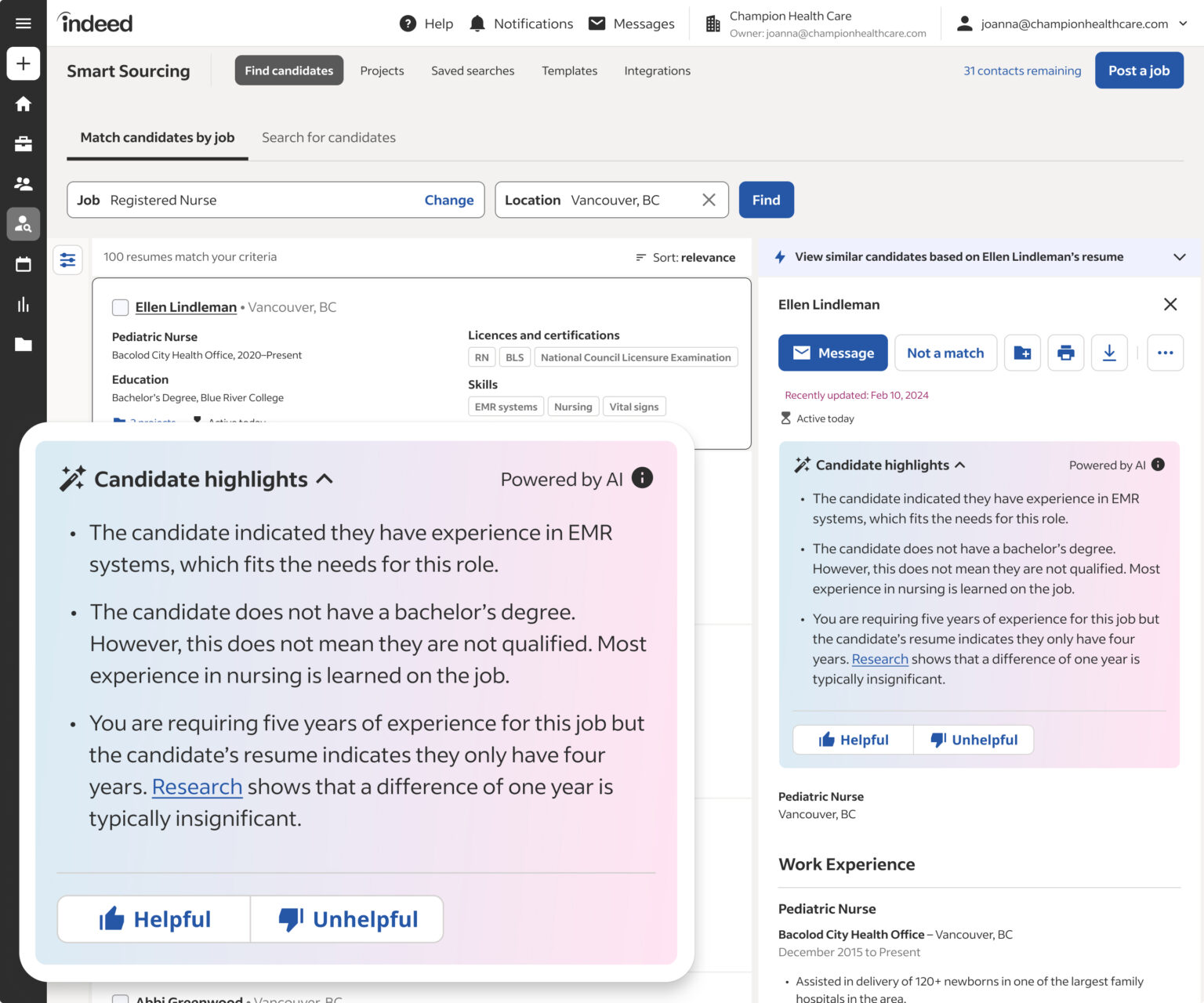
The foundation of employer discovery on Indeed lies in its resume database search engine. When a recruiter logs into Indeed Resume, they input specific search parameters to source candidates. These parameters directly mirror the qualifications found in standard job descriptions.
Recruiters typically filter talent using four core variables:
- What: Job titles, specific technical skills, tools, certifications, and industry keywords.
- Where: City, state, postal code, or remote work preferences.
- Experience: Years of experience, management level, and past job titles.
- Education: Degree level, field of study, and academic institutions.
The search algorithm ranks profiles based on semantic relevance and keyword density. If your resume lacks the specific nomenclature used by hiring managers in your industry, your profile will remain buried in the search results regardless of your actual qualifications.
Optimizing Your Resume for Maximum Recruiter Discoverability
To ensure your profile surfaces at the top of recruiter searches, you must treat your Indeed Resume like an SEO-optimized landing page. Leaving fields blank or using vague terminology drastically reduces your visibility score within the platform's database.
Strategic Keyword Placement
Keywords must appear naturally throughout your resume, with heavy concentration in your professional summary, skills section, and work history. Avoid cramming keywords into white text or irrelevant sections, as modern ATS filters flag unnatural stuffing, and recruiters will immediately dismiss a deceptive profile.
- Hard Skills: List exact programming languages, software tools, machinery types, or regulatory frameworks (e.g., Python, Salesforce, cGMP compliance, forklift certified).
- Soft Skills: Pair technical skills with contextual applications like cross-functional leadership, client negotiation, or agile project management.
- Industry Jargon: Use standardized industry terms that recruiters type into search bars rather than company-internal titles that hold no external meaning.
Setting Your Status to "Open to Work"
One of the most critical switches on Indeed is your job search status. If your resume visibility is set to private, employers cannot find you through the resume database, and you can only be discovered by applying directly to postings.
| Visibility Setting | Can Recruiters Find You? | Can You Apply to Jobs? | Best Used For |
|---|---|---|---|
| Open to Work (Public) | Yes, searchable in database | Yes | Active job seekers and passive candidates open to new opportunities |
| Active / Looking Now | Yes, prioritized visibility | Yes | Candidates immediately available for hire |
| Private | No, hidden from database | Yes | Employed professionals wanting total confidentiality |
The Impact of Profile Completeness and Assessments
Indeed rewards thoroughness. Profiles that feature complete educational histories, verified certifications, and completed Indeed Assessments consistently rank higher in search queues than sparse profiles.
Completing Indeed Assessments
Indeed offers standardized skill tests—such as typing speed, accounting principles, or customer service simulations—that take between 10 and 20 minutes to complete. When you score "Proficient" or "Highly Proficient," a badge is added to your profile. Many employers filter their candidate searches exclusively for applicants who hold these verified skill badges, making assessments a powerful differentiator.
The Role of Work History and Longevity
Recruiters reviewing search results scan your work history for stability and career progression. Ensure every role includes:
- Accurate start and end dates (month and year).
- Clear job titles that reflect your actual responsibilities.
- Action-oriented bullet points focusing on achievements and metrics rather than static task lists.
Direct Applications vs. Database Discovery
While optimizing your resume for organic discovery is vital, understanding how employers interact with your profile after you apply helps tailor your overall strategy. When you submit an application through Indeed, your resume enters the employer's customized dashboard.
Employers utilize screening questions, knockout questions, and Indeed's automated matching algorithm to score applicants. If you meet their criteria, your profile is moved into interview stages. Furthermore, when an employer views an applicant they like, Indeed often suggests "similar candidates" from the public resume database, creating a secondary wave of visibility even if you did not apply for that specific listing.
Step-by-Step Guide to Maximizing Your Indeed Presence
Executing a comprehensive profile overhaul ensures maximum exposure to hiring managers and staffing agencies utilizing the platform.
- Create or Upload Your Master Resume: Upload a clean, text-based document or build your resume directly within the Indeed Resume builder to ensure optimal parsing by the search algorithm.
- Refine Your Target Job Titles: Update your desired job titles to reflect standard industry naming conventions rather than internal company grades.
- Populate the Skills Section: Add at least 10 to 15 specific hard and soft skills relevant to your target niche.
- Take Relevant Assessments: Complete at least two to three Indeed Assessments related to your core competencies to earn verified skill badges.
- Adjust Your Privacy Settings: Set your resume visibility to public and indicate that you are open to work to allow recruiter outreach.
- Enable Job Alerts and Instant Messaging: Turn on Indeed Messenger notifications so you can respond to recruiter outreach within minutes, as speed-to-reply significantly impacts hiring success.
Common Pitfalls That Hide Your Profile from Employers
Many job seekers wonder why they receive zero recruiter messages despite having extensive experience. Several technical and strategic errors frequently cause profiles to become invisible or unappealing to hiring managers.
Common Mistakes to Avoid:
Uploading Image-Based PDFs: Resumes saved as flattened images or complex graphic designs cannot be parsed by Indeed's text extraction algorithms, leaving key fields blank in the employer's view.
Leaving Gaps Unexplained: Prolonged employment gaps without context can trigger automated filters or cause recruiters to pass over your profile during manual reviews.
Ignoring Mobile Formatting: A significant percentage of recruiters review resumes and candidate profiles on mobile devices. Ensure your formatting uses clean spacing and short paragraphs.
Outdated Contact Information: Inactive phone numbers or unmonitored email addresses prevent recruiters from making direct contact even when interested in your profile.
Frequently Asked Questions
How do I know if employers are viewing my Indeed resume?
Indeed provides a dashboard view that displays your resume view statistics and weekly search appearance metrics. You can see how many times your profile appeared in employer search results and how many recruiters clicked on your resume over a given timeframe.
Can current employers see my Indeed resume if I am employed?
Your current employer can only see your public resume if they search the Indeed Resume database and your profile matches their criteria. To protect your privacy while employed, you can set your resume visibility to private, which prevents any employer from finding you organically while still allowing you to apply directly to jobs.
Do Indeed Assessments actually help you get hired?
Yes, scoring well on Indeed Assessments allows employers to filter candidate pools for verified skills. Profiles with verified badges often appear higher in search filters and provide hiring managers with immediate proof of capability before scheduling an interview.
Should I use the Indeed Resume builder or upload my own file?
Both methods work, but uploading a clean, ATS-friendly Word document or text-based PDF is generally recommended to preserve your custom formatting. However, filling out the individual fields in the Indeed profile builder ensures that the platform's database captures every keyword accurately.
How often should I update my Indeed profile to stay visible?
Updating your profile every few weeks—such as refreshing your summary, adding a new skill, or adjusting your availability—signals to the Indeed algorithm that your account is active, which can boost your ranking in recruiter search results.
Take control of your professional visibility today by auditing your Indeed profile, integrating high-value industry keywords, and ensuring your resume is set to public so top employers can find you the moment they search for your exact skill set.
Image Gallery