How to Search a Specific Website in Google: Advanced 2026 Search Operators
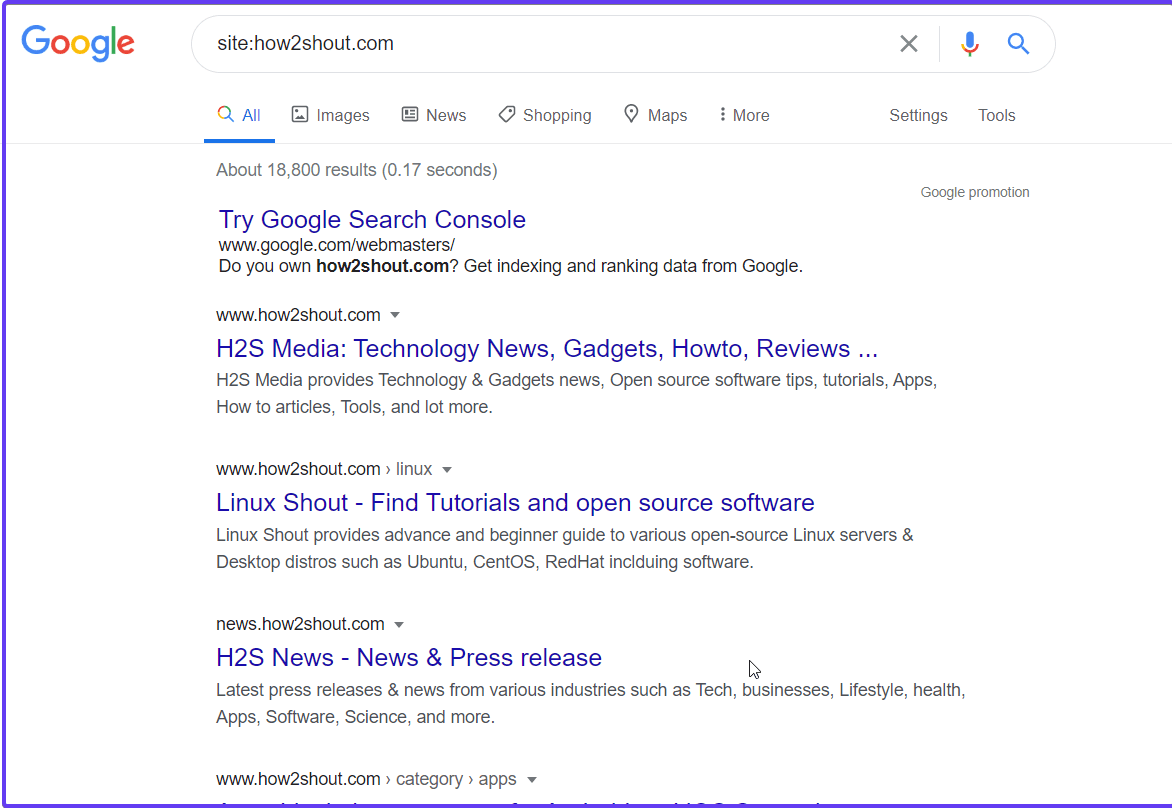
To search within a specific website using Google, use the site: search operator followed immediately by the domain name and your search query. For example, typing "site:example.com budget planning" into the Google search bar restricts...
To search within a specific website using Google, use the site: search operator followed immediately by the domain name and your search query. For example, typing "site:example.com budget planning" into the Google search bar restricts results exclusively to pages indexed from that domain, allowing you to bypass broader web clutter and extract information directly from your target site.
Contents
Understanding the Mechanics of Site-Specific Search
Google uses a complex indexing system that catalogs billions of web pages. When you perform a standard search, the engine scans its entire index. By utilizing Search Operators—specific commands that modify the search behavior—you act as a filter. The site: operator is the most powerful tool for precision, effectively telling the Google algorithm to ignore the rest of the web and focus its retrieval logic on a single URL structure or domain.
As of 2026, Google’s search algorithms prioritize semantic understanding and entity recognition. However, search operators remain the most reliable way to force the engine to disregard its internal ranking signals in favor of your specific structural constraints. This is essential for researchers, SEO professionals, and power users who need to audit content or locate buried documents without navigating through internal site navigation or poorly optimized on-site search bars.
Step-by-Step Guide to Effective Website Searching
Performing an accurate search requires understanding the correct syntax and the limitations of how domains are structured. Follow these steps to maximize your retrieval precision.
- Identify the Target Domain: Determine the exact URL of the website you wish to query. You do not need to include "https://" or "www." unless you are looking for a specific subdomain.
- Apply the Operator: In the Google search bar, type
site:followed by the domain. - Add Your Keywords: Place a single space after the domain, then enter the specific terms you are searching for within that site.
- Refine Results: If the results are too broad, enclose your search phrases in quotation marks to force an exact match for those terms within the site’s indexed content.
Examples of Operator Combinations
- Broad Domain Search:
site:wikipedia.org renewable energy - Specific Subdirectory Search:
site:nytimes.com/2026/business/ - Exact Match Phrase:
site:docs.python.org "asynchronous programming" - Filetype Restriction:
site:gov filetype:pdf "annual report 2026"
Comparative Analysis of Search Methods
When attempting to retrieve data from a website, you generally have three options. Each has distinct advantages depending on whether the site’s native search functionality is reliable.
| Method | Accuracy | Ease of Use | Dependency |
|---|---|---|---|
Google site: Operator |
Extremely High | Moderate | Requires Internet |
| Native Site Search Bar | Variable | High | Requires functional site index |
| URL Manipulation | Low | Low | Requires knowledge of site hierarchy |
| Advanced Search UI | High | Low | Requires browser interface navigation |
The site: operator is superior to most internal search bars because internal tools often index content poorly or fail to display results for deep-level pages that Google has already crawled and cached.
Advanced Techniques for Technical SEO Audits
In 2026, technical SEO professionals utilize these operators to identify indexing issues. If you manage a website, you can use these methods to understand what Google currently "sees" of your property.
- Audit Indexed Pages: By typing
site:yourdomain.com, you see a total count of pages Google has indexed. If this number is significantly higher than your actual page count, you may have issues with duplicate content or URL parameters. - Find Orphaned Pages: If you suspect content exists but isn't ranking, search for the specific URL to confirm if it has been crawled.
- Check Security/Protocol: Use
site:yourdomain.com -inurl:httpsto identify if any insecure (HTTP) pages are still indexed, signaling a need for an SSL redirect update.
Troubleshooting Common Search Failures
Sometimes, the site: operator will return zero results or unexpected content. When this occurs, analyze the following factors to diagnose the failure.
Robots.txt Interference If a website owner has blocked Google’s bots via the robots.txt file, the
site:operator will return nothing regardless of your query. This is common on staging sites or private development environments.Canonicalization Issues If the page you are looking for has a canonical tag pointing to a different URL, Google may show the "preferred" version of the page instead of the one you are searching for.
Indexing Lag Even if you published content today, it may take hours or days to appear in Google’s index. The
site:operator only reflects what is currently stored in Google’s database, not the live state of the website.
Frequently Asked Questions
Why does my site search show pages that no longer exist? Google takes time to recrawl the web. If a page was deleted, it will remain in Google’s index until the Googlebot revisits the URL and confirms a 404 or 410 status code. You can request a manual re-crawl via Google Search Console.
Can I search for specific file types using the site command?
Yes, you can combine site: with filetype:. For example, using site:harvard.edu filetype:pptx will return only PowerPoint files hosted on the Harvard domain, which is a powerful way to locate academic presentations and research data.
Is it possible to exclude a specific page from my search?
Yes, use the minus sign operator. Typing site:example.com "marketing" -blog will return all pages on example.com containing the word "marketing" while excluding any pages that contain the word "blog."
How do I search for a specific subdomain?
Specify the subdomain explicitly, such as site:support.google.com. This restricts your search to the support sub-domain and ignores results from the main domain or other subdomains.
Does using search operators affect my search history?
No, using advanced operators like site: is purely a functional query method and does not alter how Google tracks your user profile or search history in 2026.
Strategic Recommendations
For researchers, the combination of site: and file-type operators is the most efficient path to high-quality information. For website administrators, the site: operator is the primary tool for diagnostic health checks. Always verify that your site’s robots.txt settings allow Google to crawl the sections you intend to index. If you are struggling to find specific information, ensure your queries are not too restrictive by testing with broader terms before applying exact-match quotation marks.
Image Gallery