The Rise of Free Speech to Text Software for Mac: A Comprehensive Guide
The rise of free speech to text software for Mac reflects a shift toward accessible, high-performance transcription tools integrated directly into the macOS ecosystem or provided via robust, open-source alternatives. By leveraging adva...
The rise of free speech to text software for Mac reflects a shift toward accessible, high-performance transcription tools integrated directly into the macOS ecosystem or provided via robust, open-source alternatives. By leveraging advancements in local machine learning and cloud-based natural language processing, these tools now offer near-professional accuracy for dictation, accessibility, and content creation without the burden of recurring subscription costs.
Contents
Understanding the Landscape of macOS Dictation
For years, professional-grade dictation tools were dominated by expensive, proprietary software that required significant hardware overhead. In 2026, the landscape has fundamentally changed. Apple’s native Dictation feature, powered by the Neural Engine in Apple Silicon (M-series) chips, has reached a level of maturity that renders many third-party paid solutions redundant for the average user.
The "rise" refers not necessarily to a single new breakthrough, but to the democratization of speech recognition. Modern macOS environments now prioritize local processing. This means that audio data is processed directly on your Mac rather than being sent to a server, providing a significant boost to privacy, reducing latency, and eliminating the need for an active internet connection for basic tasks.
Native Apple Dictation: The Default Standard
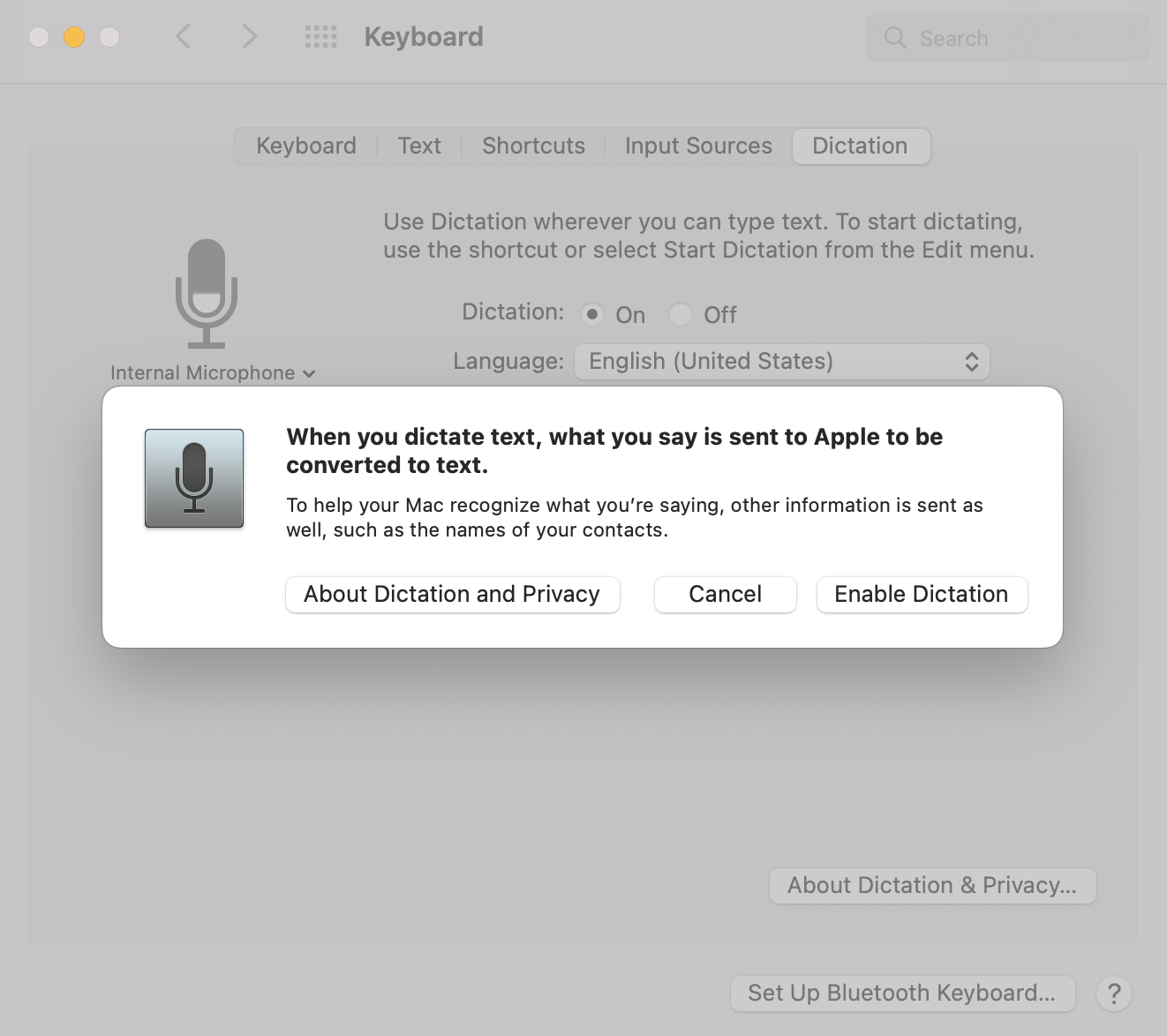
Before searching for third-party software, users should maximize the potential of the native macOS Dictation feature. Available through System Settings > Keyboard, this tool has evolved significantly.
- Offline Capability: When using a Mac with Apple Silicon, the speech-to-text engine runs entirely on-device. This is a primary advantage over web-based tools, as it ensures your sensitive documents or notes are not being stored on external servers for model training.
- Automatic Punctuation: Modern iterations of the tool automatically insert commas, periods, and question marks based on the cadence of your speech, drastically reducing post-transcription editing time.
- Multilingual Support: macOS handles switching between languages seamlessly, provided the language packs are downloaded within the system settings.
Evaluating Open-Source and Free Alternatives
While native tools are excellent for general dictation, they are sometimes limited in their ability to process long-form audio files or handle specialized vocabulary. This is where open-source projects have bridged the gap. Software built on top of frameworks like OpenAI's Whisper model has transformed the expectations for free tools.
Users now have access to applications that act as local front-ends for these advanced models. These applications allow you to drop an audio file—such as a lecture, meeting recording, or interview—into the software, which then processes the text locally. Unlike commercial SaaS platforms, these tools do not charge per-minute fees, making them the superior choice for high-volume users.
Comparative Overview of Transcription Solutions
| Feature | Apple Native Dictation | Open-Source Whisper GUI | Professional SaaS Tools |
|---|---|---|---|
| Cost | Free (Built-in) | Free (Open Source) | High Monthly Fee |
| Privacy | High (On-device) | High (On-device) | Variable (Cloud-based) |
| Setup Complexity | None | Low to Moderate | Low |
| Internet Required | No | No | Yes |
| Best For | Daily emails/notes | Transcribing files | Enterprise workflows |
Technical Prerequisites and Hardware Requirements
To leverage the full potential of free speech to text software on a Mac in 2026, hardware specifications play a pivotal role. The transition to Apple Silicon has been the greatest catalyst for this technology.
- Processor Architecture: While older Intel-based Macs can run basic dictation, they lack the dedicated Neural Engine required for the most accurate and responsive local transcription tools. If you are using an Intel Mac, you may experience higher CPU usage and battery drain during transcription.
- Memory (RAM): For processing large files through local models (like Whisper), 16GB of RAM is recommended. While 8GB models can function, they may struggle when running alongside memory-intensive creative or productivity suites.
- Storage: Local models occupy significant space. Before installing advanced transcription software, ensure you have at least 5–10GB of available SSD space to host the language models and software binary.
Operational Limitations and Troubleshooting
Even the most advanced free speech to text software has inherent limitations. Understanding these will prevent frustration during your workflow.
- Acoustic Quality: No software can compensate for poor audio. If you are transcribing a recording, the quality of the microphone and the environment’s noise floor are the primary determinants of accuracy. Use a unidirectional microphone to isolate your voice from background noise.
- Technical Vocabulary: Free, general-purpose models often struggle with industry-specific jargon, medical terminology, or legal terminology. While some advanced tools allow you to provide a "prompt" or "vocabulary list" to improve accuracy, this is rarely as effective as a tailored professional engine.
- Homophones: Despite their progress, these tools still occasionally confuse words that sound identical (e.g., "to," "too," and "two"). Always factor in a final proofreading phase; these tools are designed for transcription, not publication-ready editing.
If you encounter issues where the transcription accuracy drops suddenly, the most effective troubleshooting steps are to:
- Verify that your system microphone input is set to the correct device in System Settings > Sound.
- Clear the cache of the specific transcription application.
- Ensure your Mac is not performing a heavy background task (like a system backup or media render) that might throttle CPU resources.
Frequently Asked Questions
Is it safe to use free speech to text software on my Mac? Generally, yes, especially when using tools that process data locally. Since the data never leaves your device, you maintain full control over your privacy. Always download software from trusted repositories like GitHub or the Mac App Store to ensure the integrity of the code.
Do I need an internet connection for my Mac to transcribe audio? For native Apple Dictation on Apple Silicon Macs and most local-first open-source tools, no. Once the required language assets are downloaded, these tools function completely offline, which is ideal for working while traveling or in low-connectivity environments.
How accurate is free transcription compared to paid services? In 2026, the gap has closed significantly. For clear, single-speaker audio, free tools are often indistinguishable from paid services. Paid services usually justify their cost by providing added features like speaker diarization (labeling who said what), collaborative editing environments, and web-based API integration for teams.
Can these tools transcribe meetings or video calls? Yes, but you must ensure you have the correct system routing. You may need a virtual audio driver to "loopback" the audio from your video call software into your transcription tool. Native Dictation usually only listens to your microphone; you may need third-party utilities to capture system audio input.
Next Steps for Implementation
To start, begin with the native Dictation feature enabled in your settings. Test it for a week for simple emails and notes. If you find you need to transcribe pre-recorded audio or have specific long-form needs, research open-source front-ends for the Whisper model. Focus on tools that explicitly advertise "local-only processing" to maintain your privacy. By adopting these free, performant tools, you can significantly reduce your administrative overhead without relying on expensive, cloud-dependent subscription services.
Image Gallery