Understanding the Meaning of End User Computing (EUC) and Its Strategic Importance
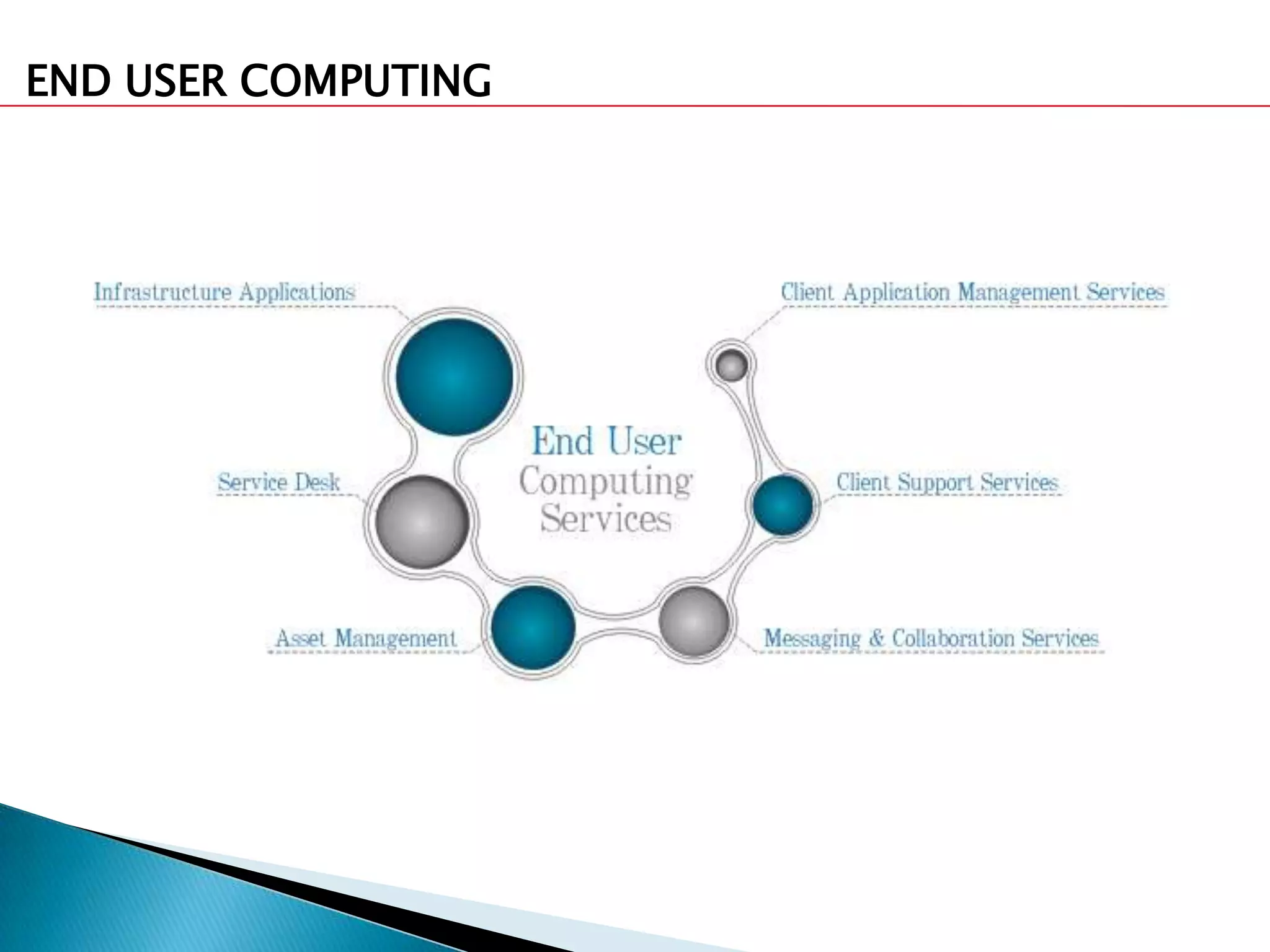
End User Computing (EUC) refers to the integration of technologies, policies, and management practices that allow non-technical employees to access, create, and interact with applications and data securely. It focuses on the "last mile...
End User Computing (EUC) refers to the integration of technologies, policies, and management practices that allow non-technical employees to access, create, and interact with applications and data securely. It focuses on the "last mile" of IT delivery, ensuring that digital workspaces remain productive, mobile, and secure across various devices.
Contents
The meaning of end user computing has evolved significantly from the era of standalone desktop PCs. In 2026, EUC represents a sophisticated ecosystem that bridges the gap between complex enterprise backend systems and the human interface. It encompasses everything from virtual desktops and mobile device management to the high-level security protocols that protect corporate assets in a decentralized work environment. As organizations move further away from traditional office-bound models, EUC has become the primary framework for defining how work is performed and managed.
The Evolution of End User Computing
To understand the modern meaning of end user computing, one must look at its historical trajectory. Originally, EUC was a term used to describe users who wrote their own basic macros or simple database queries—effectively bypassng the central IT department to solve immediate problems. However, the definition has shifted from "users doing IT tasks" to "IT providing a comprehensive environment for users."
By 2026, the focus has shifted entirely toward the Digital Employee Experience (DEX). Organizations no longer view EUC as a mere support function. Instead, it is a strategic pillar that determines how easily an employee can onboard, how effectively they can collaborate across time zones, and how securely they can access proprietary data from any hardware. The rise of hybrid work has made the "endpoint"—whether it is a laptop, a tablet, or a thin client—the new corporate perimeter.
From VDI to DaaS and Beyond
In the early 2010s, Virtual Desktop Infrastructure (VDI) was the gold standard for EUC, allowing IT to host desktop environments on central servers. While VDI remains relevant for high-security or high-compliance industries, the current landscape is dominated by Desktop as a Service (DaaS). DaaS has simplified the meaning of end user computing by shifting the heavy lifting of infrastructure management to cloud providers like Microsoft (Windows 365), AWS, and Google. This transition allows companies to scale their workforce up or down instantly without purchasing physical hardware.
Core Components of a Modern EUC Strategy
A comprehensive EUC framework consists of several overlapping technologies. Understanding these components is essential for any organization looking to modernize its workforce capabilities.
1. Unified Endpoint Management (UEM)
UEM is the evolution of Mobile Device Management (MDM) and Mobile Application Management (MAM). It provides a single "pane of glass" for IT administrators to manage every device in the fleet, including Windows 11/12 laptops, MacBooks, iPhones, and Android ruggedized devices. UEM allows for the remote wiping of lost devices, the automated pushing of security patches, and the enforcement of compliance policies without requiring the device to be on a corporate VPN.
2. Desktop and Application Virtualization
Virtualization remains a cornerstone of EUC. By separating the OS and applications from the physical hardware, organizations can deliver high-performance computing to low-spec devices. This is particularly useful for contract workers or "Bring Your Own Device" (BYOD) programs, where the company does not own the hardware but must control the data environment.
3. Digital Employee Experience (DEX) Tools
In 2026, EUC is heavily informed by telemetry. DEX tools monitor the performance of applications and hardware from the user's perspective. If a specific version of a collaboration tool is crashing on certain laptops, DEX software identifies the trend before the user even files a support ticket. This proactive approach is a vital part of the modern meaning of end user computing.
4. Zero Trust Security Architectures
Because EUC involves accessing data from uncontrolled networks (home Wi-Fi, coffee shops), security is baked into the computing environment. Modern EUC relies on Zero Trust, which assumes no device or user is safe by default. Every access request is verified based on user identity, device health, and geographic location.
Comparing EUC Delivery Models
Choosing the right model depends on an organization’s specific needs for control, cost-efficiency, and performance. The following table compares the three most common approaches in 2026.
| Feature | Virtual Desktop Infrastructure (VDI) | Desktop as a Service (DaaS) | Local Managed Desktop |
|---|---|---|---|
| Hosting Location | On-premises or Private Cloud | Public Cloud (SaaS model) | Local Hardware |
| Management Burden | High (IT manages hardware/OS) | Low (Provider manages hardware) | Moderate (OS/Hardware management) |
| Capital Expenditure | High upfront (Servers/Storage) | Low (Subscription-based) | Moderate (Device costs) |
| Internet Dependency | Total (Required for access) | Total (Required for access) | Low (Offline work possible) |
| Scalability | Limited by physical server capacity | Near-infinite and instantaneous | Manual (Buying/Shipping units) |
| Security | Centralized in data center | Centralized in cloud | Distributed (Harder to secure) |
The Strategic Role of AI in End User Computing
As we navigate through 2026, Artificial Intelligence (AI) has fundamentally redefined the meaning of end user computing. AI is no longer just a buzzword; it is an integrated layer within the EUC stack that handles routine administrative tasks.
Self-Healing Endpoints: AI-driven agents now live on the endpoint, capable of detecting and fixing configuration drifts. For example, if a security service stops running, the AI can restart it or roll back a recent update that caused the failure, reducing the volume of help desk tickets by up to 40%.
Predictive Analytics: By analyzing patterns across thousands of devices, EUC platforms can predict hardware failures. If a battery’s discharge cycle indicates imminent failure, the system can automatically trigger a replacement request in the procurement system, ensuring the employee never experiences downtime.
Natural Language Support: End users can now interact with their computing environment using natural language. Instead of navigating complex settings menus, a user can simply ask their EUC portal to "Connect to the marketing printer" or "Reset my application permissions," and the system executes the backend commands automatically.
Implementation Challenges and Considerations
While the benefits of a robust EUC strategy are clear, implementation is rarely without hurdles. Organizations must balance the desire for a seamless user experience with the rigid requirements of cybersecurity.
- Latency and Connectivity: For virtualized environments (VDI/DaaS), the user experience is entirely dependent on the quality of the internet connection. In regions with poor infrastructure, a "cloud-first" EUC strategy can lead to frustrated employees and lost productivity.
- Cost Management: While DaaS reduces upfront capital expenditure (CapEx), the ongoing operational expenditure (OpEx) can spiral if not monitored. Organizations often pay for "ghost" seats—subscriptions for employees who have left the company or no longer need the service.
- Legacy Application Support: Many businesses still rely on specialized "legacy" software that was never designed for the cloud or virtualization. Bridging these old applications into a modern EUC environment often requires complex "app layering" or expensive custom development.
- Data Privacy: With employees working from diverse locations, ensuring that data stays within specific geographic boundaries (for GDPR or CCPA compliance) requires sophisticated geo-fencing policies within the EUC management suite.
The Future of EUC: Beyond the Screen
By 2026, the meaning of end user computing has expanded to include spatial computing and the Internet of Things (IoT). In industries like manufacturing or healthcare, the "end user" might be using an Augmented Reality (AR) headset or a specialized handheld scanner rather than a traditional computer.
Modern EUC must be flexible enough to manage these non-traditional endpoints with the same level of security and visibility as a standard laptop. This "omni-channel" approach to computing ensures that no matter how the technology evolves, the underlying framework for delivery, management, and security remains consistent.
Frequently Asked Questions
What is the primary difference between EUC and traditional IT?
Traditional IT often focuses on the backend—servers, networking, and infrastructure. End User Computing (EUC) focuses specifically on the user-facing side, prioritizing the apps, devices, and digital environments that employees use daily. While traditional IT builds the road, EUC provides the vehicle and the driving experience.
Can EUC exist without the cloud?
Yes, EUC can exist without the cloud through on-premises VDI and local device management. However, in 2026, almost all modern EUC strategies utilize at least some cloud components (Hybrid EUC) to facilitate remote work, automated updates, and scalable storage.
How does EUC improve security?
EUC improves security by centralizing control. Instead of data living on various unencrypted hard drives, EUC often keeps data in a secure data center or cloud environment. Even when data is on a device, UEM tools ensure the device is encrypted, password-protected, and capable of being wiped remotely if stolen.
Is BYOD (Bring Your Own Device) part of EUC?
Absolutely. BYOD is a subset of EUC. A strong EUC strategy uses technologies like containerization and Mobile Application Management (MAM) to create a "work" partition on a personal device. This allows employees to use their own hardware while ensuring corporate data remains separate and secure from personal apps.
What skills are needed for a career in EUC?
Professionals in this field need a mix of skills, including expertise in virtualization (VMware/Omnissa, Citrix), cloud platforms (Azure, AWS), identity management (Okta, Microsoft Entra ID), and an understanding of user experience design. Knowledge of automation scripting (PowerShell, Python) is also highly valued in 2026.
Practical Recommendation: Next Steps for Organizations
To effectively leverage the meaning of end user computing in 2026, organizations should move away from fragmented toolsets. The most successful businesses are adopting Unified Endpoint Management combined with Digital Employee Experience (DEX) monitoring.
- Audit Your Current Fleet: Identify which users are best suited for DaaS (high mobility, standard task loads) versus those who need local high-performance hardware (video editors, developers).
- Prioritize the User Experience: Use telemetry to find where users are struggling. A secure system that is too difficult to use will lead to "Shadow IT," where employees use unauthorized personal tools to get their work done.
- Implement Zero Trust: Stop relying on VPNs as your sole security measure. Shift toward identity-based access and continuous device health verification.
Image Gallery