Continuous Integration for iOS: Why It Matters and How to Do It Right
Continuous Integration (CI) for iOS is the practice of automating the merging of code changes into a central repository, followed by automated builds and testing within a macOS-based environment. By identifying bugs early and maintaini...
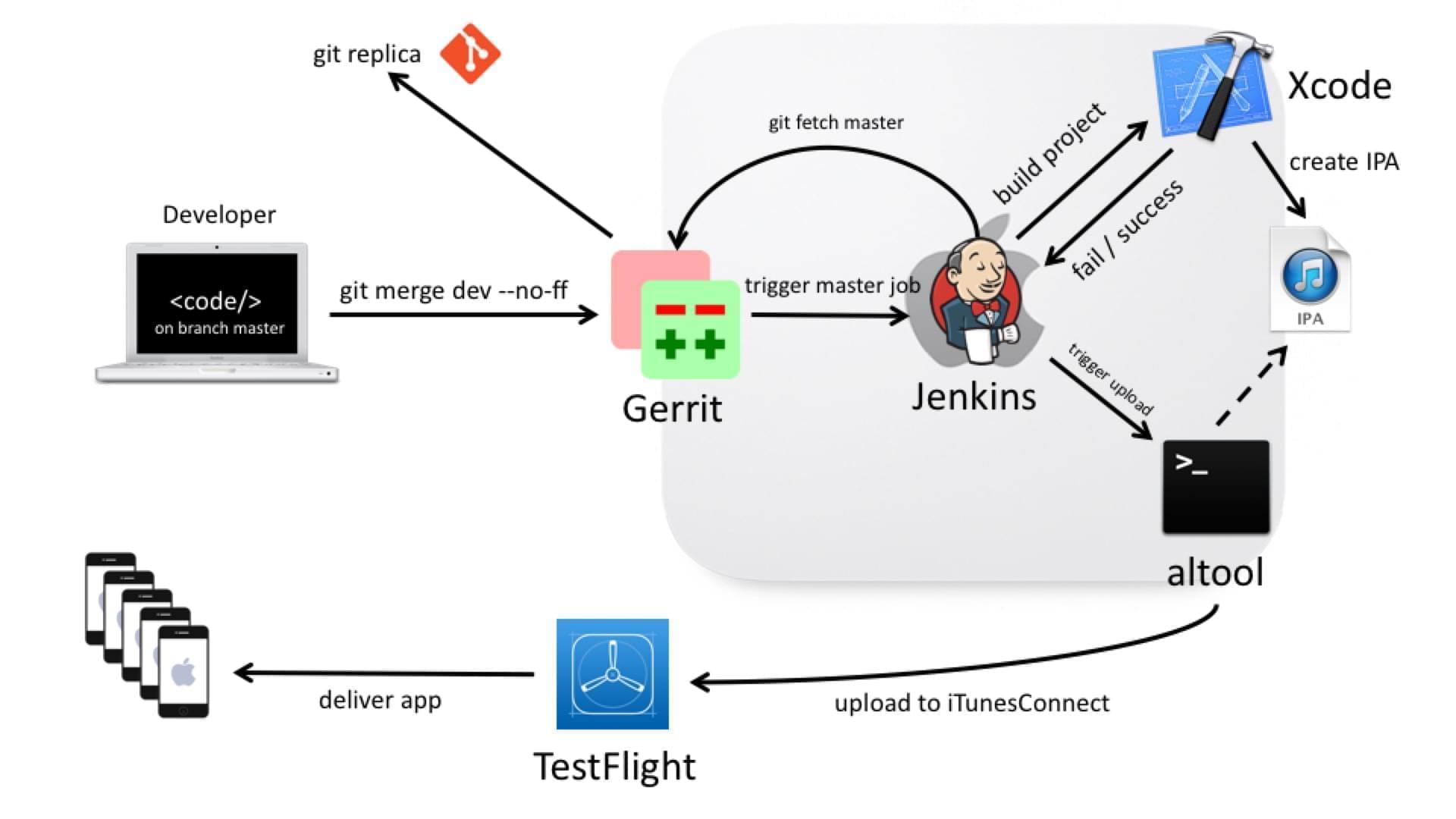
Continuous Integration (CI) for iOS is the practice of automating the merging of code changes into a central repository, followed by automated builds and testing within a macOS-based environment. By identifying bugs early and maintaining a deployable state, CI reduces the complexity of manual releases and ensures that Apple’s rigorous code-signing requirements are consistently met.
Contents
In 2026, the complexity of the Apple ecosystem—spanning iOS, iPadOS, macOS, watchOS, and visionOS—has made manual builds virtually obsolete for professional development. A robust CI pipeline is no longer a luxury; it is the fundamental infrastructure that allows teams to maintain high velocity while navigating the intricacies of Swift 6 concurrency, Apple Silicon optimization, and evolving App Store submission guidelines.
The Unique Landscape of iOS Continuous Integration
Unlike web development, where CI environments can run on lightweight Linux containers, iOS CI requires specialized macOS hardware. This hardware dependency stems from the necessity of Xcode, Apple’s proprietary Integrated Development Environment (IDE), which only runs on macOS.
As of 2026, the transition to Apple Silicon (M-series chips) is complete, meaning CI pipelines must be optimized for ARM64 architecture to reflect the performance characteristics of modern consumer devices. Furthermore, the "walled garden" of the Apple ecosystem introduces a unique challenge: Code Signing. Every build destined for a physical device or the App Store must be cryptographically signed using certificates and provisioning profiles managed through the Apple Developer Portal.
Doing CI "right" in this environment means orchestrating hardware, software versions, and security credentials into a seamless, reproducible workflow.
Why iOS CI Matters: The Business and Technical Imperatives
1. Drastic Reduction in "Merge Hell"
In larger teams, multiple developers often work on the same codebase simultaneously. Without CI, merging these branches after weeks of development leads to "merge hell," where conflicting changes break the build. Continuous Integration encourages frequent, small merges, allowing the system to flag conflicts immediately.
2. Accelerated Feedback Loops
If a new commit breaks a unit test or fails to compile under the latest version of Xcode, the developer is notified within minutes. This rapid feedback loop prevents "broken windows" in the codebase, where small errors accumulate until the system becomes unstable.
3. Reliability of Code Signing and Distribution
Manual code signing is prone to human error—expired certificates, missing UDIDs in provisioning profiles, or incorrect entitlements. A well-configured CI system handles these secrets securely and automatically, ensuring that the build that passes testing is the exact same build that reaches stakeholders via TestFlight.
4. Quality Assurance via Automated Testing
iOS apps are expected to be performant and bug-free. CI pipelines allow for the automated execution of:
- Unit Tests: Verifying individual functions and logic.
- XCUITest: Simulating user interactions on various virtual devices (simulators).
- Static Analysis: Checking for memory leaks, architectural violations, and deprecated API usage.
How to Do iOS CI Right: Core Components
A high-quality iOS CI pipeline consists of four main pillars: the runner infrastructure, the automation engine, the testing suite, and the distribution mechanism.
1. Selecting the Right Infrastructure
You must decide between cloud-hosted runners and self-hosted infrastructure.
- Cloud-Hosted (e.g., Xcode Cloud, GitHub Actions): These offer the lowest maintenance. Apple’s own Xcode Cloud is deeply integrated into the IDE, making it an excellent choice for teams that want a "plug-and-play" experience.
- Self-Hosted (e.g., Mac minis in a rack): This is often preferred by large enterprises for security or cost-efficiency at scale. However, it requires significant "DevOps" effort to keep macOS and Xcode versions updated across the fleet.
2. The Automation Engine: Fastlane
While you can write custom shell scripts to interact with xcodebuild, the industry standard remains Fastlane. Fastlane is an open-source platform that simplifies iOS and Android automation. It handles tedious tasks like generating screenshots, managing code signing (via Match), and releasing builds to the App Store.
To do CI right, your Fastfile should define "lanes" for different scenarios:
lane :test– Runs unit tests on every pull request.lane :beta– Increments the build number, signs the app, and pushes it to TestFlight.lane :release– Prepares the metadata and binary for the final App Store submission.
3. Managing Dependencies
Modern iOS projects use Swift Package Manager (SPM) or CocoaPods. Your CI environment must be configured to cache these dependencies. Without caching, the CI runner will re-download and re-compile every library for every build, leading to 20–30 minute wait times. By using a persistent cache key based on the Package.resolved or Podfile.lock file, you can reduce build times by up to 70%.
4. Implementing "Match" for Code Signing
The most common point of failure in iOS CI is code signing. The "Match" approach (part of the Fastlane suite) solves this by storing your certificates and provisioning profiles in a private, encrypted Git repository. When a CI runner starts a build, it clones this repo, installs the necessary certificates into a temporary keychain, and signs the app. This ensures a "Single Source of Truth" for the entire team.
Comparison of Leading iOS CI/CD Platforms (2026)
| Platform | Best For | Pros | Cons |
|---|---|---|---|
| Xcode Cloud | Apple-only teams | Native integration; handles code signing automatically; included in some developer plans. | Limited customization; restricted to the Apple ecosystem. |
| GitHub Actions | General-purpose teams | Excellent marketplace of actions; co-located with your code; highly scalable. | macOS runners are more expensive than Linux ones; requires manual secret management. |
| Bitrise | Mobile-first enterprises | Specialized for mobile; visual workflow editor; hundreds of pre-built "steps." | Can become expensive; proprietary configuration can lead to vendor lock-in. |
| CircleCI | Advanced DevOps | High performance; excellent caching mechanisms; supports complex pipelines. | Steeper learning curve for iOS-specific configurations. |
Step-by-Step Guide to Implementing Your Pipeline
Step 1: Standardize the Environment
Ensure that your local development environment matches your CI environment. Use a .xcode-version file to specify the exact version of Xcode required. This prevents "it works on my machine" bugs where a developer uses Xcode 17.1 but the CI server is still on 17.0.
Step 2: Configure Fastlane
Initialize Fastlane in your project and set up Match. Ensure your Matchfile points to a secure private repository. This is the foundation of a reproducible build process.
Step 3: Define the CI Workflow
Create a configuration file (like .github/workflows/main.yml for GitHub) that triggers on every push to the main branch and on every pull request. The workflow should:
- Check out the code.
- Install the correct version of Ruby and dependencies.
- Restore the dependency cache.
- Run the
testlane. - If on the main branch, run the
betalane to distribute the build.
Step 4: Secure Your Secrets
Never check API keys, certificates, or passwords into your repository. Use your CI provider’s Secret Management (Environment Variables) to store your Apple ID App-Specific Password, Git SSH keys, and Fastlane encryption keys.
Step 5: Monitor and Iterate
CI is not a "set it and forget it" task. Monitor build durations. If your pipeline takes longer than 15 minutes, look into Test Parallelization (running tests across multiple simulators simultaneously) or optimizing your asset compilation.
Common Pitfalls and Troubleshooting
- Flaky Tests: UI tests are notoriously unstable. If a test fails 5% of the time due to a slow animation or network lag, it erodes trust in the CI. Use "Retry" logic sparingly, but prioritize fixing the underlying race conditions in your
XCUITestcode. - Keychain Locking: On self-hosted macOS runners, the login keychain can often lock, causing code signing to fail. Use Fastlane’s
create_keychainaction to build a temporary, unlocked keychain for every run. - Provisioning Profile Mismatch: If you add a new capability to your app (like Push Notifications), you must update the profiles in your Match repository. Failing to do this is a frequent cause of CI build failures.
- Disk Space Exhaustion: Xcode builds generate massive amounts of intermediate data (DerivedData). Ensure your CI runners have automated cleanup scripts to prevent the disk from filling up, which will crash subsequent builds.
The Future of iOS CI in 2026
We are seeing a shift toward AI-augmented CI. Tools can now analyze a build failure and suggest the specific line of code or configuration change needed to fix it. Furthermore, with the maturation of Swift 6, CI pipelines are now focusing heavily on static concurrency checking, ensuring that data races are caught at the integration stage rather than at runtime.
For teams looking to stay competitive, the move toward "infrastructure as code" (using tools like Terraform to manage Mac mini clusters or specialized cloud configurations) is becoming the standard for maintaining reliability at scale.
FAQs
How much does iOS CI typically cost?
Costs vary significantly by platform. GitHub Actions charges a premium for macOS runners (often 10x the cost of Linux). Xcode Cloud offers a free tier (usually 25 hours per month as of 2026), but high-volume teams may spend between $50 and $500 per month depending on concurrency needs and build frequency.
Can I run iOS CI on Linux or Windows?
No. To compile an iOS app, you must use the Apple-exclusive compiler and SDKs found within Xcode, which only runs on macOS. While you can manage parts of the workflow (like linting) on Linux, the actual build and sign process requires macOS hardware.
Is Xcode Cloud better than third-party options?
Xcode Cloud is better for ease of use and native integration. However, if your team develops for multiple platforms (Android, Web, iOS), a general-purpose tool like GitHub Actions or Bitrise is often better because it allows you to manage all your pipelines in one place.
How do I handle 2FA for Apple ID in CI?
You should use an App Store Connect API Key. This is a modern, secure way to authenticate with Apple’s services without needing a 2FA code or a specific user's login credentials. Fastlane and most CI providers support these keys natively.
Why is my CI build so much slower than my local build?
CI runners often have fewer CPU cores than a high-end developer MacBook Pro. Additionally, CI usually performs a "Clean" build, whereas your local Xcode uses an incremental build. To speed it up, implement robust caching for SPM/CocoaPods and the DerivedData folder.
Final Recommendation
To do iOS CI right in 2026, start by implementing Fastlane Match for code signing and Xcode Cloud for your initial pipeline infrastructure. As your team grows and your requirements become more complex, you can transition to more customizable platforms like GitHub Actions or Bitrise, but the foundation of automated testing and secure secret management should remain your primary focus.
Image Gallery