How to Pay for an iPad Monthly: Financing Options, Costs, and Step-by-Step Guide
You can pay for an iPad monthly using Apple Card Monthly Installments, wireless carrier payment plans, retail credit programs, or Buy Now, Pay Later (BNPL) platforms. The most cost-effective routes offer 0% APR over 12 to 36 months, th...
You can pay for an iPad monthly using Apple Card Monthly Installments, wireless carrier payment plans, retail credit programs, or Buy Now, Pay Later (BNPL) platforms. The most cost-effective routes offer 0% APR over 12 to 36 months, though eligibility, down payments, and required cellular service contracts vary by provider.
Contents
1. Primary Ways to Finance an iPad
Financing an iPad divides the substantial upfront cost—ranging from $349 for an entry-level iPad to over $2,000 for a fully configured 13-inch iPad Pro—into manageable monthly installments. Rather than absorbing the entire purchase in a single billing cycle, consumers can choose between manufacturer financing, cellular carrier contracts, merchant-specific store credit, and third-party installment lenders.
Each mechanism carries distinct underwriting criteria, repayment terms, and potential fees. Choosing the right path depends on whether you need a Wi-Fi-only or Wi-Fi + Cellular model, your current credit standing, and whether you want to avoid paying interest charges.
2. Apple Card Monthly Installments (ACMI)
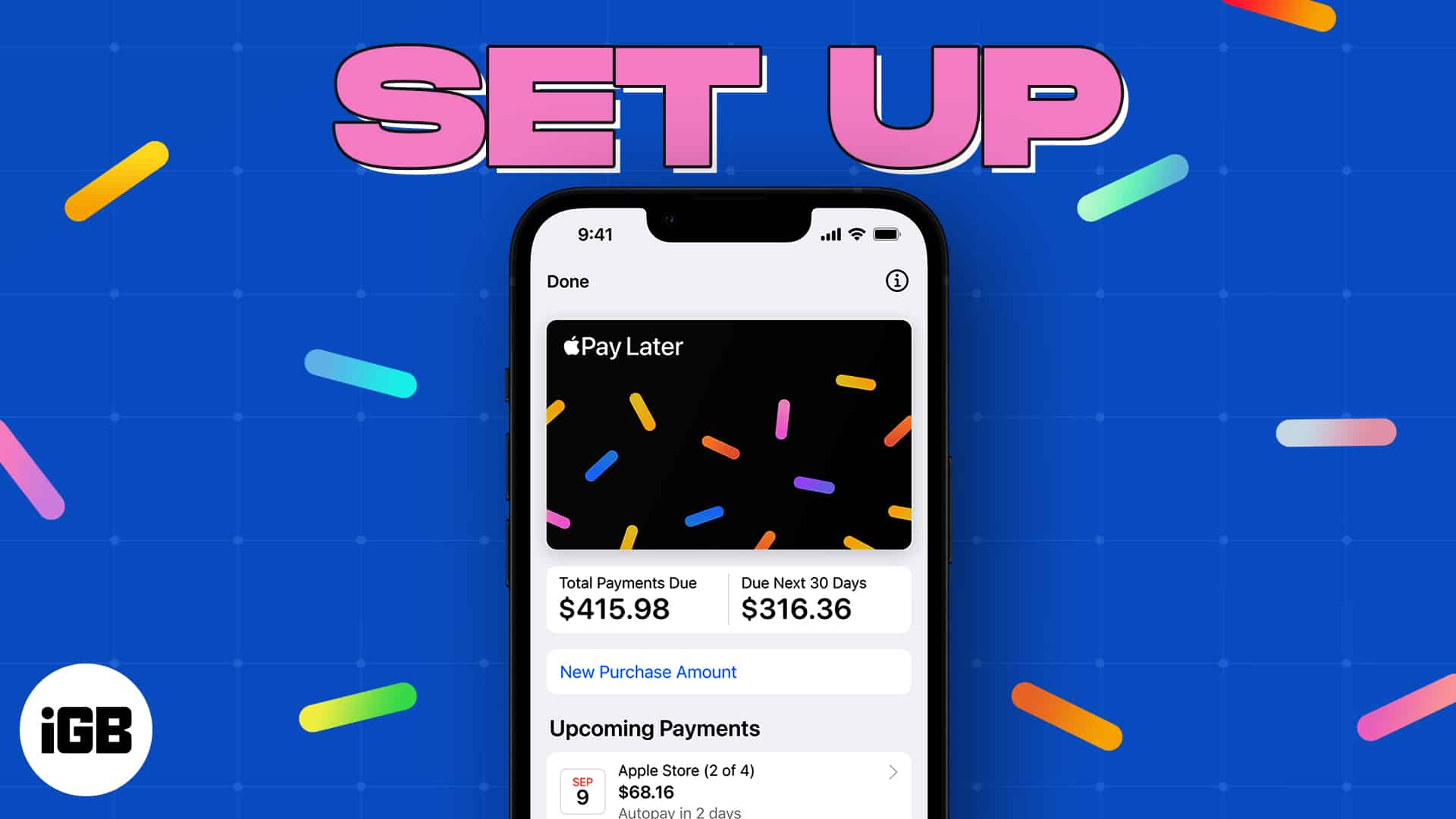
The most direct and cost-effective method to finance an iPad directly from Apple is through Apple Card Monthly Installments (ACMI). This program lets eligible Apple Card holders spread the cost of hardware purchases over interest-free monthly payments.
Purchase Price ÷ 12 Months = Fixed Monthly Payment (0% APR)
Key Terms and Conditions
- Interest Rate: 0% APR.
- Repayment Period: 12 months for iPads (accessories like the Apple Pencil and Magic Keyboard bundled in the same order qualify for 12 months as well).
- Rewards: You receive the full 3% Daily Cash back on the total pre-tax purchase amount immediately upon shipment, rather than incrementally over the course of the year.
- Credit Line Impact: When you buy an iPad using ACMI, Apple places a hold on your available Apple Card credit limit equal to the full purchase price plus tax. As you pay your monthly installment, your available credit gradually frees up.
Requirements and Process
To use this method, you must have an active Apple Card, which is issued by Goldman Sachs (or Apple's current platform banking partner). If you do not have the card, you can apply during online checkout at the Apple Store or inside the Apple Wallet app on an iPhone.
The initial application involves a soft credit check to determine eligibility and your assigned credit limit. If you accept the offer, a hard credit inquiry is performed. To complete the purchase:
- Select your iPad model, storage capacity, and finish on Apple's website or in the Apple Store app.
- Under payment options, choose Apple Card Monthly Installments.
- Confirm the order. The installment is automatically added to your Apple Card's minimum monthly balance, viewable in the Wallet app.
3. Wireless Carrier Financing Plans
If you are buying a Wi-Fi + Cellular iPad, the major United States wireless carriers—AT&T, Verizon, and T-Mobile—offer installment billing directly through your cellular service account.
Carriers generally do not finance Wi-Fi-only models because their business model relies on recurring monthly data subscriptions.
How Carrier Installments Work
- Term Lengths: Carrier contracts typically stretch repayment over 36 months (3 years), although some 24-month options occasionally exist.
- Interest Charges: Carriers offer 0% APR financing on the hardware, meaning the retail price is divided evenly across 36 monthly billing statements.
- Service Requirements: You must attach the tablet to an active cellular data plan. Standalone tablet data plans usually cost between $10 and $25 per month when paired with an existing unlimited smartphone plan, or more if purchased as an independent line.
- Promotional Bill Credits: Carriers frequently advertise "free" or steeply discounted iPads. These discounts are not provided as a lump-sum discount upfront. Instead, the carrier issues recurring monthly bill credits over the full 36-month period. If you cancel your cellular plan early, the remaining unpaid balance of the iPad immediately becomes due in full, and all future promotional credits are forfeited.
4. Retailer Financing: Best Buy and Amazon
Major electronics retailers provide in-house credit lines and payment options that allow consumers to purchase iPads on recurring payment schedules.
Best Buy Credit Cards
Best Buy offers two distinct payment structures through its My Best Buy Credit Card (issued by Citibank):
- Equal Monthly Payments: During specific promotional windows, Best Buy permits equal monthly installments (typically 12 to 24 months) at 0% APR on qualifying tablet purchases.
- Deferred Interest Financing: More commonly, retail store cards utilize deferred interest promotions (e.g., "No interest if paid in full within 12 months"). If you pay off the full balance before the promotional term ends, you pay zero interest. However, if even a $1 balance remains on day 366, interest is retroactively calculated and billed from the original date of purchase at standard purchase APRs, which often exceed 30%.
Amazon Payment Programs
Amazon offers two monthly payment avenues for iPads:
- Amazon Equal Monthly Payments: An invitation-only, zero-interest installment plan tied to standard debit or credit cards. Amazon divides the total cost into five equal monthly charges without a formal credit check. Availability is determined automatically by internal account history and purchase activity.
- Amazon Store Card / Prime Visa: The Amazon Store Card (issued by Synchrony Bank) and the Prime Visa (issued by Chase) frequently offer 6- to 12-month promotional financing at 0% interest on purchases exceeding certain dollar thresholds.
5. Buy Now, Pay Later (BNPL) Services
Third-party installment platforms have become a widespread alternative to traditional credit cards. Companies such as Affirm, Klarna, Afterpay, and PayPal Pay in 4 allow consumers to split retail transactions into equal payments.
According to guidance from the Consumer Financial Protection Bureau, consumers should carefully distinguish between short-term zero-interest micro-loans and long-term financing that charges interest.
"Pay-in-4" Short-Term Installments
- Structure: The total purchase is divided into four equal payments. The first 25% is due at checkout, with the remaining three installments debited every two weeks over a six-week period.
- Cost: 0% interest with no hidden processing fees when payments are made on time.
- Limitation: A high-end iPad Pro costing $1,200 requires $300 every two weeks, which can cause cash-flow strain over a short window compared to a 12-month loan.
Long-Term Monthly Installments (Affirm, Citizens Pay, Klarna)
- Structure: Extended terms ranging from 3, 6, 12, to 24 months.
- Cost: Highly dependent on underwriting. While some merchant integrations offer 0% APR promotions, standard rates range from 10% to 36% APR based on the borrower’s credit score.
- Underwriting: Most BNPL providers run a soft credit pull during pre-qualification, which does not affect your standard credit score, though some report monthly repayment history to major credit bureaus.
6. Comparing iPad Monthly Financing Options
The following comparison details the primary methods to finance an iPad, including standard repayment lengths, typical interest rates, and operational trade-offs.
| Financing Method | Term Length | Typical APR | Credit Impact | Cellular Line Required? | Best For |
|---|---|---|---|---|---|
| Apple Card (ACMI) | 12 months | 0% APR | Hard inquiry upon card acceptance | No | Buyers wanting an unlocked Wi-Fi or cellular iPad with no interest |
| Carrier Financing (AT&T, Verizon, T-Mobile) | 36 months | 0% APR | Soft or hard inquiry depending on carrier | Yes | Buyers needing cellular data who plan to keep service for 3 full years |
| Best Buy Card | 12–24 months | 0% or Deferred Interest | Hard inquiry | No | In-store shoppers seeking reward points or store-based promotions |
| Amazon Equal Payments | 5 months | 0% APR | None (Internal algorithm) | No | Pre-qualified Amazon shoppers buying Wi-Fi-only models |
| Affirm / Klarna (Long-Term) | 3–24 months | 0% to 35.99% APR | Soft inquiry for pre-qual; variable reporting | No | Buyers without an Apple Card seeking flexible multi-month repayment |
| Pay-in-4 (PayPal, Klarna) | 6 weeks | 0% APR | Soft inquiry or none | No | Buyers who can pay the full sum off quickly over 4 paychecks |
7. Step-by-Step: How to Apply and Purchase
Securing an iPad on an installment plan involves several operational steps. Following this process minimizes unexpected credit impacts and unexpected service fees.
Step 1: Choose the Exact Hardware Configuration
Determine your use case before looking at financing. A baseline iPad or iPad Air fulfills typical media consumption and productivity tasks, whereas creative professionals often require the iPad Pro and an Apple Pencil. Decide whether you require Wi-Fi only or Wi-Fi + Cellular, as this single decision dictates whether wireless carrier financing is an option.
Step 2: Check Pre-Qualification Terms
To avoid unnecessary hard credit inquiries, check for pre-qualification offers:
- Apple Card: You can see your credit limit and APR offer through the Wallet app or Apple’s website without impacting your credit score. The hard pull occurs only if you accept the offer.
- BNPL Apps: Affirm and Klarna offer soft-pull eligibility checks in their mobile applications or directly at online retail checkout counters.
Step 3: Review Hidden Fees and Terms
Before finalizing the checkout flow:
- Confirm whether the financing uses deferred interest or true 0% APR.
- If buying via a wireless carrier, verify the monthly cost of the mandatory data plan, line activation fees (typically $35), and the total 36-month financial commitment.
- Factor in local sales tax. In most states, sales tax on financed electronics must be paid upfront at checkout, regardless of whether the hardware cost is deferred over monthly installments.
Step 4: Finalize Checkout and Automate Payments
Complete the checkout process using your chosen installment plan. Once the transaction completes:
- Log in to the lender’s servicing portal (e.g., Apple Wallet, your carrier account, or the BNPL app).
- Set up Autopay using a checking account or primary debit card.
- Align payment due dates with your cash flow schedule to prevent late fees, returned check charges, or the invalidation of promotional 0% interest rates.
8. Financial Pitfalls and Risks to Avoid
Financing consumer electronics carries several financial risks that require discipline.
Deferred Interest Traps
Retail store credit cards frequently use deferred interest models instead of equal-payment installments. If your promotional period is 12 months, setting payments to clear the balance in 11 months provides a safety buffer. Missing the window by even a few days can trigger hundreds of dollars in back-interest charges calculated at rates above 30%.
Carrier Contract Lock-in
Wireless carriers offer low monthly hardware prices by pairing them with 36-month contracts. If you break your cellular contract after 18 months because you want to change providers, your remaining bill credits disappear immediately. The remaining 50% of the tablet's retail price becomes due on your subsequent billing statement.
Overleveraging with BNPL
Because Buy Now, Pay Later applications do not always involve strict debt-to-income checks, it is easy to accumulate multiple simultaneous payment plans. Missing BNPL payment schedules can lead to late fees, restricted platform accounts, and negative remarks forwarded to major credit bureaus.
9. Frequently Asked Questions
Can I pay for an iPad monthly without a credit check?
Most formal 12- to 36-month financing plans require a credit assessment. However, Amazon’s Equal Monthly Payments program does not pull a credit report; instead, it relies on your internal Amazon account purchasing history and card standing. Similarly, select "Pay-in-4" services only perform a soft identity check that does not appear on traditional credit bureau files.
Does Apple offer monthly payments for iPads in physical stores?
Yes. You can use Apple Card Monthly Installments at physical Apple Store locations. You inform the specialist during checkout that you want to finance the iPad using ACMI, and you complete the transaction using the Apple Card stored in your iPhone's Wallet app.
What happens if I want to pay off my financed iPad early?
With Apple Card Monthly Installments, wireless carrier financing, and reputable BNPL services like Affirm, there are no early prepayment penalties. You can pay off the outstanding balance at any time. If you finance through a carrier with recurring bill credits, paying off the device balance early may alter how future credits apply depending on the carrier's active promotion terms.
Can I finance an Apple Pencil and Magic Keyboard along with the iPad?
Yes. When using Apple Card Monthly Installments or purchasing through retailers like Best Buy, eligible accessories placed in the same transaction can be bundled into the monthly payment agreement at 0% APR.
Is paying monthly for an iPad more expensive than paying upfront?
If you secure a legitimate 0% APR plan—such as Apple Card Monthly Installments, Amazon Equal Payments, or a true 0% BNPL agreement—and pay on schedule, you pay the exact same amount as the retail cash price. However, if your plan carries interest (standard BNPL rates up to 36%), uses deferred interest that you fail to clear in time, or requires an unwanted cellular data subscription, financing becomes significantly more expensive.
10. Next Steps: Securing Your iPad
To obtain an iPad on a monthly payment schedule while keeping costs as low as possible:
- Calculate the True All-In Cost: If you require cellular connectivity on the go, compare a 36-month carrier contract (including line-access fees) against buying an unlocked model via Apple Card Monthly Installments paired with a low-cost, flexible data plan.
- Prioritize 0% APR Routes: Apply for an Apple Card or check your pre-approval status on Amazon before considering third-party installment options that carry high interest rates.
- Automate Repayment: Before the first payment cycle begins, enroll in automatic billing to preserve promotional 0% financing terms and protect your credit score.
Image Gallery