Complete Guide to M Life Rewards Login and MGM Rewards Account Management for 2026
Accessing your M Life Rewards account—now officially rebranded and integrated into MGM Rewards—allows members to track tier credits, check slot dollars, and manage hotel bookings across properties worldwide. Whether you are accessing y...
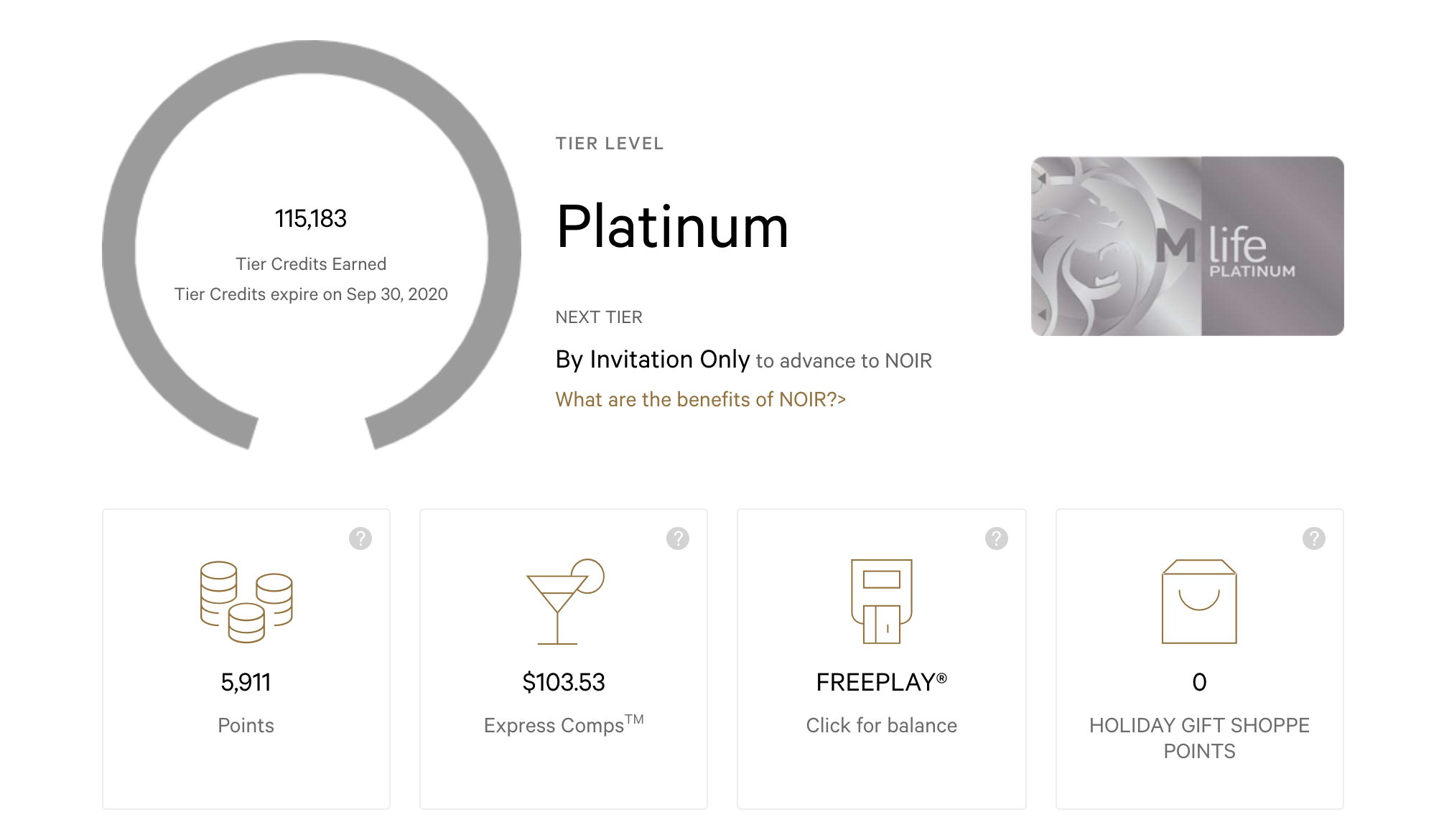
Accessing your M Life Rewards account—now officially rebranded and integrated into MGM Rewards—allows members to track tier credits, check slot dollars, and manage hotel bookings across properties worldwide. Whether you are accessing your profile for the first time since the transition or troubleshooting authentication roadblocks, navigating the secure portal requires specific credentials and adherence to security protocols to ensure your loyalty earnings remain protected.
Contents
Understanding the Evolution from M Life Rewards to MGM Rewards
The loyalty program originally known as M Life Rewards underwent a major structural evolution to become MGM Rewards. For long-time participants still searching for the legacy login portal, it is important to understand that all digital touchpoints have migrated to the unified MGM Rewards ecosystem. This integration connects your tier status and spending across premier destinations like Bellagio, Aria, MGM Grand, Mandalay Bay, and regional properties nationwide.
Migrating legacy accounts does not require creating a new profile. Your historical account data, including accumulated tier credits and promotional offers, automatically transfers over. However, accessing these benefits online requires updating your password to meet modern cryptographic standards enforced by MGM Resorts International.
Core Benefits Managed Through the Portal
- Real-time tracking of Tier Credits and MGM Rewards Points.
- Balance checks for Slot Dollars and Express Comps.
- Exclusive access to member-only room rates and resort discounts.
- Direct booking management for dining, shows, and nightlife reservations.
- Digital membership card integration for mobile wallet usage.
Prerequisites and Security Requirements for Secure Access
Before initiating the login sequence, ensuring your environment meets the minimum technical specifications prevents common browser errors and authentication loops. MGM Resorts utilizes enterprise-grade identity management systems that enforce strict compliance checks.
Essential Access Requirements
- Supported Browsers: The portal functions optimally on current, auto-updating versions of Google Chrome, Apple Safari, Mozilla Firefox, or Microsoft Edge.
- Network Stability: A secure, private internet connection is strongly recommended. Public Wi-Fi networks in casino properties may occasionally trigger defensive firewall blocks if encryption layers are compromised.
- Credentials: You must have your registered email address or M Life/MGM Rewards account number alongside your secure passphrase.
- Two-Factor Authentication (2FA): Depending on your account activity and security profile, the system may prompt you to verify your identity via an SMS code sent to your registered mobile device or an email confirmation link.
Step-by-Step Guide to the MGM Rewards Online Login Process
Executing the login workflow correctly prevents account lockouts and minimizes authentication friction. Follow this structured procedure to access your dashboard safely from any desktop or mobile browser.
- Navigate to the Official Portal: Open your web browser and navigate directly to the official MGM Resorts website or the dedicated MGM Rewards portal page, avoiding unverified third-party links or search engine advertisements that may mimic the login screen.
- Locate the Account Sign-In Trigger: Click on the profile icon or the "Sign In" button typically positioned in the top-right corner of the primary navigation bar.
- Input Your Identifier: Enter the email address associated with your loyalty account or your legacy M Life/MGM Rewards card number in the primary identification field.
- Enter Your Passphrase: Type your confidential password into the corresponding security field. Ensure Caps Lock is disabled to prevent incorrect entry errors.
- Complete Multi-Factor Verification (If Prompted): If the system detects a login from an unrecognized device or IP address, retrieve the verification code sent to your mobile phone or email and enter it when requested.
- Access Your Dashboard: Upon successful authentication, you will be redirected to your personal account dashboard where tier status, coin balances, and targeted offers are displayed.
Account Management Comparison: Legacy M Life vs. Current MGM Rewards Portal
To highlight the structural and functional changes between the old M Life framework and the current digital management system, review the comparative breakdown below.
| Feature / Metric | Legacy M Life Rewards Portal (Archived) | Current MGM Rewards Portal (2026 Standard) |
|---|---|---|
| Primary Domain / Access | mlife.com (Redirects to mgmresorts.com) | mgmresorts.com / MGM Rewards Hub |
| Authentication Standard | Standard single-factor password entry | Enhanced encryption with optional 2FA |
| Point Currency | Express Comps and Tier Credits | MGM Rewards Points, Slot Dollars, and Tier Credits |
| Cross-Property Integration | Limited primarily to Las Vegas resorts | Fully integrated across national portfolio and regional partners |
| Mobile Integration | Basic web viewing capability | Native mobile wallet integration and app synchronization |
Troubleshooting Common Login and Authentication Failures
Encountering issues while attempting to access your loyalty profile is common, particularly for infrequent travelers or members updating outdated credentials. System safeguards protect accounts by locking profiles after multiple failed attempts.
Password Recovery Protocol If you have forgotten your password, utilize the self-service "Forgot Password" utility on the sign-in screen. You will need access to the email inbox tied to your account to receive a secure, time-sensitive password reset link. Avoid sharing temporary verification links with anyone.
Common Failure Points and Solutions
- Account Lockouts: Entering incorrect credentials consecutively five times triggers an automated security lock. Contact MGM Rewards Member Services via telephone or visit a physical M Life/MGM Rewards desk at any participating resort to verify your identity and restore access.
- Browser Cache Conflicts: Stored cookies and corrupted cache files frequently cause infinite redirect loops. Clearing browser cache and cookies or attempting access via an incognito/private browsing window typically resolves this issue.
- Unrecognized Email Addresses: If your primary email address has changed since your last casino visit, online self-recovery may fail. A customer service representative must manually update your profile details using valid government-issued photo identification.
Practical Best Practices for Protecting Your Loyalty Account
Because loyalty accounts accumulate substantial financial value in Slot Dollars, Express Comps, and redeemable points, protecting your login credentials is a critical priority.
- Use Unique Passwords: Never reuse a password on the MGM Rewards portal that you utilize for banking, email, or social media platforms.
- Beware of Phishing Schemes: Official MGM Resorts representatives will never ask for your password via phone, text message, or unverified email correspondence. Always verify the browser URL before typing credentials.
- Log Out After Session Completion: When accessing your account from shared or public computers—such as kiosks located within resort properties—always manually log out of your session and close the browser window.
Frequently Asked Questions
Can I use my old M Life Rewards card to log in online?
Yes, your legacy M Life account number remains valid as a unique identifier for signing into the current MGM Rewards digital portal, provided your account is active and linked to your profile data.
What should I do if my Tier Credits are missing from my dashboard?
Tier Credits typically update within 24 to 48 hours of qualifying gaming or resort spend. If credits fail to appear after a week, contact MGM Rewards Member Services with your physical receipts or property folio numbers for manual auditing.
Is a smartphone required to access my MGM Rewards account online?
A smartphone is not strictly required, as you can access the portal via any desktop computer or laptop equipped with a modern web browser and an internet connection. However, mobile access simplifies digital card management and 2FA verification.
How do I update my personal contact information on the portal?
Once logged into your dashboard, navigate to the profile settings or account preferences section to update your mailing address, phone number, and communication preferences securely.
What differentiates Slot Dollars from Express Comps in the dashboard?
Slot Dollars are redeemable for free play directly on participating slot machines across MGM properties, whereas Express Comps can be utilized to pay for dining, entertainment, hotel stays, and spa services.
Strategic Recommendation for Ongoing Account Health
To maximize the value of your loyalty earnings and maintain uninterrupted access to targeted promotional offers, log into your portal at least once per quarter to review your tier standing and ensure your contact details remain current. Proactive account management guarantees that your earned rewards are fully optimized for your next resort stay.
Image Gallery