What Counts as Intermediate Excel Skills: A Comprehensive Benchmark
Defining intermediate Excel proficiency requires moving beyond basic data entry and simple sum functions to a functional understanding of data transformation, logical analysis, and workflow automation. An intermediate user is typically...
Defining intermediate Excel proficiency requires moving beyond basic data entry and simple sum functions to a functional understanding of data transformation, logical analysis, and workflow automation. An intermediate user is typically defined by their ability to manipulate large datasets into meaningful insights without needing constant manual intervention, leveraging tools like VLOOKUP, PivotTables, and basic conditional logic to maintain productivity.
Contents
The Foundation: Moving Beyond the Basics
If you are at the beginner level, your experience is likely confined to typing data into cells, using the AutoSum button, and perhaps applying simple formatting like bold text or cell borders. Transitioning to an intermediate level means shifting your focus from "how do I type this" to "how do I make Excel process this for me."
The core differentiator is the shift toward reusability and structural integrity. An intermediate user creates workbooks that are designed for others to read or for the same data to be refreshed later. This involves understanding cell referencing (absolute vs. relative references), which is the bedrock of building formulas that can be dragged across thousands of rows without breaking.
Essential Functional Thresholds
To be considered intermediate, a user must demonstrate mastery over specific functional categories that turn static spreadsheets into dynamic tools.
1. Advanced Data Lookup and Reference
You must move beyond simple manual searching. Proficiency here includes:
- XLOOKUP and VLOOKUP: Understanding how to pull data from one table into another based on a unique identifier. By 2026 standards, XLOOKUP is the modern, more robust preference, but familiarity with the limitations of VLOOKUP remains essential for legacy file maintenance.
- INDEX/MATCH: Combining these functions to overcome the column-order limitations of VLOOKUP. This demonstrates a deeper grasp of how Excel maps arrays.
2. Data Summarization and Analysis
Intermediate users stop manual counting or adding. You should be able to:
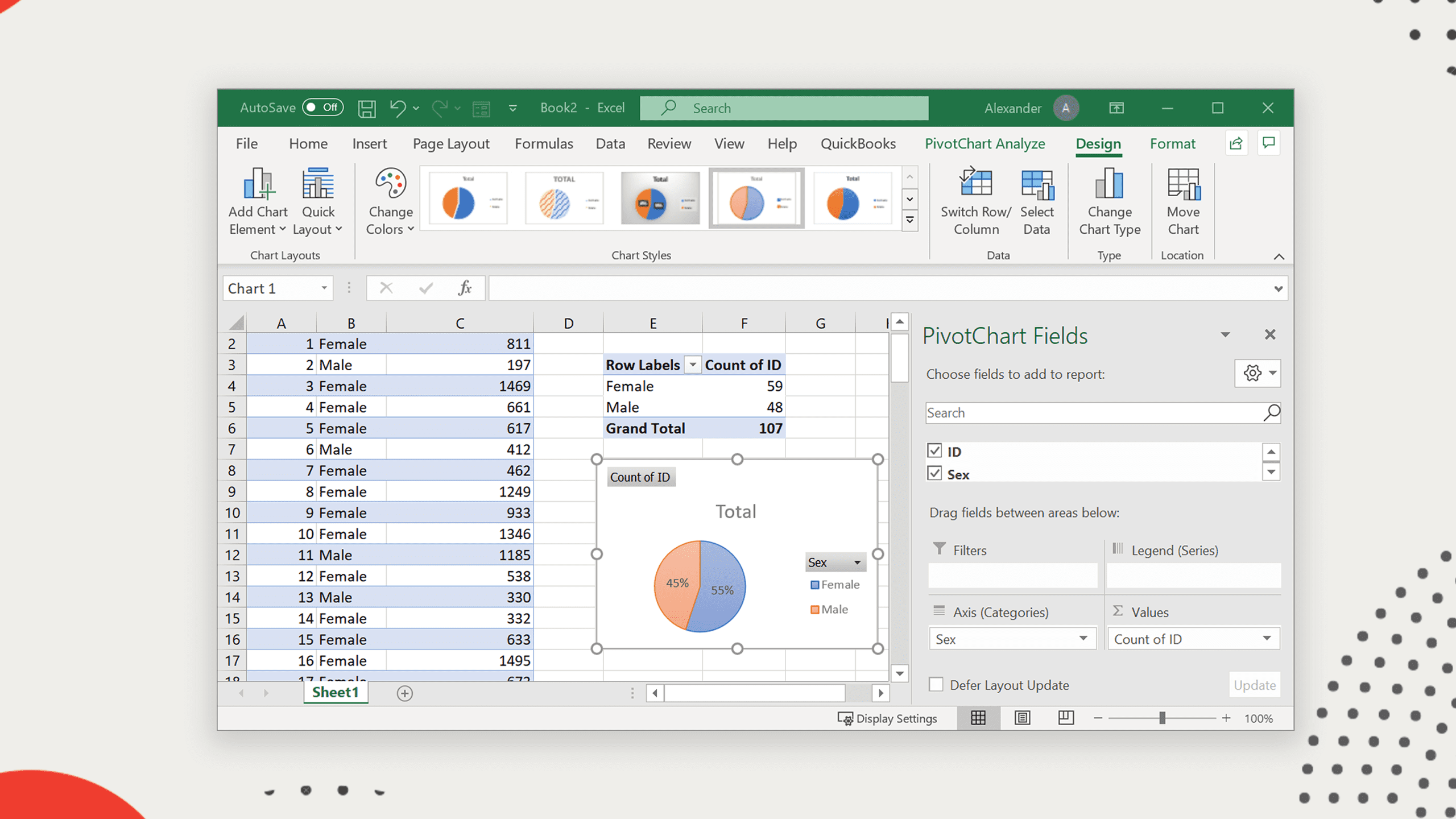
- PivotTables: This is the non-negotiable skill. An intermediate user must be able to drag fields into rows, columns, and values to summarize thousands of rows of data in seconds. This includes creating Calculated Fields and adjusting Value Field Settings (e.g., showing values as a percentage of the total).
- Slicers and Timelines: Using these visual tools to filter PivotTables, making dashboards interactive for stakeholders.
3. Logical Operations and Conditional Formatting
These features allow the spreadsheet to "make decisions" based on the data provided:
- IF, AND, OR, and Nested IFs: The ability to write logic that flags variances or categorizes data automatically.
- Conditional Formatting: Setting up rules that highlight negative margins, overdue dates, or outliers automatically. This provides immediate visual feedback on data health.
Comparison of Proficiency Levels
| Feature | Beginner | Intermediate | Advanced |
|---|---|---|---|
| Formulas | Basic Arithmetic (+, -, *, /) | Logical (IF, VLOOKUP, XLOOKUP) | Array Formulas, LAMBDA, LET |
| Data Summary | Manual Counting | PivotTables | Power Pivot, DAX, Data Models |
| Automation | None | Recorded Macros | VBA Scripting, Office Scripts |
| Visualization | Basic Charts | Dynamic Charts/Dashboards | Power BI integration, Power View |
| Data Cleaning | Manual Deletion | Power Query (Get & Transform) | M-Language, API connections |
The Power Query Milestone
In 2026, one of the most critical dividers between "competent" and "intermediate" is the use of Power Query. While many users still rely on copying and pasting data from different CSV files, an intermediate user uses the "Get & Transform" tab.
Power Query allows you to import data from external sources, clean it (remove nulls, split columns, unpivot data), and load it into your workbook. The benefit is that when the source data updates, you simply click "Refresh," and your entire report updates. If you are still cleaning your data manually every week, you have not yet reached the intermediate threshold.
Logical Troubleshooting and Data Integrity
Technical skill is not just about knowing the functions; it is about knowing how to fix the spreadsheet when things go wrong. An intermediate user knows how to use the Evaluate Formula tool to step through a calculation to find errors. They understand the difference between #N/A, #REF!, and #VALUE! errors and, more importantly, know how to wrap formulas in IFERROR or IFNA to ensure the final report remains clean and professional.
Professional Standards and Best Practices
At the intermediate level, your workbooks should reflect a standard of "defensible data." This implies:
- Separation of Concerns: Keeping raw data on one sheet, calculations on another, and the final dashboard on a third.
- Documentation: Using clear naming conventions for tabs and ensuring formulas are not overly complex. If a formula is too long, break it into helper columns.
- Data Validation: Using drop-down menus (Data Validation) to restrict user input, preventing the "dirty data" that breaks later analysis.
Frequently Asked Questions
Is knowing VBA necessary to be intermediate? No. While VBA (Visual Basic for Applications) allows for automation, most intermediate users can achieve their goals using Power Query and standard formulas. VBA is generally categorized as an advanced skill.
What is the difference between an intermediate user and an advanced user? An intermediate user leverages existing features to solve business problems. An advanced user creates custom solutions, often involving external data modeling (Power Pivot), complex array formulas, or writing scripts to automate tasks that standard Excel features cannot handle.
Do I need to know every function in Excel? Certainly not. Microsoft Excel contains hundreds of functions. An intermediate user knows the 20–30 functions relevant to their specific industry (e.g., finance, HR, or logistics) and knows how to search for documentation when a new problem arises.
Can I be intermediate without PivotTables? It is highly unlikely. PivotTables are the primary tool for summarizing large datasets. Without them, you are limited to manual summation, which is prone to error and inefficient.
Does using Office 365 change these requirements?
Yes. Modern features like Dynamic Arrays (e.g., FILTER, UNIQUE, SORT) have made some complex legacy formulas obsolete. Being intermediate in 2026 means utilizing these modern functions over clunky, older alternatives.
Next Steps for Skill Development
To verify your intermediate status, try to build a "Self-Service Report." Take a raw data export from your company's software, use Power Query to clean it, apply PivotTables to summarize it, and use Slicers to create a one-page dashboard. If you can perform this task without external help and can refresh the data in under two minutes, you have firmly secured an intermediate proficiency. If you find yourself struggling with the Power Query interface, focus your learning on "Data Transformation" workflows, as this is where the most significant gains in professional productivity are found today.
Image Gallery