Understanding FE80 IPv6 Link-Local Addresses: A Complete Technical Guide
An FE80 IPv6 address is a link-local address (LLA) that is automatically assigned to every IPv6-enabled network interface. These addresses use the prefix fe80::/10 and are restricted to a single network segment, meaning they are not ro...
An FE80 IPv6 address is a link-local address (LLA) that is automatically assigned to every IPv6-enabled network interface. These addresses use the prefix fe80::/10 and are restricted to a single network segment, meaning they are not routable across the internet but are essential for local network functions like neighbor discovery and router solicitation.
Contents
As we navigate the networking landscape of 2026, IPv6 has moved from a "future-proofing" luxury to a fundamental requirement. Within the IPv6 architecture, the link-local address is perhaps the most misunderstood yet critical component. Whether you are a network administrator or a student of computer science, understanding why these addresses start with "FE80" and how the "/10" prefix defines their behavior is key to mastering modern networking.
What is an FE80 IPv6 Address?
In the IPv6 protocol, a link-local address is a specific type of unicast address used for communication within a single network link (the local subnet). Unlike Global Unicast Addresses (GUA), which are globally reachable, or Unique Local Addresses (ULA), which are meant for internal routing, a link-local address is confined to the "link" it resides on.
The "FE80" designation comes from the binary representation of the address block. Under RFC 4291, link-local addresses are defined by the prefix fe80::/10. This means the first 10 bits of the 128-bit IPv6 address are fixed as 1111 1110 10.
When you convert these bits into hexadecimal:
- The first 8 bits (
1111 1110) equal FE. - The next 2 bits are
10. - The remaining 6 bits of the first 16-bit block are required to be zero in current standard implementations.
This results in the first four hex digits being FE80. While the theoretical range of the /10 prefix spans from fe80 to febf, in practice, the internet community and operating systems exclusively use the fe80::/64 format for interface configuration.
The Significance of the "/10" Prefix Length
The "10" in "fe80::/10" refers to the prefix length, indicating that the first 10 bits are the network portion. In the early days of IPv6 design, the /10 bitmask was chosen to reserve a large block of address space for local-link functions, allowing for future sub-categories of local addresses that might not have been envisioned at the time.
In 2026, almost all modern operating systems (Windows 11/12, Linux kernels 6.x+, and macOS) treat the FE80 block as a /64 for actual addressing. The remaining 54 bits between the prefix and the 64-bit interface identifier are set to zero. This alignment with the /64 boundary is crucial because it ensures compatibility with Stateless Address Autoconfiguration (SLAAC) and other neighbor discovery mechanisms that rely on a 64-bit host portion.
Why FE80 Addresses are Mandatory
You cannot "turn off" an FE80 address without effectively breaking IPv6 on that interface. Even if a device has a Global Unicast Address (like 2001:db8::1), it still maintains its FE80 address. This is because link-local addresses perform several "under-the-hood" tasks that are vital for the protocol's health:
- Neighbor Discovery Protocol (NDP): IPv6 does not use ARP (Address Resolution Protocol). Instead, it uses NDP to find the MAC address of neighbors on the same link. This process happens entirely over link-local addresses.
- Router Solicitation and Advertisement: When a device joins a network, it sends a Router Solicitation (RS) message to find local routers. The router responds with a Router Advertisement (RA) containing prefix information. Both of these messages use FE80 addresses.
- Next-Hop Gateway: When a router advertises itself to the network, it tells hosts to use its link-local address as the default gateway. If you look at your computer's routing table, you will often see the default gateway listed as an
fe80::address rather than a global one. - DHCPv6 Communication: Clients use their link-local addresses to communicate with DHCPv6 servers or relay agents to obtain global addresses or DNS information.
How FE80 Addresses are Generated
There are two primary methods through which an interface acquires its FE80 address. The method used significantly impacts both network management and user privacy.
1. EUI-64 (Extended Unique Identifier)
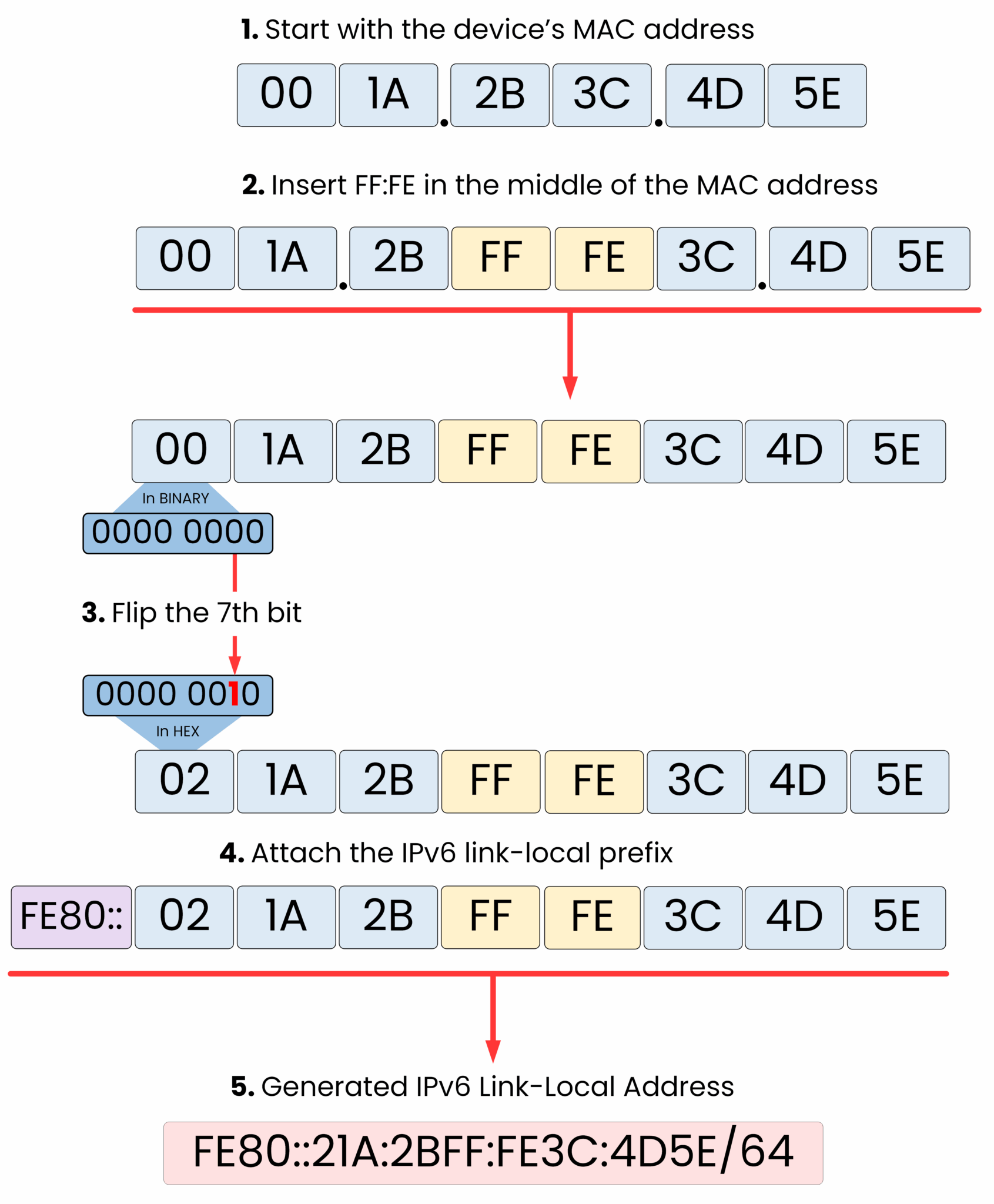
The traditional method involves taking the device’s 48-bit MAC address and expanding it into a 64-bit interface identifier.
- The Process: The MAC address is split in half, and the hex value
FF:FEis inserted in the middle. The 7th bit (the universal/local bit) is then flipped. - The Problem: Because the MAC address is constant, an EUI-64 address makes it easy to track a device across different networks, posing a privacy risk. By 2026, this method is largely deprecated for client devices but is still common in networking hardware like switches and routers.
2. Semantically Opaque/Stable Privacy Addresses (RFC 7217)
To combat the privacy issues of EUI-64, modern systems use RFC 7217. This method generates a 64-bit identifier that is stable for a specific network link but changes if the device moves to a different network. It uses a cryptographic hash of the interface ID, the network prefix, and a secret key. This ensures the address is "opaque" (it doesn't reveal the MAC address) while remaining "stable" (it doesn't change every time you reboot).
The Concept of the Zone ID (Scope ID)
Because every interface on a router or a multi-homed computer uses the same fe80::/10 prefix, the operating system needs a way to know which physical wire to send a packet out of. This is solved by the Zone ID or Scope Index.
If you try to ping a link-local address, you must specify the interface:
- Windows:
ping fe80::1abc:2def:3ghi:4jkl%12(where 12 is the interface index). - Linux/macOS:
ping fe80::1abc:2def:3ghi:4jkl%eth0.
The % sign followed by the interface name or number is the Zone ID. Without it, the packet has no "direction" because the FE80 prefix exists on every local link simultaneously.
Comparing IPv6 Address Types
| Address Type | Prefix | Scope | Routable? | Purpose |
|---|---|---|---|---|
| Link-Local | fe80::/10 |
Single Link | No | Local discovery, routing protocols, and autoconfiguration. |
| Global Unicast | 2000::/3 |
Global | Yes | Standard internet communication (equivalent to Public IPv4). |
| Unique Local | fc00::/7 |
Organization | Within Site | Private internal networking (equivalent to RFC 1918 IPv4). |
| Multicast | ff00::/8 |
Defined by Scope | Variable | One-to-many communication (replaces Broadcast). |
Troubleshooting FE80 Addresses
When troubleshooting IPv6 connectivity, the presence (or absence) of an FE80 address is the first thing to check.
- Duplicate Address Detection (DAD): Before an interface can use an FE80 address, it sends a "Neighbor Solicitation" to see if anyone else is using it. If a conflict is found, the address is marked as "duplicate," and IPv6 will fail on that interface.
- Firewall Rules: Many junior administrators mistakenly block all ICMPv6 traffic. Because FE80 addresses rely on ICMPv6 for neighbor discovery, blocking this traffic will prevent the device from communicating even with its own gateway. Always ensure that Link-Local ICMPv6 (Type 133-137) is permitted.
- Routing Issues: Remember that FE80 addresses cannot be routed. If you can ping a server's link-local address but cannot reach it from a different subnet, this is expected behavior. You must use a Global Unicast Address for cross-subnet traffic.
Frequently Asked Questions
Can I manually assign an FE80 address?
Yes. While they are usually generated automatically, you can manually assign a link-local address (e.g., fe80::1). This is a common practice on router interfaces to make them easier to remember for use as default gateways. For example, an administrator might set the router's LAN interface to fe80::1 so that all client devices can easily point to that address.
Why do I see multiple FE80 addresses on one interface?
While unusual, an interface can support multiple link-local addresses. This sometimes happens during a transition between generation methods (like switching from EUI-64 to privacy extensions) or if specific virtualized services are running. However, only one "preferred" address is typically used for outgoing local communication.
Does FE80 work if I don't have internet access?
Absolutely. FE80 addresses are entirely independent of an internet connection. They will function perfectly on an isolated switch, allowing devices to communicate with each other, share files, or discover local services without any external routing or ISP involvement.
Is the "10" in fe80::/10 ever going to change?
The architectural definition of the /10 prefix is set by the IETF (Internet Engineering Task Force). While the usage could theoretically expand into the fe90, fea0, or feb0 ranges, there has been no movement to do so as of 2026. The current fe80::/64 implementation provides enough address space for every grain of sand on earth to have its own link-local network, so an expansion is unlikely.
What is the difference between fe80::/10 and fe80::/64?
The /10 is the official registry block reserved for link-local use. The /64 is the actual prefix length used by operating systems when assigning an address to an interface. In practice, the 54 bits between the 10th and 64th bit are always padded with zeros.
Summary and Next Actions
The FE80 IPv6 address is the silent workhorse of modern networking. By utilizing the fe80::/10 prefix, IPv6 ensures that every device can talk to its immediate neighbors the moment it is plugged in, without needing a DHCP server or manual configuration.
Next Actions for Network Professionals:
- Audit your Gateways: Check your local workstations and see if the default gateway is an FE80 address. This confirms that your router is correctly using NDP for advertisements.
- Check Privacy Settings: Use
ipconfig(Windows) orip addr(Linux) to see if your link-local address contains your MAC address (look forff:fein the middle). If it does, consider enabling IPv6 privacy extensions. - Update Firewalls: Ensure your internal security policies allow ICMPv6 traffic between link-local addresses to prevent "black hole" routing issues within your local subnets.
Image Gallery