Finding the Best Ad Blocker for iPhone Apps in 2026
Navigating the ecosystem of iOS content filters requires understanding that traditional desktop extensions do not work natively inside Apple mobile software. The best ad blocker for iPhone apps relies on Safari Content Blocker APIs and...
Navigating the ecosystem of iOS content filters requires understanding that traditional desktop extensions do not work natively inside Apple mobile software. The best ad blocker for iPhone apps relies on Safari Content Blocker APIs and encrypted local DNS proxies to scrub intrusive scripts, banners, and trackers across both web browsers and third-party software environments.
Contents
Understanding How iOS Ad Blocking Operates
Apple structures iOS with strict sandboxing protocols. Unlike desktop operating systems where extensions can inject code into any browser process, iOS applications operate in isolated memory spaces. Because of this architectural design, an ad blocker cannot actively rewrite the code of a standalone native app downloaded from the App Store. Instead, effective blocking works through two primary vectors: Safari integration and network-level DNS filtering.
Safari content blockers use a compiled JSON rule list processed directly by WebKit. When you load a webpage inside Safari or within an in-app browser view (SFSafariViewController), the engine checks resource requests against thousands of filter lists without sending your browsing history to the developer. For standalone apps that make independent network calls to display advertisements, system-wide DNS blocking intercepts these requests before they hit external servers, dropping connection attempts to known telemetry and ad-serving domains.
Core Architectural Requirements for Mobile Content Filtering
Selecting a utility for your device involves evaluating specific performance parameters. A poorly optimized filtering utility can drain battery life, slow down cellular data throughput, or break legitimate web scripts required by banking and e-commerce platforms.
- WebKit Integration: Must utilize Apple native APIs to execute rules efficiently with minimal CPU overhead.
- DNS-Over-HTTPS (DoH) or DNS-Over-TLS (DoT): System-wide blocking profiles should encrypt DNS queries to prevent internet service provider tracking while neutralizing ad domains.
- Custom Filter List Support: Advanced users require the ability to subscribe to specialized community lists (such as regional filters or specific privacy repositories).
- Low Memory Footprint: The application must respect iOS background process limits to prevent sudden termination by the operating system.
Comparison of Leading iOS Content Filtering Solutions
Evaluating top-tier options highlights distinct trade-offs between Safari-exclusive browsing protection and comprehensive system-wide network filtering.
| Solution Name | Primary Mechanism | Safari Support | System-Wide App Filtering | Custom Rules Support | Approximate Pricing (2026) |
|---|---|---|---|---|---|
| 1Blocker | Safari Content Blocker API | Exceptional | Limited (Safari & In-App WebViews) | Advanced | Free tier / $14.99 yearly or $39.99 lifetime |
| AdGuard for iOS | Safari API & Local VPN/DNS | Comprehensive | Full (System-wide via Local Loopback) | Comprehensive | Free tier / $9.99 yearly or Premium lifetime options |
| Wipr | Automated Safari Content Blocker | Excellent | Basic (Safari & In-App WebViews) | Minimal (Set-and-forget focus) | One-time purchase ($3.99) |
| Brave Browser (App) | Built-in Brave Shields | N/A (Standalone Browser) | N/A (App-internal traffic only) | Built-in protections | Free |
Detailed Breakdown of Top Mobile Ad Blockers
1Blocker: Precision Engineering for Safari
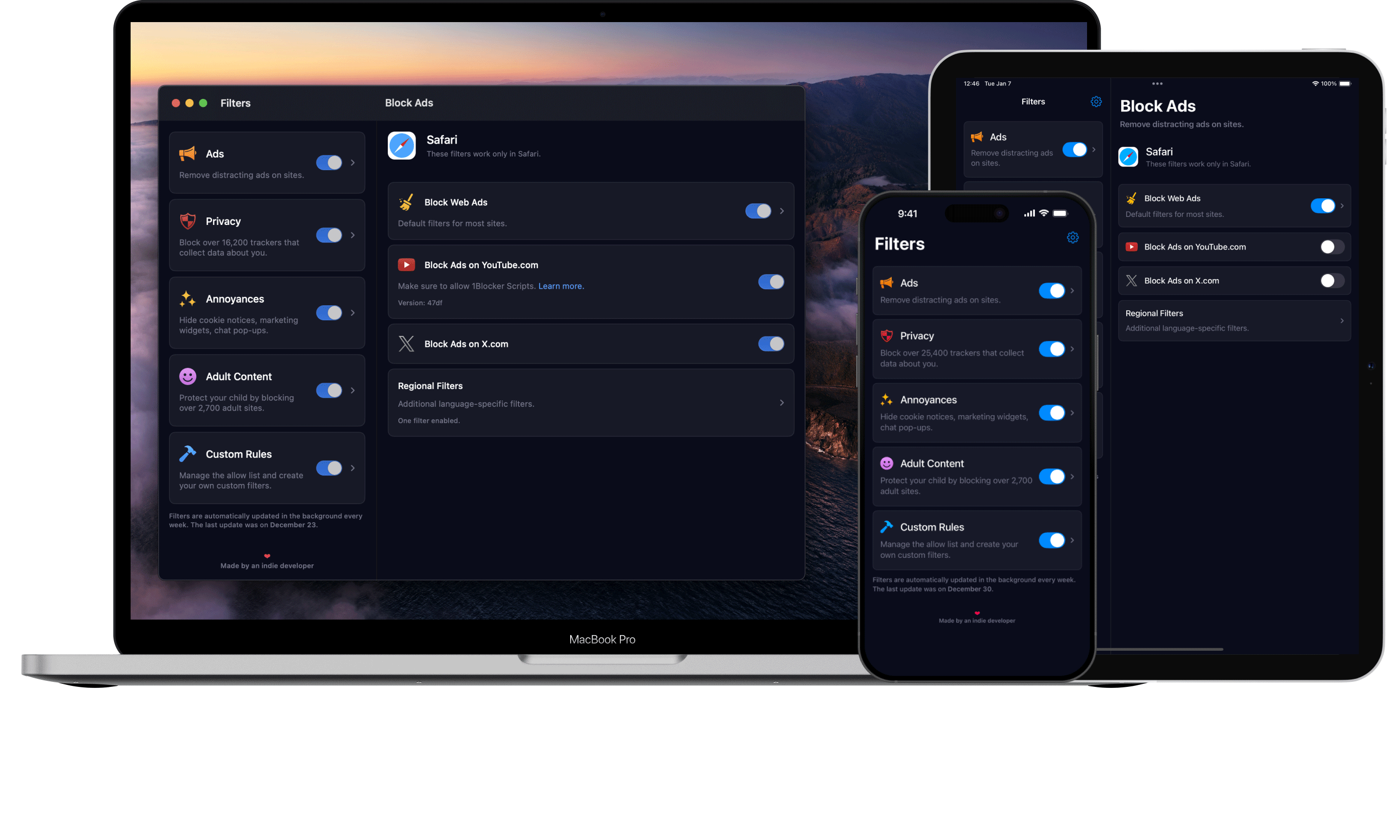
1Blocker is built specifically for users who prioritize deep Safari customization. Rather than routing traffic through a local proxy or virtual private network, it translates thousands of rules into Apple native content blocker format. This ensures zero battery drain and maximum browsing speed.
The application allows users to block trackers, adult content, custom fonts, and annoying cookie consent banners. Its firewall feature permits custom URL blocking, giving technical users granular control over network traffic originating from WebKit instances.
AdGuard for iOS: Comprehensive System-Wide Mitigation
For users seeking broader protection outside of Safari, AdGuard utilizes a local loopback interface (configured as a pseudo-VPN profile locally on the device) to filter network requests across multiple installed utilities.
While it cannot strip advertisements hardcoded into the binary code of a closed-source application, it successfully intercepts telemetry, analytics pings, and third-party ad server requests made by those programs. Its Safari integration is equally robust, featuring advanced cosmetic filtering that removes blank spaces left behind by stripped banner ads.
Wipr: The Set-and-Forget Minimalist Approach
Wipr targets users who want zero configuration overhead. It automatically updates its blocklists in the background without requiring manual intervention or fine-tuning.
While it lacks the granular rule builders found in competing utilities, it handles mainstream ad-blocking efficiently inside Safari and standard in-app browser sessions. It represents an ideal entry point for non-technical users looking for immediate relief from digital clutter.
Step-by-Step Guide: Configuring System-Wide and Safari Filtering
Implementing an effective mobile filtering stack requires proper authorization within iOS Settings. Follow this structured workflow to establish baseline protection.
- Acquire the Application: Download your chosen filtering utility (such as 1Blocker or AdGuard) from the official Apple App Store.
- Enable Safari Extensions: Navigate to device Settings -> Safari -> Extensions. Locate the installed utility and toggle all available switches to the On position. Grant permission for the extension to run on all websites when prompted.
- Configure System DNS (If using network-level blocking): Open the companion app, navigate to its protection or network tab, and allow it to install the local configuration profile. Approve the prompt in Settings -> General -> VPN & Device Management.
- Update Filter Lists: Open the application dashboard and force an immediate update of all subscription lists to ensure zero-day ad servers are captured.
- Verify Operation: Open Safari, visit a known media-heavy website, and confirm that tracking scripts and visual banners are successfully suppressed.
Operational Tip: If a specific banking or verification portal fails to load correctly while protection is active, use the app's whitelist feature or temporarily pause filtering via the Safari extension menu rather than uninstalling the software entirely.
Common Pitfalls and Troubleshooting Strategies
Deploying content filters on iOS occasionally introduces edge-case behaviors that disrupt daily workflows. Understanding these failure points ensures seamless operation.
- In-App Advertisement Persistence: Remember that no tool can remove native video ads embedded directly into media streaming applications or self-hosted application feeds. Network filters can suppress the telemetry, but the app interface may still display blank placeholders.
- Subscription List Bloat: Enabling every available filter list simultaneously can cause WebKit to crash due to strict memory limits imposed by iOS on Safari extensions. Enable only core privacy and ad-blocking lists unless advanced customization is required.
- Local VPN Conflicts: If you utilize a corporate remote access tool or a commercial privacy network, running a local DNS loopback blocker simultaneously may cause connection timeouts. Use network-integrated filter options where available to bypass this limitation.
Frequently Asked Questions
Can an iOS ad blocker remove ads inside native mobile apps?
No application can alter the compiled binary code of a closed-source native app from the App Store. However, advanced network-level blockers can intercept and block requests made to third-party ad servers, reducing tracking and occasionally preventing banner loads.
Do mobile ad blockers impact device battery life?
Native Safari content blockers have virtually zero impact on battery consumption because Apple processes the rules natively at the WebKit level. Solutions that route traffic through a local DNS proxy may introduce a minor, negligible increase in battery usage.
Why do some websites break when an ad blocker is active?
Aggressive cosmetic filtering can strip essential JavaScript elements required for interactive site features, such as login modals or checkout buttons. Whitelisting the specific domain within your application settings instantly resolves these rendering issues.
Are iOS content filtering apps safe for personal privacy?
Reputable applications process rules locally on your device hardware without routing your browsing traffic through external commercial servers. Always review the privacy policy of the specific developer to ensure no telemetry logs are collected.
How often are mobile filter lists updated?
Top-tier utilities update their underlying blocklists multiple times per week automatically in the background, ensuring defense against evolving ad-serving domains and tracking mechanisms.
Protecting your mobile browsing environment requires balancing aggressive script removal with application stability. Deploying a native Safari content blocker alongside an encrypted local DNS filter provides the optimal configuration for modern iOS devices. Configure your blocklists today, keep your filter definitions updated, and enjoy an uninterrupted, privacy-focused digital experience.
Image Gallery