Managing Your List of Email Contacts: A Photographer’s Guide
Effectively managing your email contact list involves choosing a dedicated Email Service Provider (ESP), segmenting your audience by shoot type or client status, and maintaining hygiene through regular "scrubbing." For photographers in...
Effectively managing your email contact list involves choosing a dedicated Email Service Provider (ESP), segmenting your audience by shoot type or client status, and maintaining hygiene through regular "scrubbing." For photographers in 2026, this process ensures your marketing reaches the inbox, bypasses social media algorithms, and builds sustainable long-term client relationships.
Contents
The shift toward privacy-first digital marketing has made the email list a photographer’s most valuable asset. Unlike social media platforms where organic reach is dictated by ever-changing algorithms, an email list represents a direct, owned line of communication with your past, current, and future clients. Whether you are a wedding photographer managing high-value leads or a commercial creator nurturing agency relationships, the way you organize, protect, and communicate with your contacts determines your brand's stability and growth.
The Foundation of Email Management for Photographers
Before diving into the technicalities of sending newsletters, you must establish a system for where your contacts live. In 2026, professional photographers typically balance two distinct types of software: Client Relationship Management (CRM) tools and Email Service Providers (ESP).
CRM vs. ESP: Understanding the Difference
A CRM (such as HoneyBook, Dubsado, or Studio Ninja) is designed for the "transactional" side of your business. It tracks inquiries, sends contracts, manages invoices, and stores specific session notes. While these tools hold your contact data, they are generally not optimized for mass marketing.
An ESP (such as Flodesk, Mailchimp, or ConvertKit) is designed for "relational" marketing. These platforms allow you to send beautiful, brand-aligned emails to hundreds or thousands of people at once, offering advanced automation and analytics that a CRM lacks. For a comprehensive strategy, your contact management should involve a seamless sync between these two systems, ensuring that every person who signs a contract is automatically added to your marketing list (with their consent).
Choosing the Right Platform for Your Photography Business
The "best" platform depends on your specific niche and technical comfort level. By 2026, the market has stabilized around a few key players that cater specifically to visual creatives.
| Feature | Flodesk | Mailchimp | ConvertKit (Kit) |
|---|---|---|---|
| Primary Strength | Visual design & fixed pricing | All-in-one marketing suite | Advanced automation & tagging |
| Ease of Use | High (Drag-and-drop) | Moderate | Moderate to High |
| Cost Structure | Flat rate (Unlimited subs) | Tiered (Based on sub count) | Tiered (Free up to 1k subs) |
| Best For | Portrait & Wedding Photographers | Commercial & Studio Brands | Educators & Workshop Leaders |
| Integration | Direct with most CRMs | Extensive API library | Strong e-commerce links |
Why Visual Design Matters
As a photographer, your brand is visual. Sending a plain-text email might feel personal, but your audience expects a certain aesthetic. Platforms like Flodesk have become industry standards for photographers because they prioritize high-resolution imagery and elegant typography without requiring coding knowledge. Conversely, if you are a commercial photographer targeting art directors, a more streamlined, data-driven approach using Mailchimp might better suit your professional outreach.
Strategic List Segmentation
One of the most common mistakes photographers make is treating their entire contact list as a monolith. Sending a "Newborn Session Special" to a corporate headshot client or a couple whose wedding you shot five years ago leads to high unsubscribe rates. Segmentation is the process of dividing your list into groups based on specific criteria.
1. Segmentation by Service Type
If you are a multi-hyphenate photographer, you must tag your contacts by the service they originally sought. Tags might include:
- Wedding Leads: Couples who have inquired but haven't booked.
- Past Wedding Clients: Couples you have already photographed (ideal for anniversary sessions or album sales).
- Family/Portrait Clients: High-frequency clients who may book annually.
- Commercial/B2B: Business owners and creative directors.
2. Segmentation by Lifecycle Stage
Managing your list also means knowing where a contact stands in their journey with you.
- Cold Leads: People who downloaded a guide but never booked.
- Active Clients: Currently in the middle of a project (should be excluded from general sales blasts).
- VIPs: Your most frequent referrers or high-spending clients.
3. Geographic Segmentation
For photographers who travel or host "mini-sessions" in specific cities, geographic tagging is vital. When you announce a travel date for London or New York, you should only email contacts tagged with those locations to avoid cluttering the inboxes of your local clients.
Legal Compliance and Data Ethics in 2026
Managing a list is not just about organization; it is about legal responsibility. With the continued evolution of data privacy laws like GDPR (Europe), CCPA (California), and various international anti-spam acts (CAN-SPAM, CASL), photographers must adhere to strict standards.
- Explicit Consent: Never add an email address to your marketing list just because they inquired. Use a checkbox on your contact form that asks if they would like to join your newsletter.
- Double Opt-In: This is the practice of sending a confirmation email after someone signs up. It ensures the email address is valid and that the user truly wants to receive your content.
- Easy Unsubscribe: Every marketing email must have a clear, functional unsubscribe link. In 2026, hiding this link or making the process difficult can result in your emails being flagged as spam by major providers like Gmail and Outlook.
- Data Protection: Ensure your chosen ESP is compliant with modern security standards. Your client’s personal data—including their email and name—should be treated with the same level of care as their private photo galleries.
Maintaining "List Hygiene" (Scrubbing)
A large email list is a vanity metric; a healthy email list is a business asset. If you have 5,000 subscribers but only 10% open your emails, your "sender reputation" will suffer. Mail servers may begin directing your emails to the promotions or spam folders because they perceive your content as unwanted.
How to Clean Your List
At least twice a year, you should perform a "scrub." Identify subscribers who have not opened an email in the last 6 to 12 months. Before deleting them, send a Re-engagement Campaign. This is a simple, direct email asking: "Do you still want to hear from me?"
If they do not respond or click the link within the email, remove them from your list. While it feels counterintuitive to delete potential leads, this practice drastically improves your open rates and ensures you aren't paying for "dead" subscribers on tiered pricing plans.
Lead Magnets: Growing Your List Authentically
To manage a list, you must first grow it. Photographers often struggle with the "Join my newsletter" pitch because it offers little value to the client. Instead, use a Lead Magnet—a free, high-value resource offered in exchange for an email address.
Effective Lead Magnets for Photographers:
- The Style Guide: A PDF on "What to Wear for Your Family Session."
- Location Guides: "The Top 10 Secret Photo Spots in [Your City]."
- Pricing/Value Guides: "5 Things to Ask Your Wedding Photographer Before You Hire Them."
- Workshops: A video snippet or "cheat sheet" for hobbyist photographers.
By 2026, these lead magnets should be integrated directly into your website’s workflow. When a user downloads the guide, they should be automatically tagged (e.g., "Interested in Family Portraits") and entered into an automated "Welcome Sequence" that introduces them to your brand over several days.
Frequently Asked Questions
How often should a photographer email their list?
Consistency is more important than frequency. For most photographers, one high-quality email per month is sufficient to stay "top of mind" without being intrusive. During busy seasons or sales (like Black Friday), you might increase this to once a week. Avoid "ghosting" your list for six months and then suddenly sending a sales pitch; your audience will likely have forgotten who you are.
Can I manually add my past clients to my marketing list?
Legally and ethically, you should only add clients who have given consent. If you are starting a new list, the best approach is to send a one-time personal email to your past clients. Explain that you are starting a newsletter with exclusive tips and early access to dates, and provide a link for them to opt-in.
What is a "Welcome Sequence" and do I need one?
A Welcome Sequence is a series of 3-5 automated emails that trigger when someone joins your list. It usually includes:
- The delivery of the lead magnet.
- An introduction to your "why" and your portfolio.
- A "helpful tip" email to establish expertise.
- A soft call to action to book a consultation. This automates the "know, like, and trust" factor, doing the work for you while you are out shooting.
Should I worry about my "Open Rate" or "Click Rate"?
Both are important, but for different reasons. Your Open Rate (typically 30-50% for photographers) tells you if your subject lines are effective and if your emails are reaching the inbox. Your Click Rate (typically 2-5%) tells you if your content is actually engaging and if your "Call to Action" is clear.
Is it better to have a small list or a large list?
A small, highly engaged list of 200 local clients who love your work is significantly more valuable than a list of 5,000 strangers who live across the country. Focus on quality and local relevance over sheer volume.
Practical Next Steps for Your Contact List
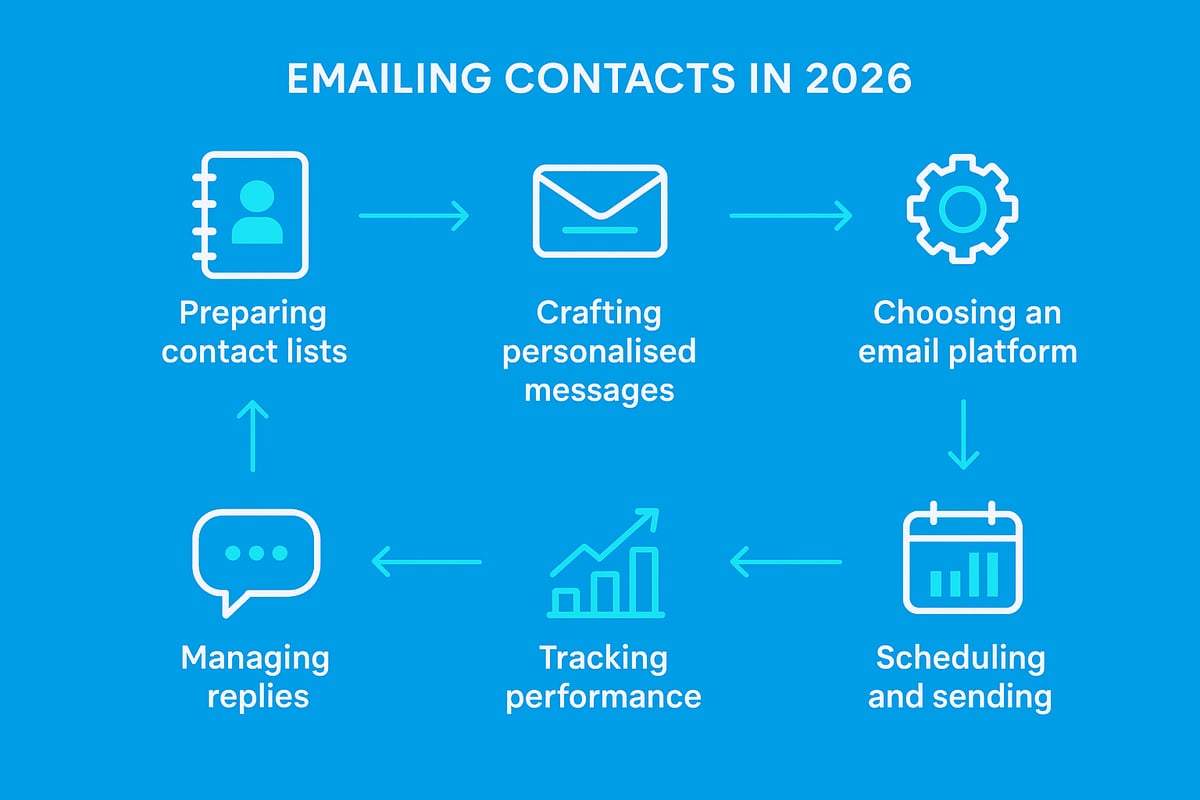
To move from an unorganized list of emails to a professional marketing machine, follow these steps:
- Audit Your Current Contacts: Export every client email from your CRM, gallery software (like Pixieset or Pic-Time), and your email inbox into a single spreadsheet.
- Select an ESP: If you prioritize aesthetics, choose Flodesk. If you want complex automation, choose ConvertKit.
- Upload and Tag: Import your spreadsheet and immediately apply tags based on the service provided (e.g., "Wedding," "Portrait").
- Create a Simple Sign-up Form: Place this on your website’s homepage and footer.
- Send a "Hello" Email: Draft a simple, image-focused email re-introducing yourself and letting your contacts know what kind of value you’ll be providing in future updates.
Managing your email contacts is a marathon, not a sprint. By spending a few hours each month organizing your list and communicating with your audience, you create a resilient business that isn't dependent on social media for survival.
Image Gallery