Free Computer Lessons for Beginners: A Complete Guide to Digital Literacy in 2026
Accessing free computer lessons for beginners in 2026 is simpler than ever through platforms like GCFGlobal, Khan Academy, and local library programs. These resources cover everything from basic hardware navigation to internet safety a...
Accessing free computer lessons for beginners in 2026 is simpler than ever through platforms like GCFGlobal, Khan Academy, and local library programs. These resources cover everything from basic hardware navigation to internet safety and office software, providing structured pathways for individuals with no prior experience to build essential digital skills without any financial investment.
Contents
The Foundation of Digital Literacy in 2026
In 2026, digital literacy is no longer an optional skill; it is a fundamental requirement for participating in modern society. Whether you are looking to manage your health records through a patient portal, apply for a job, or stay connected with family, a basic understanding of computer operations is essential. Beginners often feel overwhelmed by the rapid pace of technological change, but the core principles of using a computer have remained remarkably consistent.
Before diving into complex software, a beginner must understand the hardware—the physical parts of the computer—and the software—the instructions that tell the hardware what to do. Modern computers in 2026, including laptops, desktops, and tablets, generally use one of three major operating systems: Windows, macOS, or ChromeOS. Understanding which one you are using is the first step toward effective learning.
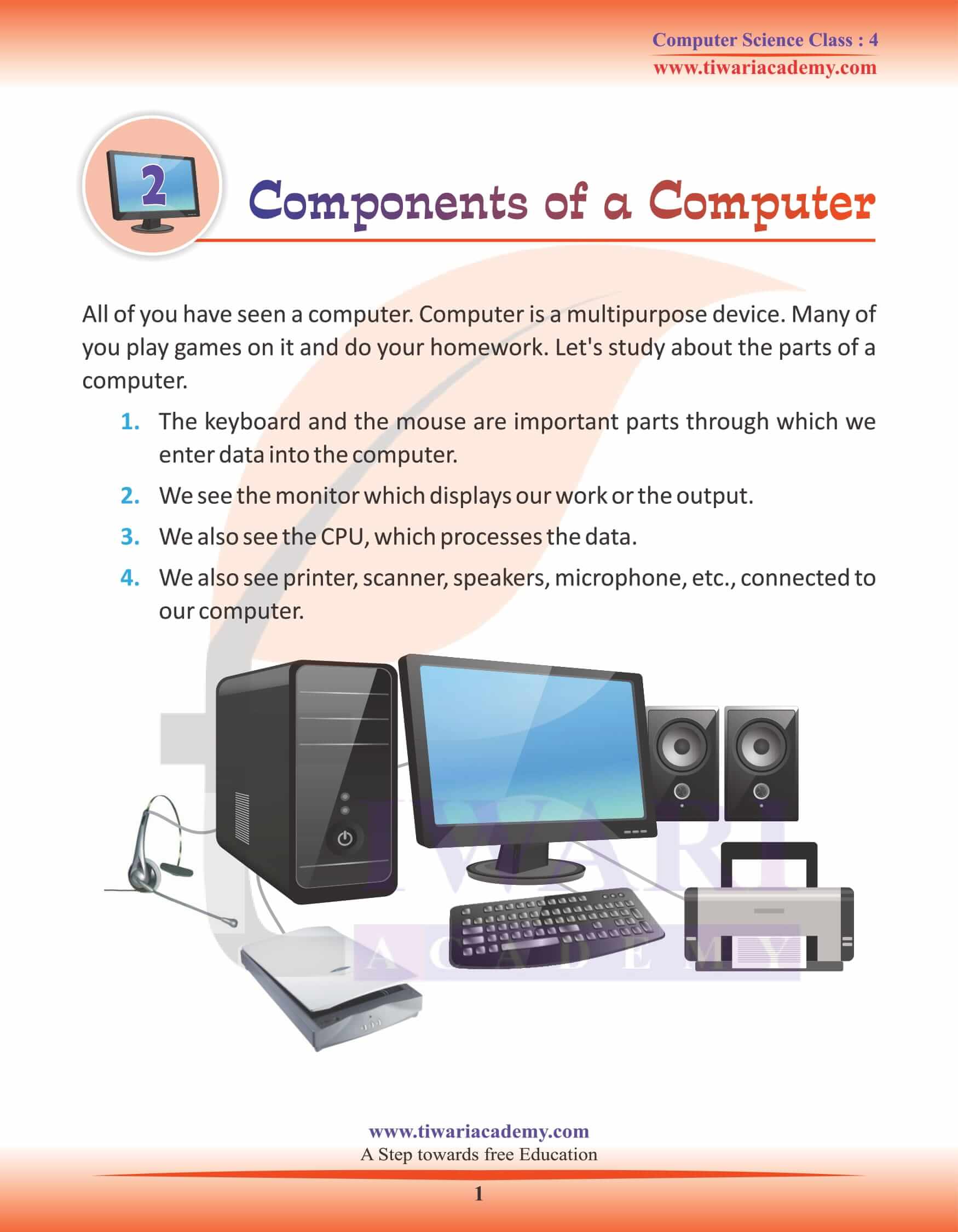
Free lessons typically begin by demystifying the physical components. This includes identifying ports (such as USB-C), understanding the difference between a trackpad and a mouse, and learning keyboard layouts. From there, lessons progress to the "Desktop" or "Home Screen," teaching users how to open applications, manage windows, and shut down the machine safely.
Top Platforms for Free Computer Lessons
Several organizations have dedicated themselves to bridging the digital divide by providing high-quality, zero-cost education. These platforms are vetted, safe, and designed specifically for those who may be intimidated by technology.
GCFGlobal (Goodwill Community Foundation)
For over two decades, GCFGlobal has been the gold standard for free digital education. Their curriculum is uniquely designed for the absolute beginner. What sets GCFGlobal apart is its lack of a "paywall." You do not need to create an account or provide a credit card to access their 2,000+ lessons. Their modules use a mix of text, clear diagrams, and short videos to explain concepts like "What is the Cloud?" or "How to use Windows 11."
Khan Academy
While known for its academic subjects, Khan Academy offers a "Computer Science" and "Digital Literacy" track that is excellent for beginners who want to understand the "why" behind the "how." Their lessons are structured as a linear course, which is helpful for learners who prefer a classroom-like progression. In 2026, they have expanded their offerings to include basic AI literacy, helping beginners understand how to interact with modern search engines and digital assistants.
Coursera and edX (Audit Mode)
While these platforms are known for professional certifications, almost all of their "Introduction to Computing" courses can be "audited" for free. When you audit a course, you get access to all the video lectures and reading materials without paying a fee. This is ideal for beginners who want a university-level introduction to computers from institutions like Harvard or Google.
Local Public Libraries
Never underestimate the power of your local library. Most public libraries in 2026 provide free access to premium learning platforms like LinkedIn Learning (formerly Lynda.com) using your library card number. Furthermore, many libraries host in-person "Ask a Tech" sessions where beginners can get hands-on help with their specific devices.
Comparing Popular Free Learning Resources
The following table compares the most accessible platforms for beginners based on their teaching style and requirements.
| Platform | Primary Format | Best For | Registration Required? |
|---|---|---|---|
| GCFGlobal | Interactive Text & Video | Absolute beginners/Seniors | No |
| Khan Academy | Video Lectures | Concept-based learning | Optional |
| YouTube (Official Channels) | Video | Visual learners/Quick fixes | No |
| Coursera (Audit) | Academic Coursework | In-depth professional basics | Yes |
| Public Libraries | In-person & Online | Hands-on assistance | Yes (Library Card) |
Essential Skills Every Beginner Should Master
When starting your journey, it is easy to get distracted by advanced features. To become digitally proficient, focus on these five core areas:
1. File Management and Organization
One of the biggest hurdles for beginners is losing files they have saved. Free lessons will teach you the "File Explorer" (Windows) or "Finder" (Mac) systems. You will learn how to create folders, rename documents, and move items from a USB drive to your computer's internal storage. Understanding the difference between saving a file "Locally" (on your computer) and "In the Cloud" (on the internet) is a key milestone in 2026.
2. Internet Safety and Privacy
The internet is a powerful tool, but it requires caution. Beginners must learn how to identify "Phishing" scams—fake emails or websites designed to steal information. Lessons in this category cover how to create strong passwords, the importance of Multi-Factor Authentication (MFA), and how to recognize a "Secure" website by looking at the browser's address bar.
3. Email Proficiency
Email remains the primary method of formal communication. Learning how to compose a message, attach a photo or document, and manage an "Inbox" is vital. Free courses often use Gmail or Outlook as examples, teaching users how to filter out "Spam" and organize their correspondence into categories.
4. Navigating Office Software
Whether you are writing a letter or tracking a household budget, basic word processing and spreadsheet skills are necessary. Free lessons often focus on Google Workspace (Docs, Sheets) or the free online version of Microsoft 365. These tools allow you to create professional-looking documents entirely within your web browser.
5. Using Search Engines Effectively
In 2026, search engines have evolved to understand natural language. Learning how to ask a computer a question and, more importantly, how to evaluate the results for accuracy is a critical skill. This is often referred to as "Information Literacy."
Overcoming Common Challenges for Beginners
Many beginners stop their lessons because they hit a technical snag or feel "too old" to learn. It is important to remember that every expert was once a novice. Modern operating systems are designed to be "user-friendly," meaning they are built to be intuitive.
One common mistake is the fear of "breaking" the computer. In reality, it is very difficult to cause permanent damage to a computer through normal software use. Most mistakes can be undone with a simple "Undo" command (Ctrl+Z on Windows or Command+Z on Mac) or by restarting the device.
Another challenge is the vocabulary. Terms like "RAM," "Browser," "Cache," and "Operating System" can feel like a foreign language. High-quality free lessons, such as those from the Goodwill Community Foundation, provide clear glossaries to help you learn the lingo at your own pace.
How to Get Started Today
If you are ready to begin, the most effective approach is a "step-by-step" method rather than trying to learn everything at once.
- Identify Your Device: Determine if you are using a PC (Windows), a Mac, or a Chromebook.
- Set a Schedule: Dedicate 20 minutes a day to one specific lesson. Consistency is more effective than "cramming" once a week.
- Practice Hands-On: If a lesson teaches you how to create a folder, pause the video and actually create a folder on your computer.
- Ask for Help: If you have a local senior center or library, do not hesitate to attend a digital literacy workshop.
Frequently Asked Questions
Are these "free" lessons actually free or just a trial?
The resources mentioned, such as GCFGlobal and Khan Academy, are genuinely free. They are funded by non-profit organizations or grants and do not require a subscription. Some sites like Coursera offer "freemium" models where the learning is free, but a certificate of completion costs money. For a beginner, the free audit version is more than sufficient.
Do I need a brand-new computer to learn?
No. Most lessons apply to any computer made within the last 5-7 years. As long as your device can connect to the internet and run a modern web browser (like Chrome, Edge, or Safari), you can complete almost any free online course.
Can I learn computer skills on my smartphone?
While you can watch the lessons on a smartphone, it is highly recommended to practice on a laptop or desktop computer. The interface and navigation of a mobile device are significantly different from a traditional computer.
How long does it take for a total beginner to become proficient?
Digital literacy is a journey, not a destination. However, most beginners can master the basics—email, internet browsing, and file management—within 10 to 15 hours of focused study spread over a few weeks.
Is it safe to provide my email address to these sites?
Reputable sites like Khan Academy or LinkedIn Learning are safe. However, always be cautious of sites that ask for your Social Security number or credit card information for a "free" lesson. Stick to established educational platforms.
Practical Next Steps
The best way to start is to visit GCFGlobal.org and click on the "Computer Basics" section. This will take you through a sequence of lessons that assume you know nothing about computers. Once you feel comfortable with the mouse and keyboard, move on to the "Internet Safety" modules. Remember, the goal is not to become a computer programmer overnight, but to gain the confidence needed to navigate the digital world safely and effectively in 2026.
Image Gallery