The Best Auto Insurance Websites and Apps for US Drivers
Navigating the landscape of digital auto insurance in 2026 requires understanding how major carriers leverage mobile applications and web portals to streamline policy management, claims processing, and quote generation. Drivers today p...
Navigating the landscape of digital auto insurance in 2026 requires understanding how major carriers leverage mobile applications and web portals to streamline policy management, claims processing, and quote generation. Drivers today prioritize platforms that offer real-time document access, automated premium payments, and transparent, tech-driven claims tracking to minimize administrative friction.
Contents
Evaluating Digital Insurance Infrastructure
Modern auto insurance platforms are no longer simple quote generators; they are comprehensive financial management hubs. When evaluating a website or app, the primary concern for a driver should be "operational autonomy." Can you perform every essential task—such as adding a driver, updating a policy, filing a claim, or retrieving an ID card—without speaking to a human agent?
Top-tier insurers have invested heavily in UX (user experience) design to ensure that mobile apps provide the same functionality as their desktop counterparts. For US drivers, the gold standard includes high-resolution digital proof-of-insurance cards, which are legally recognized in most jurisdictions for traffic stops.
Key Functionality Standards for Insurance Portals
To be considered among the "best," an insurance app must surpass basic account viewing. It must integrate advanced features that address the specific needs of the modern motorist:
- Digital ID Cards: Instant, offline-accessible proof of insurance.
- Claims Workflow Integration: The ability to upload photos of vehicle damage, document incident locations via GPS, and receive status updates via push notifications.
- Usage-Based Insurance (UBI) Tracking: Seamless background integration with telematics devices or mobile sensors to calculate "safe driving" discounts without requiring manual check-ins.
- Flexible Billing Management: Options for autopay, split payments, and immediate digital payment history exports for personal or tax records.
- Roadside Assistance Request: Geo-located dispatching that tracks the tow truck or service vehicle in real-time, similar to modern ride-sharing apps.
Comparing Top-Tier Carrier Digital Platforms
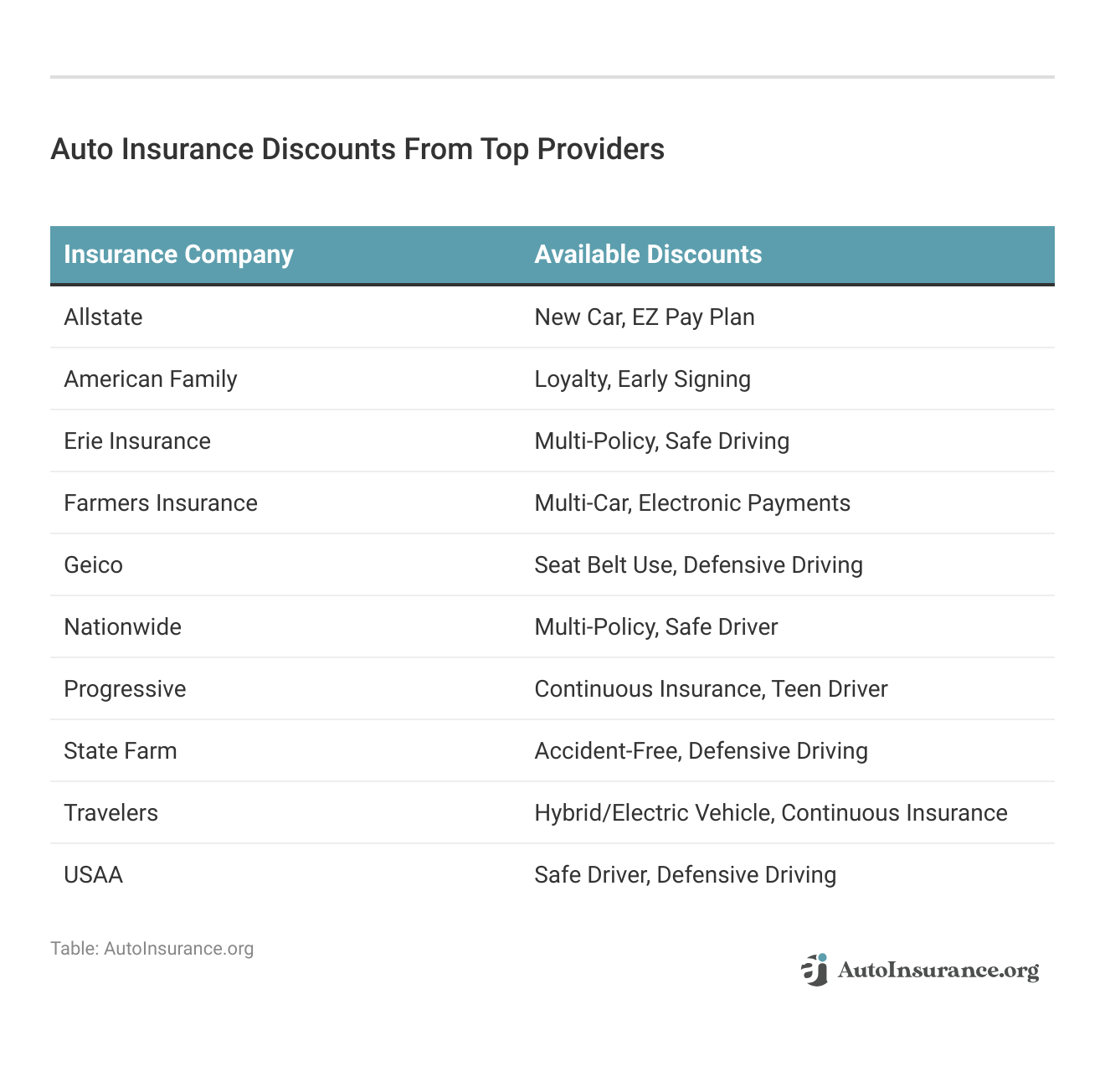
The following table categorizes the strengths of major providers based on their digital interface capabilities and core service offerings.
| Provider | Mobile App Strength | Web Portal Capability | Best Used For |
|---|---|---|---|
| State Farm | Highly intuitive navigation | Extensive self-service options | Personal policy management |
| Geico | Superior claims tracking | Fast, mobile-responsive quotes | Rapid digital interaction |
| Progressive | Advanced UBI (Snapshot) tools | Detailed coverage visualization | Usage-based savings |
| Allstate | Integrated accident triage | Robust document repository | Comprehensive account control |
The Role of Telematics in Modern Apps
One of the most significant shifts in the 2026 insurance market is the reliance on mobile-first telematics. Apps like Progressive’s Snapshot or State Farm’s Drive Safe & Save utilize the gyroscope and accelerometer sensors within your smartphone to monitor braking, acceleration, and speed.
While some drivers express concerns regarding data privacy, the trade-off is often a quantifiable reduction in premiums. When using these features, ensure that the app is properly configured with background location permissions, or the system may fail to record trips correctly. If the app stops logging data, check your device’s "Battery Optimization" settings, as modern operating systems frequently force-close background apps to save power, which inadvertently disables telematics logging.
Security and Data Privacy Protocols
When using any insurance app, security should be the priority. You are uploading personal identification, financial details, and sensitive driver history. Ensure that the apps you install employ biometric authentication (FaceID or Fingerprint scanning) and Multi-Factor Authentication (MFA).
If a website or app does not offer at least one form of two-factor authentication, it is advisable to contact customer support to verify if the account can be further secured. Never access your insurance portal through a public Wi-Fi network; use a Virtual Private Network (VPN) or your mobile data provider to ensure that your financial session remains encrypted and private.
Troubleshooting Common Technical Hurdles
Digital insurance tools are robust, but they are not immune to technical failures. Common issues often revolve around synchronization. If your digital ID card is outdated, try refreshing the app's cache or logging out and back in to force a fresh pull from the carrier’s server.
For claims filing, always capture photos locally on your phone before uploading them to the app. In the event of a network outage or an app crash, having a local copy of the evidence ensures that you do not lose critical documentation of the incident. If you are involved in a collision, the app may guide you through a specific workflow; follow these prompts strictly, as they are legally designed to capture the necessary information required by state regulators.
Frequently Asked Questions
Can I use a digital insurance card if I get pulled over? Yes. All 50 states and the District of Columbia recognize digital proof of auto insurance. However, ensure your phone is charged and the app is accessible offline. If your phone is dead, you may face difficulties; keeping a printed backup in your glove box is still a recommended best practice.
Is it safer to file a claim through an app or over the phone? Both methods are secure, but using the app is generally faster. The app creates a digital audit trail, timestamped location data, and visual evidence that automatically attaches to your claim file, which can accelerate the initial assessment phase by the insurance company.
Do I have to share my driving data to use these apps? No. Participation in telematics or usage-based insurance programs is typically voluntary. You can use the app for payments, ID cards, and policy management without enabling the tracking features that monitor your driving habits.
What happens if I change my insurance carrier? When switching, the old app will typically lose functionality once the policy is canceled. Ensure you have downloaded all necessary documents, such as proof of prior insurance or accident history reports, before the effective date of your policy termination, as many portals restrict access once a policy is closed.
How do I know if an app is the official version? Only download insurance apps from the official Apple App Store or Google Play Store. Verify that the developer name matches the official company name (e.g., "State Farm Mutual Automobile Insurance Company"). Avoid third-party "comparison" apps that prompt you to enter your credentials, as these may be phishing attempts.
Final Recommendation
For most US drivers, the optimal approach is to download the official app of your chosen provider as soon as your policy is active. Set up biometric login immediately and ensure that push notifications are enabled for claims and billing alerts. If you are a high-mileage driver, test the telematics feature for one cycle—usually 30 to 90 days—to see if the potential premium discount outweighs the data privacy trade-off. Always maintain a secondary, physical copy of your insurance ID card in your vehicle as a reliable fail-safe for technical outages.
Image Gallery