Understanding Why Google Chat Is Encrypted But Not End-To-End
Google Chat provides encryption for data in transit and at rest, meaning messages are scrambled as they travel between your device and Google's servers, and again when stored in Google’s data centers. However, it lacks end-to-end encry...
Google Chat provides encryption for data in transit and at rest, meaning messages are scrambled as they travel between your device and Google's servers, and again when stored in Google’s data centers. However, it lacks end-to-end encryption (E2EE) by default for standard users because Google retains the cryptographic keys required to access, manage, and scan the data for compliance, malware, and abuse prevention.
Contents
The distinction between standard transport-layer security and true end-to-end encryption is vital for organizations, enterprise security teams, and privacy-conscious individuals evaluating collaboration software. While Google Chat secures your communications against external interceptors, the platform itself—and by extension, Google as a service provider—maintains administrative visibility over the content flowing through its network. This comprehensive analysis breaks down how Google Chat handles security, why it falls short of true end-to-end privacy, and how it compares to alternative communication tools.
The Foundations of Google Chat Security Architecture
To understand why Google Chat is encrypted without being end-to-end, you must first examine how data moves through Google's infrastructure. Every message, file attachment, and shared link undergoes multiple layers of cryptographic protection during its lifecycle.
Encryption in Transit
When you send a message from your smartphone, tablet, or desktop browser, Google Chat uses Transport Layer Security (TLS) to encrypt the data packets as they travel across the public internet. This prevents malicious third parties, Internet Service Providers (ISPs), and local network sniffers from intercepting your keystrokes or media files in transit. If someone is monitoring a public Wi-Fi network, they cannot read the raw text of your Google Chat communications.
Encryption at Rest
Once your message arrives at Google’s server infrastructure, it is decrypted momentarily for routing and processing, and then encrypted again before being written to persistent storage media, such as solid-state drives in Google’s data centers. This process is known as encryption at rest and typically utilizes industry-standard algorithms like Advanced Encryption Standard (AES-256). If an unauthorized party were to physically steal a server blade from a Google data center, the raw data would remain unreadable without the corresponding keys.
The Role of Google's Key Management
The crucial architectural difference lies in who holds the keys. In a standard Google Chat implementation, Google generates, manages, and stores the cryptographic keys used to encrypt and decrypt your data. Because Google possesses the keys, its automated systems can scan messages for spam, malware, phishing attempts, and policy violations. Furthermore, Google can technically comply with valid legal subpoenas and law enforcement requests to disclose message contents, because the company possesses the technical capability to decrypt them.
Why End-to-End Encryption Differs From Standard Encryption
End-to-end encryption (E2EE) represents a fundamentally different security paradigm. In a true end-to-end encrypted messaging environment, encryption keys are generated exclusively on the end-user devices—such as your phone or laptop—and never shared with the service provider, server administrators, or any third party.
- [Sender Device (Has Private Key)]
- Encrypted Locally
- [Google Servers / Cloud (Blind Relay)]
- Transmitted Ciphertext
- [Recipient Device (Has Private Key)]
When E2EE is active, a message is locked on the sender’s device and can only be unlocked by the specific private key held on the intended recipient's device.
- No Server-Side Visibility: The hosting platform or messaging provider acts merely as a blind conduit. It passes ciphertext back and forth without possessing the cryptographic keys required to read it.
- Immunity to Server Compromise: Even if a hacker breaches the cloud infrastructure or a rogue employee gains administrative access to the server farm, they see only unreadable random strings of characters.
- Absence of Centralized Scanning: Because the server cannot read the messages, automated content moderation, server-side keyword indexing, and cloud-based spam analysis must happen locally on the device rather than on the cloud infrastructure.
Enterprise Considerations and Client-Side Encryption (CSE)
While consumer accounts and standard Google Workspace tiers rely on Google-managed keys, the landscape shifts when examining enterprise environments and high-security compliance requirements. Google provides options for specific business tiers to bridge the security gap through Client-Side Encryption (CSE).
Google Workspace Client-Side Encryption
Google Workspace Enterprise Plus and Education Plus customers can implement Client-Side Encryption for Google Chat, Drive, Docs, and Meet. With CSE enabled, encryption happens directly in the client browser or app before any data is sent to Google's servers.
However, implementing CSE involves specific trade-offs and infrastructure requirements:
- External Key Management Service (KMS): Organizations must integrate an external, third-party key management service (such as Fortanix, Thales, or Virtru) to control the encryption keys.
- Loss of Native Features: Turning on client-side encryption disables certain cloud-based conveniences, such as server-side search indexing across encrypted files, automated compliance scanning, and some third-party app integrations.
- Administrative Complexity: IT administrators must manage key lifecycles, user provisioning, and access policies carefully. If a user loses their key or access credentials, recovery without administrative key escrow is often impossible.
| Security Feature | Standard Google Chat | Google Chat with Client-Side Encryption (CSE) |
|---|---|---|
| Encryption in Transit | Yes (TLS) | Yes (TLS) |
| Encryption at Rest | Yes (Google-managed keys) | Yes (Customer-managed keys) |
| Server-Side Read Access | Yes (Google can read data) | No (Data is client-encrypted) |
| Compliance & Scanning | Fully supported | Limited by encryption boundary |
| Target Audience | General consumers, standard businesses | Regulated industries, government, high-security enterprise |
Compliance, Moderation, and Legal Implications
The decision by platform operators to avoid default end-to-end encryption across all user tiers is rarely arbitrary. It involves balancing user privacy expectations against regulatory obligations, enterprise data governance, and public safety mandates.
Content Moderation and Abuse Prevention
Major technology providers face intense regulatory and societal pressure to combat illegal content, including child sexual abuse material (CSAM), terrorist recruitment, and financial fraud. Automated scanning tools operating on server-side data allow platforms to detect and report illicit activity swiftly. When a service is fully end-to-end encrypted, the provider has no algorithmic visibility into abuse patterns, placing the entire burden of reporting onto end users or client-side detection mechanisms.
E-Discovery and Corporate Governance
In enterprise legal environments, corporations must maintain compliance with regulatory frameworks like the Health Insurance Portability and Accountability Act (HIPAA), the Sarbanes-Oxley Act (SOX), and various financial industry regulations. Compliance officers require the ability to archive, search, and audit employee communications in response to litigation holds or internal investigations. Standard encryption with server-managed keys permits administrators to export audit logs and retain message history seamlessly, whereas rigorous end-to-end encryption can complicate e-discovery workflows.
Frequently Asked Questions
Is Google Chat safe to use for sensitive personal conversations?
Google Chat is safe from casual snooping, public Wi-Fi interceptors, and unauthorized external hackers because of its transport and storage encryption. However, it is not private from Google itself or from entities with legal authority to compel Google to turn over data. If you require absolute confidentiality against all third parties, a dedicated end-to-end encrypted alternative is preferable.
Can Google read my Google Chat messages?
Yes. Because Google manages the cryptographic keys for standard consumer and business accounts, its automated systems can process message content for spam filtering, spell check, and service improvement. Additionally, authorized Google personnel can access data when required by strict legal processes or internal safety investigations.
How do I turn on end-to-end encryption in Google Chat?
Standard users cannot toggle end-to-end encryption on or off in consumer Google Chat. True end-to-end security is only achievable in enterprise contexts through Google Workspace Client-Side Encryption, which requires an administrator to configure an external key service and assign specific security policies to designated organizational units.
Which popular messaging apps use end-to-end encryption by default?
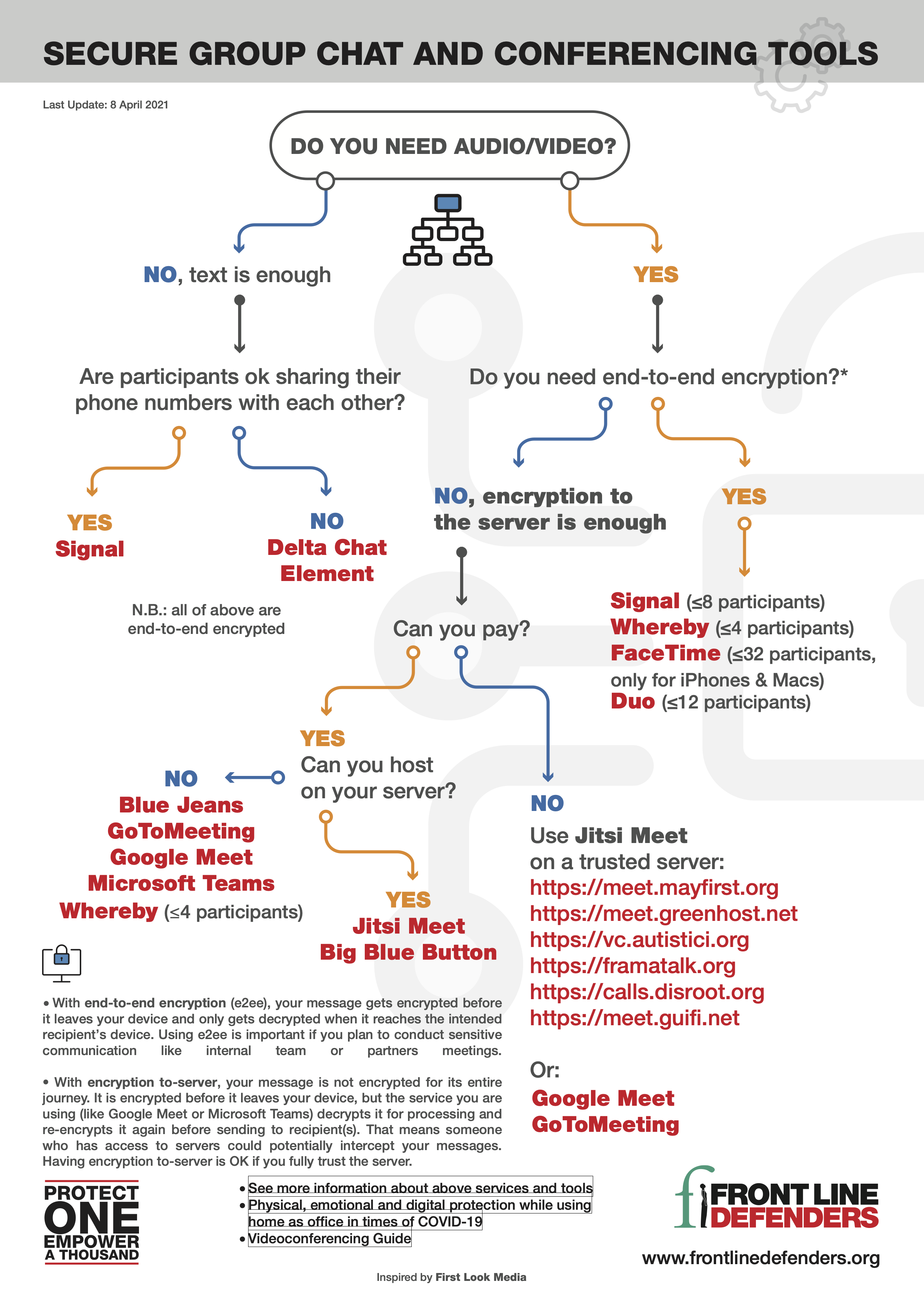
Applications such as Signal, WhatsApp, and Apple iMessage use end-to-end encryption by default for all standard peer-to-peer text communications. In these environments, neither the parent company nor network operators can read the message contents in transit or at rest.
Does Google Chat support encrypted direct messages and spaces?
Google Chat supports secure messaging for both direct conversations and group spaces, but these communications are protected by standard Google-managed encryption rather than client-side or end-to-end keys, unless explicitly configured via enterprise CSE policies.
Practical Recommendations for Secure Communication
When deciding whether Google Chat meets your communication security requirements, evaluate your threat model and organizational compliance obligations. For everyday personal coordination, internal office communication, and low-risk project management, standard Google Chat provides adequate safeguards against external cyber threats.
If your work involves handling classified government intelligence, protecting vulnerable journalistic sources, or discussing proprietary intellectual property under high threat conditions, avoid standard cloud messaging tools. Instead, deploy platforms built from the ground up with mandatory end-to-end encryption, or configure Google Workspace with certified Client-Side Encryption managed through a trusted external provider. Always review your organization's internal data governance policies before transmitting sensitive records across cloud-hosted collaboration suites.
Image Gallery