Key Security Considerations for Moving to the Cloud
Transitioning to the cloud in 2026 requires a fundamental shift from perimeter-based security to a Zero Trust framework centered on identity and data protection. Organizations must master the Shared Responsibility Model, implement robu...
Transitioning to the cloud in 2026 requires a fundamental shift from perimeter-based security to a Zero Trust framework centered on identity and data protection. Organizations must master the Shared Responsibility Model, implement robust Identity and Access Management (IAM), and ensure continuous visibility through automated Cloud Security Posture Management (CSPM) tools to mitigate configuration-based vulnerabilities.
Contents
Moving to a cloud environment—whether public, private, or hybrid—is no longer a simple infrastructure migration; it is a transformation of the entire security lifecycle. In 2026, the complexity of multi-cloud environments and the speed of automated deployments mean that security cannot be an afterthought or a "bolt-on" feature. It must be integrated into the architecture from the first day of planning. Failure to address these considerations often leads to data breaches, regulatory fines, and operational downtime.
The Foundation: The Shared Responsibility Model
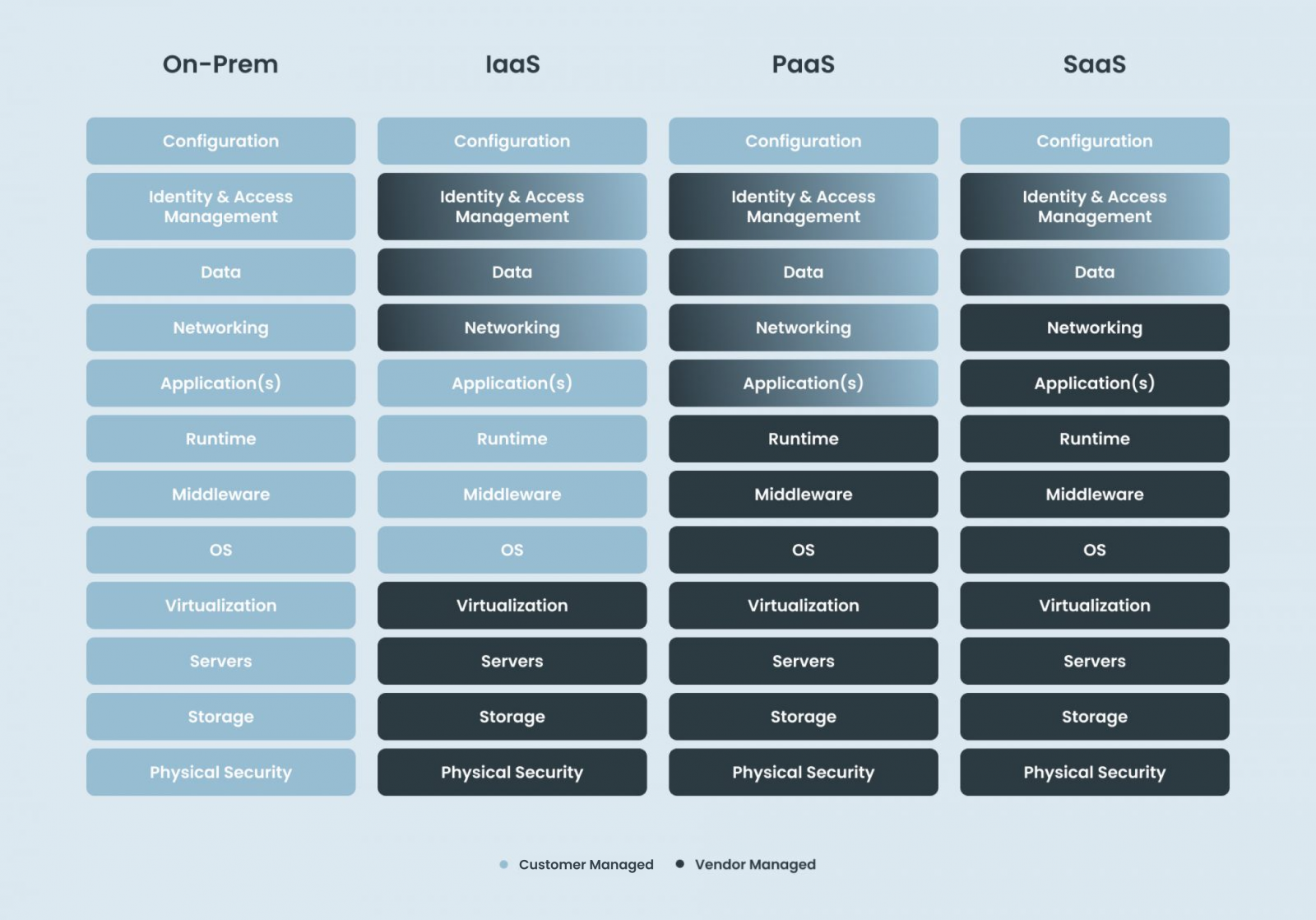
The most critical concept in cloud security is the Shared Responsibility Model. A common mistake organizations make is assuming the Cloud Service Provider (CSP) is responsible for all security aspects. While CSPs like AWS, Microsoft Azure, and Google Cloud secure the "security of the cloud" (the physical data centers, hardware, and underlying virtualization layer), the customer is responsible for "security in the cloud."
The division of responsibility shifts depending on the service model:
- Infrastructure as a Service (IaaS): The customer has the highest level of responsibility. This includes securing the operating system, network traffic, applications, and all data hosted on the virtual machines.
- Platform as a Service (PaaS): The provider manages the underlying infrastructure and middleware, while the customer remains responsible for application security and data protection.
- Software as a Service (SaaS): The provider manages almost the entire stack, but the customer is still responsible for managing user access, identity, and the security of the data they input into the system.
Understanding exactly where the provider's responsibility ends and yours begins is the only way to avoid "security gaps" where neither party is monitoring a specific control.
Implementing Zero Trust Architecture
In 2026, the traditional network perimeter is effectively dead. With employees accessing cloud resources from various locations and devices, organizations must adopt a Zero Trust Architecture (ZTA). Zero Trust operates on the principle of "never trust, always verify."
Identity as the New Perimeter
Identity and Access Management (IAM) has become the primary security control. In a cloud environment, a compromised set of credentials can give an attacker the "keys to the kingdom." Organizations should enforce the Principle of Least Privilege (PoLP), ensuring that users and automated service accounts have only the minimum access necessary to perform their functions.
Multi-Factor Authentication (MFA) and Passwordless Systems
Standard passwords are no longer sufficient. Robust MFA—utilizing hardware tokens, FIDO2 standards, or biometric verification—is a prerequisite for cloud migration. In 2026, many enterprises are moving toward passwordless authentication to eliminate the risks associated with credential stuffing and phishing attacks. The Cybersecurity & Infrastructure Security Agency (CISA) provides extensive guidance on maturing Zero Trust models to protect cloud-native assets.
Data Encryption and Confidential Computing
Data is the most valuable asset in the cloud, and protecting it requires a multi-layered approach to encryption. In 2026, standard encryption for data at rest and data in transit is the bare minimum.
Protecting Data in Use
A significant advancement in recent years is Confidential Computing. This technology uses hardware-based Trusted Execution Environments (TEEs) to encrypt data while it is being processed in memory. This prevents even the cloud provider’s administrators or malicious actors with physical access to the server from viewing the raw data.
Key Management
Who controls the encryption keys is as important as the encryption itself. Many organizations utilize Bring Your Own Key (BYOK) or Hold Your Own Key (HYOK) strategies. These allow enterprises to manage their keys in their own Key Management Systems (KMS) or Hardware Security Modules (HSM), ensuring that the CSP cannot decrypt their data without explicit permission.
Continuous Monitoring and Cloud Security Posture Management (CSPM)
The dynamic nature of the cloud means that a secure configuration today can become an insecure one tomorrow. Cloud environments are "software-defined," meaning a single misclick in a console or an error in a script can expose a database to the public internet.
Cloud Security Posture Management (CSPM) tools are essential for identifying these misconfigurations in real-time. CSPM solutions continuously scan the environment against security best practices and compliance frameworks (like CIS Benchmarks). They provide automated remediation for common issues, such as unencrypted storage buckets or overly permissive security groups.
Furthermore, Cloud Workload Protection Platforms (CWPP) are necessary to protect the actual workloads (containers, serverless functions, and virtual machines) from runtime threats, such as malware or unauthorized lateral movement within the cloud network.
Regulatory Compliance and Data Sovereignty
Before moving any data to the cloud, organizations must understand the legal and regulatory landscape. Data sovereignty laws, such as the EU's GDPR or California's CCPA, dictate where data can be stored and how it must be protected.
Organizations must verify:
- Geographic Storage: Where are the CSP’s data centers located?
- Cross-Border Transfers: Does moving data to a specific region violate local privacy laws?
- Audit Rights: Does the CSP provide the necessary SOC2, ISO 27001, or HIPAA compliance reports required by your industry?
The International Organization for Standardization (ISO) provides the ISO/IEC 27017 standard, which specifically addresses information security controls for cloud services. Adhering to these standards helps simplify the audit process during and after migration.
Securing the Software Supply Chain
Modern cloud migrations rely heavily on Infrastructure as Code (IaC) and automated CI/CD pipelines. This introduces the risk of "poisoning" the supply chain. If a base container image or a third-party library contains a vulnerability, that vulnerability is automatically propagated across your entire cloud environment.
To counter this, organizations must implement:
- Vulnerability Scanning: Scanning container images and code repositories for known CVEs (Common Vulnerabilities and Exposures).
- Software Bill of Materials (SBOM): Maintaining a comprehensive list of all components and dependencies used in your applications.
- Signed Images: Ensuring that only verified, signed images are allowed to run in your production environment.
Comparative Security Responsibilities
The following table outlines how security responsibilities are typically distributed between the client and the provider across different cloud models in 2026.
| Security Layer | On-Premises | IaaS | PaaS | SaaS |
|---|---|---|---|---|
| Physical Data Center | Client | Provider | Provider | Provider |
| Physical Network/Host | Client | Provider | Provider | Provider |
| Operating System | Client | Client | Provider | Provider |
| Network Controls | Client | Client | Mixed | Provider |
| Identity & Access | Client | Client | Client | Client |
| Application Security | Client | Client | Client | Provider/Mixed |
| Data Protection | Client | Client | Client | Client |
Disaster Recovery and Resilience
Security also encompasses availability. A ransomware attack that deletes your cloud backups is just as devastating as a data breach. Cloud providers offer high availability across multiple Availability Zones (AZs) and regions, but the customer must configure their applications to take advantage of this redundancy.
A robust cloud security strategy includes:
- Immutable Backups: Backups that cannot be altered or deleted for a set period, protecting against ransomware.
- Regular Testing: Performing "Chaos Engineering" or disaster recovery drills to ensure the failover process works as expected.
- Egress Filtering: Limiting outbound traffic to prevent compromised servers from communicating with command-and-control (C2) servers.
Frequently Asked Questions
What is the single biggest security risk when moving to the cloud?
Misconfiguration remains the leading cause of cloud security incidents. Because cloud environments are complex and highly automated, a single error in an Identity and Access Management (IAM) policy or a publicly accessible storage bucket (like an S3 bucket or Azure Blob) can lead to massive data exposure. Utilizing automated CSPM tools is the primary way to mitigate this risk.
Is the cloud more secure than on-premises data centers?
Generally, yes, but with a caveat. Major cloud providers invest billions in physical security, hardware hardening, and threat intelligence that most individual companies cannot match. However, the cloud is only as secure as your configuration of it. While the "infrastructure" is often more secure, the "application and data" layers are subject to the same (or higher) risks if not managed properly.
How does Zero Trust differ in the cloud compared to traditional networks?
In traditional networks, security was often "castle and moat"—once you were inside the VPN, you were trusted. In the cloud, there is no "inside." Every request for a resource, whether it comes from a CEO's laptop or an internal microservice, must be authenticated, authorized, and encrypted. Zero Trust in the cloud relies heavily on dynamic signals like device health, location, and user behavior.
Do I need to use the cloud provider's native security tools?
While not mandatory, using native tools (such as AWS GuardDuty, Azure Sentinel, or Google Security Command Center) is highly recommended because they are deeply integrated into the provider's API. However, for organizations using multiple clouds (multi-cloud), third-party security platforms are often used to provide a "single pane of glass" view across all environments to ensure consistent policy enforcement.
Recommendation for Next Actions
For organizations planning a migration in 2026, the first step is to perform a Security Gap Analysis. Compare your current on-premises security controls against the requirements of your target cloud architecture. Prioritize the implementation of a centralized Identity Provider (IdP) with strong MFA before moving any production data. Finally, establish a "Cloud Center of Excellence" (CCoE) that includes security engineers to ensure that security is baked into the automated deployment templates (IaC) used by your developers, effectively "shifting security left" in the development lifecycle.
Image Gallery