Complete Guide to Verizon Promotional Code Savings: How to Find, Apply, and Stack Discounts
Verizon promotional code savings allow new and existing customers to lower upfront hardware costs, reduce monthly cellular and home internet service bills, and claim promotional rewards such as gift cards or trade-in enhancements. Maxi...
Verizon promotional code savings allow new and existing customers to lower upfront hardware costs, reduce monthly cellular and home internet service bills, and claim promotional rewards such as gift cards or trade-in enhancements. Maximizing these savings requires understanding how promotional codes interact with monthly plan requirements, device payment agreements, and account-level discounts.
Contents
Understanding Verizon Promotional Codes: Instant vs. Bill Credit Savings
Verizon structures promotional code savings into two distinct mechanisms: instant cart discounts and recurring bill credits. Distinguishing between these two types is vital before committing to a purchase or service upgrade, as they carry different redemption requirements, commitment terms, and cash-flow impacts.
Instant Cart Discounts
Instant promotional codes apply directly during checkout. These codes immediately reduce the retail price of qualifying phone accessories (such as cases, chargers, or screen protectors), lower initial setup fees, or discount upfront line connection fees. Instant discounts do not require a multi-year service commitment, nor are they dependent on keeping a specific service plan active after checkout.
Monthly Bill Credits
The majority of high-value Verizon promotional code savings—especially for mobile devices, Bring Your Own Device (BYOD) switchers, and line additions—are distributed as monthly bill credits spread across a 36-month device payment agreement. For example, a $720 promotional code discount on a new smartphone is typically applied as a $20 per month credit on your billing statement for 36 consecutive months.
If you pay off the device early, transfer the line, or downgrade to an non-qualifying plan before the 36-month period ends, remaining promotional bill credits are forfeited, and the outstanding balance of the device becomes due immediately.
Where to Find Legitimate Verizon Promo Codes
Finding active, verified promotional codes requires navigating official channels, as third-party coupon aggregators frequently post expired, region-locked, or non-stackable promo codes.
- Official Verizon Channels
- Verizon Deals & Promotions
- My Verizon App "Just for You"
- Identity Hubs (Student/Military First Responder)
- Official Verizon Deals and Promotions Page: Verizon updates its centralized promotional hub for mobile and Fios home internet deals weekly. This is the primary source for publicly available promo codes, gift card rebates, and bundle incentives.
- My Verizon App ("Just For You" Targeted Offers): Existing account owners frequently receive exclusive promotional codes within the My Verizon app. Located under the account management and upgrade tabs, these targeted offers include account-specific account loyalty credits, trade-in bonuses, or line add-on promo codes that are not available to the general public.
- Identity-Based Discount Hubs: Verizon maintains permanent discount programs for specific qualified demographics:
- Military Personnel and Veterans: Monthly plan savings up to $25/month depending on line count, plus device discounts.
- First Responders and Healthcare Workers: Plan discounts for active emergency personnel, nurses, and doctors.
- Teachers and Educators: Account-level service discounts for state-certified K-12 and post-secondary educators.
- College Students: Discounted monthly service rates for enrolled undergraduate and graduate students (up to $25/month for two lines).
- Verizon Digital Rebate Center: Promotional codes for post-purchase rebate redemption (such as switcher gift cards or prepaid Mastercard promotions) are distributed via email or purchase confirmation documents to be claimed at the official rebate portal.
How to Correctly Apply Promo Codes on Verizon
Applying a promotional code correctly ensures that discounts are activated without triggering cart conflicts or missing post-purchase claim windows.
Method 1: Applying Codes During Online Checkout
- Add your desired device, plan, or accessory to the digital cart on Verizon's web portal or the My Verizon app.
- Proceed to the Payment & Summary screen prior to finalizing the order.
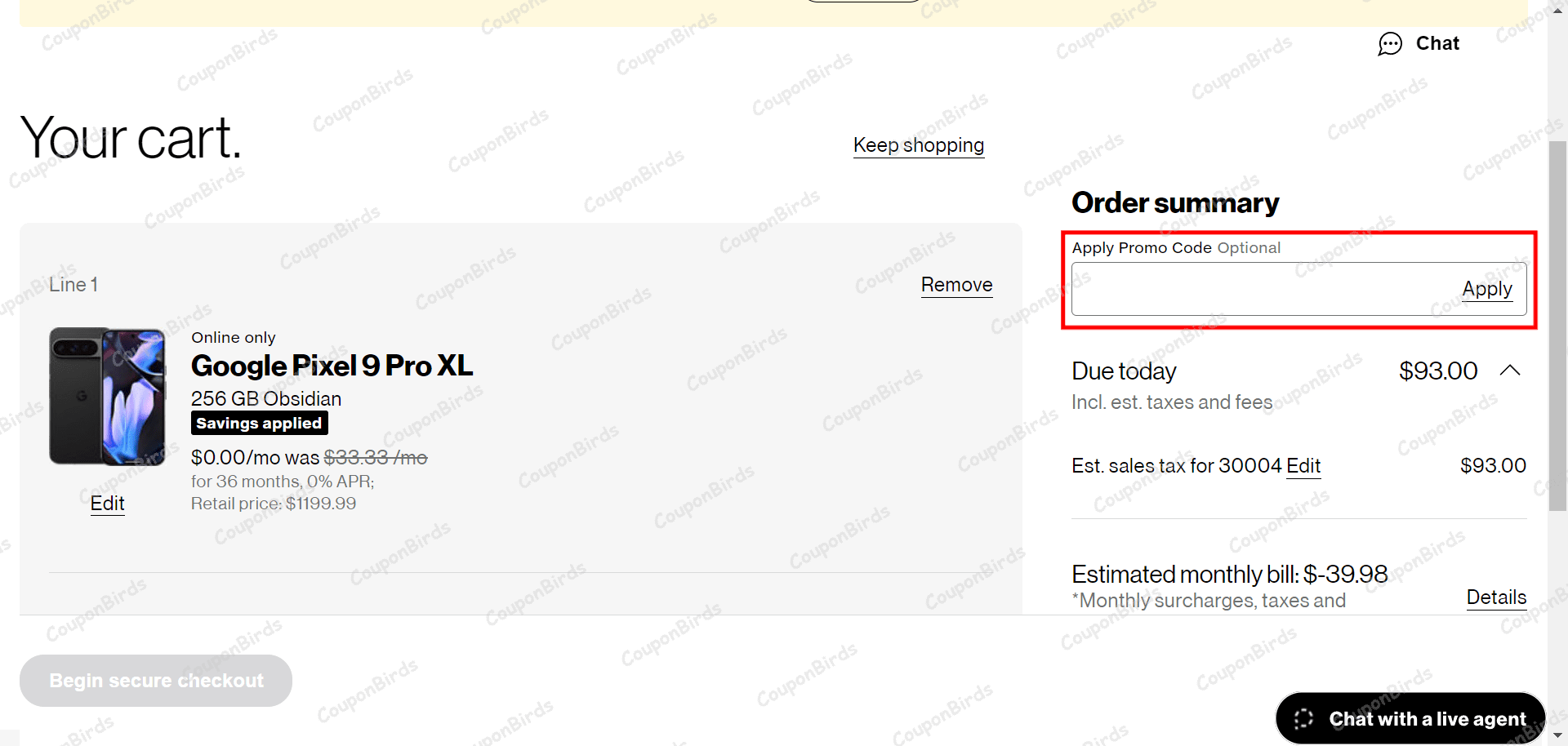
- Locate the field labeled Promo Code, Discount Code, or Have a Promo Code?.
- Enter the code exactly as written, observing case sensitivity, and click Apply.
- Verify that the order summary updates to reflect either an upfront price drop or an explicit line-item notice displaying your projected 36-month bill credit savings.
Method 2: Redeeming Post-Purchase Codes via the Rebate Center
Certain promotional codes—specifically bring-your-own-device (BYOD) credits, early termination fee reimbursements, and switcher gift cards—cannot be applied in the online shopping cart. Instead, they must be registered after service activation.
Step 1: Complete Activation
- Activate device/service on eligible plan
Step 2: Access Rebate Center
- Visit verizon.com/rebates with account credentials
Step 3: Enter Code & Order Details
- Submit tracking number within 30 days of setup
Step 4: Verification & Credit
- Credits process in 1–2 billing cycles
Complete line activation and receive your final order confirmation or receipt.
Visit the Verizon Digital Rebate Center.
Log in with your My Verizon credentials or provide your order number and mobile phone number.
Enter the specific promotional code provided in your offer terms (e.g.,
SWITCH24orBYOD2026).Upload required documentation, such as a final bill from a previous carrier, if claiming switcher expense reimbursements.
Submit the claim within 30 days of activation. Rebate processing typically takes 2 to 8 weeks, after which credits appear on your bill or arrive as a digital prepaid card.
Rules for Stacking and Combining Verizon Discounts
Maximizing Verizon promotional code savings often depends on "stacking"—combining multiple promotions on a single account or line. Verizon enforces specific logic regarding which discounts can run concurrently.
1. Auto Pay and Paperless Billing Discount
The Auto Pay discount ($10 per month per line on eligible unlimited plans) is an account-level operational discount. In almost all cases, Auto Pay discounts can be stacked with promotional code device credits, loyalty savings, and identity discounts. To preserve this discount, payment must be linked to a checking account, debit card, or the official Verizon Visa Card; standard credit cards do not qualify.
2. Device Trade-in Promotions + Promo Codes
When Verizon offers promotional trade-in value (e.g., up to $800 or $1,000 off via bill credits), these offers usually require selecting a specific plan, such as Unlimited Ultimate or Unlimited Plus. Instant accessory promo codes or waiver codes (like waived activation fees) can generally be stacked with trade-in credits. However, you cannot combine two separate device discount promotional codes on the exact same phone purchase.
3. Mobile + Home Rewards
Customers who combine Verizon Wireless mobile service with Verizon Fios, 5G Home, or LTE Home Internet qualify for Mobile + Home Rewards. These combined plan credits stack seamlessly alongside device promo codes, military/student discounts, and monthly Auto Pay discounts.
Overview of Verizon Savings & Discount Types
The table below breaks down the primary categories of promotional savings available on Verizon, detailing how each operates, average savings value, and key limitations.
| Discount Category | Applied As | Redemption Method | Estimated Savings Value | Key Restrictions & Rules |
|---|---|---|---|---|
| Device Bill Credits | Monthly credit (36 mos.) | Cart code or automatic promo link | $360 – $1,000 total | Requires 36-mo finance agreement; early payoff voids remaining credits. |
| BYOD (Bring Your Own Device) | Monthly credit or prepaid card | Promo code submitted at Rebate Center | $180 – $540 per line | Must keep active line on qualifying Unlimited plan for minimum period. |
| Military / Nurse / Teacher / Student | Monthly bill discount | Identification verification via ID.me | $10 – $25/mo per account | Account owner must be identity-verified; re-validation required periodically. |
| Auto Pay & Paperless Billing | Monthly service credit | Account billing preferences setup | $10/mo per line | Limited to debit, checking account, or Verizon Visa Card payments. |
| Accessory Promo Codes | Instant upfront cart discount | Standard promo code field at checkout | 15% – 30% off retail price | Excludes major hardware/phones; applies only to eligible accessories. |
| Fios / Home Internet Bundles | Gift card or price guarantee | Online registration / claim code | $50 – $300 gift card value | Requires maintaining home internet service active without cancellation for 65+ days. |
Troubleshooting: Why Your Verizon Promo Code Isn't Working
If a promo code fails during online checkout or is rejected at the digital rebate portal, it is usually due to one of the following eligibility mismatches:
Incompatible Unlimited Service Plan
Modern Verizon promotional codes regularly specify plan tier minimums. High-tier device promotions often require Unlimited Ultimate or Unlimited Plus plans. If your account is on an older legacy plan (such as Unlimited Welcome, Play More, Do More, or older tiered data packages), the promotional code will reject or fail to generate bill credits until your plan is updated.
Checkout Timeouts and Cart Conflicts
Entering multiple promotional codes can trigger cart conflict errors. If a promo code returns an "Invalid Code" message:
- Clear your web browser cache or switch to an incognito window.
- Remove all items from the cart and re-add the primary device or plan first.
- Ensure no conflicting third-party affiliate extensions are overriding the promo code entry field.
Missing Promo Credits on Monthly Statements
If a post-purchase promotional code was accepted but does not appear on your monthly statement after two billing cycles:
- Locate your original receipt and rebate submission confirmation code.
- Contact Verizon Customer Care or utilize the My Verizon Chat feature to request a manual Rebate Escalation Ticket.
- Provide the representative with the promotional code tracking number. If eligibility criteria were met within the valid dates, customer service can apply a manual billing adjustment or re-submit the promotional credit to your account line.
Verizon Fios vs. Verizon Wireless Promotional Structures
Promotional codes function differently depending on whether you are acquiring mobile cellular service or home broadband (Verizon Fios / 5G Home Internet).
- Verizon Savings Taxonomy
- Wireless Mobile
- 36-Month Credits
- Trade-In Offsets
- Device Lock Terms
- Fios Broadband
- Instant Upfront
- Price Guarantees
- Prepaid Gift Cards
- Wireless Mobile
- Verizon Wireless (Mobile): Heavily reliant on multi-year bill credits paired with hardware purchases or line activations. Codes are frequently linked to physical equipment IMEI numbers and device payment contracts.
- Verizon Fios (Broadband): Focuses on service stability incentives. Promo codes for Fios primarily offer multi-year price locks (e.g., 2- to 5-year fixed pricing guarantees), waived equipment rental or installation fees, and high-value digital gift cards (such as Visa prepaid cards or brand-specific shopping credits) issued after two months of paid service.
Frequently Asked Questions
How long does it take for a Verizon promo code bill credit to show up?
Bill credits resulting from promotional codes typically begin appearing on your statement within 1 to 2 billing cycles after activation or rebate submission. If credits are delayed beyond the second billing cycle, Verizon applies catch-up credits retroactively to cover the missing initial months.
Can existing Verizon customers use promotional codes?
Yes. While some promotional codes are reserved for new lines or switchers, existing customers can access account-specific loyalty promo codes, upgrade trade-in promotions, and accessory savings through the Just For You tab in the My Verizon app or by maintaining continuous account eligibility.
What happens to my promo code savings if I pay off my phone early?
If your promotional code savings are delivered as monthly bill credits over 36 months, paying off the remaining device balance early will cancel all future promotional credits. You will be required to pay the remaining full retail balance of the phone without the benefit of the remaining monthly discounts.
Where do I enter a promo code in the My Verizon App?
During checkout in the My Verizon app, proceed to the Order Review tab after selecting your products or plans. Tap the section marked Promotions & Discounts or Have a Promo Code?, enter the code into the field, and select Apply before completing your payment.
How do Verizon switcher or BYOD promotional codes work?
Bring Your Own Device (BYOD) and switcher promo codes reward customers who transfer an existing mobile number from a competing carrier to Verizon without buying a new phone. The promo code must be submitted via the Digital Rebate Center within 30 days of line activation. Savings are distributed either as monthly statement credits over 36 months or as a single digital gift card sent after maintaining active service for a designated period (usually 60 to 90 days).
Summary and Recommended Next Steps
To extract maximum value from Verizon promotional codes without incurring unexpected fees, follow this strategic checklist:
- Verify Plan Requirements: Ensure your selected mobile line is on a qualifying plan tier (such as Unlimited Plus or Ultimate) before applying high-value hardware promo codes.
- Setup Auto Pay with Qualified Methods: Combine your promo codes with Auto Pay linked to a checking account or debit card to secure an additional $10/month per line discount.
- Validate Identity-Based Eligibility: If you are a veteran, student, teacher, or first responder, clear identity verification via ID.me prior to applying general promotional codes to ensure your account qualifies for permanent service discounts.
- Track Post-Purchase Rebate Deadlines: If your promo code requires manual submission through the Verizon Digital Rebate Center, submit all documentation within 30 days of activation and retain your claim confirmation code until the credits actively reflect on your monthly bill.
Image Gallery