How to Avoid an Office Lockout: A Comprehensive Prevention Guide
To avoid an office lockout, businesses must implement a multi-layered strategy combining modern keyless access control, rigorous administrative protocols, and redundant physical key management. Prioritizing cloud-based systems with mob...
To avoid an office lockout, businesses must implement a multi-layered strategy combining modern keyless access control, rigorous administrative protocols, and redundant physical key management. Prioritizing cloud-based systems with mobile credentials eliminates the primary cause of lockouts—lost physical keys—while maintaining a vetted commercial locksmith relationship ensures rapid resolution if hardware fails.
Contents
An office lockout is more than a minor inconvenience; it is a significant operational disruption that can lead to lost revenue, decreased employee morale, and potential security vulnerabilities. In 2026, the technology available to secure commercial premises has evolved significantly, yet many organizations still rely on legacy hardware that is prone to human error. Preventing a lockout requires a proactive approach that addresses both the physical mechanisms of the door and the administrative habits of the staff.
The Operational and Financial Impact of Access Failure
Understanding the true cost of a lockout is the first step in justifying the investment in prevention. When staff members are unable to enter the building, the immediate "down-time" cost is calculated by the hourly wage of every affected employee. However, the secondary costs—missed client meetings, delayed project milestones, and the emergency call-out fees for a commercial locksmith—can easily escalate into the thousands of dollars.
Furthermore, a lockout often leads to "improvised entry" attempts. Employees may try to force windows or manipulate locks with improper tools, resulting in permanent damage to the door frame or the locking mechanism itself. These repairs are significantly more expensive than the preventative measures discussed in this guide. By treating access management as a core business utility rather than an afterthought, facility managers can ensure continuous operations and a professional environment.
Modernizing Access with Keyless Technology
The most effective way to avoid an office lockout is to remove the physical key from the daily workflow. Traditional metal keys are easily lost, stolen, or forgotten. Transitioning to an electronic access control system (EACS) provides multiple avenues for entry, ensuring that if one method fails, another is available.
Cloud-Based Access Control Systems
Cloud-managed systems allow administrators to grant or revoke access remotely via a web dashboard or mobile app. If an employee arrives at the office and realizes they have forgotten their credentials, a manager can unlock the door from their home or another location using an encrypted signal. This eliminates the need for anyone to physically drive to the site with a spare key.
In 2026, these systems have become the industry standard for small to mid-sized enterprises (SMEs) due to their scalability and ease of integration with other office software. According to the Security Industry Association (SIA), cloud-based security solutions provide higher uptime and better audit trails than localized, server-based hardware.
Mobile Credentials and Biometrics
Mobile credentials utilize the Bluetooth or Near-Field Communication (NFC) capabilities of a smartphone to authenticate the user. Since people are statistically less likely to forget their phones than their office keys, this significantly reduces "accidental" lockouts.
For high-security environments, biometric scanners—such as fingerprint or iris recognition—provide a "keyless" solution that is tied to the individual's physical person. While highly effective, these should always be implemented with a secondary bypass (such as a keypad code) to account for technical glitches or power outages.
Establishing Robust Physical Key Protocols
Despite the rise of digital solutions, many offices still utilize physical cylinders for perimeter security or as an emergency override. Preventing a lockout in a key-heavy environment requires strict organization and redundancy.
The Master Key System Architecture
A well-designed master key system allows for a hierarchy of access. A single "Grand Master Key" can open every door in the facility, while individual "Change Keys" are restricted to specific zones. To avoid a lockout, the Grand Master Key should never leave the possession of the highest-level security officer or should be stored in a high-security, off-site location such as a bank safety deposit box.
Secure Off-Site Redundancy
A common mistake is storing all spare keys inside the office they are meant to unlock. To prevent a lockout, at least one full set of master keys should be held by a trusted third party or stored in a secure, weather-proof lockbox located on the exterior of the property. Modern lockboxes can be equipped with rotating digital codes that are changed after every use, maintaining security while providing an emergency lifeline.
Administrative Strategies and Employee Policy
Technology and hardware are only as effective as the policies governing them. Administrative failures, such as failing to update access lists or neglecting battery replacement schedules, are frequent contributors to office lockouts.
Onboarding and Offboarding Procedures
Lockouts often occur during personnel transitions. When an employee leaves the company, their physical keys must be recovered immediately, or their digital credentials must be deactivated. Failure to do so often leads to "panic" lock changes, which can result in key confusion and eventual lockouts. A standardized checklist for HR and Facility Management ensures that access rights are always aligned with current staffing.
The "Buddy System" for Opening and Closing
If your office relies on physical keys, avoid a situation where only one person has the ability to open the building. Implementing a policy where at least two or three localized managers hold opening keys ensures that a single person’s morning commute delay or lost key doesn't shut down the entire office.
Preventative Maintenance for Locking Hardware
Locks are mechanical devices subject to wear, friction, and environmental degradation. A lock that is "sticky" or requires "jiggling" the key is a lockout waiting to happen. Regular maintenance can identify these issues before the mechanism fails entirely.
- Lubrication: Use graphite or PTFE-based lubricants specifically designed for locks. Avoid oil-based lubricants like WD-40, which can attract dust and eventually gum up the internal pins.
- Alignment Checks: Building settling can cause door frames to shift, putting pressure on the latch or bolt. If the door doesn't close easily, the lock is under constant stress and may seize.
- Battery Management: For electronic locks, establish a semi-annual battery replacement schedule (e.g., during Daylight Saving Time changes) to prevent power-related failures.
Access Method Comparison
The following table compares common office access methods based on their lockout risk and ease of recovery.
| Access Method | Primary Lockout Risk | Recovery Ease | Cost to Implement | Maintenance Level |
|---|---|---|---|---|
| Traditional Metal Key | Physical loss or theft | Difficult (Requires Locksmith) | Low | Low (Mechanical) |
| Keypad / PIN Code | Forgotten code | Easy (Remote Reset) | Moderate | Low (Battery checks) |
| RFID Card / Fob | Forgotten or demagnetized | Moderate (Admin override) | Moderate | Moderate (Database) |
| Mobile Credential | Dead phone battery | Easy (Manager remote unlock) | High (Software) | High (Software updates) |
| Biometric Scanner | Technical sensor failure | Difficult (Requires bypass) | Very High | Moderate (Sensor cleaning) |
Emergency Preparedness: Selecting a Commercial Locksmith
Even with the best prevention strategies, hardware can fail. The worst time to search for a locksmith is while standing outside a locked door in the rain. Business owners should vet and establish a relationship with a licensed commercial locksmith before an emergency occurs.
When selecting a professional, verify their credentials through organizations like the Associated Locksmiths of America (ALOA). Ensure they offer 24/7 emergency services and are familiar with your specific brand of hardware (e.g., Schlage, Assa Abloy, or HID). Having a pre-approved vendor in your contact list ensures that if a lockout does happen, the response time is minimized, and the technician already understands your building’s security layout.
Frequently Asked Questions
What should I do immediately if I am locked out of my office?
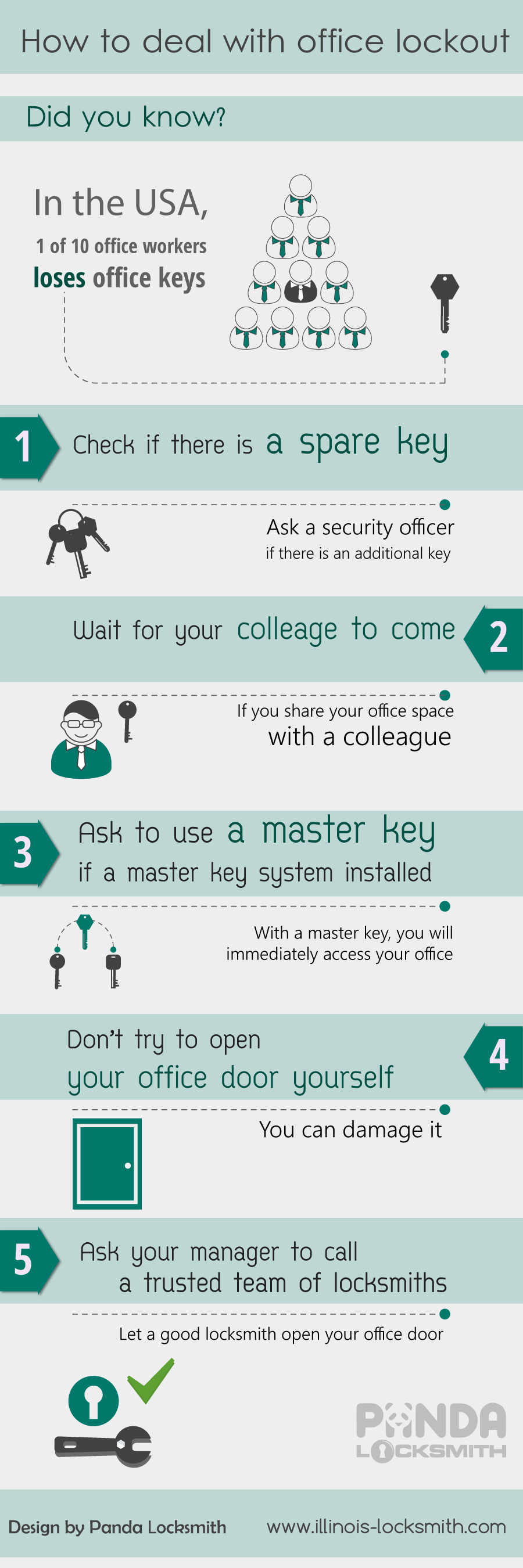
First, verify if any other entrances (loading docks, side doors) are accessible or if a colleague with remote access can unlock the door. If no internal resolution is possible, contact your pre-selected commercial locksmith. Avoid attempting to "pick" the lock or force the door, as this often leads to expensive damage that is not covered by standard maintenance budgets.
How often should we audit our office keys and access codes?
An access audit should be performed at least quarterly. This involves verifying who has physical keys, ensuring all deactivated employees have been removed from electronic systems, and changing any shared PIN codes. Regular audits prevent "access creep," where too many people have entry rights, increasing the statistical likelihood of a security breach or a lockout.
Are smart locks reliable enough for a main commercial entrance?
In 2026, commercial-grade smart locks are highly reliable, provided they carry a Grade 1 ANSI/BHMA rating. These locks are tested for hundreds of thousands of cycles. However, for a main entrance, it is recommended to use a "hybrid" system—an electronic lock with a concealed physical key override—to ensure access during a total electronic or power failure.
Does business insurance cover the cost of a locksmith?
Many commercial property insurance policies include "lock replacement" or "emergency assistance" riders, but they often have deductibles that exceed the cost of a standard service call. It is best to check your specific policy details with the Insurance Information Institute (III) or your broker to see if lockout services are reimbursed.
Can a locksmith open a high-security "restricted" key system?
If your office uses a restricted keyway (where keys cannot be duplicated at a hardware store), a standard locksmith may not be able to "pick" the lock easily. You will typically need to contact the specific locksmith or security firm that installed the system, as they hold the exclusive rights to the key patterns and specialized tools required for that hardware.
Practical Recommendation for 2026
To virtually eliminate the risk of an office lockout, transition your primary entry points to a cloud-based mobile access system while maintaining a physical Grade 1 deadbolt as a secondary backup. Store the emergency override key in a secure, encrypted lockbox located at a nearby off-site facility or with a trusted security partner. This dual-path approach ensures that neither a lost phone nor a mechanical failure can completely halt your business operations.
Image Gallery