How to Return Comcast Xfinity Equipment in 2026: A Complete Guide to Avoiding Fees
To return your Comcast Xfinity equipment in 2026, you can bring it to any The UPS Store for free packing and shipping, visit a local Xfinity Store in person, or initiate a return through the Xfinity app to print a prepaid shipping labe...
To return your Comcast Xfinity equipment in 2026, you can bring it to any The UPS Store for free packing and shipping, visit a local Xfinity Store in person, or initiate a return through the Xfinity app to print a prepaid shipping label. Always ensure you receive and retain a physical or digital receipt to prevent unreturned equipment fees.
Contents
The process of returning hardware to Comcast—now operating almost exclusively under the Xfinity brand—is a critical final step in managing your telecommunications account. Whether you are upgrading to the latest 10G-capable hardware, moving to a new service area, or canceling your subscription entirely, the efficiency of your return determines whether you walk away with a clean slate or a significant bill. In 2026, Xfinity has streamlined these processes through enhanced digital integration, but the fundamental requirement for physical verification remains the most important aspect of the transaction.
The Financial Importance of Proper Equipment Returns
In 2026, Comcast maintains a strict inventory management system. Hardware such as the Xfinity XB9 Gateway or the X1 4K DVR system represents a significant capital investment for the provider. Failure to return these items within the designated 30-day window following service termination can result in "Unreturned Equipment Fees" ranging from $120 to over $500, depending on the specific hardware generation.
Beyond the immediate fees, failing to document your return can lead to long-term credit complications. Unpaid equipment balances are frequently referred to third-party collection agencies, which can negatively impact your credit score for up to seven years. Therefore, treating the return process with the same level of scrutiny as a financial closing is essential for consumer protection.
Inventory Checklist: What Exactly Needs to Go Back?
Before choosing a return method, you must perform a full inventory of the hardware assigned to your account. You can verify your active equipment list via the Xfinity app or by logging into your account portal at xfinity.com.
Primary Gateway and Modems The most common item is the Xfinity Gateway. In 2026, this is likely an XB7, XB8, or the newer XB9 model. You must return the main unit along with the proprietary power adapter. While standard Ethernet cables are often ignored by technicians, returning them ensures there are no disputes regarding "complete kit" requirements.
Television and Streaming Boxes This category includes the X1 DVRs, Xi6 wireless boxes, and the Xfinity Flex (XiOne) streaming devices. Each box must be returned with its corresponding XR15 or XR16 voice remote. Xfinity now tracks remotes specifically by serial number in many regions, so ensure you are returning the specific remote paired with that box.
Xfinity Home Security Components If you are a Home Security subscriber, the touchscreen controller is the primary piece of leased equipment. Most sensors and cameras purchased outright do not need to be returned, but the central hub and any leased range extenders are mandatory for return.
Digital Voice and Specialized Hardware For legacy accounts or those with specialized VOIP setups, the eMTA (Embedded Multimedia Terminal Adapter) must be included. If you use Xfinity Storm-Ready WiFi, the battery backup unit and the cellular failover device are also considered leased equipment.
Method 1: The UPS Store (The Recommended Professional Route)
In 2026, the partnership between Comcast and The UPS Store remains the most efficient way to return equipment. This method is highly recommended because it shifts the responsibility of packing and shipping logistics to professional handlers at no cost to the customer.
- Find a Location: Visit any The UPS Store location. You do not need to visit a UPS Customer Center (the hubs); the retail stores are the designated partners.
- No Box Required: You do not need to find a box or print a label. Simply bring the equipment and your account information.
- The Hand-off: Inform the associate that you are performing an "Xfinity Equipment Return." They will scan the serial numbers of each device.
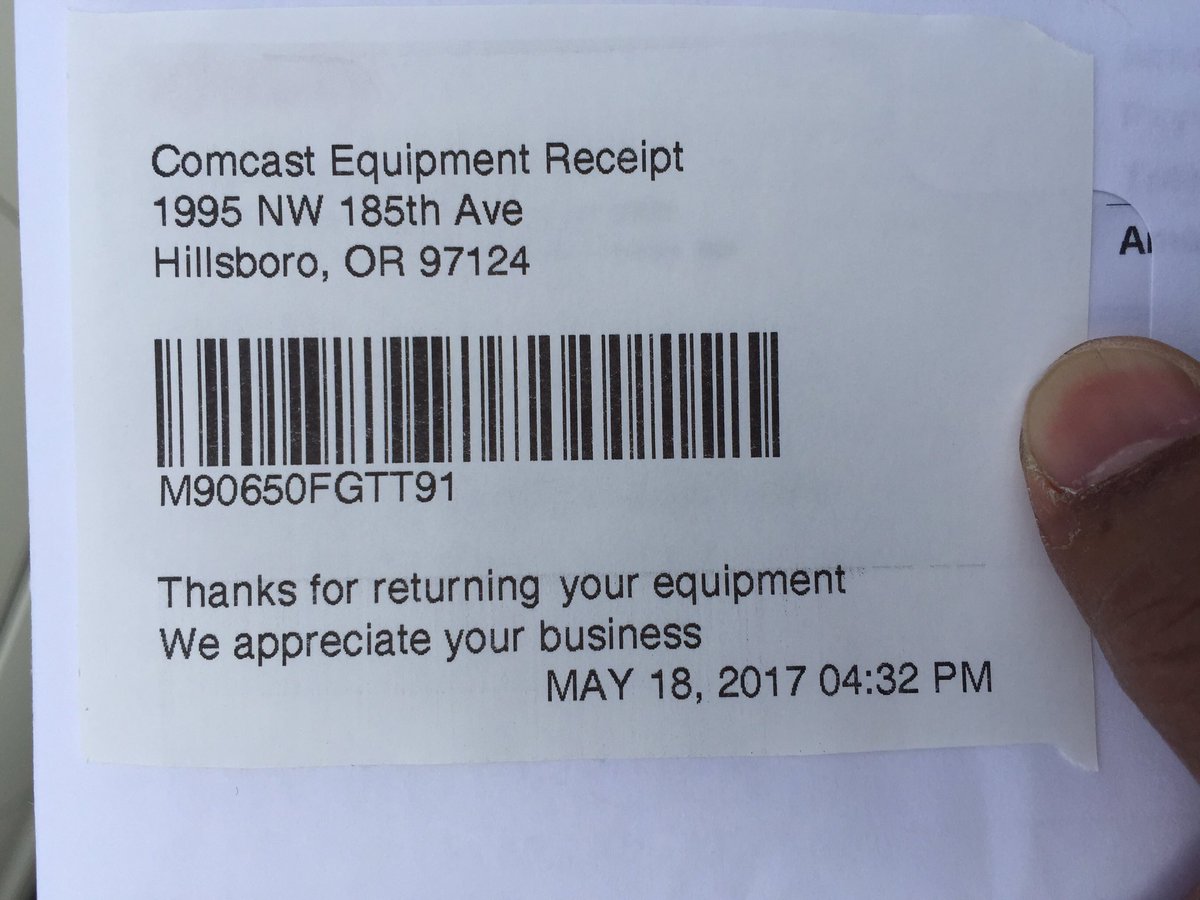
- Verification: The associate will pack the items and provide you with a physical receipt.
Crucial Advice: The UPS Store receipt is your primary legal defense. It contains the tracking number and the specific serial numbers of the devices scanned. In 2026, Xfinity’s automated systems are highly accurate, but manual errors in the warehouse still occur. If Xfinity claims a device was never received, providing this tracking number is the only way to have the charges reversed instantly.
Method 2: In-Store Returns at Xfinity Retail Centers
Returning equipment to an Xfinity Store provides the advantage of immediate account updates. When the store associate scans your equipment, it is removed from your active account inventory in real-time.
- Locate a Store: Use the Xfinity app to find the nearest Xfinity Store. In 2026, many stores have implemented a "Drop-off Kiosk" for equipment returns to bypass standard service lines.
- Appointment Scheduling: To avoid long wait times, it is highly recommended to schedule an appointment through the app.
- The Return Process: A retail associate will scan each piece of hardware. Ensure they scan the remotes and power blocks if your specific account terms require it.
- Digital Receipt: While you will receive a digital confirmation via email, always request a printed receipt before leaving the store.
Method 3: Prepaid Shipping Labels (Self-Packing)
If you cannot visit a store, you can initiate a return through the Digital Management Portal. This method requires you to have your own packing materials.
- Initiate Online: Log into your Xfinity account and navigate to the "Equipment" or "Support" section. Select "Start a Return."
- Select Devices: Check the boxes next to the specific devices you are returning.
- Print the Label: Xfinity will generate a prepaid UPS shipping label. Print this and affix it to a sturdy cardboard box.
- Packing Safety: Wrap the gateway and set-top boxes in bubble wrap or similar protective material. Damages incurred during shipping due to poor packing can sometimes be charged to the customer if the equipment is deemed "unrepairable" upon arrival.
- Drop-off: Take the package to any authorized UPS drop-off point.
2026 Return Method Comparison Table
| Feature | The UPS Store | Xfinity Retail Store | Prepaid Shipping Label |
|---|---|---|---|
| Cost | Free | Free | Free |
| Packing Required? | No (Provided) | No | Yes (Customer Provided) |
| Receipt Type | Physical Tracking Receipt | Printed & Digital Receipt | Digital Tracking Only |
| Account Update Speed | 24-48 Hours | Immediate | 3-5 Business Days |
| Best For | High-value hardware | Immediate account closure | Remote/Rural areas |
| Remote Pickup? | No | No | Available (UPS Pickup Fee applies) |
Specialized Situations: Moves, Deaths, and Damaged Gear
The standard return process applies to 90% of users, but specific life events require a different technical approach.
Returning Equipment for a Deceased Account Holder
In 2026, Xfinity has a dedicated "Compassionate Care" team to handle account transitions following a death. You can return equipment at an Xfinity store by presenting a copy of the death certificate or via the standard UPS method. It is important to ensure the account is officially marked as "Estate Settlement" to prevent automated billing cycles from continuing during the hardware transit period.
Handling Damaged or "Bricked" Equipment
If your equipment was damaged by a power surge, water, or physical impact, you are still required to return the hardware. Do not discard it. Comcast technicians will evaluate the internal components. In most cases, if the damage was due to a technical failure or standard wear and tear, no fee is assessed. However, obvious physical abuse or unauthorized tampering with the internal casing may trigger a replacement fee.
Equipment Left at a Property (For Landlords)
Landlords often find Xfinity equipment left behind by tenants. Since the equipment is linked to the tenant's Social Security number or credit profile, the landlord is not legally responsible for the fees. However, to clear the property for a new tenant's installation, the landlord can return the equipment to any Xfinity store. The store will "un-archive" the hardware, making the address eligible for new service immediately.
Common Pitfalls and How to Avoid Them
The most frequent error customers make is returning the gateway but forgetting the power adapter. In 2026, many Xfinity power blocks are high-wattage units specifically designed for the XB8 and XB9 gateways. If these are missing, Xfinity may charge a "partial return" fee of $25 to $40.
Another common mistake is mixing up Xfinity equipment with personal hardware. Before returning your "modem," ensure it actually says "Xfinity" or "Cisco/Arris/Technicolor" with a Comcast asset tag. If you return a personally owned retail modem (e.g., a Netgear Nighthawk) to Comcast, it can be extremely difficult to recover once it enters their automated logistics stream.
The 90-Day Rule for Receipts Even after your account shows a zero balance, keep your return receipt for at least 90 days. Xfinity’s internal audits occasionally trigger "missing equipment" flags months after a return. Having a photo of your receipt on your smartphone is usually sufficient to resolve these disputes with a customer service representative over the phone.
Troubleshooting Lost Returns
If you returned your equipment but are still being billed, follow these steps in 2026:
- Locate the Tracking Number: Find the receipt from UPS or your printed label.
- Verify Delivery: Check the status on the UPS website. If it shows "Delivered to [Agent]," the liability has shifted to Comcast.
- Contact the "Retention and Billing" Department: Do not speak to general technical support. Request the billing department and provide the tracking number.
- Request a "Research Ticket": Ask the agent to open a research ticket with the warehouse. This process usually takes 5-7 business days. Once the warehouse confirms the serial number was scanned at their facility, the fees will be credited back to your account.
Frequently Asked Questions
Do I need to return the remote control with my Xfinity box?
Yes, in 2026, Xfinity considers the XR voice remote a mandatory part of the equipment kit. While they occasionally waive fees for older legacy remotes, newer models (XR15/XR16/XR100) are tracked. Including the remote ensures you avoid a "missing accessory" charge which can range from $15 to $30.
What happens if I lost the equipment?
If the equipment is lost (e.g., due to a fire, theft, or misplacement during a move), you must contact Xfinity support immediately. In cases of theft or natural disaster, providing a police report or insurance claim can often lead to a waiver of the unreturned equipment fees. Otherwise, you will be liable for the full replacement cost of the hardware.
Can I give my equipment to a neighbor who wants Xfinity?
No. All equipment is serialized and linked to your specific account. If you give your gateway to a neighbor, it will not work for them because the MAC address is "locked" to your account profile. Furthermore, you will remain financially responsible for that equipment until it is returned to an official Xfinity or UPS location and scanned out of your name.
How long do I have to return the equipment after canceling?
Typically, you have 30 days from the date of service disconnection to return all leased hardware. After 30 days, the system automatically generates an unreturned equipment charge. While this charge can be reversed once the equipment is eventually returned, it is best to complete the process within the first two weeks to avoid automated collection notices.
Is there a fee for returning equipment?
No, returning equipment is free when using the official channels: The UPS Store or an Xfinity Store. The only time a fee applies is if you schedule a "Home Pickup" via UPS and do not have a prepaid label from Xfinity, or if you request a technician to come to your home specifically to pick up the gear (which Xfinity rarely offers in 2026, preferring digital/retail channels).
Final Recommendation
For the highest level of security and convenience in 2026, take your Comcast Xfinity equipment to The UPS Store. It requires the least amount of effort on your part—no boxing or labeling—and provides the strongest physical evidence (the tracking receipt) to protect you against any future billing disputes. Ensure every serial number is scanned, take a photo of your receipt, and monitor your final bill to confirm the hardware has been successfully removed from your account.
Image Gallery