What On-Premises Infrastructure Means for Your Business in 2026
On-premises (often shortened to "on-prem") refers to a deployment model where a company’s IT infrastructure—including servers, storage, networking hardware, and software applications—is located physically within the organization's own...
On-premises (often shortened to "on-prem") refers to a deployment model where a company’s IT infrastructure—including servers, storage, networking hardware, and software applications—is located physically within the organization's own facilities. In this model, your business retains full ownership, operational control, and responsibility for the entire hardware and software stack.
Contents
Understanding the Physical and Operational Reality of On-Premises
For a modern business in 2026, choosing an on-premises model means more than just buying a few servers. It involves the creation or maintenance of a dedicated environment specifically engineered to support high-density computing. Unlike cloud computing, where resources are abstracted and delivered over the internet, on-premises requires a tangible investment in real estate and utility infrastructure.
The physical component begins with a server room or a private data center. This space must be equipped with specialized cooling systems (HVAC) to manage the thermal output of high-performance processors. It also requires redundant power supplies, such as Uninterruptible Power Supplies (UPS) and backup diesel or natural gas generators, to ensure business continuity during grid failures.
From an operational standpoint, on-premises means your internal IT department is the service provider. Your team is responsible for the "racking and stacking" of hardware, configuring the hypervisors (the software that creates virtual machines), managing the internal network fabric, and ensuring that physical security measures—such as biometric access and CCTV—are strictly enforced. This "full-stack" responsibility is the defining characteristic that separates on-premises from the "shared responsibility" model found in public cloud environments.
The Strategic Shift: Why Businesses Choose On-Premises in 2026
While the mid-2010s saw a massive migration toward the public cloud, the landscape in 2026 has shifted toward a more calculated, hybrid approach. Many enterprises have engaged in "cloud repatriation," moving specific workloads back to on-premises environments for several strategic reasons.
Data Sovereignty and Strict Regulatory Compliance
In 2026, global data privacy regulations have become increasingly localized and stringent. For businesses operating in highly regulated sectors—such as defense, healthcare, or financial services—on-premises infrastructure provides the highest level of assurance for data residency. By keeping data on local disks within a specific jurisdiction, companies can more easily comply with mandates like the General Data Protection Regulation (GDPR) or updated national security laws that may restrict the movement of sensitive metadata across international borders.
Latency and Edge Computing Requirements
For industries involving real-time data processing, such as advanced manufacturing with IoT (Internet of Things) or high-frequency trading, even the millisecond delays inherent in cloud routing are unacceptable. On-premises infrastructure allows for "edge" processing, where data is analyzed at the source of generation. This proximity eliminates the "round-trip" time to a distant cloud data center, enabling instantaneous automated decision-making on the factory floor or in the operating room.
Long-Term Cost Predictability
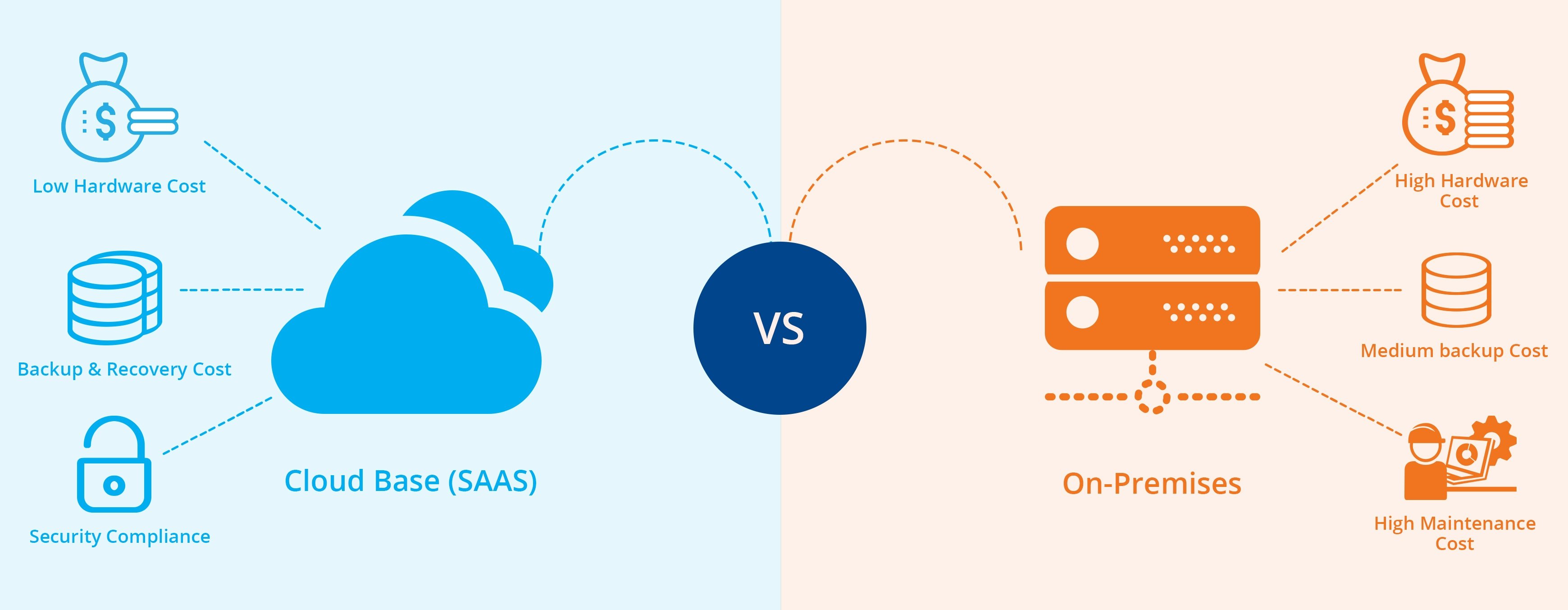
The public cloud operates on an OpEx (Operating Expenditure) model, where costs fluctuate based on usage, data egress, and API calls. For "steady-state" workloads—applications that run 24/7 with predictable resource needs—the cloud can become significantly more expensive over a five-year lifecycle than owning the hardware. On-premises allows for a CapEx (Capital Expenditure) model. Once the hardware is purchased and depreciated, the ongoing costs are limited to power, cooling, and maintenance, providing a level of budgetary certainty that many CFOs prefer for core legacy systems.
The Financial Implications: CapEx vs. OpEx
Understanding what on-premises means for your business requires a deep dive into your balance sheet. The financial structure of on-premises is front-loaded, requiring significant initial capital.
- Capital Expenditure (CapEx): This includes the purchase of servers, storage arrays (SAN/NAS), networking switches, and the physical build-out of the data center. In 2026, these assets are typically depreciated over a three-to-five-year period.
- Software Licensing: On-premises software often involves perpetual licenses or "site licenses," which require a large upfront fee followed by annual maintenance and support contracts (typically 18-25% of the initial cost).
- Indirect Costs: These are often underestimated. They include the cost of the floor space (rent), electricity for both the hardware and the cooling systems, and insurance for the physical assets.
- Labor Costs: You must employ or contract specialized engineers to manage the hardware. Unlike the cloud, where the provider handles firmware updates and hardware replacements, your team must perform these tasks manually.
Comparing On-Premises and Cloud Deployment Models
To decide if on-premises is right for your business, it is helpful to compare it against other common deployment models available in 2026.
| Feature | On-Premises | Public Cloud | Private Cloud (Hosted) |
|---|---|---|---|
| Control | Absolute; you own the hardware and software. | Shared; the provider controls the infrastructure. | High; dedicated hardware managed by a third party. |
| Scalability | Manual; requires purchasing and installing new hardware. | Near-instant; elastic scaling based on demand. | Moderate; requires request for new dedicated resources. |
| Cost Model | CapEx (High upfront, lower recurring). | OpEx (Low upfront, variable recurring). | Hybrid (Monthly lease/service fee). |
| Security | Physical and logical security are your responsibility. | Provider handles physical security; you handle data. | Provider handles physical security; you control access. |
| Maintenance | Internal IT handles all hardware and software updates. | Provider handles hardware and underlying platform. | Provider handles hardware; you handle software. |
| Latency | Minimal (Local Network speeds). | Variable (Internet/WAN dependent). | Low to Moderate (Depends on connection). |
Implementation Prerequisites and Requirements
If your business decides to maintain or build on-premises infrastructure in 2026, several foundational requirements must be met to ensure the environment is enterprise-grade.
Power and Environmentals
Modern server hardware requires high-density power distribution units (PDUs). Your facility must support at least N+1 redundancy for power—meaning if one power source fails, another is immediately available. Furthermore, according to NIST standards for data center security and operations, environmental monitoring for humidity and temperature is critical to prevent hardware degradation.
Physical Security Protocols
On-premises means you are the warden of your own data. This requires multi-factor authentication (MFA) even for physical access to the server room. Many businesses in 2026 utilize "man-traps" or biometric scanners (fingerprint or iris) to ensure that only authorized personnel can touch the physical equipment, mitigating the risk of "insider threats" or physical data theft.
Disaster Recovery (DR) and Backups
A common mistake in on-premises deployment is failing to account for off-site backups. Even if your primary production environment is on-site, a robust DR strategy requires that copies of your data be stored in a separate geographic location—either a secondary on-prem site or a cloud storage bucket—to protect against local catastrophes like fires or floods.
Challenges and Common Pitfalls
While on-premises offers control, it also introduces significant risks that must be actively managed.
- The "Shadow IT" Problem: If internal on-premises resources are difficult to access or slow to provision, employees may bypass IT to use unauthorized cloud services. On-premises teams must implement internal "self-service" portals to mimic the cloud experience for their users.
- Hardware Obsolescence: Unlike the cloud, where the provider constantly refreshes the underlying CPUs and RAM, an on-premises business is stuck with what it buys until the next refresh cycle. This can lead to performance bottlenecks as software becomes more resource-intensive over time.
- Scalability Lag: If your business experiences a sudden 300% growth spurt, an on-premises data center cannot adapt overnight. The lead times for ordering, shipping, and installing enterprise hardware can range from weeks to months, potentially stifling business growth.
The Role of Hybrid Cloud in 2026
In the current year of 2026, "on-premises" rarely exists in a vacuum. Most businesses utilize a Hybrid Cloud strategy. This involves using on-premises servers for core, sensitive databases and "steady-state" applications, while "bursting" into the public cloud for temporary compute needs or using cloud-based AI tools to analyze data stored locally.
Modern software stacks, such as Kubernetes, allow businesses to run the same containerized applications both on-premises and in the cloud seamlessly. This "write once, run anywhere" capability has reduced the friction of maintaining an on-premises environment, as the management tools have become standardized across all platforms.
Frequently Asked Questions
Does "on-premises" always mean the servers are in my office?
Not necessarily. While it usually means hardware in a room you own, it can also refer to "colocation." In a colocation setup, you own the hardware, but you rent space, power, and cooling in a third-party data center. Because you still own and manage the equipment, it is considered an on-premises deployment rather than a cloud service.
Is on-premises more secure than the cloud?
It is not inherently more secure, but it offers more control. In the cloud, you rely on the provider's security protocols. On-premises, you define the protocols. However, if your internal team fails to patch firmware or lacks physical security, an on-premises system can be significantly less secure than a high-standard cloud provider like AWS or Microsoft Azure.
What is the average lifespan of on-premises hardware?
In 2026, most enterprise servers and storage arrays are built to last five to seven years. However, most businesses perform a "tech refresh" every three to five years to take advantage of gains in energy efficiency and processing power, which can lower utility costs and improve application performance.
Can I run modern AI and Machine Learning models on-premises?
Yes, but it requires significant investment in GPU (Graphics Processing Unit) clusters. Many businesses in 2026 choose to keep their proprietary AI training data on-premises for intellectual property protection while utilizing specialized high-density hardware racks to run the actual training cycles.
How does on-premises affect remote work?
On-premises infrastructure requires a robust Virtual Private Network (VPN) or Software-Defined Perimeter (SDP) to allow remote employees to access internal resources safely. Unlike cloud apps that are accessed directly via the internet, on-prem apps require you to manage the "gateway" that lets remote workers in.
Practical Recommendation for Your Business
If your organization is evaluating an on-premises move in 2026, start with a Workload Audit. Identify which applications require the lowest latency and which data is subject to the strictest residency laws. For these specific needs, on-premises is the gold standard. However, for general productivity tools (like email) or highly variable workloads, a hybrid approach—retaining the cloud for flexibility while using on-premises for core stability—is the most fiscally and operationally responsible path forward.
Before committing to a physical build-out, ensure your IT team has the specialized skills required for hardware lifecycle management, as the "hands-on" requirements of on-premises are much higher than those of cloud-native environments.
Image Gallery