Why the Best Cheats for Supermarket Simulator Cost Nothing
Supermarket Simulator, developed by Nokta Games, is a single-player simulation title built on the Unity engine that places full control of shop logistics, pricing, restocking, and expansion into the player's hands. Because the game run...
Supermarket Simulator, developed by Nokta Games, is a single-player simulation title built on the Unity engine that places full control of shop logistics, pricing, restocking, and expansion into the player's hands. Because the game runs entirely offline without intrusive anti-cheat software or server-side verification, creating custom modifications and trainers is straightforward for developers. The best cheats, utility mods, and save editors for Supermarket Simulator cost nothing because an active, open-source community distributes them freely through trusted platforms like Nexus Mods, GitHub, and WeMod. Paying for cheats in a single-player Unity title is unnecessary and often exposes users to security risks or paywalled open-source code.
Contents
The Architecture Behind Free Supermarket Simulator Cheats
To understand why high-quality modifications for Supermarket Simulator are freely available, it helps to look at how the game is built. Unity games that execute code locally on a player's computer store game logic, economy variables, inventory counts, and player attributes in standard system memory (RAM) and local storage files.
Because the game lacks competitive multiplayer elements and kernel-level anti-cheat systems (such as Easy Anti-Cheat or BattlEye), third-party tools can interact with the game engine without triggering security blocks or account bans.
- Supermarket Simulator Process
- Game Memory (RAM)
- Money, XP, Stock Levels
- Memory Injection via BepInEx / WeMod / CE (Runtime DLL Modding)
- Local Save Files (JSON/ES3)
- Store Level, Licenses, Cash
- File Read/Write via Web / Local Save Editors (Direct Value Editing)
- Game Memory (RAM)
Unity Engine and C# Accessibility
Supermarket Simulator utilizes managed C# assemblies compiled within the Unity framework. Developers and modders can inspect these assemblies using free reverse-engineering tools like ILSpy or dnSpy.
Because the underlying C# class structures for cash management, product pricing, shelf storage, and checkout interactions are human-readable, modders can quickly identify the exact functions governing store operations. Once a function is identified—such as the method that deducts money when buying licenses or adding stock—modders can write scripts to alter or bypass those operations entirely.
Runtime Memory Injection via BepInEx
The backbone of modding for Unity games on PC is BepInEx, an open-source plugin framework that acts as a bridge between the game's executable file and custom user C# plugins. BepInEx injects directly into the game startup process, allowing community scripts to alter game behavior dynamically without changing the original core game files on disk.
Modders use Harmony, an open-source library bundled with or supported by BepInEx, to patch game methods at runtime. For example, a modder can use Harmony to insert a "pre-patch" method that intercepts the store's daily expense calculations, effectively setting store rent or inventory restock costs to zero. Because BepInEx and Harmony are open-source projects maintained by dedicated software developers, the foundational technology behind these cheats is free by default.
Local Save Data Storage
Unlike online service games that validate account data on remote server clusters, Supermarket Simulator stores all store progression, available cash, store upgrades, employee counts, and shelf configurations locally on the user’s primary hard drive.
These save files, typically stored in the Windows %USERPROFILE%\AppData\LocalLow\Nokta Games\Supermarket Simulator directory, use standard formatting (such as Easy Save .es3 format or structured JSON data). Because modifying these files requires nothing more than a text editor or a lightweight browser tool, players can adjust their store bank balance or unlock store expansions for free without executing complex software.
Popular Categories of Free Supermarket Simulator Cheats
The community has created several distinct categories of free utilities for Supermarket Simulator, ranging from traditional trainers that grant infinite currency to complex quality-of-life (QoL) automation plugins that eliminate tedious manual labor.
- Free Cheat & Mod Ecosystem
- Memory Trainers
- Unlimited Cash
- Fast Player Speed
- Freeze Time
- BepInEx Plugins
- Auto-Restock Storage
- Instant Delivery
- Auto Market Pricing
- Save Editors
- Direct JSON Edits
- Unlock Licenses
- Modify Store Tier
- Memory Trainers
1. Memory Trainers and Utility Software
Memory trainers operate by reading and writing to the specific memory addresses allocated to Supermarket Simulator while the game process is running.
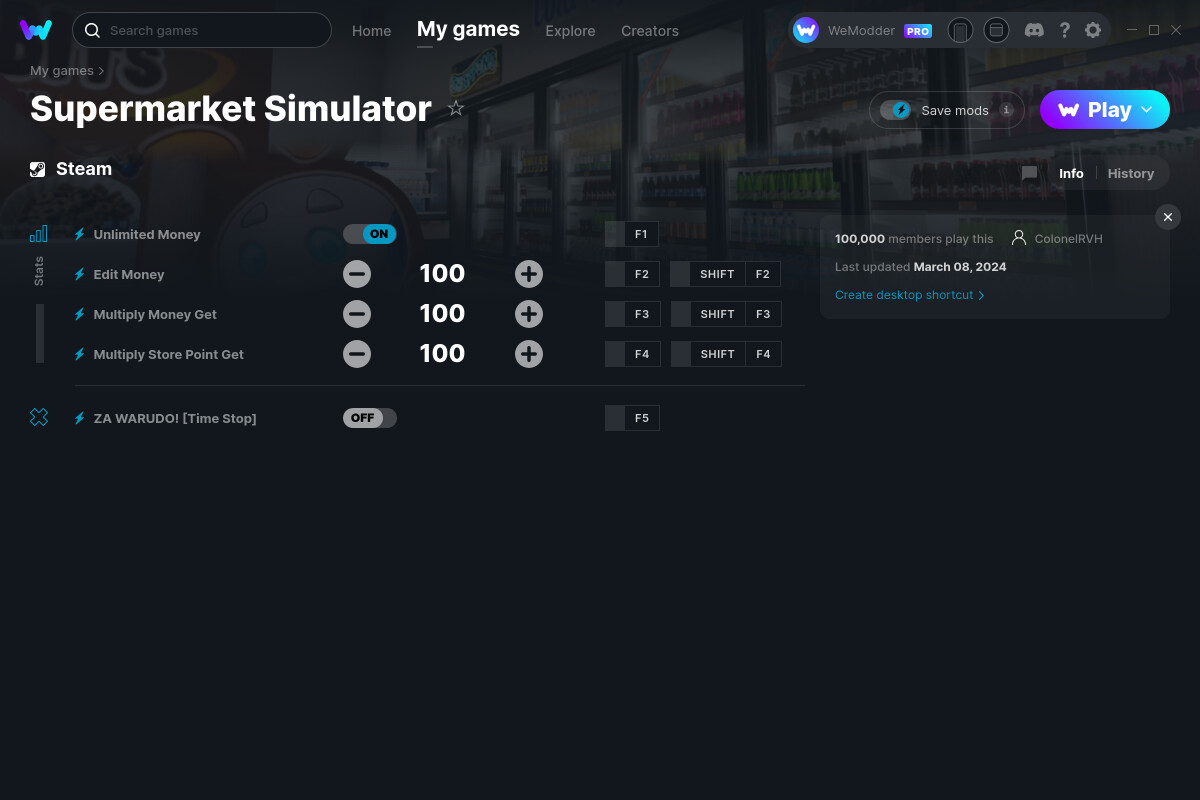
- WeMod: A popular, legitimate software platform that consolidates thousands of free single-player game trainers into one desktop launcher. For Supermarket Simulator, WeMod provides simple toggle switches and sliders to grant custom amounts of money, set store points/experience, freeze the daily clock, or increase player movement speed.
- Cheat Engine Tables (.CT files): Cheat Engine is a free, open-source memory scanner and debugger. Members of forums like FearLess Cheat Engine create downloadable
.CTtables containing pre-configured pointers for Supermarket Simulator. Loading these tables allows players to lock their currency values, alter employee scanning speeds, or spawn items directly.
2. Automation and Quality-of-Life (QoL) Plugins
While gaining infinite cash is useful, many players turn to mods to automate repetitive tasks that slow down store operations. These BepInEx plugins alter game mechanics directly:
- Auto-Restockers and Storage Helpers: Automatically move delivered boxes from the curb directly to storage shelves, or automatically replenish retail display racks from storage boxes when stock drops below a specified threshold.
- Automated Pricing Mods: Automatically set product prices to match current market trends or apply a custom percentage markup (e.g., Market Price + 10%) across all items whenever market rates adjust at the start of a new day.
- Instant Checkout & Delivery Mods: Eliminate NPC customer queue bottlenecks by scanning items instantly or granting cashiers maximum proficiency.
3. Web-Based and Local Save Editors
For players who prefer not to install background applications or modding frameworks, open-source web applications allow users to upload their save file (SaveFile.es3), edit fields such as Money, StoreLevel, StoreExperience, and unlocked product licenses, and download the updated save file back into their AppData directory.
Comparing Free Community Tools vs. Paid Cheat Services
To clarify why free tools dominate the modding landscape for Supermarket Simulator, the table below compares community-driven open-source tools with paid cheat subscriptions or paywalled download links.
| Feature / Metric | Free Community Mods & Trainers (BepInEx, WeMod, Nexus) | Paid Cheat Subscriptions & Paywalled Lockers |
|---|---|---|
| Total Cost | $0 (Completely Free) | $5 to $30+ per month or per download |
| Source Transparency | Open-source code available on GitHub; scripts inspectable with ILSpy | Closed-source executables; frequently protected by obfuscators |
| Safety Verification | Automatically scanned for malware by Nexus Mods and community moderation | High risk of hidden ad trackers, miners, or malicious survey lockers |
| Feature Depth | Extensive (QoL automation, price algorithms, inventory tools, graphics tweakers) | Basic (usually limited to simple memory modifications like cash or speed) |
| Game Update Compatibility | Rapid updates by active community members and modding groups | Slow or abandoned updates; locked behind recurring payment tiers |
| Installation Support | Detailed wiki guides, GitHub issue trackers, and community Discord channels | Limited or non-existent support outside of automated payment portals |
Why Paid Cheats for Supermarket Simulator Are Red Flags
Searching for cheats online can lead to websites offering "VIP Trainers," password-protected archives, or subscription services promising exclusive options for Supermarket Simulator. In virtually every scenario involving single-player indie games, paying money for cheats is a major red flag.
1. Monetization of Repackaged Open-Source Code
Many shady platforms simply download free, open-source BepInEx plugins from GitHub or Nexus Mods, wrap them inside a custom user interface or launcher, and place them behind a paywall. Charging money for work created by unpaid community modders violates open-source licenses (such as MIT or GNU licenses) and exploits players who are unaware that the original software is free.
2. Predatory Subscription Models
Single-player games do not require live server upkeep, anti-cheat bypass updates, or costly private host infrastructures. Modifying an offline variable like store cash in Supermarket Simulator requires the exact same basic memory access logic today as it did when the game launched. Subscribing to a monthly service to edit offline local data is financially unnecessary.
3. Malware, Adware, and Survey Scams
Free cheat aggregation sites that force users to complete surveys, click through monetization link-shorteners (such as AdFly or Work.ink), or disable antivirus protections to extract password-protected .zip files frequently distribute malware.
Malicious actors exploit interest in popular simulation games to distribute trojans, keyloggers, and cryptocurrency miners. Legitimate open-source repositories and verified platforms like Nexus Mods or WeMod host unencrypted files and publish automated virus scanning results directly on download pages.
Step-by-Step Guide: Safely Installing Free Cheats and Mods
Installing free cheats and mods for Supermarket Simulator requires only a few minutes. Follow this guide to safely modify your game using the BepInEx framework.
- Installation Sequence
- Step 1: Backup Save
- Copy AppData Folder
- Step 2: Install BepInEx
- Extract to Game Root
- Step 3: Add Plugins
- Move .dll to /plugins
- Step 1: Backup Save
Step 1: Backup Your Save Files
Before modifying game memory or installing plugins, always back up your existing save file to prevent data loss if a mod crashes your save state.
- Press
Windows Key + Rto open the Run dialog box. - Paste the following path and press Enter:
%USERPROFILE%\AppData\LocalLow\Nokta Games\Supermarket Simulator - Copy the entire folder or the
SaveFile.es3file to a safe location on your desktop.
Step 2: Download and Install BepInEx 5
- Visit the official GitHub repository for BepInEx (ensure you download BepInEx 5, as Unity Mono games rely on this stable version).
- Download the 64-bit architecture zip file (e.g.,
BepInEx_x64_5.x.x.x.zip). - Open Steam, right-click Supermarket Simulator in your library, select Manage > Browse local files.
- Extract the contents of the BepInEx zip file directly into the main game folder alongside
Supermarket Simulator.exe. The directory structure should look like this:
- Supermarket Simulator/
- BepInEx/
- core/
- plugins/
- Supermarket Simulator.exe
- UnityPlayer.dll
- winhttp.dll
- BepInEx/
- Launch the game once and exit at the main menu. This step allows BepInEx to generate its configuration files and create the
pluginsfolder.
Step 3: Add Free Plugins from Nexus Mods
- Go to Nexus Mods and navigate to the Supermarket Simulator section.
- Search for verified free utilities, such as restocker automations or pricing adjusters.
- Download the mod file (typically a
.dllfile). - Place the
.dllfile into theSupermarket Simulator/BepInEx/pluginsfolder. - Launch the game. The mod will load automatically. Most mods feature configuration files in
BepInEx/configwhere keybindings (e.g., pressingF5to open an in-game cheat menu) can be customized.
Troubleshooting Common Issues After Game Updates
When Nokta Games releases official updates for Supermarket Simulator, modded setups may occasionally experience bugs or startup crashes. Because free community tools are modular, resolving these issues is straightforward.
Handling Steam Game Patches
When the game developers update game binaries or change C# method signatures, existing BepInEx plugins may fail to locate the code they intend to patch.
- Symptom: The game crashes on startup, or mod features stop responding after an official patch.
- Solution: Open the
Supermarket Simulator/BepInEx/LogOutput.txtfile. This log text highlights which specific plugin generated an error during startup. Temporarily remove the failing.dllfile from theBepInEx/pluginsfolder until the mod author uploads an updated file to Nexus Mods or GitHub.
Dealing with Antivirus False Positives
Certain antivirus applications flag BepInEx or memory trainers like Cheat Engine as potential risks.
- Why it happens: Antivirus heuristics flag "DLL Injection" and "Process Memory Modification" because malware sometimes uses similar techniques to manipulate target processes.
- Solution: If you downloaded BepInEx from its official GitHub releases page or WeMod from its official domain, add an exception/exclusion for the
Supermarket Simulatorinstallation directory within your security software. Never turn off security protection to run unverified executable files from unknown third-party file hosts.
Frequently Asked Questions
Can you get banned for using cheats in Supermarket Simulator?
No. Supermarket Simulator is entirely single-player and does not use online servers, account systems, or anti-cheat monitoring. Players can modify currency, speed, item values, and game mechanics without risking bans from Steam or the game developers.
What is the easiest free method to get unlimited cash without installing mods?
The easiest zero-installation method is manual save editing. Navigate to %USERPROFILE%\AppData\LocalLow\Nokta Games\Supermarket Simulator, open SaveFile.es3 with a text editor like Notepad++, search for the entry labeled "Money", change its numerical value to your desired target (e.g., 999999), and save the file before launching the game.
Are Nexus Mods and WeMod safe to use?
Yes. Both Nexus Mods and WeMod are reputable platforms within the PC gaming community. Nexus Mods runs automated multi-antivirus scans on every file uploaded to its servers, and WeMod distributes digitally signed applications tested against single-player titles.
Why do some cheats stop working after an official game update?
When developers update Supermarket Simulator, internal code structure and variable names often change. When this occurs, injection frameworks or trainers cannot locate the old memory addresses. Free mod creators usually post updated .dll plugin files on Nexus Mods within a few days of a major patch.
Do free BepInEx mods work on Steam Deck and Linux?
Yes. BepInEx functions on Linux distributions and Steam Deck via Valve's Proton compatibility layer. Players need to add a launch option in Steam properties for the game: WINEDLLOVERRIDES="winhttp=n,b" %command%. This command tells Proton to load the custom winhttp.dll wrapper provided by BepInEx when launching the game.
Practical Next Steps for Players
To enhance your Supermarket Simulator experience cleanly, safely, and at zero cost, follow this action plan:
- Avoid Paid Download Sites: Never enter credit card information, complete online surveys, or purchase subscriptions for single-player game trainers or mods.
- Use Trusted Repositories: Source all game mods from established platforms like Nexus Mods or open-source GitHub releases, and use WeMod if you prefer a graphical trainer interface.
- Keep Regular Save File Backups: Copy your local save data from AppData prior to installing major mod configurations or tweaking memory values. This practice ensures your store progress remains protected across future game updates.
EDITORIAL CATEGORY METADATA:
Image Gallery