How to Find Your Local News Channel on Any Device or Provider
To find your local news channel, identify your zip code and broadcast market, then select your delivery method. Over-the-air antenna users can run an automated channel scan after checking broadcast availability on the FCC DTV Reception...
To find your local news channel, identify your zip code and broadcast market, then select your delivery method. Over-the-air antenna users can run an automated channel scan after checking broadcast availability on the FCC DTV Reception Maps tool. Cable, satellite, and live streaming subscribers can search their provider's electronic program guide by market affiliate or zip code.
Contents
Understanding Local Broadcast Markets and Networks
Before searching for a channel number, it helps to understand how television stations distribute local news across the United States. Local broadcast stations operate within specific geographic regions known as Designated Market Areas (DMAs). Standardized by Nielsen, DMAs group counties into local media markets centered around major metropolitan areas.
In almost every DMA, local news is produced and broadcast by local station affiliates connected to major national television networks:
- ABC (American Broadcasting Company)
- CBS (Columbia Broadcasting System)
- NBC (National Broadcasting Company)
- FOX (Fox Broadcasting Company)
- CW and PBS (Public Broadcasting Service - often featuring local public interest news)
Additionally, independent television stations in larger markets frequently produce original morning, evening, and late-night newscasts.
Because channel numbering varies significantly between broadcast television, cable systems, satellite platforms, and internet streaming applications, your specific channel location depends entirely on where you live and how your television signal is delivered.
Method 1: Locating Over-the-Air (OTA) Channels with an Antenna
Over-the-air (OTA) television remains a reliable, zero-cost method for receiving uncompressed, high-definition local broadcasts. If you use an indoor or outdoor antenna connected directly to your television's coaxial input, follow these steps to locate your local news stations.
OVER-THE-AIR (OTA) CHANNEL SETUP
- Connect Antenna (Coaxial Input)
- Check FCC Maps (Determine Freq.)
- Run TV Scan (Auto-Tuning)
1. Identify Nearby Stations using Signal Tools
Before scanning, determine which stations broadcast in your area and which direction your antenna should face:
- FCC DTV Reception Maps: Visit the official Federal Communications Commission DTV map utility (dtv.gov/maps). Enter your address or zip code to generate a complete list of broadcast stations available at your location, along with signal strength predictions and channel assignments.
- AntennaWeb: Maintained by the Consumer Technology Association and the National Association of Broadcasters, AntennaWeb provides location-based recommendations for antenna types and exact compass headings for station transmitters.
2. Understand RF vs. Virtual Channel Numbers
Modern digital television uses Program and System Information Protocol (PSIP) standards. This technology decouples a station's actual physical radio frequency (RF channel) from its displayed channel number (virtual channel).
For example, a local NBC station might advertise itself as "Channel 4," but transmit over physical RF channel 28. Your television tuner automatically decodes this information, displaying the traditional virtual channel number on your screen.
3. Run a Channel Scan (Auto-Tuning)
To find and store all local news stations available in your coverage area:
- Ensure your HDTV antenna is securely connected to the ANT/IN or CABLE IN port on the back of your television.
- Press the Menu or Settings button on your television remote control.
- Access the Channels, Tuner, or Input Settings menu.
- Set the Signal Source or Tuner Mode to Air or Antenna (do not select Cable).
- Select Auto Scan, Auto Program, or Channel Search.
- Allow the TV 5 to 15 minutes to complete the digital scan. Once complete, your tuner will populate all receivable local channels, including secondary digital subchannels (e.g., 4.1, 4.2, 4.3) that frequently air local news relays or weather subcasts.
Method 2: Finding Local Channels on Cable and Satellite TV
Traditional pay-TV providers operate under specific federal guidelines regarding local channel delivery, but channel positioning varies by region and service provider.
Understanding Must-Carry and Retransmission Consent
The Communications Act governs how cable and satellite operators distribute local broadcast stations. Under FCC regulations, local broadcast stations choose between two carriage paths every three years:
- Must-Carry Status: Mandates that local cable operators carry the station's primary signal on their basic tier without monetary compensation.
- Retransmission Consent: Allows stations to negotiate a fee with cable and satellite operators in exchange for permission to retransmit their broadcast signal.
If negotiations stall under retransmission consent, temporary carriage disputes (channel blackouts) can occur, temporarily removing a local news channel from a provider's lineup.
Locating Your Local Station on Cable Systems
Cable providers like Comcast Xfinity, Spectrum, Cox, and Optimum assign local news channels to lower channel tiers—typically channels 2 through 13 on basic packages, alongside dedicated high-definition (HD) channel mappings higher in the guide.
To locate channels on cable:
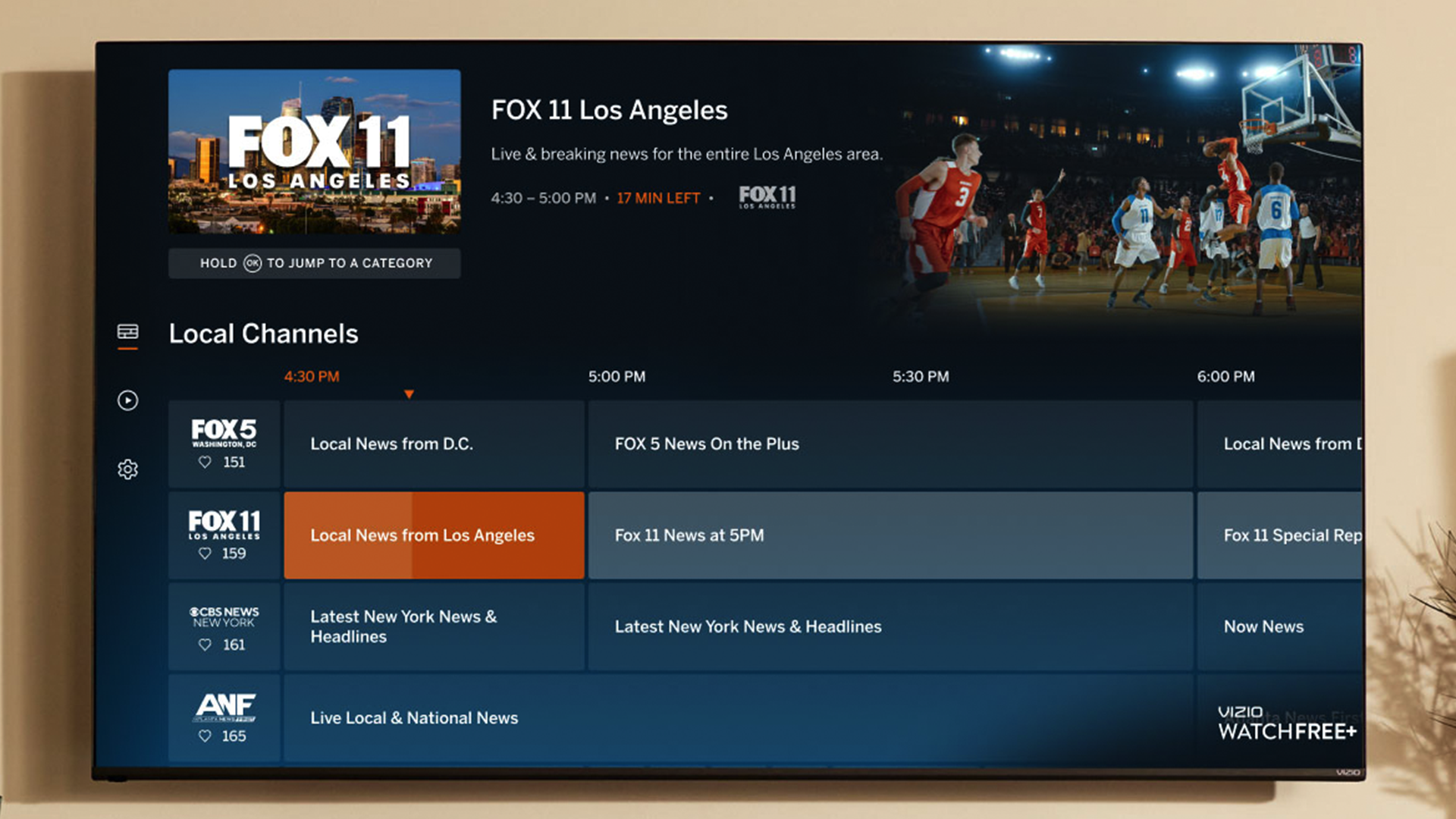
- Open the provider's On-Screen Guide using your remote control.
- Filter the guide by Local, Broadcast, or HD Channels.
- Use your provider's official online channel lineup tool by entering your account zip code:
- Spectrum: Navigate to Spectrum's Channel Lineup lookup.
- Xfinity: Use the Xfinity Channel Lineup assistant.
- Cox: Access the Cox Channel Lineup directory.
Locating Your Local Station on Satellite (DIRECTV and DISH Network)
Unlike terrestrial cable, direct-broadcast satellite providers use spot-beam technology to beam localized channel packages down to specific geographic areas.
- DIRECTV: Local network affiliates are generally grouped together in the main channel guide (typically matching the local broadcast station's virtual number or assigned to specific regional channel blocks).
- DISH Network: DISH places local news channels in specific guide blocks based on market size. You can quickly verify your assigned channel numbers by visiting the DISH Local Channels Lookup tool and inputting your zip code.
Method 3: Streaming Local News on Smart TVs and Connected Devices
Cord-cutters and digital-first viewers can access local news streams through subscription services, free ad-supported streaming platforms, and station-specific applications across platforms like Roku, Amazon Fire TV, Apple TV, Android TV, and Samsung Tizen.
STREAMING LOCAL NEWS OPTIONS
| Subscription Live TV | Network Apps | Free News Apps |
|---|---|---|
| YouTube TV | Paramount+ (CBS Local) | NewsON |
| Hulu + Live TV | Peacock (NBC Local) | Local Now |
| Fubo | Haystack News | |
| DIRECTV STREAM | Tubi / Pluto TV |
1. Subscription Live TV Streaming Services (vMVPDs)
Virtual Multichannel Video Programming Distributors (vMVPDs) function similarly to traditional cable, offering live feeds of local broadcast network affiliates based on your physical location determined by device location services or IP address lookup.
- YouTube TV: Includes live local carriage for ABC, CBS, NBC, FOX, CW, and PBS in almost all U.S. markets. Locate local news by selecting the Live tab and scrolling through the channel guide.
- Hulu + Live TV: Provides local network coverage based on subscriber billing zip code and home network location.
- Fubo: Focuses heavily on local broadcast networks and regional sports networks (RSNs).
- DIRECTV STREAM: Replicates traditional satellite channel structures in a streaming environment, offering local ABC, CBS, NBC, and FOX feeds in basic packages.
- Sling TV: Offers local FOX and NBC channels in select major metropolitan markets on its Sling Blue package. In markets where local channels are omitted, Sling offers antenna integration hardware.
2. Standalone Network Streaming Apps
If you hold a subscription to a parent network’s direct-to-consumer platform, you can frequently access live streams of your local news:
- Paramount+: Subscribers to the Paramount+ with SHOWTIME tier receive a continuous live feed of their local CBS affiliate.
- Peacock: Subscribers to the Peacock Premium Plus tier can access 24/7 live streams of their local NBC affiliate station.
- Hulu (On-Demand & Live): Offers live local broadcasts on its Live TV tier, alongside next-day clips of select local affiliate news segments.
3. Free Ad-Supported Streaming (FAST) Platforms & News Aggregators
If you do not have a paid TV subscription or an antenna, several free apps stream live and on-demand local newscasts nation-wide:
- NewsON: A dedicated app streaming local news broadcasts from over 275 local TV stations across 160+ U.S. markets. It offers live broadcasts as well as on-demand clips from recent newscasts.
- Local Now: Owned by Allen Media Group, this service uses your location to deliver real-time local news, weather updates, traffic reports, and local channels.
- Haystack News: Uses custom location configuration and interest-based algorithms to curate local, national, and global news feeds from local station partners.
- Tubi & Pluto TV: Both FAST platforms feature dedicated "Local News" sections in their electronic program guides, carrying 24/7 curated news streams from major broadcast group owners (such as FOX Local, CBS News Local, and local station affiliates).
- Individual Station Apps: Search your Smart TV or device app store (e.g., Roku Channel Store, Fire TV Appstore) directly using your local news station's call sign (e.g., WABC, KABC, WGN, WSB-TV). Most local stations operate dedicated smart TV apps providing live stream broadcasts and weather video clips.
Channel Retrieval Quick-Reference Guide
Use this comparison table to identify how to find local news across different broadcast technologies, along with their associated costs and operational requirements.
| Platform / Viewing Method | Cost Model | How to Locate Stations | Key Requirements & Setup |
|---|---|---|---|
| Over-the-Air (OTA) Antenna | Free after hardware purchase | Run an TV channel scan; check frequencies on FCC DTV Maps. | Indoor/Outdoor HDTV Antenna connected via Coaxial. |
| Cable TV (Xfinity, Spectrum, Cox) | Monthly Subscription | Use remote's EPG guide; check provider channel lineup online by zip code. | Provider Cable Box or CableCARD-compatible hardware. |
| Satellite TV (DIRECTV, DISH) | Monthly Subscription | Access local guide block; enter zip code into provider local lookup tool. | Satellite Dish, receiver, clear line-of-sight to southern sky. |
| Live TV Streaming (YouTube TV, Hulu) | Monthly Subscription | Navigate to the app's "Live" guide tab; station auto-assigns via IP. | High-speed internet connection, Smart TV or streaming stick. |
| Network Apps (Paramount+, Peacock) | Monthly Premium Tier | Select "Live TV" or "Channels" tab within the app. | Top-tier subscription plan, active internet connection. |
| Free Apps (NewsON, Local Now, Tubi) | Free (Ad-Supported) | Download app; permit location access or enter home zip code manually. | Compatible Smart TV or media player (Roku, Fire TV, Apple TV). |
Troubleshooting Local News Signal and Reception Issues
If your local news channel is missing, pixelated, or showing the wrong location, review these common issues and solutions:
COMMON TROUBLESHOOTING STEPS
- ISSUE: Missing Antenna Channels: Re-scan TV Channels (FCC Repack)
- ISSUE: Wrong Streaming Location: Reset Home Network / Location
- ISSUE: Blacked Out Cable Channel: Check Retransmission Disputes
Antenna Signal Loss or Missing Channels
- Run Periodic Rescans: Broadcast networks periodically adjust their transmission frequencies due to federal spectrum repack initiatives or station maintenance. If a channel suddenly disappears from your lineup, run a fresh channel scan via your TV menu.
- Antenna Positioning: UHF and VHF signals travel via line-of-sight. Physical obstacles like metal roofs, dense foliage, and high-density building materials degrade signals. Re-position indoor antennas near high windows facing toward local broadcast towers.
- Add an Amplifier or Attenuator: If you live more than 30 miles from transmission towers, an inline signal amplifier can boost low signals. Conversely, if you live very close to towers, strong signals can overload your TV tuner; using an attenuator can stabilize reception.
Incorrect Location on Streaming Platforms
If your live TV streaming app displays local news from an adjacent city or wrong market, your platform is misidentifying your physical geography:
- Enable Location Services: Ensure location permissions are toggled "On" within your smart TV or streaming media player settings.
- Update Home Network Settings: Services like Hulu + Live TV and YouTube TV require you to set a "Home Network." If your internet service provider (ISP) routes your IP address through a central server in another city, update your location within the streaming app's account management settings.
- Cellular Hotspot Interference: Avoid using mobile hotspots as primary TV connection points, as cellular IP addresses frequently resolve to distant regional hubs rather than your physical home address.
Broadcast Blackouts on Pay-TV Services
If a local channel displays a black screen or informational banner stating the channel is temporarily unavailable:
- This indicates an active retransmission consent dispute between your pay-TV provider and the station's parent ownership group.
- Workaround: While negotiations take place, watch the local newscast for free using an over-the-air antenna or by downloading free aggregator apps like NewsON or the local station's standalone smart TV application.
Frequently Asked Questions
How do I find local news channels on my TV without cable?
You can access local news channels without cable by connecting an indoor or outdoor HDTV antenna to your TV's coaxial port and running an auto-tune channel scan. Alternatively, you can stream local broadcasts using subscription services like YouTube TV and Hulu + Live TV, or watch free local newscasts using apps like NewsON, Local Now, and Tubi.
Why is my streaming service showing local news from a different city?
Streaming platforms determine your local news feed using your internet connection's IP address and device location settings. If your Internet Service Provider (ISP) routes traffic through a remote server, or if your device's location services are disabled, the app may assign you to an adjacent media market. You can resolve this by updating your "Home Area" settings in the app or re-authenticating your location on a mobile device connected to the same Wi-Fi network.
Can I stream my local news channel for free online?
Yes. Most local TV stations stream their daily newscasts live and on-demand through their official station websites and dedicated Smart TV applications (available on Roku, Fire TV, and Apple TV). Free platforms like NewsON, Local Now, and Haystack News also aggregate live and recent local newscasts from hundreds of stations nationwide without requiring a paid subscription.
What is the difference between an RF channel number and a virtual channel number?
An RF (Radio Frequency) channel number represents the actual physical frequency band over which a television station transmits its signal through the air. A virtual channel number is the digital channel assignment displayed on your TV screen (e.g., Channel 4.1), preserving historical channel branding established during the analog television era.
Why did my local news channel suddenly disappear from my antenna lineup?
Local channels typically disappear from antenna lineups due to physical signal obstruction, station frequency adjustments, or atmospheric changes. Run an auto-program or channel scan through your TV setup menu to refresh channel maps and pick up any changed broadcast frequencies.
Recommended Next Steps
To quickly find and start watching your local news channel today:
- For Antenna Viewers: Check your broadcast availability by inputting your zip code into the FCC DTV Reception Maps database, adjust your antenna toward the recommended tower headings, and run a Channel Auto-Scan in your television settings menu.
- For Streaming Viewers: Search your Smart TV app store for your local station's call sign (e.g., WHDH, KGO, WAGA) or download NewsON or Local Now for instant, zero-cost access to regional broadcasts.
- For Cable/Satellite Users: Access your provider's digital program guide and filter by "Local/Broadcast" or search your provider's official online lineup directory using your billing zip code.
Image Gallery