Comprehensive Guide to Online Analyzers: Tools for Performance, SEO, and Data Insights
An online analyzer is a web-based application designed to evaluate, diagnose, and report on specific datasets or web properties without requiring local software installation. In 2026, these tools primarily focus on real-time website pe...
An online analyzer is a web-based application designed to evaluate, diagnose, and report on specific datasets or web properties without requiring local software installation. In 2026, these tools primarily focus on real-time website performance metrics, automated SEO audits, security vulnerability scanning, and AI-driven data visualization for enterprise-level business intelligence.
Contents
The Evolving Landscape of Online Analyzers in 2026
The term "online analyzer" encompasses a broad spectrum of digital tools, ranging from simple grammar checkers to complex cloud-based diagnostic suites. As we move through 2026, the technology behind these platforms has shifted from static reporting to dynamic, predictive intelligence. The primary goal of any online analyzer is to transform raw data—whether it is a URL, a block of code, a financial spreadsheet, or a legal document—into actionable insights.
The democratization of high-compute cloud environments has allowed online analyzers to perform tasks that previously required expensive hardware. Today, a user can upload a massive dataset to an online statistical analyzer and receive a full regression analysis in seconds. Similarly, web developers use online performance analyzers to simulate user conditions from dozens of global locations simultaneously, ensuring that their applications meet modern speed and accessibility standards.
The Shift Toward AI and Machine Learning
In 2026, the integration of Large Language Models (LLMs) and specialized machine learning algorithms has redefined the "analysis" phase. Older tools simply flagged errors; modern online analyzers interpret the context. For instance, a technical SEO analyzer no longer just identifies a missing alt tag; it suggests a contextually relevant description based on computer vision analysis of the image itself. This shift from identification to remediation is a hallmark of current online diagnostic tools.
Website Performance and SEO Analyzers
For digital marketers and webmasters, online analyzers are indispensable for maintaining visibility in search engine results pages (SERPs). These tools examine a site’s architecture, content, and technical health to ensure compliance with search engine algorithms and user experience (UX) standards.
Technical SEO Auditing
Online SEO analyzers crawl a website similarly to how a search engine bot would. They look for "crawlability" issues, such as broken links (404 errors), improper use of canonical tags, and robots.txt misconfigurations. In 2026, these tools have become more sophisticated in handling JavaScript-heavy frameworks, ensuring that Single Page Applications (SPAs) are properly indexed.
Key areas analyzed include:
- Metadata Accuracy: Ensuring titles and descriptions are optimized for both click-through rates and keyword relevance.
- Schema Markup: Verifying that structured data is correctly implemented to facilitate rich snippets in search results.
- Internal Link Equity: Mapping how "link juice" flows through a site to prioritize high-value pages.
Performance and Core Web Vitals
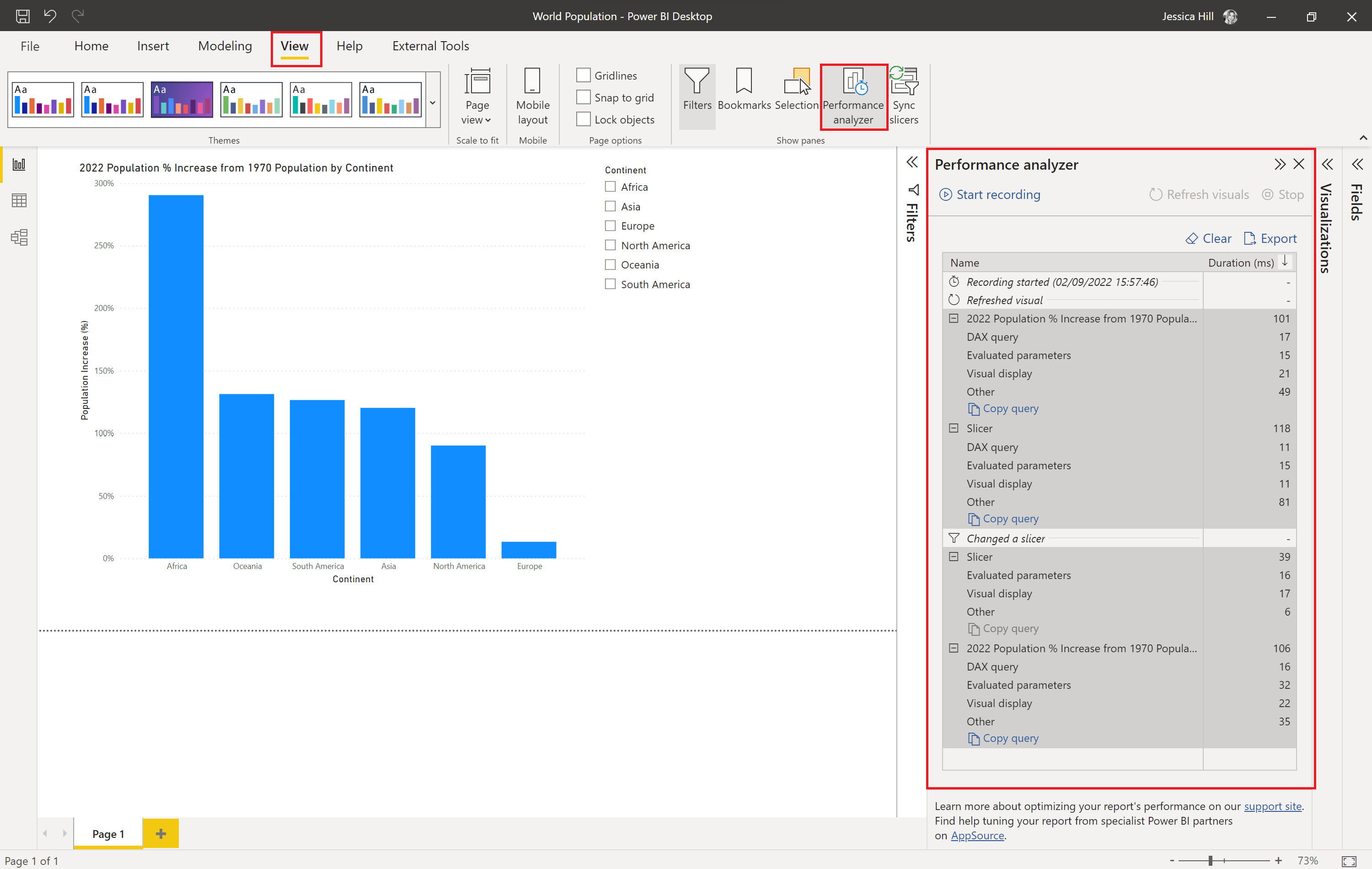
Performance analyzers focus on speed and responsiveness. Since the full adoption of Interaction to Next Paint (INP) as a core metric, online analyzers prioritize how quickly a page responds to user inputs rather than just how fast it loads. Tools like Google's PageSpeed Insights and GTmetrix provide detailed breakdowns of the Critical Rendering Path.
To understand the output of these analyzers, one must be familiar with metrics such as Largest Contentful Paint (LCP), which measures loading performance, and Cumulative Layout Shift (CLS), which measures visual stability. A high-quality online analyzer provides a waterfall chart, showing exactly which script or image is delaying the "time to interactive" (TTI).
Security and Vulnerability Analyzers
With the increasing frequency of cyber threats, online security analyzers have become a first line of defense for small and medium enterprises. These tools fall into two main categories: Static Analysis (SAST) and Dynamic Analysis (DAST).
Scanning for Vulnerabilities
An online security analyzer can scan a URL or a code repository for known vulnerabilities, such as Cross-Site Scripting (XSS), SQL Injection, and insecure headers. For example, the OWASP Top 10 serves as the standard benchmark for these evaluations. Modern analyzers also check the "Software Bill of Materials" (SBOM) to identify if any third-party libraries used in a project have documented security flaws.
SSL/TLS and Privacy Verification
Online analyzers like Qualys SSL Labs provide deep dives into a server's configuration. They verify that the SSL/TLS certificate is valid, check for support of modern protocols like TLS 1.3, and ensure that legacy, insecure protocols like SSL 3.0 are disabled. Furthermore, with privacy regulations like GDPR and CCPA remaining strictly enforced in 2026, specialized privacy analyzers check for cookie compliance and the presence of accessible privacy policies.
Data and Statistical Online Analyzers
Beyond the web, online analyzers serve the scientific and business communities by processing complex datasets. These platforms allow users to perform advanced calculations without needing to master programming languages like R or Python.
Business Intelligence (BI) and Visualization
Online data analyzers can connect to live APIs or ingest CSV/JSON files to create real-time dashboards. These tools use predictive modeling to forecast trends based on historical data. For instance, a retail business might use an online analyzer to determine the correlation between local weather patterns and online sales volume.
Academic and Scientific Analysis
In the academic sphere, online statistical analyzers provide access to ANOVA, T-tests, and multivariate analysis. These platforms are particularly useful for collaborative research, as they allow multiple users to view the same analysis in a cloud environment, ensuring consistency in methodology and results.
Key Metrics and Comparison of Online Analyzers
Selecting the right tool depends on the specific problem you are trying to solve. The following table compares the primary categories of online analyzers available in 2026.
| Analyzer Category | Primary Use Case | Key Metrics Tracked | Target Audience |
|---|---|---|---|
| SEO Analyzer | Improving Search Rankings | Keyword density, Backlinks, Crawl errors | Marketers, SEO Specialists |
| Performance Analyzer | Optimizing Load Speed | LCP, INP, CLS, TTFB | Web Developers, UX Designers |
| Security Analyzer | Identifying Risks | XSS, SQLi, SSL Grade, CVEs | Security Engineers, IT Admins |
| Data Analyzer | Business Insights | Correlation, Trend Analysis, ROI | Data Scientists, Executives |
| Code Analyzer | Quality Assurance | Technical Debt, Syntax Errors, Logic Flaws | Software Developers |
Technical Implementation: How Online Analyzers Work
Most online analyzers operate on a "Request-Response" model. When you input a URL or upload a file, the tool's backend initiates a series of automated scripts.
- Data Acquisition: The analyzer fetches the target data. For a website, this involves a "headless browser" (like Chromium) that renders the page exactly as a user would.
- Parsing and Extraction: The tool breaks down the HTML, CSS, JavaScript, or raw data into a structured format, often using JSON or XML.
- Rule Evaluation: The parsed data is compared against a set of predefined rules or machine learning models. For example, a code analyzer checks if a function exceeds a certain "cyclomatic complexity" score.
- Reporting: The results are compiled into a user-friendly report, often including a "health score" and a prioritized list of recommendations.
Limitations to Consider
While powerful, online analyzers have limitations. They often operate from a "clean" environment, which may not perfectly replicate the varied hardware and network conditions of actual users. Additionally, automated tools can sometimes produce "false positives," especially in security and SEO contexts, where human judgment is required to determine if a flagged issue is actually a problem or a deliberate design choice.
Best Practices for Using Online Analyzers
To get the most value out of an online analyzer, it is important to follow a structured approach. Using these tools haphazardly can lead to "optimization fatigue," where you spend time fixing minor issues that have no real impact on performance or security.
- Establish a Baseline: Before making any changes, run an initial analysis to understand your current state. Save this report as a benchmark.
- Prioritize Critical Issues: Focus on "Red" or "High" severity flags first. In SEO, this might be a site-wide "NoIndex" tag; in security, it might be an open database port.
- Analyze Periodically: Digital environments are dynamic. A website that is optimized today may slow down next month due to a bloated third-party script. Set up automated monthly or weekly scans.
- Cross-Reference Tools: No single analyzer is perfect. Use at least two different tools for critical tasks like security auditing or performance testing to ensure consistency in the findings.
- Verify Fixes: After implementing a recommendation, re-run the analyzer immediately to confirm that the issue has been resolved and that the fix hasn't introduced new problems.
Frequently Asked Questions
Are online analyzers safe to use with sensitive data?
It depends on the provider's privacy policy and encryption standards. For website URLs, safety is generally high as the data is already public. However, when using data or code analyzers, ensure the platform uses end-to-end encryption and has a clear data retention policy. Reputable tools will often have ISO 27001 or SOC 2 certifications.
Why do different SEO analyzers give me different scores?
Each analyzer uses a proprietary algorithm and weights factors differently. One tool might prioritize backlink quality, while another focuses more heavily on technical site structure. Instead of chasing a "perfect score" across all platforms, focus on the specific underlying issues (like slow server response times) that multiple tools agree upon.
Can an online analyzer replace a professional audit?
An online analyzer is an excellent first step and a powerful maintenance tool, but it cannot replace the nuanced perspective of a human expert. Professionals can interpret data within the context of your specific business goals, whereas an automated tool can only check against general rules.
How often should I run a performance analyzer?
For high-traffic sites, performance should be monitored continuously using synthetic monitoring. For smaller sites, running an online analyzer after every major content update or code deployment is a best practice. At a minimum, a monthly check ensures that no "performance regression" has occurred due to external factors like updated browser versions or slow third-party APIs.
Are free online analyzers as good as paid ones?
Free versions are typically "point-in-time" scanners with limited features. Paid versions often provide historical data tracking, more frequent automated scans, API access for integration into your workflow, and deeper insights into "why" a problem is occurring. For professional use, the time saved by a paid tool's advanced reporting often outweighs the subscription cost.
Final Recommendation
When choosing an online analyzer in 2026, prioritize tools that offer actionable intelligence rather than just raw data. Look for platforms that integrate with your existing workflow—such as those that can push alerts directly to your project management software or code repository. Start by running a comprehensive audit using a trusted tool like the W3C Validator for code integrity or Google PageSpeed Insights for performance. Once the foundational issues are resolved, implement a routine of periodic scanning to maintain the health and security of your digital assets.
Image Gallery