Online Medical Billing Software: Architecture, Selection, and Workflow Implementation
Online medical billing software is a cloud-based application that automates the healthcare revenue cycle by managing patient eligibility checks, charge capture, medical coding, electronic claim submission, clearinghouse routing, paymen...
Online medical billing software is a cloud-based application that automates the healthcare revenue cycle by managing patient eligibility checks, charge capture, medical coding, electronic claim submission, clearinghouse routing, payment posting, and denial management. Hosted on secure remote servers, these web-based platforms allow healthcare practices to submit Electronic Data Interchange (EDI) claims to commercial and government payers from any internet-connected device while maintaining strict data compliance.
Contents
Understanding Online Medical Billing Software: Cloud vs. On-Premise Architecture
Modern healthcare practices rely on revenue cycle management (RCM) technology to convert patient encounters into clean claims and predictable cash flow. Historically, clinics installed client-server medical billing software on local hard drives and internal servers. That architecture required dedicated IT staff, manual software patches, hardware maintenance, and complex remote access configurations.
The shift toward online medical billing software—delivered via a Software-as-a-Service (SaaS) model—has transformed healthcare administrative operations. Web-based platforms host application code and patient databases in secure, centralized cloud environments. Users access system functionalities through web browsers or encrypted mobile applications.
- Patient Encounter
- EHR / Charge Capture
- Claim Scrubbing Engine
- Clearinghouse / EDI 837
- Payment Posting & Denial Management
Online medical billing platforms interact with two adjacent healthcare technology layers:
- Electronic Health Records (EHR / EMR): Captures clinical encounter documentation, diagnostic notes, and procedure details entered by clinicians during patient visits.
- Practice Management (PM) Systems: Handles front-office scheduling, patient intake, demographic entry, and appointment reminders.
- Revenue Cycle Management (RCM) Engines: Receives clinical documentation from the EHR, translates care into standardized billing codes, scrubs claims for errors, transmits electronic claims via HIPAA-compliant networks, and tracks reimbursement status.
Most modern web platforms integrate PM and RCM capabilities into a single environment, linking with third-party EHRs through Application Programming Interfaces (APIs) or Health Level Seven (HL7) and Fast Healthcare Interoperability Resources (FHIR) standards.
Regulatory Compliance and Data Security Requirements
Because web-based systems process Sensitive Protected Health Information (PHI) over public telecommunications networks, online medical billing platforms must comply with federal healthcare privacy and security standards.
- Core Compliance & Security Layers
- HIPAA Security Rule
- Administrative
- Physical Controls
- Technical Guard
- HITECH Act
- Breach Notification
- Audit Logging
- Vendor BAA Signings
- Technical Safeguards
- AES-256 Encryption
- TLS 1.3 Transmission
- Role-Based Access
- HIPAA Security Rule
HIPAA and HITECH Mandates
Under the Health Insurance Portability and Accountability Act (HIPAA) Privacy and Security Rules, any cloud vendor storing or transmitting electronic PHI (ePHI) acts as a Business Associate. Healthcare practices must execute a formal Business Associate Agreement (BAA) with their online billing software provider before processing live patient claims. The BAA legally binds the vendor to implement administrative, physical, and technical safeguards to protect ePHI against unauthorized disclosure or breaches.
The Health Information Technology for Economic and Clinical Health (HITECH) Act expanded HIPAA enforcement by requiring mandatory notification to affected individuals and the U.S. Department of Health and Human Services (HHS) Office for Civil Rights (OCR) in the event of an unencrypted ePHI data breach.
Essential Security Features
When evaluating web billing tools, healthcare administrators must verify the vendor supports key technical security mechanisms:
- Data Encryption: Enforces Advanced Encryption Standard (AES) 256-bit encryption for stored data at rest and Transport Layer Security (TLS 1.2 or TLS 1.3) for data in transit across web browsers.
- Role-Based Access Control (RBAC): Limits staff privileges so billers, front-desk receptionists, and clinical providers access only the specific PHI necessary for their job duties.
- Multi-Factor Authentication (MFA): Requires secondary authentication tokens before granting access to web portals.
- Audit Logs and Access Monitoring: Maintains immutable, time-stamped logs of every user login, record creation, modification, export, and deletion to meet federal compliance auditing guidelines.
Disclaimer: Healthcare regulatory requirements vary by jurisdiction and practice specialty. Practice managers should consult qualified healthcare legal counsel and certified compliance professionals when executing BAAs and establishing billing security policies.
Core Features of Modern Online Medical Billing Platforms
High-performing online billing software minimizes manual data entry, reduces claim rejection rates, and shortens the accounts receivable (A/R) cycle.
- Real-Time Eligibility Verification (EDI 270 / EDI 271)
- Automated Charge Capture & Coding (ICD-10-CM / CPT / HCPCS)
- Claim Scrubbing Engine (CCI Edits / LCD & NCD Validation)
- Clearinghouse Transmission (EDI 837P Professional / 837I Institutional)
- Payment Posting & Denial Management (EDI 835 ERA / Action Tracking)
Real-Time Insurance Eligibility Verification
Before services are rendered, front-office personnel use the software to submit electronic inquiry transactions (EDI 270) directly to commercial or government insurance databases. The system receives instant response files (EDI 271) detailing active coverage status, co-pay amounts, deductible progress, prior authorization requirements, and co-insurance responsibilities. Automated eligibility checks reduce front-end claim rejections caused by terminated coverage or incorrect subscriber IDs.
Automated Charge Capture and Code Scrubbing
Once clinical notes are finalized in the EHR, billing software maps patient encounters to diagnostic and procedural code sets:
- ICD-10-CM / ICD-11: Clinical diagnostic codes.
- CPT (Current Procedural Terminology): Outpatient medical, surgical, and diagnostic service codes.
- HCPCS Level II: Codes for durable medical equipment (DME), supplies, and injectable medications.
Before claim generation, an integrated claim scrubber engine runs custom rules against National Correct Coding Initiative (NCCI) edits, Local Coverage Determinations (LCDs), and National Coverage Determinations (NCDs). The scrubber flags invalid modifier combinations, unbundled codes, missing National Provider Identifiers (NPIs), or missing prior authorization numbers prior to submission.
Clearinghouse Routing and Electronic Claim Transmission
Online billing software compiles scrubbed charges into standardized electronic formats:
- EDI 837P: Used for professional services provided by physicians and outpatient clinics.
- EDI 837I: Used for institutional billing by hospitals and inpatient facilities.
The software securely routes 837 files to an integrated clearinghouse, which validates basic file structures and forwards claims to primary, secondary, and tertiary insurance payers (including Medicare, Medicaid, and private commercial carriers).
Electronic Remittance Advice (ERA) and Payment Posting
Payers return electronic remittance files (EDI 835) containing payment approvals, contractual adjustments, and denial details. Modern web platforms automatically read 835 ERA files, post approved payments to patient ledgers, and assign contractual write-offs. This automated reconciliation replaces manual paper Explanation of Benefits (EOB) entry, saving administrative labor.
Denial Management and Appeals Tracking
When a claim is denied or rejected, the system categorizes the response code (such as Claim Adjustment Reason Codes, or CARCs) and automatically places the claim into a work queue for billing staff. Billers can edit demographic details, correct modifiers, attach clinical documentation, and generate standardized appeal letters directly within the web dashboard.
Selecting the Right Online Medical Billing Software
Choosing an online medical billing system requires evaluating practice size, specialty workflows, integration needs, and vendor cost structures.
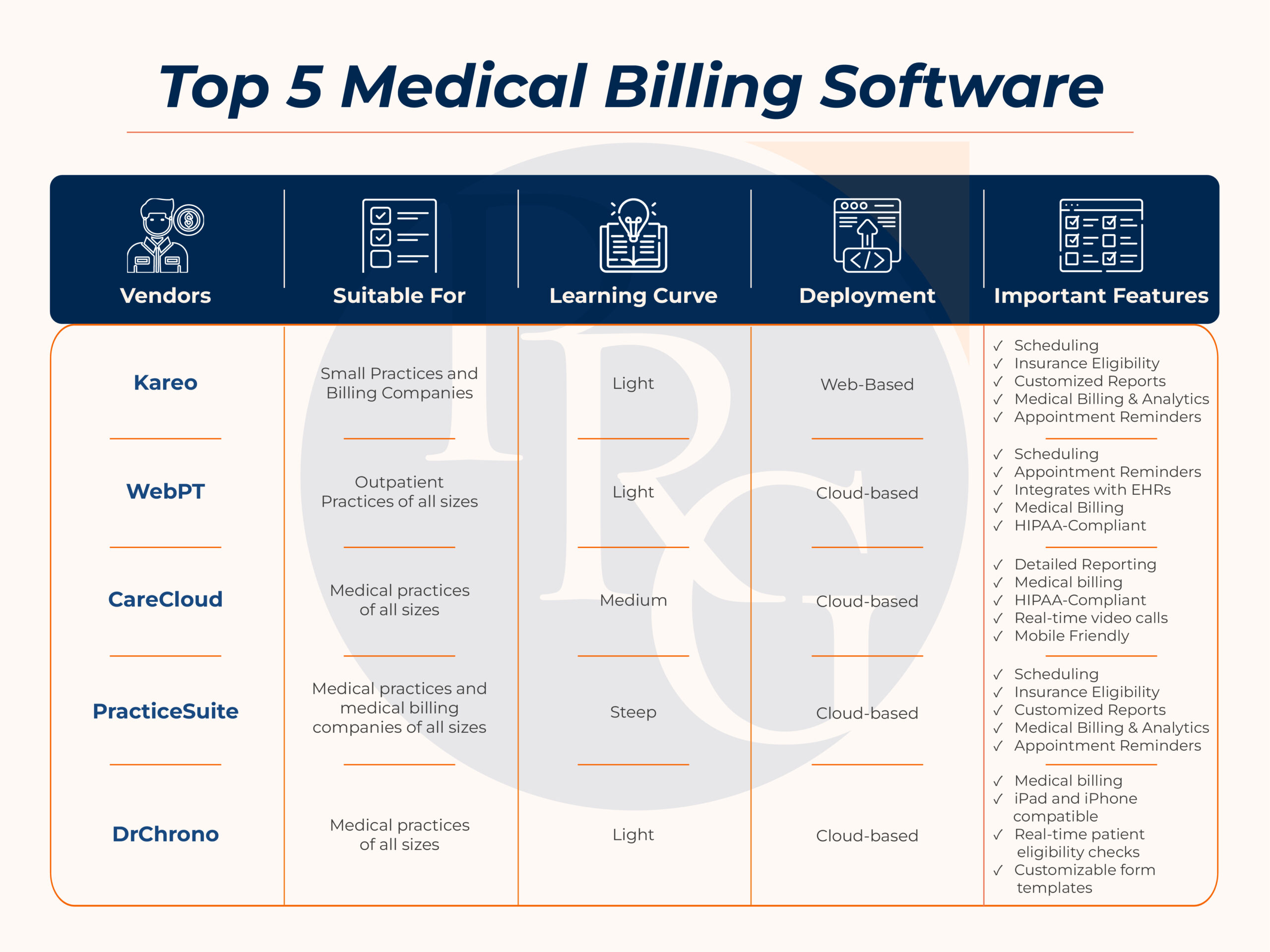
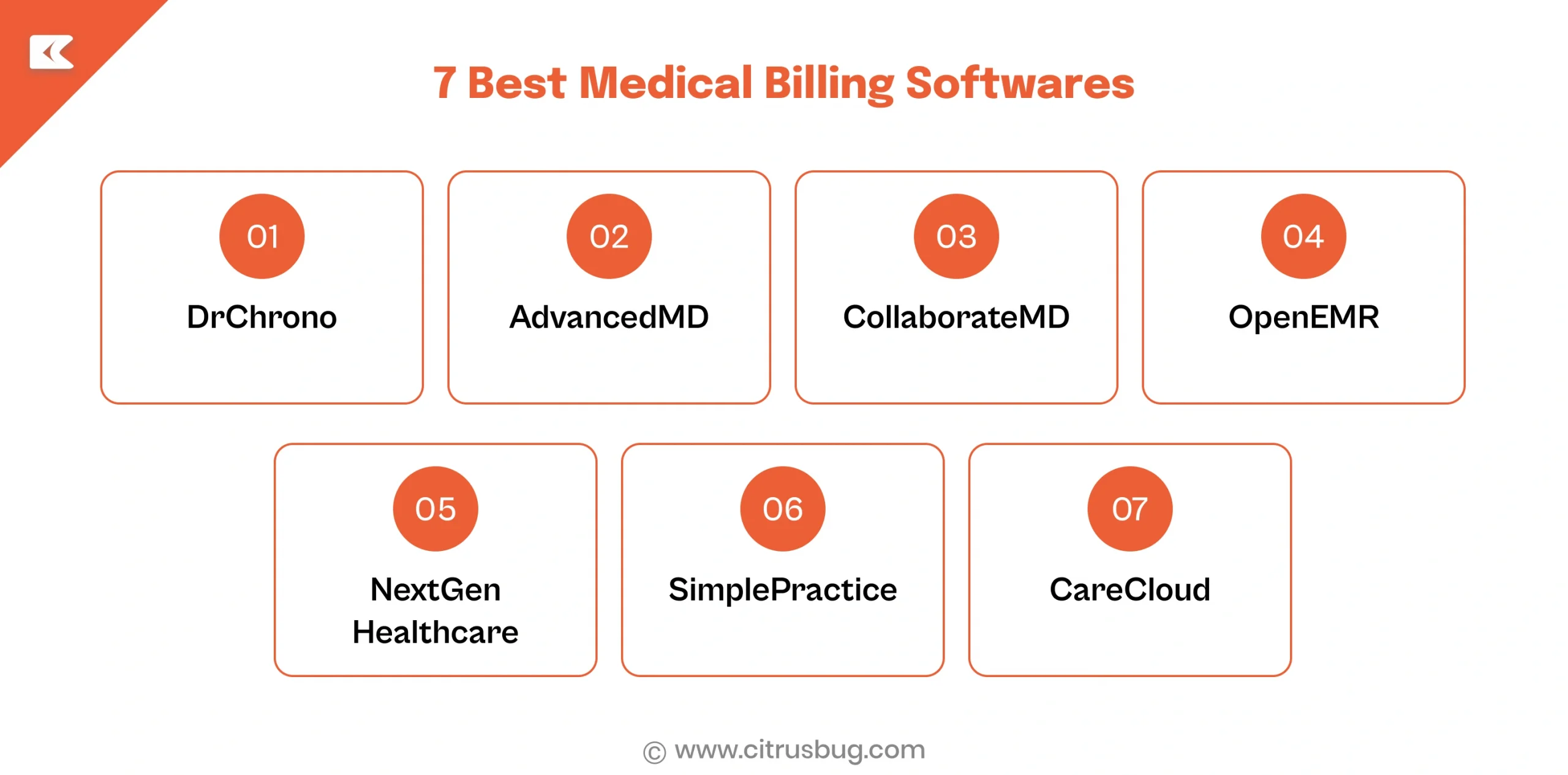
Deployment Models and Vendors Comparison
| Vendor / Platform | Primary Target Market | Core Strengths | Common Integration Options | Typical Pricing Model |
|---|---|---|---|---|
| Tebra (formerly Kareo) | Small to mid-sized independent practices | User-friendly dashboard, patient portal, built-in clearinghouse | Direct API, native clinical modules | Flat monthly subscription per provider |
| AdvancedMD | Mid-sized to enterprise medical groups | Advanced reporting, multi-specialty customizable templates | Open API ecosystem, HL7 integration | Tiered monthly subscription or per-encounter |
| athenahealth (athenaOne) | Small practices to multi-specialty networks | Integrated cloud EHR/PM/RCM, automated rules engine | Proprietary network connectivity, FHIR APIs | Percentage of collected revenue |
| DrChrono | Specialty clinics, mobile practices | iPad/iOS-optimized clinical tools, open API library | Robust RESTful APIs, third-party apps | Tiered subscription packages |
| CureMD | Ambulatory clinics, community health centers | Specialty billing rules, integrated practice management | HL7 engine, lab interface network | Monthly subscription or RCM service fee |
Evaluating Software Pricing Models
Online medical billing tools generally operate under one of three financial models:
- Monthly Subscription per Provider: The practice pays a fixed recurring fee (ranging from $200 to $600+ per month per provider) for access to software modules, clearinghouse claims, customer support, and system updates.
- Percentage of Practice Collections: Common in full-service RCM partnerships where the vendor provides both software and remote billing personnel. The provider pays a negotiated percentage (typically 4% to 8%) of net practice receipts collected each month.
- Per-Transaction or Per-Claim Model: A base platform subscription fee is supplemented by incremental charges (e.g., $0.29 to $0.60) for every claim submission, real-time eligibility lookup, or electronic patient statement issued.
Step-by-Step Implementation and Workflow Integration
Transitioning to a new web billing platform requires systematic planning to maintain uninterrupted revenue flow during migration.
- Step 1: Pre-Implementation Audit & Integration Mapping
- Step 2: Data Migration & Executing Security Agreements
- Step 3: Clearinghouse Setup & Payer Enrollment
- Step 4: Staff Training & Parallel Claim Testing
- Step 5: Go-Live & Post-Launch Revenue Auditing
Step 1: Pre-Implementation Audit and Integration Mapping
Assess existing billing bottlenecks, average days in Accounts Receivable (A/R), clean claim rates, and payer denial trends. Map required data flows between front-desk registration, clinical EHR entry, and the incoming web billing portal.
Step 2: Data Migration and Security Agreements
Execute a Business Associate Agreement (BAA) with the software provider. Extract master files from the legacy software—including patient demographic records, insurance carrier tables, provider NPI/Tax ID credentials, standard fee schedules, and active diagnosis/procedure code lists. Validate data formatting to prevent corrupt records during system upload.
Step 3: Clearinghouse Setup and Payer Enrollment
Register practice NPIs and Tax IDs with the software vendor's integrated clearinghouse. Submit Electronic Data Interchange (EDI) enrollment forms for claim routing and Electronic Funds Transfer (EFT) / ERA setup across primary payers (such as Medicare, Medicaid, and commercial insurers). Payer EDI enrollments typically take 2 to 6 weeks for full approval.
Step 4: Staff Training and Parallel Testing
Train billing specialists, coders, and administrative staff on web portal workflows. Perform end-to-end testing by processing test batches of EDI 837 claim files to verify code scrubbing accuracy, payer routing rules, and fee schedule calculations.
Step 5: Go-Live and Post-Launch Revenue Auditing
Cut over to the online billing software for live patient encounters. Maintain legacy billing access to resolve lingering historical A/R. Continuously monitor key performance indicators (KPIs) during the first 90 days:
- Clean Claim First-Pass Rate: Target > 95%.
- Days in Accounts Receivable (A/R): Target < 35 days.
- Denial Rate: Target < 5%.
Common Challenges and Troubleshooting Solutions
Even robust online billing applications require proactive oversight to manage technical and operational disruptions.
Common Revenue Cycle Bottlenecks
| Issue | Root Cause | Resolution |
|---|---|---|
| High Rejection Rates | Incorrect Demographics | Real-time EDI 270 |
| Clearinghouse Stoppage | Unenrolled Payers | EDI Setup Review |
| API Integration Drops | Outdated Endpoint Code | Webhook / API Log |
High Initial Claim Rejection Rates
- Symptom: Claims fail at the clearinghouse level before reaching the payer.
- Root Cause: Front-desk demographic errors, missing subscriber ID prefixes, or mismatched NPI/Tax ID configurations.
- Solution: Enable mandatory real-time eligibility verification (EDI 270/271) during patient check-in. Configure the software's claim scrubber to block submission whenever required demographic fields or taxonomy codes are missing.
Unprocessed Electronic Remittances (ERA Drops)
- Symptom: Payers deposit funds via direct deposit, but patient ledgers do not show updated account balances.
- Root Cause: Incomplete payer ERA enrollment or missing EDI 835 mapping rules within the software dashboard.
- Solution: Audit electronic bank deposits against unmatched clearinghouse 835 files. Manually download electronic EOB files directly from payer portals while verifying that payer ERA enrollment paperwork is fully active.
Interoperability and API Communication Failures
- Symptom: Charges captured in the EHR do not transfer to the web billing module.
- Root Cause: API access token expirations, outdated HL7 mapping protocols, or network firewall blocks.
- Solution: Inspect integration log files within the administration panel to locate failed transaction payloads. Reset API authentication keys and establish automated alerts to notify IT supervisors if connection endpoints go offline.
Frequently Asked Questions
What is the main difference between practice management software and online medical billing software?
Practice management software focuses primarily on front-office operations such as patient scheduling, provider calendars, patient registration, and appointment notifications. Online medical billing software handles financial revenue cycle workflows, including ICD-10/CPT coding validation, electronic claim scrubbing, EDI submission to clearinghouses, payment posting, and denial appeals. Most modern cloud applications integrate both functions into a unified software suite.
Is cloud-based medical billing software secure for HIPAA compliance?
Yes, cloud-based medical billing platforms can be fully HIPAA-compliant if configured correctly. Vendors must implement technical safeguards like AES-256 encryption at rest, TLS 1.2 or TLS 1.3 encryption in transit, multi-factor authentication (MFA), role-based access controls, and detailed access audit logs. The practice must execute a signed Business Associate Agreement (BAA) with the software vendor before transmitting any patient data.
How does online medical billing software handle code updates?
Because the software is hosted in the cloud, vendors deploy regulatory code set updates (such as annual ICD-10-CM, CPT, and HCPCS Level II revisions) automatically on remote servers. Practice personnel do not need to install local desktop patches to receive updated billing codes or revised payer edit rules.
Can an online billing system connect with an existing Electronic Health Record (EHR)?
Yes. Modern online medical billing systems connect with third-party EHRs using standard interfaces such as HL7, FHIR, or RESTful APIs. These connections automatically import demographic data and clinical billing charges from encounter notes into the billing system without requiring dual data entry.
What key performance metrics should a practice monitor using billing software reports?
Practices should track four primary financial metrics using built-in reporting dashboards:
- Clean Claim First-Pass Rate: The percentage of claims accepted by the payer on the first submission (aim for 95% or higher).
- Days in Accounts Receivable (A/R): The average number of days required to collect payments (aim for under 35 days).
- Net Collection Rate: Total payments received divided by allowable charges (aim for 98% or higher).
- Initial Denial Rate: The percentage of claims initially rejected or denied by payers (aim for under 5%).
Actionable Next Steps for Practice Managers
To upgrade or implement an online medical billing solution:
- Conduct a Revenue Cycle Assessment: Measure your current practice clean claim rate, average days in A/R, and monthly claim processing volume to set operational benchmarks.
- Audit Compatibility: Compile a list of mandatory third-party software tools currently in use (such as independent EHRs, lab portals, or merchant card processors) that must interface with the web billing system.
- Request Vendor Demonstrations: Schedule live software demonstrations focusing on real-time eligibility tools, automated claim scrubbing rules, ERA auto-posting workflows, and custom financial reporting modules.
- Verify Compliance and Contract Terms: Confirm the vendor will sign a comprehensive Business Associate Agreement (BAA). Review system SLA commitments, data ownership rights, software update policies, and total cost structures—including clearinghouse transaction fees and implementation costs.
Image Gallery