How a Cable Internet Access Provider Works: From Headend to Home
A cable internet access provider delivers high-speed data services using a Hybrid Fiber-Coaxial (HFC) network. By utilizing the same infrastructure that carries cable television signals, providers transmit data as radio frequency signa...
A cable internet access provider delivers high-speed data services using a Hybrid Fiber-Coaxial (HFC) network. By utilizing the same infrastructure that carries cable television signals, providers transmit data as radio frequency signals. These signals travel through fiber-optic backbones to local nodes before reaching individual homes via traditional coaxial copper cables and a cable modem.
Contents
The mechanics of cable internet represent a sophisticated blend of legacy infrastructure and modern fiber-optic technology. Unlike DSL, which relies on telephone lines, or pure fiber-to-the-home (FTTH), cable internet occupies a unique middle ground known as HFC. To understand how a provider functions in 2026, one must look at the path data takes from the global internet backbone to the localized hardware inside a residence or business.
The Architecture of a Hybrid Fiber-Coaxial (HFC) Network
Modern cable internet providers do not rely solely on the thick copper wires seen on utility poles. Instead, they utilize a Hybrid Fiber-Coaxial (HFC) architecture. This system is designed to maximize the speed of fiber optics while leveraging the cost-effectiveness and existing reach of coaxial cables.
The Backbone and the Headend
The process begins at the Headend, which serves as the central nervous system of the cable provider’s local operation. The headend is where the provider receives data from the global internet backbone—high-capacity fiber lines that connect cities and continents. At this facility, the provider houses the Cable Modem Termination System (CMTS). The CMTS is a high-performance server and switching system that manages the data traffic for thousands of subscribers, converting digital data from the internet into radio frequency (RF) signals suitable for cable transmission.
Fiber-Optic Transport and Neighborhood Nodes
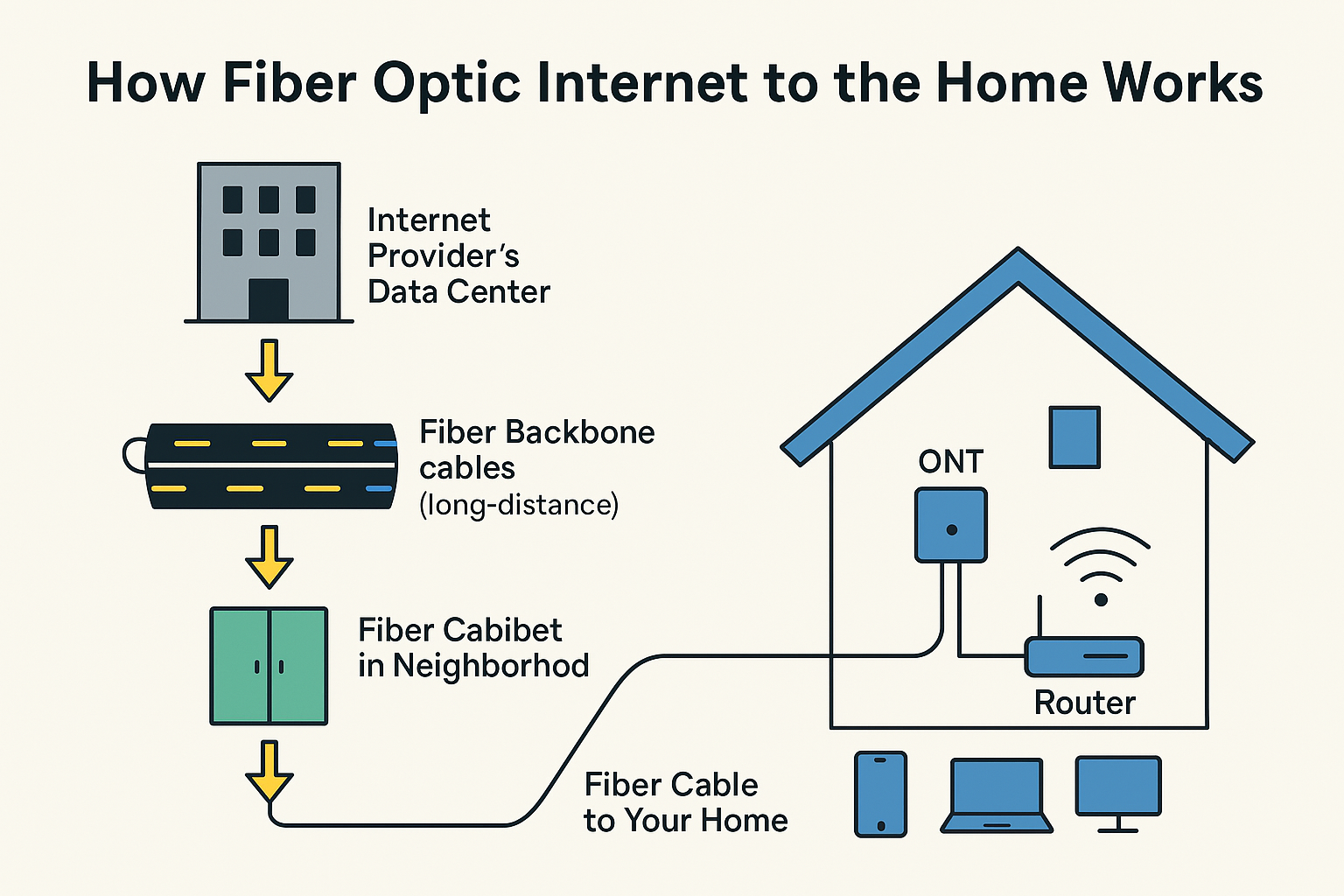
Once the data is converted at the headend, it is sent out over fiber-optic cables. These cables can carry massive amounts of data over long distances with minimal signal degradation. These fiber lines terminate at an Optical Node located within a specific neighborhood or geographic cluster. The node’s primary job is to act as a translator, converting the light pulses from the fiber-optic cable back into RF electrical signals that can travel over coaxial copper wire.
The Last Mile: Coaxial Distribution
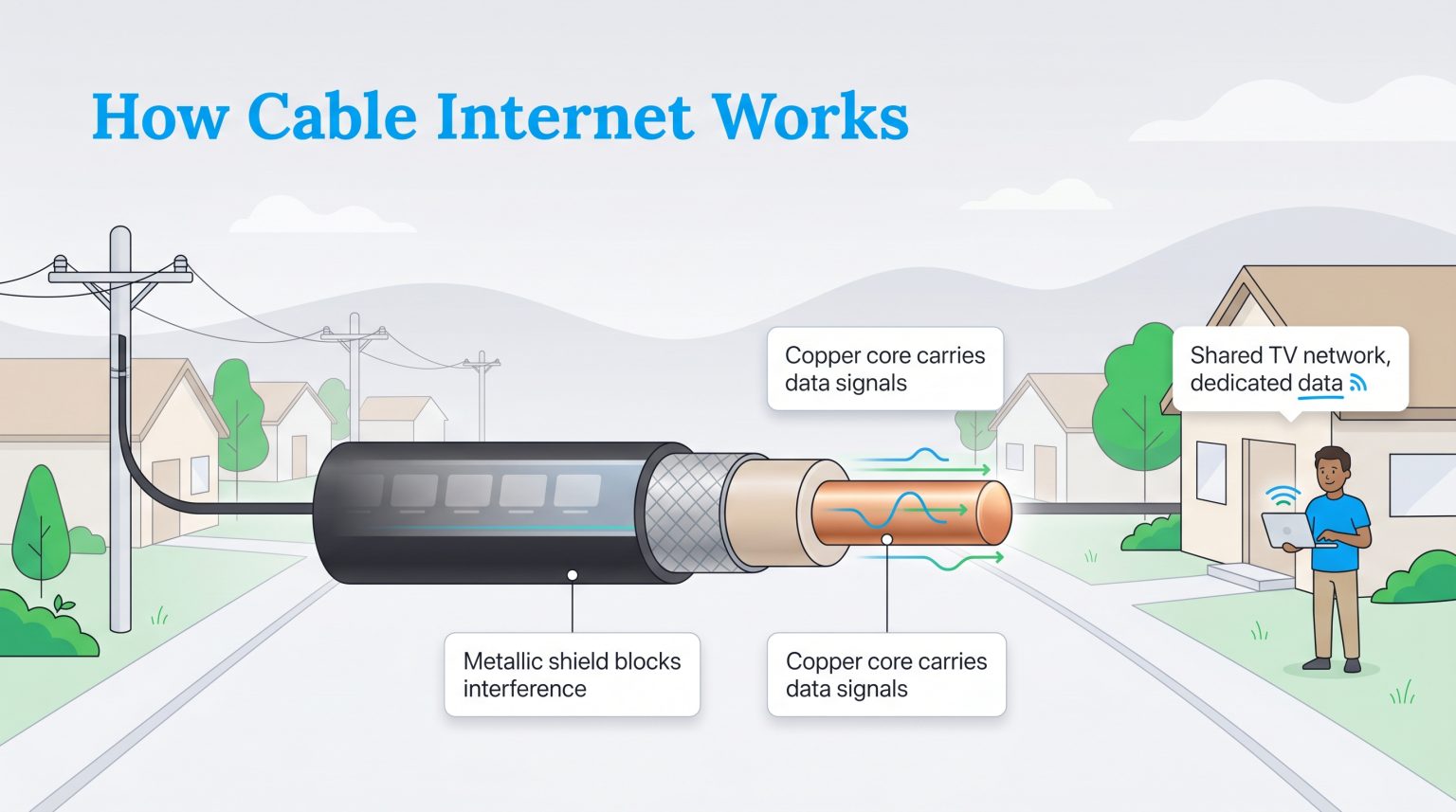
From the neighborhood node, the signal enters the "last mile." This is the portion of the network that uses coaxial cable (the round, shielded black or white wire) to reach individual buildings. Because coaxial cable has a higher resistance than fiber, providers use amplifiers along the line to maintain signal strength. The signal eventually enters a home through a "drop" cable, which connects to the internal wiring and ultimately the subscriber's modem.
The Role of DOCSIS Technology
The "language" that cable internet providers use to communicate is called DOCSIS (Data Over Cable Service Interface Specification). This international standard allows for high-addition data transfer over existing cable TV systems.
By 2026, the industry has largely transitioned to DOCSIS 4.0, though many regions still operate on DOCSIS 3.1. These standards determine the maximum possible download and upload speeds and how efficiently the provider can use the available frequency spectrum on the wire.
- Frequency Allocation: A coaxial cable has a specific amount of "bandwidth" or frequency range (typically up to 1.2 GHz or 1.8 GHz in modern systems). The provider carves this spectrum into different "channels." Some channels are reserved for digital television, while others are dedicated to upstream (sending) and downstream (receiving) internet data.
- Symmetrical Speeds: Historically, cable internet was heavily asymmetrical, offering fast downloads but slow uploads. With the advancement of DOCSIS 4.0, cable providers are now able to offer symmetrical or near-symmetrical multi-gigabit speeds, making them more competitive with pure fiber providers.
- Modulation (QAM): Providers use a technique called Quadrature Amplitude Modulation (QAM) to pack more data into each frequency channel. Higher versions of DOCSIS use more advanced QAM (like 4096-QAM), allowing for significantly higher data throughput over the same physical wire.
Technical Specifications of DOCSIS Generations
To understand the capability of a cable provider, it is essential to compare the standards currently in use.
| Feature | DOCSIS 3.0 | DOCSIS 3.1 | DOCSIS 4.0 (Current Standard) |
|---|---|---|---|
| Max Download Speed | 1 Gbps | 10 Gbps | 10 Gbps |
| Max Upload Speed | 200 Mbps | 1-2 Gbps | 6 Gbps |
| Latency Management | Basic | Improved (Active Queue Mgmt) | Ultra-Low Latency (ULL) |
| Spectrum Range | Up to 1 GHz | Up to 1.2 GHz | Up to 1.8 GHz |
| Security | Baseline Privacy | Advanced (BPI+) | Enhanced Encryption/Authentication |
The Communication Loop: Modem and CMTS
When a user requests a website, a complex handshake occurs between the user's hardware and the provider’s infrastructure.
- The Request: The computer sends a request to the Cable Modem. The modem converts the digital data into an RF signal.
- Upstream Transmission: This signal travels upstream through the coaxial lines, through the neighborhood node (where it becomes light), and arrives at the CMTS in the headend.
- Authentication and Routing: The CMTS checks the modem’s MAC (Media Access Control) address to ensure the subscription is active and to determine what speed tier the user is paying for. It then routes the request to the open internet.
- The Response: The data from the requested website returns to the CMTS.
- Downstream Transmission: The CMTS "broadcasts" the data onto the downstream channels. While many modems in a neighborhood see this data, only the specific modem it is addressed to can decrypt and process it, thanks to the unique identifiers established during the handshake.
Shared Bandwidth and Network Congestion
A common critique of cable internet is that it is a "shared medium." Because everyone in a neighborhood connects to the same local node, there is a finite amount of bandwidth available for that specific cluster of homes.
In the past, this led to significant slowdowns during "peak hours" (usually 6:00 PM to 10:00 PM). However, in 2026, cable providers mitigate this through Node Splitting. If a neighborhood node becomes too congested, the provider physically splits the service area into two or more smaller nodes, effectively doubling or tripling the available bandwidth for those users. Furthermore, the massive capacity of DOCSIS 4.0 ensures that even shared nodes rarely reach a saturation point that affects user experience.
Factors Affecting Performance
Several variables can influence the actual speed and reliability a subscriber experiences:
- Line Noise and Interference: Since coaxial cables carry electrical signals, they are susceptible to electromagnetic interference (EMI). A loose connection, a damaged "splitter" in the attic, or even a poorly shielded microwave can introduce "noise" that forces the modem to re-send data packets, slowing down the connection.
- Distance from the Node: While HFC is robust, the length of the coaxial run from the neighborhood node to the home matters. Longer runs may require more amplification, which can occasionally introduce signal distortion.
- Hardware Limitations: Even if a provider offers 2 Gbps speeds, an older DOCSIS 3.0 modem or an outdated Wi-Fi router will bottle-neck the connection. To utilize modern cable speeds, the entire hardware chain must be compatible with current standards.
Frequently Asked Questions
Does weather affect cable internet connections?
Generally, no. Cable lines are shielded and often buried or tightly insulated on poles. However, extreme temperatures can cause the physical copper in the lines to expand or contract, which may slightly alter signal levels. Most modern providers use "thermal compensation" in their amplifiers to automatically adjust for these changes. Significant outages during storms are usually the result of physical damage to lines or power loss at the headend or nodes.
Why do I need a specific "cable modem"?
You need a cable modem because it is the only device capable of translating RF signals from a coaxial cable into the Ethernet data your computer or Wi-Fi router understands. Furthermore, the modem must be "provisioned" by the provider, meaning it must be registered with the CMTS to be allowed onto the network.
Is cable internet as fast as fiber-to-the-home?
In terms of download speeds, cable (via DOCSIS 4.0) is effectively equal to many fiber offerings, with both reaching 10 Gbps. However, fiber often has a slight edge in "latency" (the delay in data transmission) and has historically offered better upload speeds. The gap is narrowing significantly as cable providers upgrade their upstream spectrum.
Can I use my own modem with any cable provider?
Most providers allow you to use your own modem, provided it is on their "approved equipment list." Using your own modem can save on monthly rental fees, but you must ensure it supports the DOCSIS version required for your speed tier.
What is a "splitter" and how does it affect my speed?
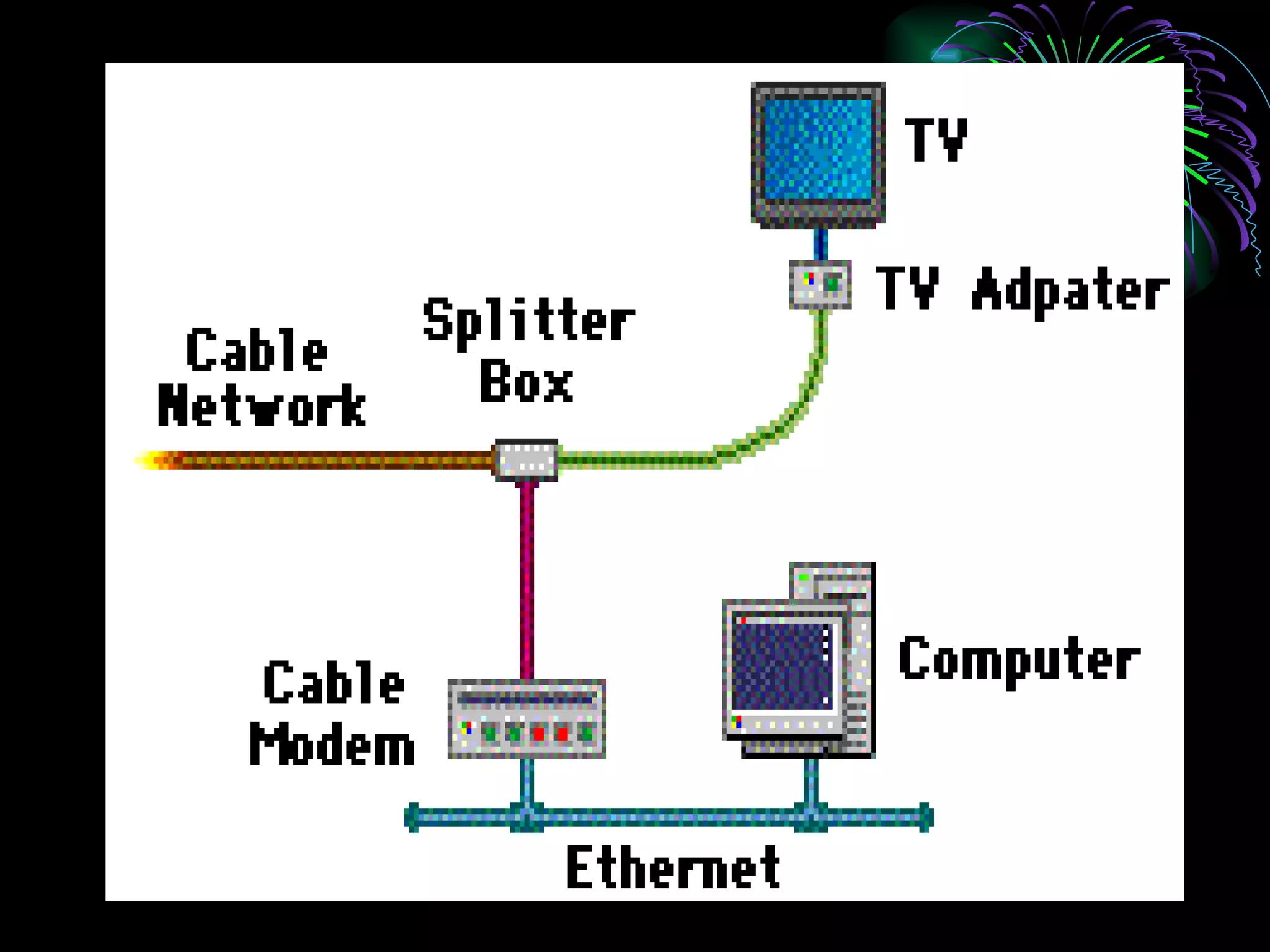
A splitter is a small metal device that divides one incoming cable signal into two or more paths (e.g., one for the internet and one for a TV box). Every time a signal is split, it loses strength. Using too many splitters, or using low-quality ones, can degrade the signal to the point where the modem loses its connection or experiences high error rates.
Practical Recommendation
When setting up or troubleshooting cable internet, prioritize the "drop" connection. Ensure the coaxial cable coming into your home is high-quality (RG6 is the standard) and minimize the use of unnecessary splitters. If you are paying for speeds above 1 Gbps, verify that your modem is DOCSIS 3.1 or 4.0 compliant and that your router has a 2.5 GbE or 5 GbE WAN port to avoid hardware bottlenecks. If you experience intermittent connectivity, checking the "Signal-to-Noise Ratio" (SNR) in your modem’s status page (usually found at 192.168.100.1) can help you identify if the issue is a physical line problem that requires a technician.
Image Gallery