How FileMaker Academic Programs Support Education
Claris FileMaker academic programs support education by providing discounted software licensing, comprehensive training resources, and structured curricula that enable students and educators to build custom cross-platform applications,...
Claris FileMaker academic programs support education by providing discounted software licensing, comprehensive training resources, and structured curricula that enable students and educators to build custom cross-platform applications, automate administrative workflows, and develop vital real-world data management skills.
Contents
Introduction to Custom App Development in Educational Environments
Educational institutions face constant pressure to streamline administrative tasks, manage disparate data systems, and provide students with modern technical proficiencies. In this landscape, Claris FileMaker—a low-code relational database and application development platform—has established a significant presence. Through targeted academic initiatives, Claris (an Apple subsidiary) offers specialized programs designed to integrate custom application development into classrooms, research facilities, and administrative offices.
Understanding how these academic programs function requires looking at software accessibility, curriculum integration, technical capability, and long-term career preparation. By lowering economic barriers to enterprise-grade tools, these programs allow secondary and higher education institutions to foster computational thinking without requiring advanced computer science degrees from every participating student.
Software Access and Licensing Models for Schools and Universities
The foundation of any educational software initiative is accessibility. Acquiring enterprise-grade development tools typically involves prohibitive per-seat costs for budget-constrained schools, colleges, and universities. FileMaker academic programs address this challenge through restructured licensing models tailored specifically to learning environments.
The Claris Community and Educational Pricing Tiers
Claris provides distinct purchasing pathways for accredited educational institutions, spanning individual student use, classroom deployment, and campus-wide availability.
- Student and Teacher Licensing: Eligible individuals can often access single-user licenses at substantially reduced rates compared to commercial tiers, allowing personal exploration, portfolio building, and homework execution on local machines.
- Campus and Departmental Licensing: Institutions can secure multi-user agreements that cover entire computer labs, specific academic departments, or enterprise-wide administrative structures. This bulk approach reduces the cost per user significantly.
- Non-Profit and Research Accommodations: Many accredited research projects and educational non-profits qualify for specialized pricing models that facilitate secure data collection, field research tracking, and collaborative grant management.
System Requirements and Infrastructure Considerations
Deploying a relational database platform in an educational setting requires careful attention to underlying infrastructure. FileMaker operates across a client-server architecture primarily consisting of FileMaker Pro (client application), FileMaker Go (iOS client for iPad and iPhone), and FileMaker Server (hosting environment).
Educational institutions must ensure their network architecture accommodates database connections safely, particularly when students access remote servers via Wi-Fi networks. Additionally, because FileMaker integrates closely with Apple and Windows ecosystems, IT departments evaluate hardware specifications to guarantee smooth rendering of layouts, scripts, and graphical user interfaces across desktop and mobile devices.
Curriculum Integration and Skill Development
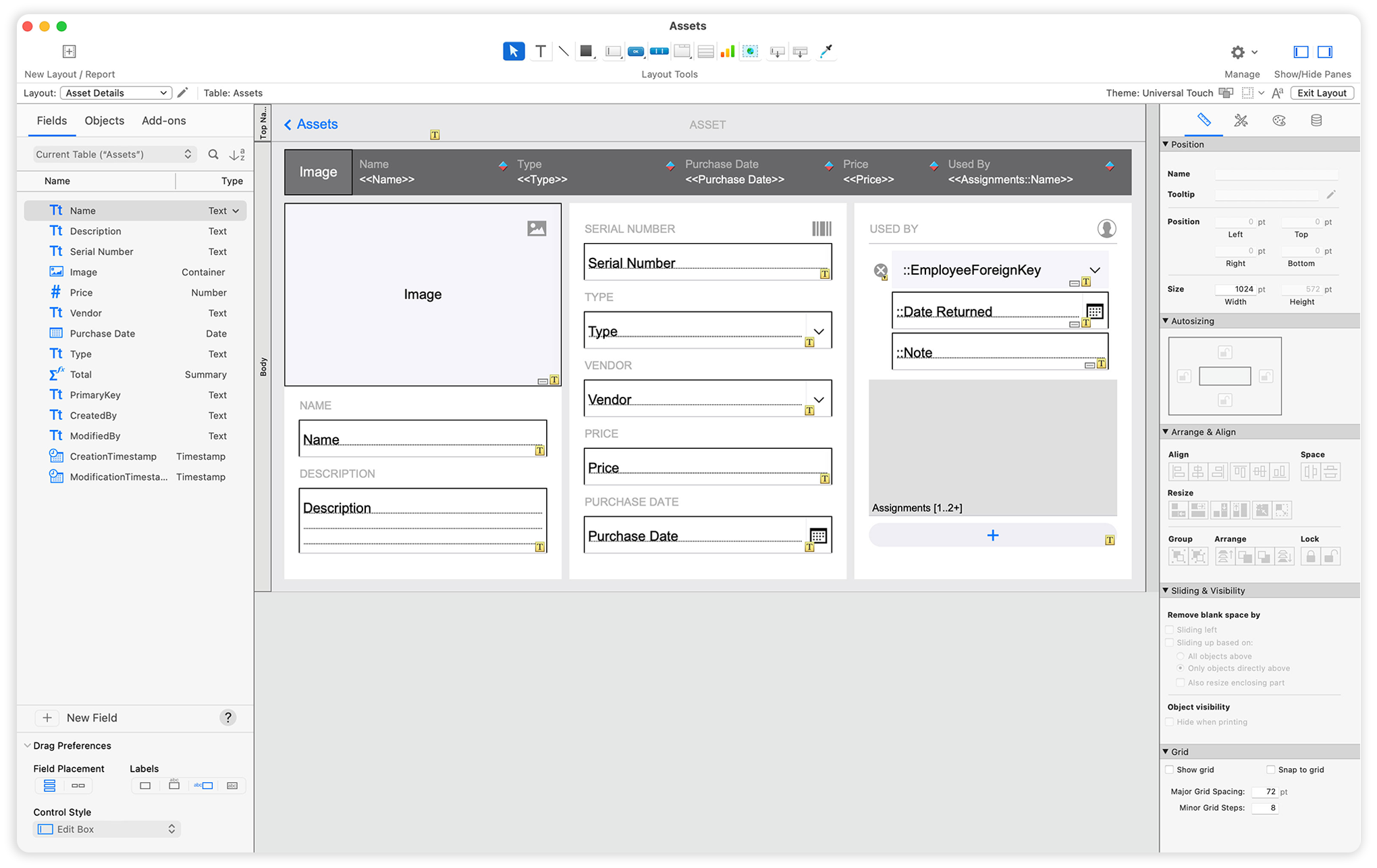
Beyond licensing discounts, academic programs provide the conceptual and structural frameworks necessary to teach relational database design, logic, and rapid application development (RAD). Because FileMaker relies on a graphical user interface combined with a robust calculation and scripting engine, it serves as an educational bridge between simple spreadsheet tracking and complex object-oriented programming.
Teaching Relational Database Concepts
In many information systems and business administration courses, students struggle to grasp abstract database theories such as entity-relationship modeling, primary-foreign key relationships, and normalization. FileMaker’s visual schema builder allows students to see these connections directly.
Instructors use the platform to demonstrate how altering a field type or relationship graph instantly impacts data views, portals, and layouts. This immediate feedback loop reinforces theoretical concepts through tactile application.
Fostering Low-Code and Rapid Application Development Competencies
The modern workplace increasingly values low-code development platforms that accelerate digital transformation. By incorporating FileMaker into coursework, educational programs equip students with skills in:
- User Interface (UI) Design: Designing intuitive, accessible layouts for desktop and mobile endpoints.
- Workflow Automation: Writing scripts to handle repetitive tasks, data validation, and automated email generation.
- API Integration: Connecting custom databases to external web services, payment gateways, and institutional single-sign-on (SSO) systems.
- Data Security Management: Implementing account privileges, permission sets, and field-level security protocols.
Administrative Efficiency and Institutional Operations
While classroom instruction is a primary focus, academic programs also support education by helping institutional staff optimize internal operations. Many schools, departments, and research centers use FileMaker applications built by students, faculty, or IT staff to solve hyper-specific institutional problems that off-the-shelf enterprise resource planning (ERP) software fails to address efficiently.
Common Use Cases in Educational Administration
| Administrative Domain | Typical Application / Function | Operational Benefit |
|---|---|---|
| Academic Advising | Student progress tracking, meeting logs, and course recommendation histories. | Centralizes student interactions across multiple advisors. |
| Laboratory Management | Equipment checkout, chemical inventory, and safety compliance audits. | Reduces liability and prevents resource bottlenecks. |
| Event Planning | Venue reservation calendars, equipment allocation, and attendee tracking. | Eliminates double-booking and streamlines cross-departmental coordination. |
| Grants & Research | Expense tracking, milestone documentation, and participant data collection. | Ensures compliance with funding agency reporting requirements. |
By building these systems in-house or through student capstone projects, institutions save substantial software customization costs while gaining solutions tailored to their exact administrative workflows.
Comparison of Educational Software Deployment Models
To understand where FileMaker fits within an institution's technology stack, it is helpful to compare it against alternative approaches to software education and administrative tooling.
| Feature / Criteria | Claris FileMaker Academic | Traditional Programming (e.g., Python, SQL) | Generic Spreadsheet Software (e.g., Excel, Google Sheets) |
|---|---|---|---|
| Learning Curve | Moderate; visual tools accelerate initial building. | Steep; requires mastering syntax, compilers, and database connectors. | Low; highly familiar to most students and staff. |
| Development Speed | Extremely fast; rapid prototyping and deployment. | Slower; requires writing boilerplate code and managing dependencies. | Fast initially, but degrades rapidly as data complexity grows. |
| Multi-User Collaboration | Built-in concurrent access with robust record locking. | Requires custom web frameworks or database connection pooling. | Prone to version conflicts and data overwrites. |
| Mobile Deployment | Native iOS support via FileMaker Go without separate coding. | Requires responsive web design or dedicated native app development. | Limited to mobile browser views of tabular data. |
Professional Certification and Career Readiness
A critical metric of any academic technology program is its impact on student employability. Claris offers structured certification paths, such as the Claris FileMaker Certified Developer credential, which provides recognized industry validation.
Preparing Students for the Workforce
Educational institutions that integrate official training materials position their graduates for roles as business analysts, database administrators, and custom application consultants. Because businesses across healthcare, manufacturing, non-profit, and education sectors rely on FileMaker systems, students possessing these practical development skills enter the job market with demonstrable, project-based portfolios.
Furthermore, capstone projects involving real-world clients—such as designing a database for a local community organization—teach students essential client-management and requirements-gathering skills that pure textbook learning cannot replicate.
Common Challenges and Mitigation Strategies
Despite the clear benefits, implementing FileMaker academic programs involves specific hurdles that educators and IT administrators must navigate.
Resource Constraints and Faculty Training
Many instructors lack formal training in low-code database architecture, as traditional computer science programs often focus on low-level languages like C++ or Java rather than rapid application platforms. To counter this, Claris and independent user communities provide educator toolkits, sample databases, and teaching guides designed to minimize preparation time.
IT Governance and Security Compliance
Allowing decentralized database creation within a university or school district can lead to data silos and security vulnerabilities if not properly managed. Institutional IT departments mitigate this by establishing clear governance policies, mandating centralized server hosting rather than peer-to-peer sharing, and ensuring compliance with privacy regulations such as FERPA (Family Educational Rights and Privacy Act) and GDPR where applicable.
Frequently Asked Questions
What educational institutions are eligible for FileMaker academic discounts?
Accredited primary schools, secondary schools, vocational schools, colleges, universities, and registered educational non-profit organizations generally qualify for academic pricing tiers. Verification of institutional accreditation status is typically required during the purchasing process.
Can students collaborate on database projects remotely?
Yes. When connected to a shared FileMaker Server instance (or hosted via Claris Cloud), multiple student developers can access, modify, and test relational schemas, layouts, and scripts collaboratively in real time, mirroring professional software development environments.
Do students need prior coding experience to learn FileMaker?
No prior programming experience is strictly required. FileMaker uses a graphical script workspace with drag-and-drop steps and contextual calculation dialogs, making it accessible for absolute beginners while still offering deep logic controls for advanced developers.
How does FileMaker integrate with mobile devices in education?
FileMaker Go allows users to run custom applications natively on iPad and iPhone devices. This is particularly valuable in educational fields such as agriculture, field biology, and physical education, where students and researchers collect data on-site without relying on continuous desktop computer access.
Are there official certification exams available for students?
Yes, Claris provides official certification pathways. While these exams are typically targeted at professional developers, advanced students in high school CTE (Career and Technical Education) programs or university information systems majors frequently pursue these credentials to enhance their resumes.
Conclusion and Next Actions
Claris FileMaker academic programs bridge the gap between abstract computer science theory and practical workplace application. By offering affordable licensing, visual relational design tools, robust mobile integration, and clear paths to professional certification, these programs empower students to build functional software solutions while helping institutions operate more efficiently.
Educational leaders, department chairs, and IT administrators looking to introduce or expand custom app development within their curricula should begin by reviewing the official Claris Education portal to verify institutional eligibility, assess departmental licensing structures, and download sample academic deployment kits.
Image Gallery