Enterprise Mobile Management in the Modern Workplace
Enterprise Mobile Management (EMM) is a comprehensive set of technologies and policies designed to secure and manage corporate data on mobile devices. In the 2026 work environment, EMM has evolved into a critical component of Unified E...
Enterprise Mobile Management (EMM) is a comprehensive set of technologies and policies designed to secure and manage corporate data on mobile devices. In the 2026 work environment, EMM has evolved into a critical component of Unified Endpoint Management (UEM), providing a centralized console for IT administrators to oversee smartphones, tablets, and laptops, ensuring compliance while supporting flexible hybrid work models.
Contents
The Evolution of Mobile Management: From MDM to UEM
The landscape of mobile management has shifted significantly over the last decade. Initially, organizations focused solely on Mobile Device Management (MDM), which prioritized the hardware itself—locking down cameras, enforcing passcodes, and performing remote wipes. However, as the "Bring Your Own Device" (BYOD) trend accelerated, the industry moved toward Mobile Application Management (MAM), focusing on securing specific corporate applications rather than the entire device.
By 2026, these individual silos have converged into Enterprise Mobile Management (EMM) and, more recently, Unified Endpoint Management (UEM). UEM represents the pinnacle of this evolution, allowing IT departments to manage every endpoint—from a field worker’s ruggedized tablet to an executive’s smartphone—under a single security umbrella. This integration is vital because the modern workplace no longer distinguishes between "mobile" and "desktop" tasks; employees expect a seamless transition between devices without compromising security or user experience.
Core Pillars of Modern EMM Architectures
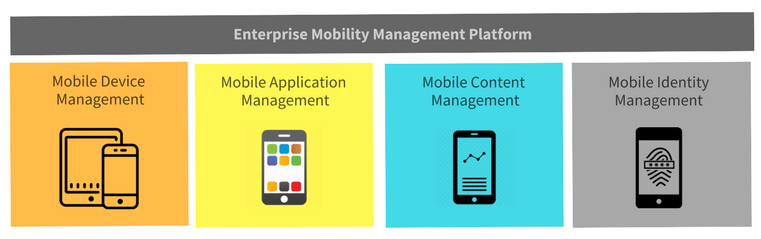
To understand how EMM functions in a high-security environment, one must examine its four primary technical pillars. These components work in tandem to create a "containerized" environment where corporate data is isolated from personal activities.
1. Mobile Device Management (MDM)
MDM remains the foundational layer. It utilizes platform-specific APIs (such as Apple’s MDM framework or Google’s Android Enterprise) to send commands to the device. In 2026, MDM is less about "policing" and more about "provisioning." It automates the distribution of Wi-Fi profiles, VPN configurations, and security certificates. If a device is lost, MDM allows for a selective wipe, which removes only corporate data while leaving personal photos and apps intact—a crucial distinction for maintaining employee trust.
2. Mobile Application Management (MAM)
MAM allows administrators to control the lifecycle of applications. This includes pushing mandatory apps through an enterprise app store and, more importantly, controlling how data moves between them. For instance, a MAM policy can prevent an employee from copying text from a corporate Outlook email and pasting it into a personal social media application. This "Data Loss Prevention" (DLP) capability is the primary defense against accidental data leakage.
3. Mobile Content Management (MCM)
MCM focuses on the secure access and storage of documents. By integrating with cloud storage providers like OneDrive, Google Drive, or Box, MCM ensures that sensitive files are encrypted both in transit and at rest. In 2026, modern MCM solutions often include built-in document viewers that prevent unauthorized screen captures or third-party sharing of proprietary PDFs and spreadsheets.
4. Identity and Access Management (IAM) Integration
Mobile management is ineffective without robust identity verification. Modern EMM solutions integrate directly with identity providers (IdPs) such as Microsoft Entra ID or Okta. This allows for "conditional access," where a device is granted access to the network only if it meets specific criteria: it must be encrypted, it must not be jailbroken, and the user must pass a Multi-Factor Authentication (MFA) challenge.
Deployment Models: Choosing the Right Strategy
The success of an EMM strategy depends on selecting a deployment model that balances security with user privacy. Organizations typically utilize a mix of the following three models based on job roles and risk profiles.
| Model | Ownership | Primary Use Case | Key Benefit |
|---|---|---|---|
| BYOD (Bring Your Own Device) | Employee | Knowledge workers, contractors | Reduced hardware costs; higher user satisfaction. |
| COPE (Corporate-Owned, Personally Enabled) | Organization | Full-time employees | Balance of corporate control and personal privacy. |
| COBO (Corporate-Owned, Business Only) | Organization | High-security roles, retail, logistics | Maximum security; strict lockdown of functions. |
BYOD and User Enrollment
In 2026, BYOD has become the standard for most office-based roles. To address privacy concerns, platforms like iOS and Android have introduced User Enrollment or Work Profiles. This creates a cryptographically separate partition on the device. The employer has zero visibility into the personal side of the phone—they cannot see personal apps, browsing history, or location data—while maintaining total control over the "Work" side.
COPE and the Privacy Balance
For organizations that provide hardware, the COPE model offers a middle ground. The company owns the asset and can enforce stricter OS update policies, but the employee is allowed to use the device for personal tasks. This model often requires a transparent Acceptable Use Policy (AUP) to ensure employees understand where corporate monitoring begins and ends.
Zero Trust and Mobile Threat Defense (MTD)
The traditional "perimeter" of the corporate network has vanished. In the modern workplace, the device is the new perimeter. This has led to the adoption of Zero Trust Architecture (ZTA) within EMM frameworks. Zero Trust operates on the principle of "never trust, always verify."
EMM contributes to Zero Trust by providing continuous posture assessment. If a device’s security status changes—for example, if a user disables their screen lock or if a malicious "man-in-the-middle" attack is detected on a public Wi-Fi network—the EMM system automatically revokes access to corporate resources.
Furthermore, Mobile Threat Defense (MTD) plugins are now frequently integrated into EMM agents. These tools use machine learning to detect zero-day exploits, phishing attempts via SMS (smishing), and suspicious network traffic in real-time, providing a layer of protection that standard MDM profiles cannot offer.
Strategic Implementation: A Step-by-Step Approach
Implementing or upgrading an EMM solution requires more than just technical configuration; it requires alignment between IT, HR, and Legal departments.
- Define Requirements and Compliance: Identify the regulatory standards your organization must meet, such as GDPR in Europe or HIPAA in healthcare. This dictates the level of encryption and data residency required.
- Select the Platform: Choose a vendor that supports your primary OS ecosystem. Leading options in 2026 include Microsoft Intune, VMware Workspace ONE, and Ivanti.
- Establish Enrollment Gates: Utilize automated enrollment programs like Apple Business Manager or Android Zero-Touch. These allow devices to be shipped directly from the factory to the employee, automatically configuring themselves upon first power-on.
- Develop Policy Tiers: Do not apply a one-size-fits-all policy. Create different profiles for "Standard Users," "Executive Users," and "High-Risk Users" to ensure security measures are proportionate to the threat level.
- User Education: The greatest security risk remains the human element. Provide clear documentation on what the EMM can and cannot do on a personal device to reduce "shadow IT" (the use of unmanaged devices for work).
Technical Specifications and Prerequisites
Before deploying an EMM solution, IT teams must ensure their infrastructure is prepared. Most cloud-based EMM platforms require:
- APNs Certificates: For managing Apple devices, an annual Apple Push Notification service certificate is mandatory.
- Managed Google Play: An enterprise account is needed to curate and distribute Android applications.
- Network Bandwidth: While EMM agents are lightweight, initial enrollment and application pushes can consume significant bandwidth; ensure your office guest networks are optimized for this traffic.
- Integration with SASE: In 2026, EMM is often integrated with Secure Access Service Edge (SASE) to provide secure, direct-to-cloud connectivity without the latency of traditional VPNs.
Common Troubleshooting and Challenges
Even the most robust EMM deployments face hurdles. One frequent issue is Enrollment Fatigue, where complex authentication steps lead to users abandoning the setup. Streamlining the process with Single Sign-On (SSO) is essential.
Another challenge is OS Version Fragmentation. While Apple has a high adoption rate for new iOS versions, Android devices can vary wildly. EMM administrators must set "Minimum OS" requirements to ensure that devices lacking the latest security patches are denied access to the network.
Summary of Recommendations
For organizations looking to optimize their mobile management in 2026, the focus should be on automation and privacy. Move away from heavy-handed device lockdowns and toward intelligent, app-centric security. Prioritize platforms that offer deep integration with your existing identity provider and consider adopting an MTD solution to counter increasingly sophisticated mobile-specific threats. By treating the mobile device as a secure extension of the office, businesses can empower their workforce while maintaining a rigorous security posture.
Frequently Asked Questions
What is the difference between EMM and UEM? EMM focuses specifically on mobile devices (smartphones and tablets), whereas UEM (Unified Endpoint Management) extends those same management capabilities to traditional PCs, Macs, and even IoT devices. In 2026, most EMM products have rebranded as UEM to reflect this broader scope.
Can my employer see my personal text messages through EMM? In a properly configured BYOD or Work Profile environment, no. Modern mobile operating systems are designed to prevent the EMM agent from accessing personal data partitions. However, on a fully supervised corporate-owned device (COBO), the level of visibility is higher, though usually limited to metadata and installed apps rather than the content of private messages.
How does EMM impact device battery life? Modern EMM agents are highly optimized and typically have a negligible impact on battery life. Most management occurs via push notifications from the OS (like APNs or FCM), meaning the agent does not need to constantly run in the background to "check-in" with the server.
Is an EMM agent mandatory for all employees? If an employee needs to access sensitive corporate data (like email, internal apps, or proprietary documents), an EMM agent or profile is generally mandatory to ensure the device meets security standards. Organizations often allow "web-only" access for those who choose not to enroll, though this typically offers a more limited user experience.
Image Gallery