How to Recover Data from a Dead Phone: A Step-by-Step Guide
To recover data from a dead phone, first check for automated cloud backups via Google Account or iCloud. If the device remains unresponsive, attempt a hardware "revival" using a new battery or screen. For advanced hardware failure, pro...
To recover data from a dead phone, first check for automated cloud backups via Google Account or iCloud. If the device remains unresponsive, attempt a hardware "revival" using a new battery or screen. For advanced hardware failure, professional data recovery services must perform a chip-off or motherboard transplant to bypass encryption.
Contents
A "dead" phone is a broad term that can range from a simple blown fuse or depleted battery to a catastrophic logic board failure. In 2026, mobile devices feature highly sophisticated encryption protocols that make data recovery significantly more complex than it was a decade ago. When a phone stops turning on, the data isn’t necessarily gone; it is simply locked inside a storage chip that no longer has a functioning gateway to the outside world. This guide explores the systematic hierarchy of recovery, moving from the simplest software solutions to high-level hardware forensics.
Phase 1: Identifying the "Type" of Death
Before attempting any recovery method, you must diagnose why the phone is unresponsive. The recovery path for a phone with a broken screen is vastly different from a phone that suffered a short circuit after being submerged in saltwater.
The Black Screen vs. The Dead Logic Board
Often, a phone appears dead because the display assembly has failed. If the phone still vibrates when you toggle the silent switch or makes a sound when plugged into a charger, the "brain" is alive. This is the best-case scenario. You can often recover data by simply connecting the device to a computer or replacing the screen.
Power Management Failure
If there is no vibration, no sound, and no heat, the issue likely lies in the power delivery system. This could be a failed charging port, a "dead-flat" battery that has dropped below the minimum voltage threshold, or a faulty Power Management Integrated Circuit (PMIC).
Catastrophic Logic Board Failure
This occurs when the primary printed circuit board (PCB) suffers a short circuit or physical crack. On modern devices, the CPU, RAM, and Storage (NAND flash) are often layered or "sandwiched." If the CPU or the Secure Enclave (Apple) / Titan M chip (Android) is damaged, the data may be cryptographically unreachable even if the storage chip itself is healthy.
Phase 2: Utilizing Cloud Ecosystems and Remote Backups
In 2026, most users have some form of background synchronization active by default. This is the most reliable way to recover data without needing to physically repair the dead device.
Accessing iCloud (iOS Devices)
Apple’s ecosystem is designed to sync nearly everything to the cloud. If your iPhone is dead, log into iCloud.com from a desktop browser.
- Photos and Videos: Check the "Photos" web app to see if your recent media has synced.
- Contacts and Notes: These are usually the first to sync and are often available even if a full device backup failed.
- Device Backups: Check "Account Settings" to see the date of the last successful iCloud Backup. If a recent backup exists, you can restore it to a new iPhone immediately.
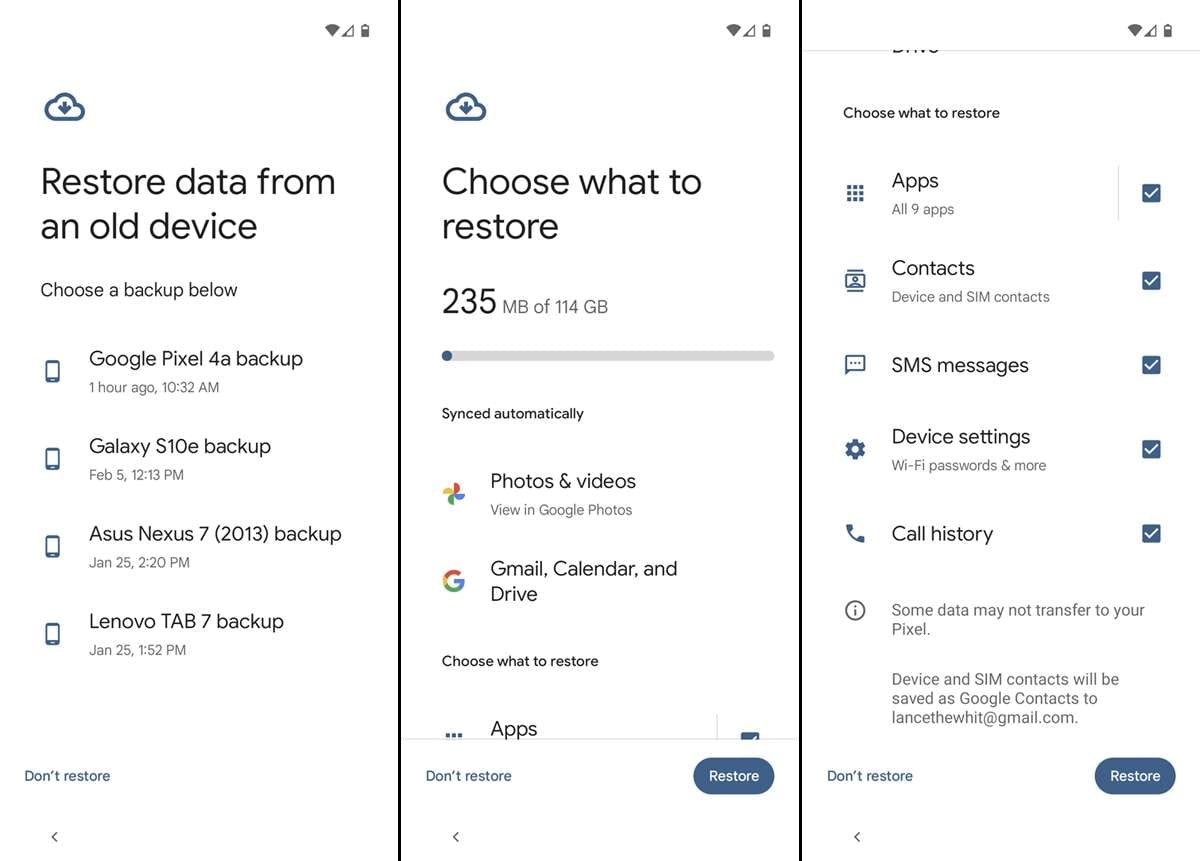
Google Account and Android Backups
For Android users, Google serves as the primary repository for data.
- Google Photos: Visit photos.google.com. Even if your phone died an hour ago, any photos taken while on Wi-Fi are likely there.
- Google Drive: Check for manual uploads or app-specific backups (like WhatsApp databases).
- Google Contacts: Syncing is usually instantaneous. Visit contacts.google.com to verify your list.
Manufacturer-Specific Clouds
Samsung (Samsung Cloud/Smart Switch) and Xiaomi (Mi Cloud) offer proprietary backup solutions. If you owned one of these devices, log into their respective web portals. Often, these services back up SMS messages and call logs, which Google sometimes excludes by default.
Phase 3: Hardware Revival for "Partial Death"
If the data is not in the cloud, you must make the phone "talk" to a computer. This requires the phone to have a basic level of power and a functional data port.
The "Screen Swap" Technique
If the phone is on but the screen is black or the touch digitizer is unresponsive, you cannot "Trust This Computer" to allow data transfer.
- The Solution: Temporarily connect a replacement screen. You do not need to fully glue or install the screen; simply opening the device and snapping the ribbon cables onto the motherboard is enough to allow you to enter your passcode and initiate a backup.
Battery Bypass and Ammeter Testing
Sometimes a battery fails in a way that prevents the phone from booting even when plugged in. Using a USB Power Meter, check how many Amps the phone is drawing.
- 0.0A to 0.1A: The phone is not drawing power; the charging port or PMIC is likely dead.
- 0.6A to 1.0A: The phone is charging; let it sit for two hours.
- Fluctuating Current: The phone is trying to boot but "boot-looping." This suggests a software error or a minor hardware short.
Using an OTG Mouse
For Android phones with a functional screen but broken touch sensitivity, use an On-The-Go (OTG) adapter to plug in a standard USB computer mouse. A cursor will appear on the screen, allowing you to draw your pattern or enter your PIN to unlock the device and move data to an SD card or cloud service.
Phase 4: Advanced Software Extraction Tools
If the phone can be put into "Recovery Mode" or "DFU Mode" (Device Firmware Update), specialized software can sometimes pull data that is otherwise inaccessible.
Professional Recovery Suites
Tools like EnCase or Cellebrite are used by forensic experts, but consumer-grade versions like Dr.Fone or Tenorshare UltData exist. These tools attempt to communicate with the device's bootloader.
- Warning: Many of these tools require the device to be in a "partially functional" state. They cannot magically extract data from a cracked motherboard.
- Effectiveness in 2026: Due to the prevalence of File-Based Encryption (FBE), these tools are less effective than they were on older devices unless the user knows the passcode and the device's Secure Element is functioning.
| Method | Success Rate | Cost | Difficulty |
|---|---|---|---|
| Cloud Sync Recovery | High (if enabled) | Free | Very Easy |
| Temporary Hardware Repair | Medium-High | $50 - $150 | Moderate |
| DIY Software Extraction | Low-Medium | $40 - $100 | Moderate |
| Micro-Soldering/Jumpering | Medium | $200 - $500 | Expert Only |
| Professional Lab Recovery | High | $500 - $1,500 | N/A (Outsourced) |
Phase 5: Professional Micro-Soldering and Data Forensic Labs
When the motherboard is physically damaged—perhaps due to water corrosion or a high-impact drop—DIY methods will fail. This is where professional intervention is required.
Micro-Soldering and "Donoring"
A technician uses a microscope to identify "shorted" capacitors on the logic board. By removing the faulty component or "jumping" a connection, they can restore power to the NAND storage chip long enough to image the data. This is a delicate process that requires specialized heat guns and soldering stations.
The "Chip-Off" Method (Historical Context vs. 2026)
Historically, you could desolder a storage chip and read it in a separate machine. In 2026, this is almost impossible for modern smartphones because the data is encrypted with a key stored in the CPU. If you move the storage chip to a new board, it won't be readable without the original CPU and Secure Enclave.
- The Modern Solution: A "Full Board Swap" or "CPU Transplant." Technicians move the CPU, Storage, and Logic chips to a known-working donor board. This is the most expensive and complex form of data recovery.
Choosing a Recovery Lab
If your data is priceless (e.g., irreplaceable photos of a deceased loved one), do not keep trying to turn the phone on. Every attempt to power a water-damaged phone can cause further short circuits. Send the device to a reputable lab such as DriveSavers or Ontrack.
Common Pitfalls to Avoid
- The "Rice" Myth: Putting a dead, water-damaged phone in rice does nothing to fix internal corrosion. In fact, it can delay proper treatment. Use silica gel packets or, better yet, take it to a professional immediately.
- Repeated Charging: If a phone is dead due to liquid, plugging it in is the fastest way to "fry" the CPU.
- Software "Fixes" that Wipe Data: Be careful with tools like iTunes or Google's "Find My Device." Selecting "Restore" or "Factory Reset" in an attempt to fix a boot loop will permanently delete the encryption keys, making the data unrecoverable even for professionals.
FAQ
Can I recover data if the phone won't turn on at all? Yes, but it depends on the state of the NAND flash memory chip and the CPU. If these two components are intact, a micro-soldering expert can usually repair the power rails on the motherboard to facilitate a one-time data dump.
Does a factory reset make data recovery impossible? On modern devices (post-2020), yes. Modern phones use hardware-accelerated encryption. When you factory reset, the "master key" is destroyed. Even if the raw bits of your photos remain on the chip, there is no mathematical way to decrypt them in any reasonable timeframe.
How much does professional data recovery cost in 2026? Prices typically range from $300 for simple hardware fixes to $1,500+ for complex motherboard transplants or cleanroom forensic work. Always check if the lab has a "No Data, No Fee" policy.
What if my phone was encrypted with a PIN I forgot? If the phone is dead and you also forgot the PIN, recovery is effectively impossible. The encryption keys are wrapped with your passcode; without it, the data remains a scrambled mess of bits.
Final Recommendation
If your phone has died, your first action should be to verify your cloud backups via a secondary device. If the data isn't there, stop attempting to power the device on. Physical damage and liquid exposure worsen with every electrical current sent through the board. If the data is of high value, bypass local repair shops and contact a dedicated data recovery laboratory that specializes in micro-soldering and forensic extraction. To prevent this in the future, ensure that "Automatic Backups" are enabled in your device settings and consider a secondary cloud provider for redundant storage.
Image Gallery