MyChart OSU Edu: Comprehensive Access Guide for Ohio State University Wexner Medical Center Patients
MyChart OSU Edu is the official secure online patient portal for the Ohio State University Wexner Medical Center, allowing patients to manage appointments, view test results, communicate with care teams, and handle prescription refills...
MyChart OSU Edu is the official secure online patient portal for the Ohio State University Wexner Medical Center, allowing patients to manage appointments, view test results, communicate with care teams, and handle prescription refills 24/7. This platform serves patients across Central Ohio and beyond, bridging clinical care and digital health management.
Contents
Understanding the Ohio State University Wexner Medical Center Patient Portal Ecosystem
The digital health landscape at Ohio State University is anchored by electronic health record systems designed to streamline patient communication. Accessing health data requires understanding the underlying infrastructure that connects patients to physicians, nurses, and billing specialists.
The portal operates as a centralized node for clinical data exchange. When a physician orders laboratory work, diagnostic imaging, or clinical notes, those records feed directly into the repository accessed through the web portal or mobile applications. This eliminates traditional communication bottlenecks, reducing the lag time between diagnostic completion and patient notification.
Core Architectural Features of the Platform
- Centralized Data Repository: Combines inpatient, outpatient, and emergency department records into a single dashboard.
- Encrypted Messaging Protocols: Utilizes secure socket layer (SSL) encryption and multi-factor authentication to protect personal health information under HIPAA guidelines.
- Interoperability Standards: Complies with Fast Healthcare Interoperability Resources (FHIR) standards, allowing patients to download their health summaries into third-party health applications safely.
Prerequisites and Account Registration Requirements
Before accessing the portal interface, users must satisfy specific verification criteria to protect private medical records against unauthorized exposure. Setting up an account requires verifying identity using clinical identifiers issued during a recent hospital visit or outpatient clinic appointment.
Patients generally receive an activation code via email following registration at any Ohio State Wexner Medical Center facility. Those without an active code can utilize the self-service online identity verification process, which cross-references personal data with secure third-party identity verification bureaus.
Essential Setup Requirements
- A valid email address that is not shared with another MyChart account.
- A mobile phone capable of receiving SMS text messages for two-factor authentication.
- An activation code from an after-visit summary or clinical encounter documentation.
- Personal identification details including Social Security Number, date of birth, and legal name.
Step-by-Step Guide to Account Activation and Login
Navigating the initial login sequence requires adherence to specific security steps. Proper configuration of login credentials prevents account lockouts and ensures seamless access to ongoing medical treatment plans.
- Navigate to the official portal landing page via a secure web browser or launch the mobile application on an iOS or Android device.
- Select the "Sign Up Now" button if you possess an activation code, or choose "Sign Up Online" to initiate automated identity verification.
- Input your activation code exactly as printed, along with your date of birth and ZIP code. If using automated verification, provide your Social Security number and legal contact details.
- Create a unique username that combines letters and numbers, avoiding common terms or easily guessable sequences.
- Establish a complex password containing upper and lower case letters, numbers, and special symbols.
- Enable two-factor authentication by registering your mobile phone number or email address for security challenge codes during future logins.
Managing Clinical Care, Appointments, and Medications
Once authenticated, the patient portal serves as an operational hub for healthcare management. Knowing how to utilize these digital tools effectively reduces administrative friction during care coordination.
Appointment Scheduling and Management
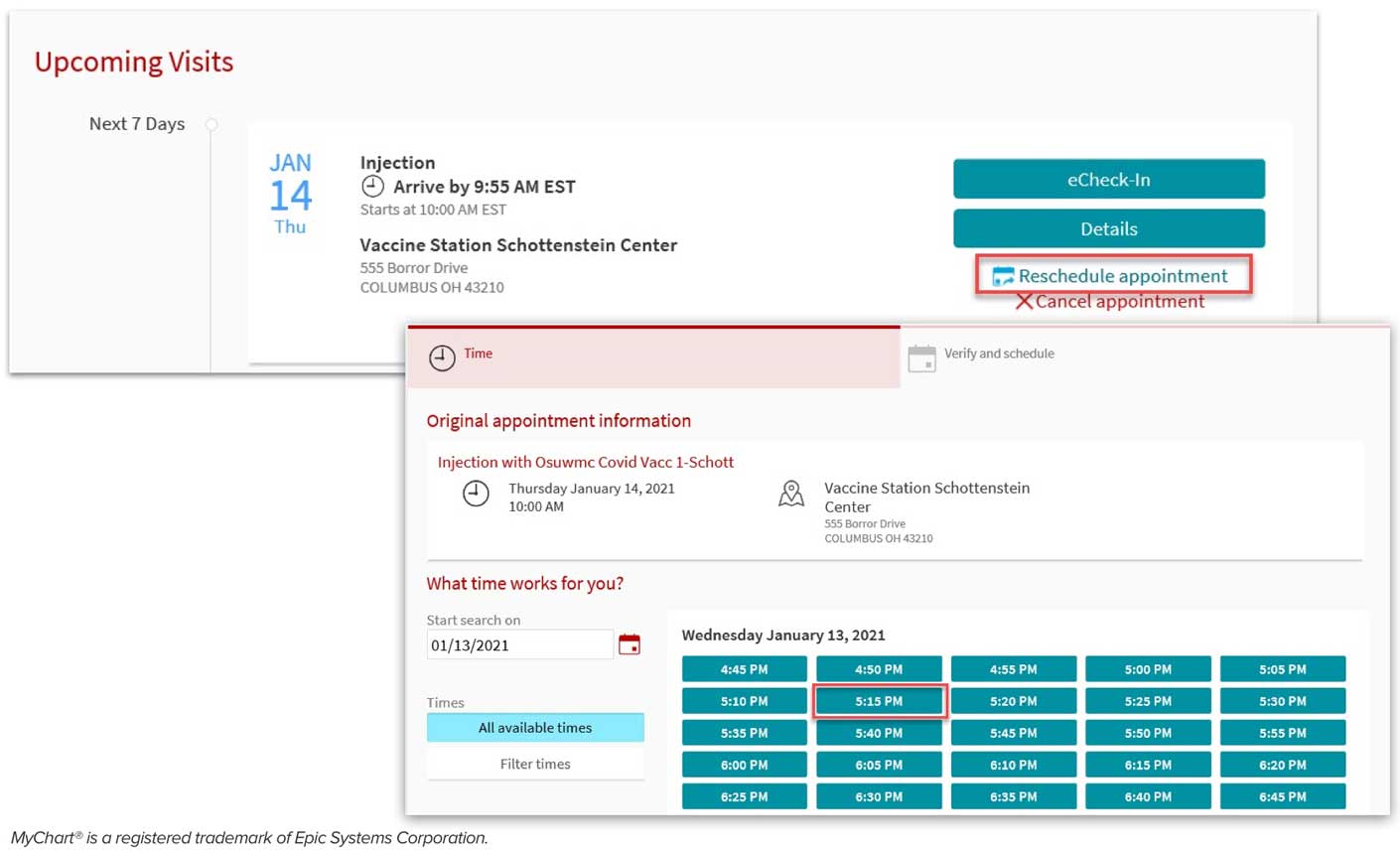
The platform allows patients to schedule routine primary care visits, preventive screenings, and specific specialty follow-ups. Users can view open provider schedules, select preferred time slots, and complete pre-visit questionnaires online to shorten waiting times upon arrival at the clinic.
Prescription Management and Pharmacy Routing
Patients can review their active medication lists, check dosage instructions, and submit secure renewal requests directly to their prescribing physicians. The system permits users to designate their preferred local or mail-order pharmacy, streamlining the transmission of electronic prescriptions.
| Feature Category | Primary Function | Typical Processing Time | Required Patient Action |
|---|---|---|---|
| Test Results | View lab work, pathology, and imaging reports | Immediate to 4-14 days (pending physician review) | None; notifications sent via email/SMS |
| Prescription Refills | Request medication renewals from care teams | 24 to 72 business hours | Select preferred pharmacy and medication |
| Appointment Booking | Schedule or reschedule clinic visits | Real-time | Choose provider, date, and visit reason |
| Billing & Payments | View statements and pay outstanding balances | Immediate processing | Input valid credit card or banking details |
Comparison of Access Methods: Web Portal vs. Mobile Application
Patients can interact with the Ohio State health system through multiple interfaces, each optimized for specific device types and usage scenarios.
| Evaluation Metric | Desktop / Web Browser | Mobile App (iOS / Android) |
|---|---|---|
| Screen Real Estate | High; ideal for reviewing complex multi-page PDF records and billing statements. | Compact; optimized for quick notifications, messaging, and check-ins. |
| Biometric Login | Limited to browser-saved credentials and password managers. | Full support for Face ID, Touch ID, and Android fingerprint authentication. |
| Push Notifications | Browser-dependent alerts for new messages or test results. | Native push notifications for immediate alerts and appointment reminders. |
| Offline Capabilities | None; requires continuous active internet connection. | Limited offline viewing for cached immunization records and emergency cards. |
Troubleshooting Common Access and Technical Issues
Technical hurdles occasionally arise during login attempts or password resets. Understanding the root causes of these errors helps resolve access blocks without requiring immediate phone support.
Forgotten Username or Password
If authentication fails, users should utilize the "Forgot Username?" or "Forgot Password?" links located directly beneath the login fields. The system will prompt for registered recovery details to verify identity before issuing a secure reset link via email or SMS.
Browser Compatibility and Cache Errors
Outdated browser caches or extensions frequently interfere with secure login tokens. Clearing browser cookies and cache data, disabling aggressive ad-blockers, or switching to an updated standards-compliant browser like Google Chrome, Mozilla Firefox, Apple Safari, or Microsoft Edge typically resolves rendering and loading failures.
Activation Code Expiration
Activation codes generated during clinical visits feature built-in expiration dates for security purposes—usually lasting 14 to 30 days. If an activation code has expired, patients must request a new code through the automated recovery system or by contacting their clinic directly.
Practical Recommendations for Optimal Portal Usage
Maximizing the utility of the health portal requires proactive engagement and adherence to digital security best practices.
- Keep Contact Information Updated: Ensure that your current phone number, email address, and mailing address are accurate within your profile settings to prevent missed clinical notifications or billing alerts.
- Review Test Results Strategically: While lab results appear automatically, complex diagnostic imaging reports often require clinical interpretation. Allow your care team time to review results before sending follow-up messages.
- Consolidate Family Accounts: Utilize proxy access features to manage healthcare records for dependent children or elderly family members legally under your care, streamlining household medical tracking.
- Maintain Account Security: Never share your password or two-factor authentication codes with third parties, and always log out of public or shared computer terminals after use.
Frequently Asked Questions
How do I view my test results on MyChart OSU Edu?
Test results appear automatically in your portal dashboard once reviewed and released by your clinical care team, typically within a few days. Standard lab panels often populate faster than complex pathology or diagnostic imaging reports.
What should I do if my activation code does not work?
Verify that you are entering the code, birth date, and ZIP code exactly as they appear on your after-visit summary. If the code has expired, use the online identity verification option to generate a new registration link without needing a physical code.
Can I use the portal to schedule appointments with any Ohio State physician?
You can schedule online with participating primary care providers and select specialists with whom you have an established care relationship. Certain advanced subspecialties require direct clinical referral before online booking becomes available.
How do I grant a family member access to my medical record?
You can request proxy access by navigating to the sharing settings within your account or by discussing proxy permissions with your clinic coordinator during your next scheduled medical visit.
Is there a fee for using the MyChart OSU Edu platform or mobile app?
The portal service and its corresponding mobile applications are entirely free for patients receiving care through the Ohio State University Wexner Medical Center health system.
Who should I contact if I experience persistent technical login errors?
For technical support that cannot be resolved through automated password recovery tools, you can contact the dedicated patient portal support help desk listed on the official login page.
Image Gallery