YouTube Age Restrictions and Account Requirements: Complete Policy and Verification Guide
YouTube enforces strict age-related guidelines governing account creation, content access, and creator monetization. Generally, users must be at least 13 years old to manage a standard YouTube account, while specific regional laws requ...
YouTube enforces strict age-related guidelines governing account creation, content access, and creator monetization. Generally, users must be at least 13 years old to manage a standard YouTube account, while specific regional laws require higher minimum ages. Content containing mature themes is flagged as age-restricted (18+), requiring mandatory age verification via Google Account credentials or official identity documents.
Contents
Minimum Age Requirements for YouTube Accounts by Region
To create an independent Google Account and access full YouTube functionality, users must meet the minimum age of digital consent established by local regulations. For children under these threshold ages, Google requires accounts to be managed through Google Family Link as Supervised Accounts or directed toward the standalone YouTube Kids platform.
The Children's Online Privacy Protection Act (COPPA) in the United States sets the baseline at 13 years old. However, regional privacy frameworks across Europe, Asia, and Latin America mandate varying age thresholds before an individual can legally consent to data processing without parental authorization.
| Region / Country | Minimum Age for Standard Account | Supervised Account Option (Under Minimum Age) | Relevant Regulatory Framework |
|---|---|---|---|
| United States | 13 Years | Yes (Google Family Link) | COPPA |
| United Kingdom | 13 Years | Yes (Google Family Link) | UK Age Appropriate Design Code |
| European Union (General) | 16 Years (Varies by member state) | Yes (Google Family Link) | EU GDPR (Article 8) |
| Austria, Cyprus, Italy, Spain | 14 Years | Yes (Google Family Link) | National GDPR Implementation |
| Czech Republic, France, Greece | 15 Years | Yes (Google Family Link) | National GDPR Implementation |
| South Korea | 14 Years | Yes (Google Family Link) | Personal Information Protection Act (PIPA) |
| Australia & New Zealand | 13 Years | Yes (Google Family Link) | Privacy Act / Online Safety Act |
For users under the local minimum age who attempt to create a standard account without parental consent, Google's system automatically locks the registration process. Accounts discovered to be operating below the legal age threshold without parental supervision are flagged for termination unless parental consent is verified within a designated grace period.
YouTube Content Age Restrictions: The 18+ Threshold
YouTube applies an age restriction (18+) to videos that may not be suitable for viewers under 18 years of age. Content age restrictions are distinct from content marked as "Made for Kids." While "Made for Kids" compliance dictates data collection and ad targeting under COPPA, age-gating explicitly blocks minors and logged-out users from viewing mature material.
YouTube’s Trust and Safety team and automated Machine Learning (ML) classifiers evaluate content against specific Community Guidelines criteria to determine whether an 18+ restriction is necessary:
- Child Safety Concerns: Videos depicting young people engaging in dangerous activities, performing hazardous stunts, or participating in risky online challenges.
- Harmful or Dangerous Activities: Content featuring real-world activities that present a high risk of bodily harm, illegal acts, or regulated substance usage not suitable for minors.
- Nudity and Sexually Suggestive Material: Content that contains non-explicit nudity, artistic depictions of sexual themes, or heavily suggestive imagery intended for adult audiences.
- Violent or Graphic Content: Footage displaying real or simulated severe violence, gore, medical procedures without educational context, or intense combat scenes.
- Vulgar and Profane Language: Content heavily featuring explicit language, derogatory slurs, or persistent profanity in titles, thumbnails, or the initial segments of a video.
Policy Clarification: An age restriction does not necessarily mean a video violates YouTube Community Guidelines. If content crosses the threshold into severe policy violations—such as explicit pornography, extreme graphic violence, or hate speech—it is removed entirely rather than simply age-gated.
Technical Mechanisms of YouTube Age Verification
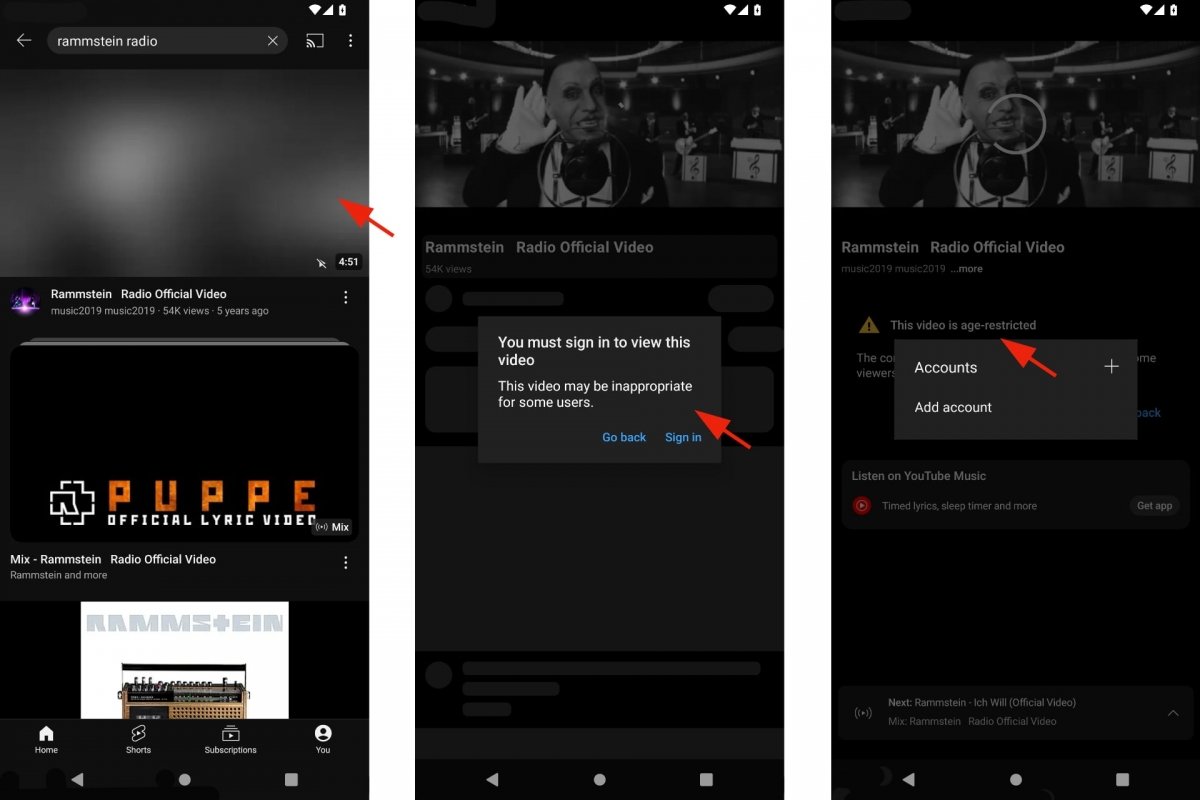
YouTube uses a multi-layered identity infrastructure to enforce age limits across web, mobile, smart TV, and embedded video players. When a user attempts to view age-restricted content, YouTube verifies the birth date stored in the associated Google Account.
In jurisdictions with strict digital safety mandates—such as the European Union under the Audiovisual Media Services Directive (AVMSD) and the UK under the Age Appropriate Design Code—passive account data is insufficient. Users in these regions attempting to access age-restricted videos must complete explicit identity verification through one of three approved methods:
Credit or Debit Card Verification: The user provides a valid payment card. Google processes a temporary authorization hold (typically refunded immediately) to confirm the cardholder's legal status.
Government-Issued Identity Document: The user submits a clear image of an official ID, such as a passport, driver’s license, or national identity card. Automated identity systems check the document's validity and extracted birth date before purging or securely storing the image according to privacy compliance protocols.
Facial Age Estimation: Implemented in select jurisdictions via privacy-preserving biometric analysis, users submit a video selfie to third-party verification partners (such as Yoti). The AI system estimates facial age without matching the image against real-world identities, immediately deleting the biometric data after evaluation.
User requests age-restricted video
Logged in to Google Account?
- No: Prompt user to sign in / create acct
- Yes: Verify account birth date >= 18
- Failed: Block access & show restricted disclaimer
- Passed: Check regional mandatory ID laws
- Passed: Grant video access
- Prompt: Require ID / card verification
When embedded on third-party websites, age-restricted YouTube videos automatically disable direct playback. Instead, the iframe redirects the user back to the main YouTube platform to complete authentication before access is granted.
Impact of Age Restrictions on Creators and Viewers
The application of an age restriction alters how a video is distributed and monetized within the YouTube ecosystem.
Impact on Viewers
- Forced Authentication: Viewers cannot watch age-restricted videos without logging into an authenticated Google Account.
- Third-Party App Restrictions: Third-party applications, media centers, and external sites cannot bypass the age gate using embedded players or API calls.
- Smart Device Blocking: Unauthenticated TV interfaces or voice-activated smart display devices automatically restrict playback of 18+ content.
Impact on Creators
- Monetization Penalties: Age-restricted videos are generally ineligible for standard advertising algorithms. They are automatically set to limited or no ad serving (yellow icon status) because most advertisers opt out of placing placement bids on 18+ content under the Global Alliance for Responsible Media (GARM) framework.
- Algorithmic Suppressed Reach: Age-restricted videos are removed from YouTube’s Home feed recommendations, "Up Next" sidebar suggestions, and trending tabs. Discovery is primarily restricted to direct search queries and subscriber notifications.
- Feature Disabling: Age-restricted content automatically loses access to live chat replays, channel memberships promos, Super Chat integrations, and end screen overlays designed to direct traffic to external links.
How Creators Can Set and Appeal Age Restrictions
Creators can manually flag their own uploads as age-restricted during the video metadata uploading process in YouTube Studio. If a creator does not self-restrict content that contains mature themes, YouTube’s automated content identification systems or human review teams may apply an automated restriction.
Steps to Appeal an Automated Age Restriction
If YouTube’s systems apply an automated 18+ restriction to a video that a creator believes complies with general audience standards, an appeal can be filed directly within YouTube Studio.
- Log in to YouTube Studio.
- From the left menu, select Content.
- Filter for or navigate to the specific video showing an Age restriction limit in the Restrictions column.
- Hover over Age restriction and click Appeal.
- Review the automated decision note provided by YouTube.
- Enter a detailed concise explanation explaining why the video content adheres to YouTube Community Guidelines (e.g., providing educational context, artistic value, or non-graphic news reporting).
- Click Submit.
Note on Appeals: Creators can only submit an appeal once per video age-restriction action. If YouTube re-evaluates the video and upholds the restriction, the decision is final and cannot be re-appealed through the dashboard.
Parents' Guide to YouTube Safety and Age Control
Managing children’s access to video content requires choosing the right administrative framework within Google's ecosystem. Google provides three distinct tiers based on developmental maturity and parental control requirements.
1. YouTube Kids (Ages 0–12)
YouTube Kids is a separate app and web experience operating independently from the main YouTube ecosystem. Content is filtered using automated algorithms, human review, and parental whitelists.
- Preschool (Ages 4 & under): Features videos that promote creativity, learning, and play.
- Younger (Ages 5–8): Focuses on cartoons, crafts, and basic educational topics.
- Older (Ages 9–12): Includes gaming videos, family vlogs, science experiments, and music videos filtered for age appropriateness.
2. YouTube Supervised Accounts (Ages 9–17)
Supervised Accounts allow parents to transition children to the main YouTube interface using their own child Google Account managed through Google Family Link. Parents select from three content settings:
- Explore: Aligns generally with content rated for creators aged 9+. Excludes live streams, graphic news, and mature themes.
- Explore More: Expands content access to videos generally rated for ages 13+. Includes live streams, broader gaming content, and educational topics with mild profanity.
- Most of YouTube: Grants access to almost all YouTube videos except 18+ age-restricted content and explicitly prohibited material.
3. Google Family Link Controls
Parents managing Supervised Accounts can enforce hardware- and software-level protections directly from the Family Link dashboard:
- Search Control: Ability to turn off the internal search function, restricting the child solely to recommended channels.
- Watch History Controls: Pause watch or search history to prevent algorithmic recommendations from adapting to specific content viewing sessions.
- Screen Time Limits: Establish strict daily time allowances and device downtime schedules that lock access to the YouTube app.
- Channel Blocking: Manually block specific creator channels from being accessible on the child's profile.
Frequently Asked Questions
Can you bypass YouTube age restrictions without signing in?
No, YouTube relies on server-side age verification that blocks media playback data directly at the API and streaming distribution level for unauthenticated users. Third-party web scripts, altered URLs, or proxy embeds that previously bypassed client-side age gates are rendered ineffective by modern Google Account authentication protocols.
Why is YouTube asking for my government ID or credit card to watch a video?
YouTube mandates credit card or government ID verification in specific regions (such as the EU, UK, and select Australian states) to comply with regional digital safety legislation like the AVMSD. These regulations require online platforms to verify that users seeking access to adult or sensitive content are legally 18 years of age or older.
What is the difference between "Made for Kids" and "Age Restricted"?
"Made for Kids" is a COPPA compliance designation indicating that a video's primary audience is children under 13, which disables targeted advertising, comments, and notifications to protect child privacy. "Age Restricted" is a threshold setting applied to mature content intended exclusively for viewers aged 18 and older, blocking access for minors completely.
Does getting an age restriction on a video cause a copyright or channel strike?
No, an age restriction is an audience gating measure, not a policy strike. An age-restricted video remains published on your channel, but its distribution is limited and ad monetization is restricted; it does not generate a Community Guidelines strike or Copyright strike against your account status.
How old do you have to be to monetize a YouTube channel through the Partner Program?
To enter the YouTube Partner Program and sign the associated terms, a creator must be at least 18 years old. If a creator is under 18, a legal parent or guardian over the age of 18 must sign the terms and set up an approved Google AdSense account to receive payment distributions.
Managing YouTube Compliance and Age Safeguards
To navigate YouTube’s age policies successfully, creators and account managers should adopt structured publishing protocols:
- Audit Content Prior to Upload: Review raw video assets against Community Guidelines to self-designate age restrictions before publication, avoiding sudden demonetization post-launch.
- Implement Google Family Link: Parents managing minors should utilize Supervised Accounts over unmanaged profiles to enforce granular content filters and monitor digital well-being.
- Verify Identity Proactively: Viewers in regulatory zones requiring strict verification should complete identity checks within Google Account Security settings to ensure uninterrupted platform access.
Image Gallery