Understanding Public and Private IP Addresses: The Complete Guide
An Internet Protocol (IP) address is a unique numerical label assigned to every device connected to a computer network. Public IP addresses are globally unique and allow devices to be identified on the internet, while private IP addres...
An Internet Protocol (IP) address is a unique numerical label assigned to every device connected to a computer network. Public IP addresses are globally unique and allow devices to be identified on the internet, while private IP addresses are used within local networks to facilitate communication between internal devices behind a network router.
Contents
The architecture of the modern internet relies heavily on the distinction between public and private IP addresses. As we navigate 2026, the depletion of IPv4 addresses has made this distinction more critical than ever, influencing how home networks, enterprise infrastructures, and global service providers manage connectivity. Understanding these concepts is essential for troubleshooting connectivity issues, securing your digital environment, and managing how your devices interact with the world.
The Fundamentals of IP Addressing
At its core, an IP address serves two primary functions: host or network interface identification and location addressing. Think of it like a mailing system. For a letter to reach your house, it needs a unique street address (the Public IP). However, once the mail reaches the front desk of a large apartment building, the staff needs to know the specific apartment number (the Private IP) to deliver it to the right person.
In the networking world, the Internet Assigned Numbers Authority (IANA) manages the global pool of IP addresses. They distribute blocks of addresses to five Regional Internet Registries (RIRs), which then allocate them to Internet Service Providers (ISPs) and large enterprises.
The Role of IPv4 and IPv6
Most discussions regarding public and private IPs involve IPv4 (Internet Protocol version 4). This protocol uses a 32-bit address scheme, allowing for approximately 4.3 billion unique addresses. Because the global population and the number of connected devices have far exceeded this limit, the industry has shifted toward IPv6.
IPv6 uses a 128-bit address, providing a virtually infinite number of addresses (340 undecillion). While IPv6 reduces the absolute necessity for private IP ranges, the legacy of IPv4 and the security benefits of internal networking mean that the public-private divide remains a foundational element of networking in 2026.
What is a Public IP Address?
A Public IP address is an address that is accessible directly over the internet. It is assigned to your network router by your Internet Service Provider (ISP). When you access a website, send an email, or stream video, the servers on the other end see your public IP address to know where to send the requested data back.
Characteristics of Public IPs
- Global Uniqueness: No two devices on the public internet can have the same public IP address at the same time.
- Reachability: Public IPs are "routable," meaning they can be seen and communicated with by any other device on the internet, provided no firewall is blocking the traffic.
- Cost: Because the pool of IPv4 addresses is exhausted, ISPs often charge a premium for "Static" public IPs, while "Dynamic" IPs are standard for residential customers.
Dynamic vs. Static Public IPs
Most residential users have a Dynamic IP address. This means the ISP assigns an address from a pool, and it may change periodically—often when you restart your router or when a specific "lease" time expires. This is cost-effective for ISPs and sufficient for most users.
A Static IP address, conversely, never changes. These are vital for businesses that host their own servers, websites, or email systems, as remote devices need a consistent address to find them. In 2026, static IPv4 addresses are considered high-value assets due to their scarcity.
What is a Private IP Address?
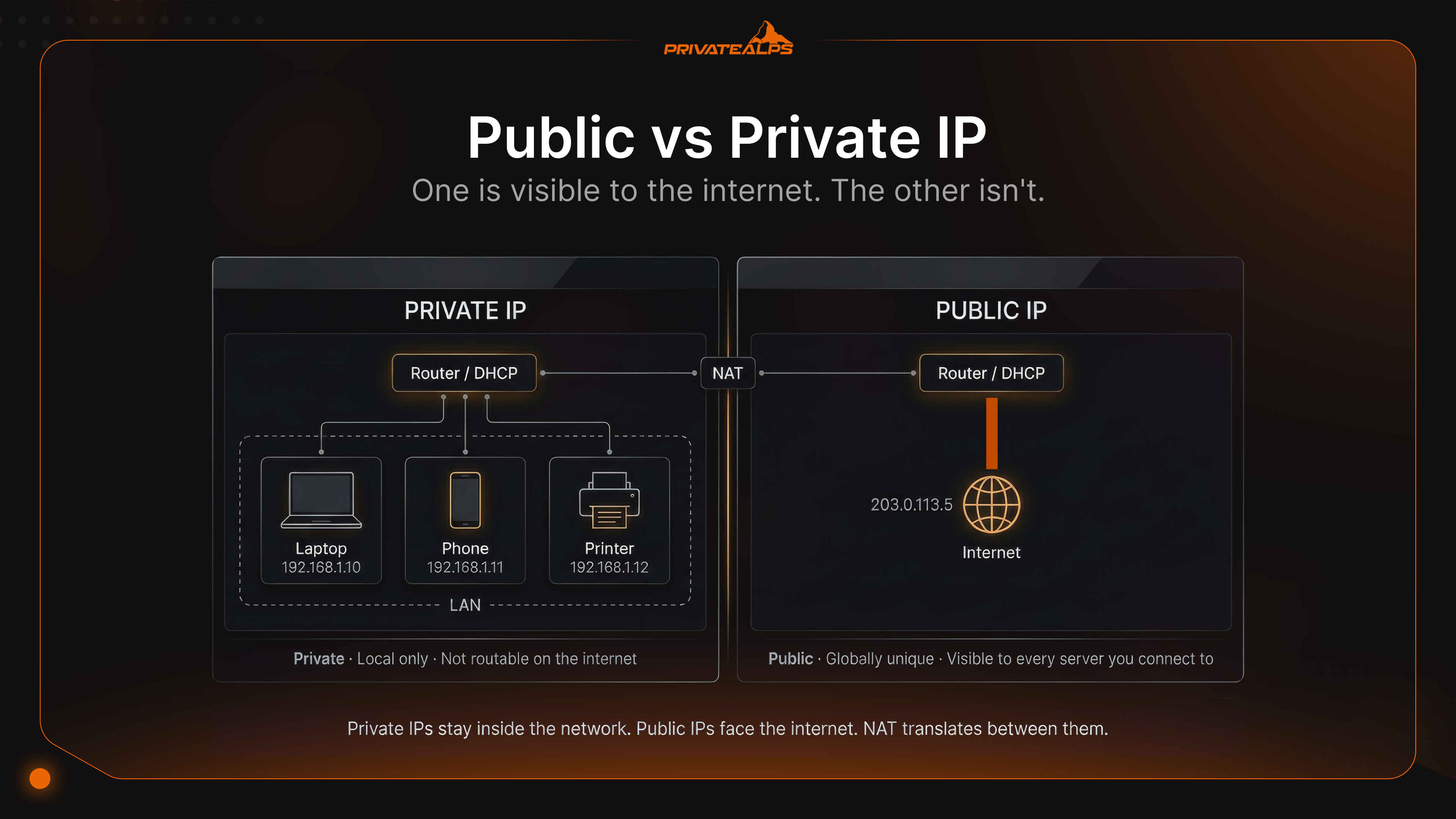
A Private IP address is used exclusively within a local area network (LAN), such as your home, office, or a coffee shop. These addresses are not routed on the internet, meaning a computer in a different city cannot "ping" or connect to your laptop using its private IP address.
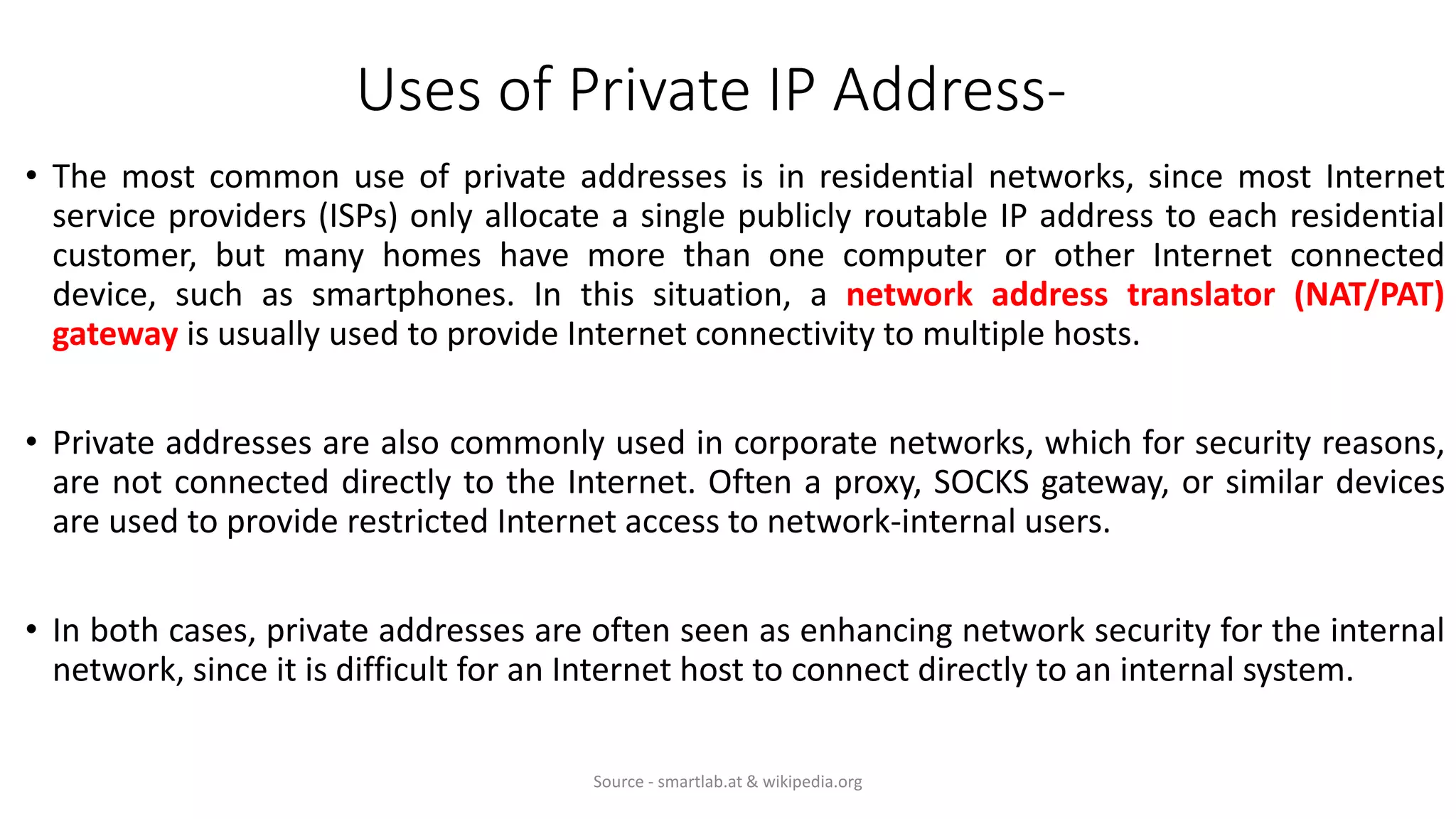
Private IPs allow billions of devices to connect to the internet using only a single public IP address. Your router acts as the intermediary, assigning private IPs to your smartphone, laptop, smart fridge, and gaming console.
Reserved Private IP Ranges
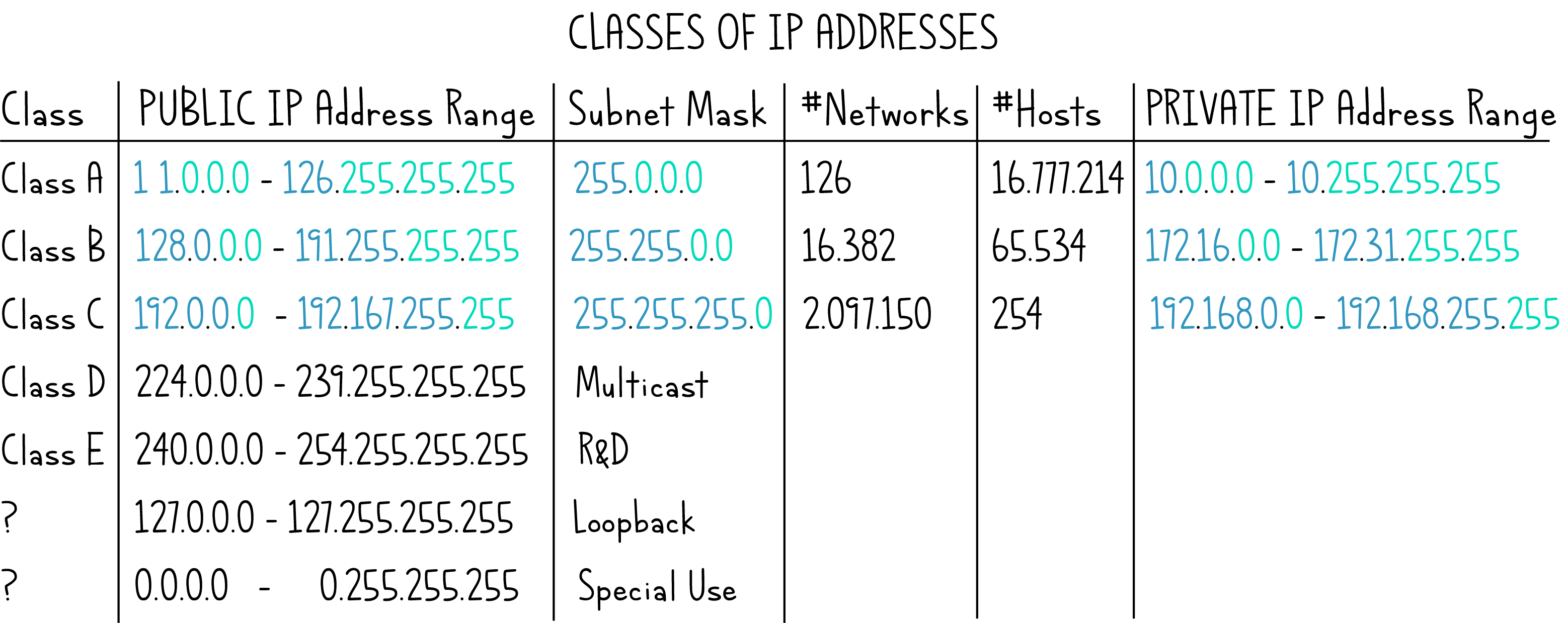
To prevent confusion, the Internet Engineering Task Force (IETF) reserved specific ranges of addresses for private use under RFC 1918. These addresses will never be assigned as public IPs:
- Class A: 10.0.0.0 to 10.255.255.255 (Used for massive corporate networks).
- Class B: 172.16.0.0 to 172.31.255.255 (Used for medium-sized networks).
- Class C: 192.168.0.0 to 192.168.255.255 (The standard for home and small office routers).
If you check your device settings and see an address starting with 192.168., you are looking at your private IP address.
How They Work Together: Network Address Translation (NAT)
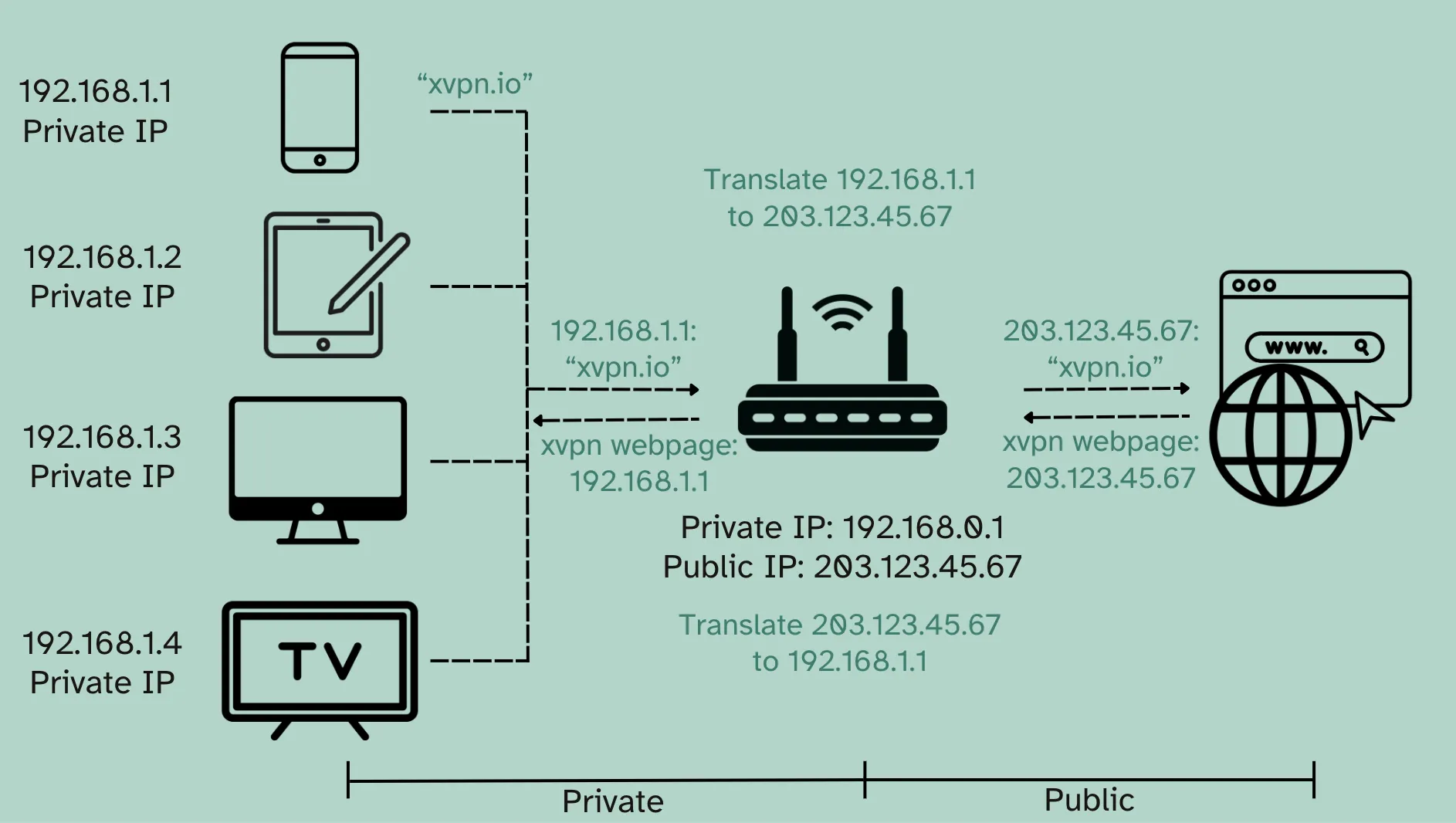
The "magic" that allows a private IP to communicate with the public internet is called Network Address Translation (NAT). Your router is the only device in your home that possesses both a public IP (on its WAN/Internet port) and a private IP (on its LAN ports).
When you click a link on your computer:
- Your computer sends the request to the router using its Private IP.
- The router "translates" the request, replacing your private IP with the router’s Public IP.
- The router makes a note in its "NAT Table" to remember which internal device made the request.
- When the website sends the data back to your public IP, the router checks its table and forwards the data to your computer’s Private IP.
This process is so fast that it is virtually imperceptible to the user, yet it is what allows a household of twenty devices to share one internet connection.
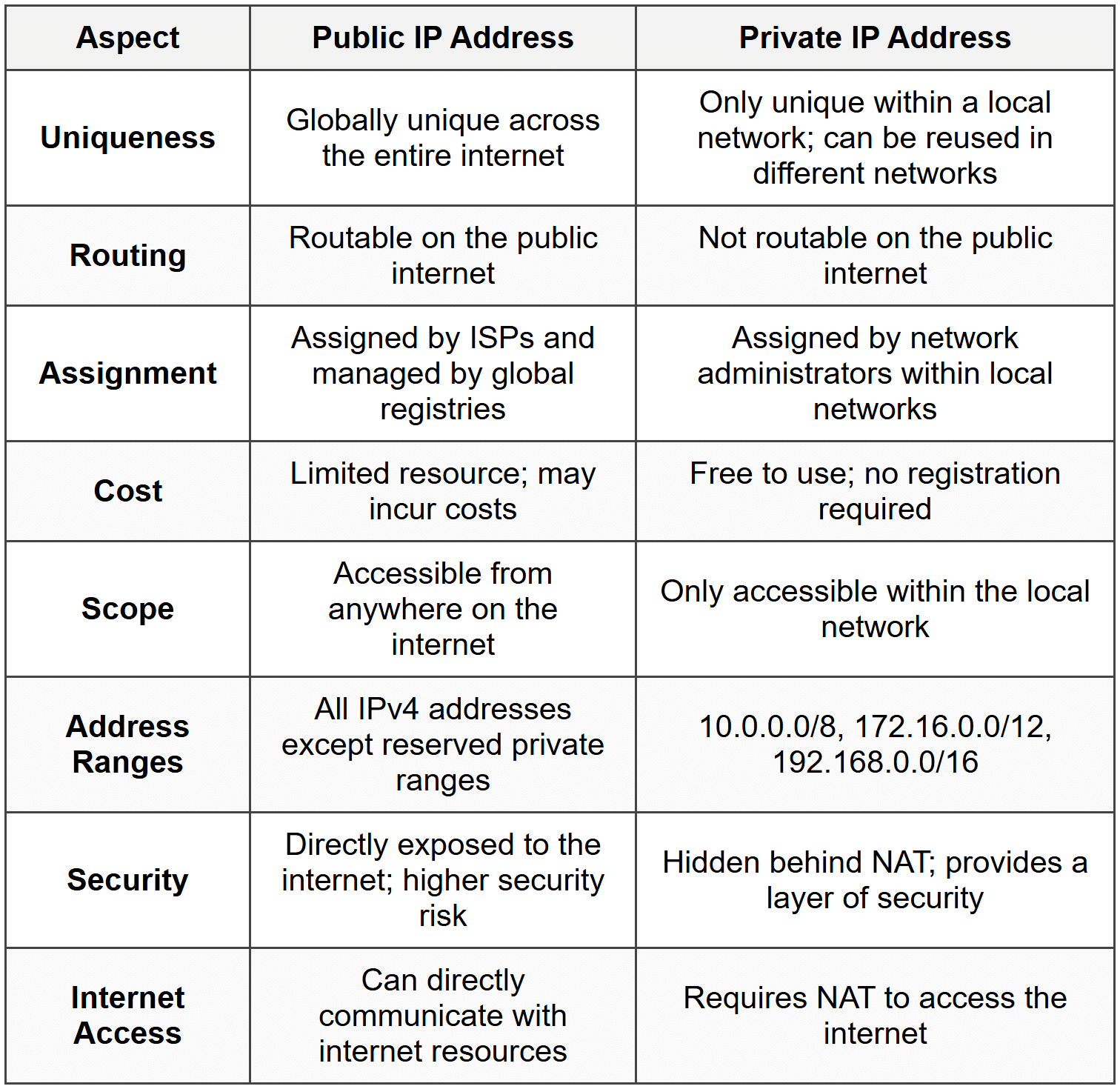
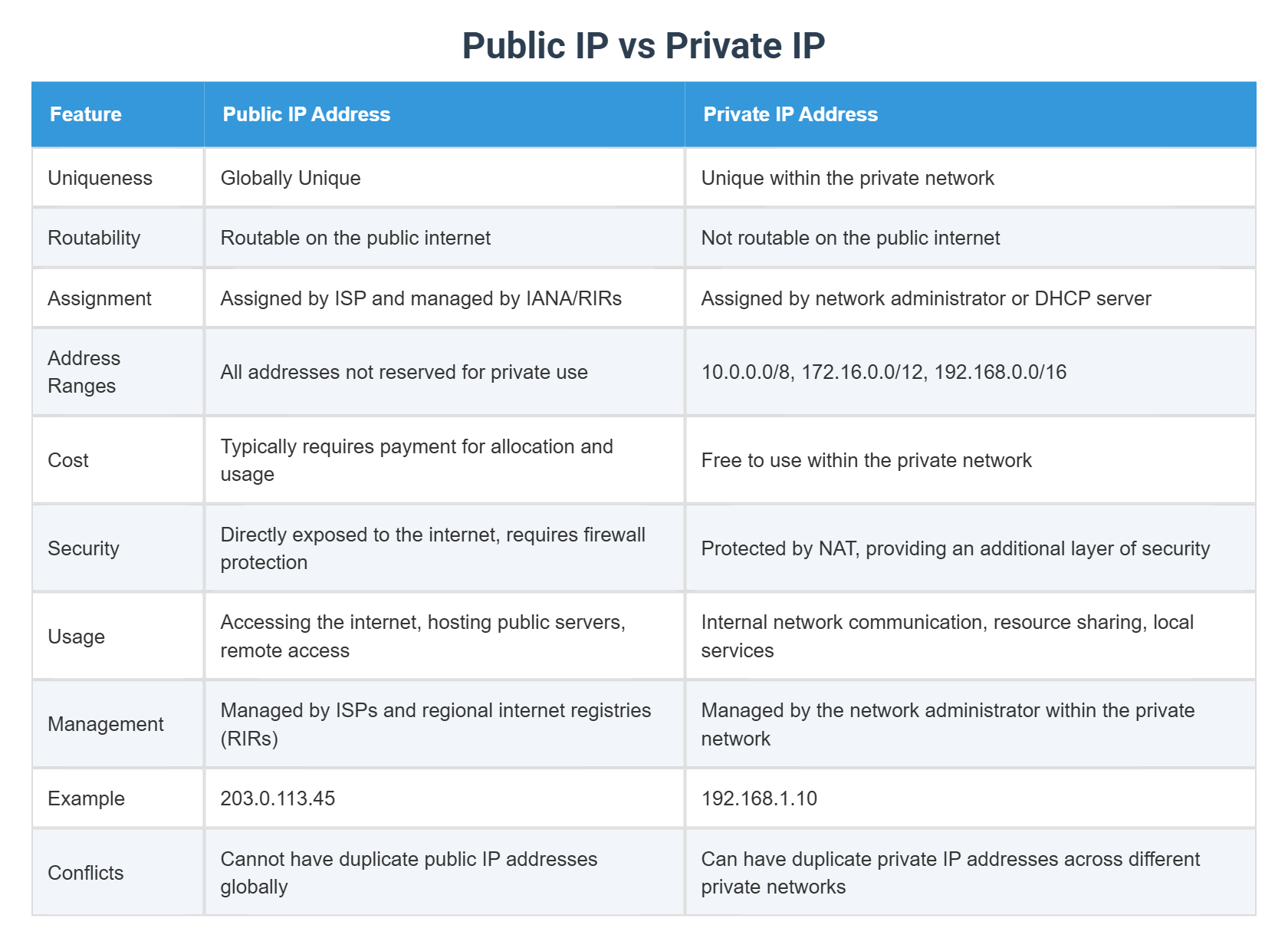
Comparison Table: Public vs. Private IP Addresses
| Feature | Public IP Address | Private IP Address |
|---|---|---|
| Scope | Global (Internet-wide) | Local (Internal network only) |
| Assignment | Assigned by ISP | Assigned by Router (via DHCP) |
| Uniqueness | Must be unique globally | Unique only within the local network |
| Routability | Routable on the public web | Non-routable on the internet |
| Cost | Often carries a fee (especially static) | Free of charge |
| Standard Ranges | Varies by ISP/Region | 10.x.x.x, 172.16.x.x, 192.168.x.x |
| Visibility | Visible to all websites you visit | Hidden from the public internet |
Security and Privacy Implications
The distinction between public and private IPs provides a natural layer of security. Because private IP addresses are non-routable, an attacker on the internet cannot directly access your laptop by its private IP. They can only see your router's public IP.
The Firewall Layer
Your router’s firewall typically blocks all unsolicited incoming traffic to your public IP. For a device outside your network to reach a device inside, the router must have specific "Port Forwarding" rules or the internal device must have initiated the connection first.
Privacy and Tracking
Your public IP address is a digital fingerprint. Websites use it to determine your general geographic location (usually down to the city level) and to track your browsing habits. This is why many users in 2026 utilize Virtual Private Networks (VPNs). A VPN masks your actual public IP with one owned by the VPN provider, making it appear as though you are browsing from a different location and preventing your ISP from logging your specific destination traffic.
Identifying Your IP Addresses
Knowing how to find your IP addresses is a fundamental troubleshooting skill.
How to Find Your Public IP
The simplest way is to use an external service. In any search engine, type "What is my IP". Because these websites are outside your network, they see the public IP your router is using to communicate.
How to Find Your Private IP
This varies by operating system:
- Windows: Open the Command Prompt, type
ipconfig, and look for the "IPv4 Address" under your active connection. - macOS: Go to System Settings > Network, select your connection, and click "Details."
- Linux: Open the terminal and type
hostname -Iorip addr show. - Mobile (iOS/Android): Go to Wi-Fi settings and tap the "i" or the gear icon next to your connected network.
The Future: Carrier-Grade NAT (CGNAT)
As we progress through 2026, many ISPs have moved to Carrier-Grade NAT (CGNAT). This is a scenario where the ISP doesn't even give you your own unique public IPv4 address. Instead, they put your router behind another NAT layer at the ISP level.
In this setup, your "Public IP" is actually shared with hundreds of other customers. While this works fine for basic browsing, it can cause issues for online gaming (latency and "Strict NAT" types) and makes it nearly impossible to host a home server without specialized tunneling software or a move to IPv6.
Frequently Asked Questions
Can two devices have the same public IP address?
No. Every device directly connected to the internet must have a globally unique IP address. However, multiple devices behind the same router all share the same public IP address when communicating with the outside world.
Can two devices have the same private IP address?
Yes, but only if they are on different networks. Your home laptop might have the private IP 192.168.1.15, and your neighbor’s laptop might also have 192.168.1.15. This is fine because their routers keep the traffic separated. Two devices on the same local network cannot share a private IP without causing a "network conflict," which usually results in both losing connectivity.
Does my public IP change when I use a VPN?
Yes. When you connect to a VPN, your device creates an encrypted "tunnel" to the VPN server. All your internet traffic exits from that server rather than your home router. As a result, websites will see the VPN server's public IP address instead of your own. Your private IP address assigned by your local router remains the same.
Is IPv6 public or private?
IPv6 was designed to give every device its own globally unique address, potentially eliminating the need for NAT. However, IPv6 still uses a concept called Unique Local Addresses (ULA) which function similarly to private IPs for internal communication, though they are less commonly used in home environments than IPv4 private ranges.
Why is my public IP location wrong?
Public IP locations are based on databases maintained by ISPs and third-party companies. These databases link IP blocks to specific geographic regions. If your ISP reassigns an IP block from one city to another, or if you are using a cellular connection (which routes traffic through central hubs), your reported location may be hundreds of miles away from your actual physical location.
Recommendation for Users
For the average home user, the best practice is to leave your IP settings on "Automatic" (DHCP). This ensures your router and ISP handle the complex task of address assignment for you. However, if you are setting up security cameras, a home media server, or a NAS, you should assign those specific devices a Static Private IP within your router's settings to ensure they are always reachable at the same internal address.
Furthermore, if you value privacy, consider using a reputable VPN to shield your public IP from trackers. In 2026, as data harvesting becomes more sophisticated, masking your public-facing identifier is one of the most effective ways to maintain digital anonymity.
Image Gallery