Comprehensive Guide to Missouri Case.Net in 2026: Accessing Court Records Online
Missouri Case.Net serves as the primary electronic public access system for the Missouri Judiciary, allowing citizens, attorneys, and researchers to view court records, docket entries, and scheduled hearings across state circuit and ap...
Missouri Case.Net serves as the primary electronic public access system for the Missouri Judiciary, allowing citizens, attorneys, and researchers to view court records, docket entries, and scheduled hearings across state circuit and appellate courts. Whether you need to track a civil lawsuit, verify municipal or traffic court filings, or check scheduled court dates, understanding how to navigate this platform effectively ensures accurate legal research and case management.
Contents
Understanding the Missouri Case.Net Infrastructure and Scope
The Missouri Case.Net system functions as a centralized portal managed by the Office of State Courts Administrator (OSCA). It integrates case management data from participating circuit courts throughout the state, providing real-time visibility into judicial proceedings.
Unlike federal court systems managed through PACER, Missouri Case.Net provides public access to state-level court records without a per-page fee, making it an essential resource for open government transparency. However, the depth of information available depends heavily on the specific type of case, the level of court, and statutory privacy rules enacted by the Missouri Supreme Court.
What Court Levels Are Included?
- Supreme Court of Missouri: The state's highest court handles appeals from lower courts and handles original proceedings. Case.Net tracks filings, briefs, and orders.
- Missouri Court of Appeals (Eastern, Western, and Southern Districts): Appellate dockets and decisions are fully integrated into the public search interface.
- Circuit Courts (Trial Courts): Spanning 45 judicial circuits across Missouri’s 114 counties and the City of St. Louis, these courts generate the vast majority of Case.Net records, covering civil, criminal, domestic relations, probate, and small claims matters.
- Municipal Courts: Integration varies. While many municipal divisions utilize Case.Net, some local municipalities maintain independent docketing software.
Core Features and Search Methods Available to Users
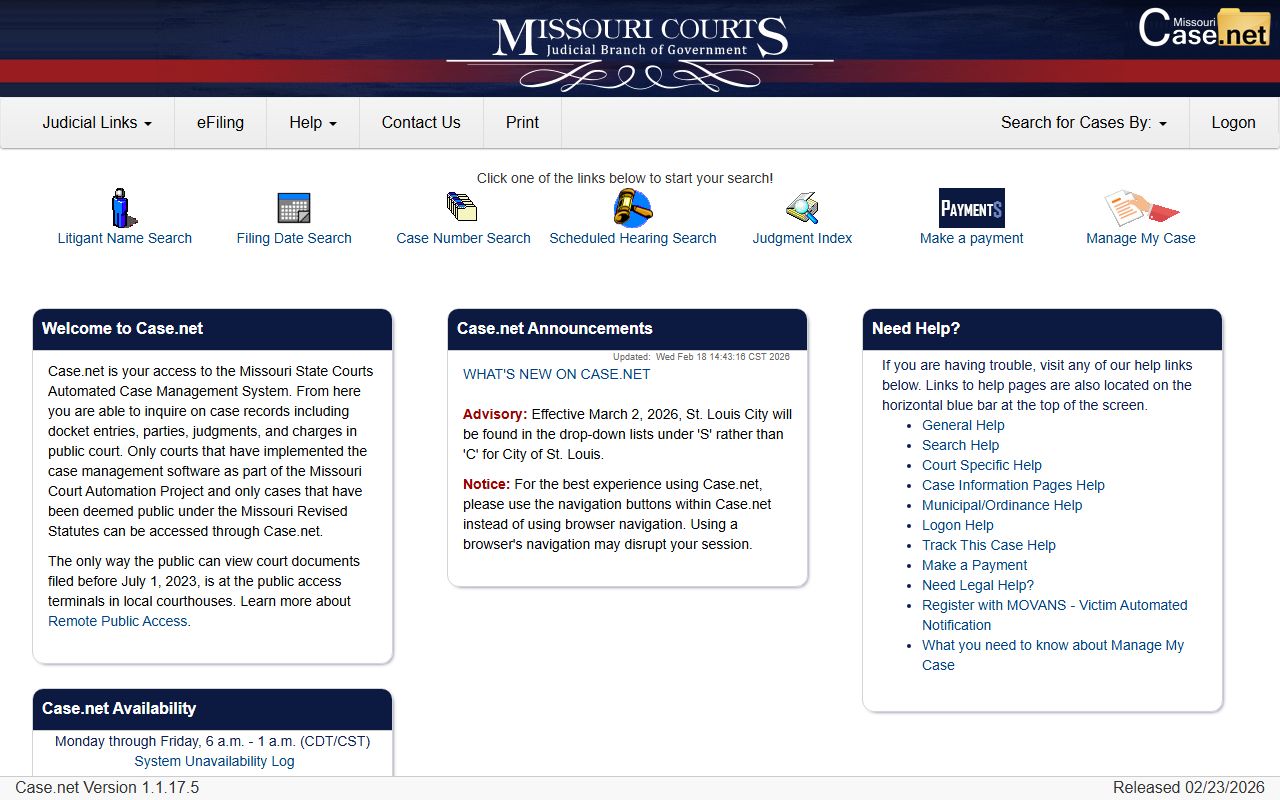
Navigating Missouri Case.Net requires familiarity with its core search parameters. Users can query the database using several distinct criteria depending on the information they possess.
Primary Search Options on the Platform
- Case Number Search: The most precise method. Entering the exact uniform case number (e.g., matching the county code, case type, and sequential numbering) retrieves the exact docket.
- Litigant Name Search: Allows searches by individual or business name. For individuals, entering a last name and first name yields better results. Users must navigate potential name matches using birth years, filing dates, or associated addresses when available.
- Scheduled Hearings Search: Enables users, witnesses, and legal counsel to look up upcoming court appearances by date, judge, courtroom, or attorney bar number.
- Attorney Search: Allows verification of a lawyer’s active status, bar number, and associated active cases across Missouri courts.
Step-by-Step Guide: How to Search and View Court Records
Conducting an effective search on Missouri Case.Net requires systematic execution to avoid common pitfalls such as overly broad name queries or incorrect case number syntax.
Step-by-Step Search Process
- Navigate to the Official Portal: Access the system exclusively through the official domain hosted by the Missouri Courts judiciary network to avoid third-party data aggregators that charge fees.
- Select the Search Criterion: Choose whether you are searching by Case Number, Litigant Name, or Hearing Date from the primary menu options.
- Input Precise Parameters: If using a name search, utilize filters such as the specific county circuit or case filing date ranges to narrow down common names. Avoid searching single common surnames without secondary identifiers.
- Review the Case Summary: Once the system generates search results, click on the relevant case number to open the summary screen. Here you will see basic case attributes, including the filing date, case status (active/closed), and assigned judge.
- Examine the Docket Entries: Scroll through the chronological ledger of events. Each entry lists the date, the party filing the document or the action taken by the court, and brief descriptions of minute entries or filed motions.
- Access Public Documents: Where authorized by court operational rules, click on available document icons next to specific docket lines to view or download PDF copies of public filings.
Comparison of Public Access vs. Restricted Records
Not all records maintained by the Missouri judiciary are available to the general public through Case.Net. Privacy laws, juvenile protection statutes, and court-ordered seals restrict access to specific files.
| Record Category | Publicly Accessible on Case.Net | Restrictions and Exclusions | | civil lawsuits | Yes (Full access to petitions, motions, and orders) | Sealed records, trade secret documents, or confidential settlements. | | Criminal Felony and Misdemeanor | Yes (Charges, dockets, bond info, and dispositions) | Expunged records, sealed indictments, and certain protective orders. | | Juvenile and Adoption Proceedings | No (Completely restricted) | Protected under Missouri Juvenile Code to protect minors. | | Mental Health Commitments | No (Completely restricted) | Protected under statutory medical privacy and civil commitment laws. | | Municipal Traffic Violations | Yes (Varies by municipal court integration) | Cases closed and expunged pursuant to state statute. |
Common Limitations, Technical Challenges, and Troubleshooting
Users frequently encounter specific roadblocks when utilizing Missouri Case.Net. Understanding these limitations prevents frustration and clarifies when to seek records directly from a local court clerk.
Frequently Encountered Issues
- Incomplete Municipal Integration: Not every municipal court in Missouri feeds data into Case.Net in real-time. If a traffic ticket or municipal citation does not appear, contact the specific city’s municipal court clerk directly.
- Common Name Overload: Searching for common names generates extensive lists. Users should utilize middle initials, date of birth parameters, or county filters to isolate the correct record.
- Document Availability Gaps: While docket entries are updated promptly, scanned PDF copies of every document are not universally attached. Older paper files predating electronic filing mandates require physical inspection at the local courthouse.
- Browser Compatibility and Timeouts: The system periodically logs out inactive sessions for security purposes. Utilizing modern updated browsers ensures optimal stability during extensive research tasks.
Frequently Asked Questions About Missouri Case.Net
Is there a fee to search or view records on Missouri Case.Net?
No, searching for cases, viewing docket histories, and downloading available public documents on Missouri Case.Net is entirely free for the general public.
Why can I see a criminal case, but the documents won't open?
Certain documents within a criminal case file may be restricted from public view by court rule, statute, or judicial order, such as unexecuted warrants or identifying information of sensitive witnesses.
Can I file legal documents directly through Missouri Case.Net?
No, Missouri Case.Net is primarily a public viewing and case tracking tool. Attorneys and registered e-filers use separate portals, such as Missouri's electronic filing system (eFiling), to submit pleadings and court documents.
How far back do records go on the Missouri Case.Net database?
Historical data availability varies by county circuit. While most active and recent historical records are fully accessible, archived paper records from decades past may only be available by contacting the specific county circuit clerk's office.
What should I do if my name appears on a case record in error?
If you believe there is a clerical error, identity mix-up, or incorrect data entry associated with your name on Case.Net, you must contact the circuit court clerk in the county where the case was filed to request a correction.
Are federal court cases in Missouri searchable on Case.Net?
No, Case.Net only covers Missouri state courts (Supreme Court, Court of Appeals, Circuit Courts, and participating Municipal Courts). Federal cases (such as the U.S. District Court for the Eastern or Western Districts of Missouri) are maintained on the federal PACER system.
Practical Recommendations for Legal Researchers
When conducting thorough legal or background research using Missouri Case.Net, always cross-reference critical findings with the local circuit clerk's office, especially for time-sensitive matters like court dates or active judgments. System maintenance windows typically occur during weekends, which may temporarily affect uptime. For official guidance, refer to the Missouri Courts website or consult a qualified attorney licensed in Missouri to interpret complex procedural dockets.
Image Gallery