Implementing a Live Twitter Feed on a Restaurant Wall: A Technical Guide for Owners
Integrating a live Twitter feed on a restaurant wall serves as a dynamic engagement tool that bridges the gap between digital social interaction and the physical dining experience. By displaying real-time customer mentions, hashtags, o...
Integrating a live Twitter feed on a restaurant wall serves as a dynamic engagement tool that bridges the gap between digital social interaction and the physical dining experience. By displaying real-time customer mentions, hashtags, or curated industry content, restaurant owners can foster a sense of community, encourage user-generated content, and keep patrons entertained. Achieving this setup requires a reliable display hardware configuration, a stable network connection, and a robust social media aggregation platform to ensure the feed remains professional, safe, and visually appealing.
Contents
Hardware Requirements for Social Displays
To project a live Twitter feed effectively, the restaurant must balance hardware longevity with aesthetic integration. Because these displays are often mounted in high-traffic, warm, or grease-prone environments, choosing the right equipment is essential for both safety and performance.
Commercial-Grade Displays
For a restaurant wall, home-use televisions are rarely recommended. Commercial-grade digital signage displays are built for 16/7 or 24/7 operation, featuring improved cooling systems and anti-glare panels. These units are designed to prevent "burn-in"—a condition where static images, such as a persistent Twitter interface, become permanently etched onto the screen.
Media Players
A dedicated media player is the brain of the operation. While a smart TV may have a browser, relying on native applications often leads to stability issues and limited customization. A compact digital signage player or a professional-grade micro-PC running a browser in kiosk mode ensures the feed restarts automatically after power outages or network disruptions.
Software Selection and Content Aggregation
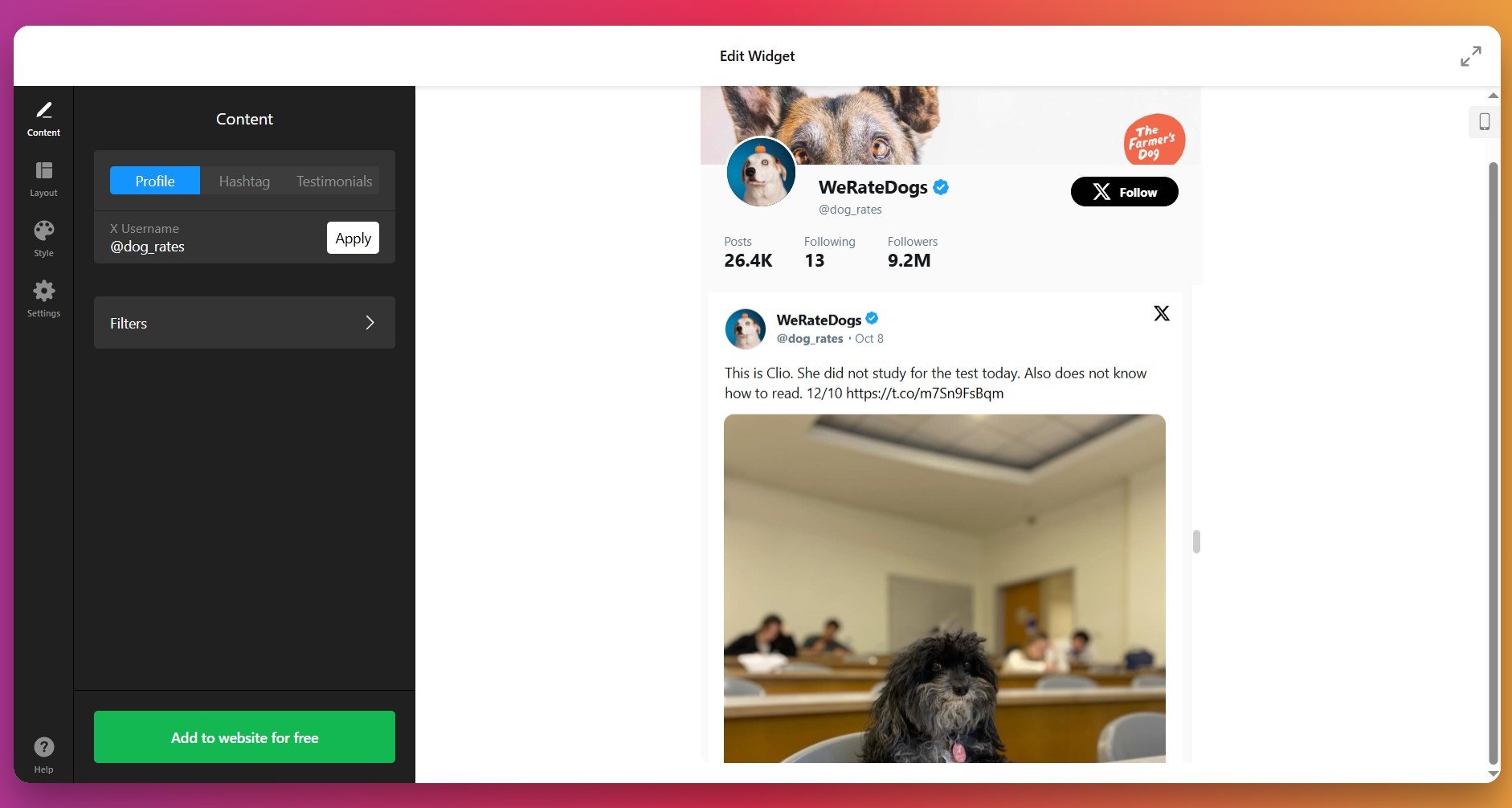
You cannot simply open a web browser to Twitter.com on a public display; the layout is cluttered, requires constant interaction, and exposes the audience to unmoderated content. Instead, you must use a specialized social media wall aggregator. These platforms allow you to filter content, block specific users, and customize the layout to match your brand’s visual identity.
Key Features of Aggregation Platforms
- Content Filtering: The ability to blacklist specific words or hashtags is critical for maintaining a brand-safe environment. Most platforms allow you to whitelist only specific accounts or hashtags (e.g., #MyRestaurantName).
- Layout Customization: Ensure the platform offers "masonry" or "carousel" layouts that look good on large landscape displays.
- Offline Caching: High-quality software will cache the latest feed data so that if the internet drops, the screen does not show a blank error page or a spinning loading icon.
Comparing Aggregation Approaches
| Feature | Direct Browser Feed | Third-Party Aggregator |
|---|---|---|
| Moderation | Manual/None | Automated & Manual |
| Customization | Very Low | High (Branding/Colors) |
| Stability | Poor (Auto-refresh issues) | High (Optimized for uptime) |
| Safety | High Risk of Trolls | High Control |
Legal and Safety Considerations
Displaying social media in a public venue involves adherence to both platform-specific terms of service and broader consumer protection laws. As of 2026, social media platforms strictly regulate how their data is displayed via APIs. Using an approved third-party partner ensures you are compliant with the display policies of X (formerly Twitter).
Brand Safety and Moderation
The primary risk of a public Twitter feed is the appearance of inappropriate, controversial, or competitive content. Always enable "Post Moderation" in your aggregator settings. This creates a virtual "waiting room" where a staff member or manager must approve a tweet before it appears on the screen. Even with strict hashtag-only filtering, unexpected content can slip through if a user misuses a hashtag or if a malicious bot hijacks a trending term.
Privacy Compliance
Be mindful of user privacy. While tweets are public, displaying a customer's full name, profile picture, or handle on a large screen without explicit consent can be perceived negatively. Configure your aggregator to anonymize or truncate identifiers if you have concerns regarding the privacy preferences of your diners.
Operational Setup and Network Reliability
The success of a live wall is highly dependent on network stability. A fluctuating Wi-Fi connection can lead to choppy performance or, worse, a frozen screen that looks broken to customers.
Network Configuration
- Hardwired Connection: Whenever possible, use a Category 6 (Cat6) Ethernet cable to connect your media player directly to your router. Wi-Fi is susceptible to interference from kitchen equipment, microwaves, and customer mobile devices.
- Dedicated VLAN: If the restaurant shares a network with the point-of-sale (POS) system, ensure the digital signage is on a separate Virtual Local Area Network (VLAN). This prevents the display traffic from interfering with payment processing.
- Auto-Restart Protocols: Configure your media player or signage software to perform an automated reboot every 24 hours (e.g., 4:00 AM) to clear the browser cache and ensure fresh data ingestion.
Troubleshooting Common Issues
Even with professional setup, technical hitches occur. A proactive approach to troubleshooting minimizes the time a screen displays an error.
- The "Blank Screen" Issue: If the feed is empty, verify that your API connection to the source platform is active. If your account tokens have expired, the aggregator will fail to pull new tweets.
- Formatting Errors: If text is overlapping or cut off, the display resolution of your signage player may be misaligned with the restaurant’s monitor. Always match the hardware output (e.g., 1920x1080) with the software canvas settings.
- Connectivity Drops: If the network is inconsistent, implement a secondary "fall-through" playlist. If the live feed fails to load, the media player should be set to automatically switch to a static slide deck of menu promotions rather than displaying an error code.
Engaging Your Audience Effectively
A live feed should add value, not distraction. The most successful implementations are those that incentivize interaction. Encourage customers to share photos of their meals with a specific hashtag for a chance to see their contribution on the "Wall of Fame."
Best Practices for Engagement
- Clear Call to Action: Print the specific hashtag on your menu or on small table tents. If customers do not know exactly what to tag, they will not participate.
- Timing: Keep the refresh rate steady. A feed that refreshes too quickly is distracting; a feed that never updates feels stagnant. A 60-second rotation is generally considered the "sweet spot" for high-traffic environments.
- Seasonal Campaigns: Change your hashtag for events or holidays (e.g., #HolidayDinner2026) to keep the content fresh and relevant to the current atmosphere of the restaurant.
Frequently Asked Questions
Is it legal to display Twitter posts on a commercial screen?
Yes, provided you follow the platform's developer policies. Most reputable social media wall aggregators are officially licensed to use the platform APIs, which keeps your restaurant compliant with terms of service regarding public displays.
What should I do if an offensive tweet gets through?
If an inappropriate post is displayed, immediately remove the tweet from your aggregator dashboard. To prevent recurrence, block the specific user and tighten your hashtag filters. Always have a "kill switch"—a simple way for a staff member to turn off the display or switch it to a static image immediately if a problem occurs.
How much does it cost to set up a social media wall?
Costs vary based on hardware and software. Hardware (display and media player) can range from $500 to $2,000. Aggregator software typically operates on a subscription model, costing between $20 and $100 per month depending on the volume of content and advanced moderation features included.
Can I run a Twitter feed without an internet connection?
No. Because the content is live, it requires a continuous data stream. If your restaurant’s internet connection is unstable, you may experience significant downtime, which can detract from the professional appearance of your establishment.
Can I mix Twitter content with my own promotions?
Yes, most aggregator platforms allow for "interleaving." This means you can insert your own images, promotions, or daily specials into the rotation alongside the live Twitter feed, ensuring the screen is always working for your bottom line.
Final Recommendation
To implement a successful live Twitter feed, start by vetting a professional-grade social media aggregator rather than trying to use free, manual browser-based solutions. Secure a dedicated network connection and ensure your staff is trained on how to use the "kill switch" in the event of inappropriate content. Begin by testing the feed with a small, private hashtag before rolling it out to your general customer base to gauge the flow of content and ensure it complements, rather than competes with, your restaurant's ambiance.
Image Gallery